Nitesco,
In case something would crop up


you could point to this thread but you should start a new thread here:
https://Graphic Cards | www.sevenforums.com. You've probably heard of
Furmark, here's a tutorial on how to run the stress test:
Video Card - Stress Test with Furmark remember to check the related tutorials at the bottom.
On the
Geeks3D Softwares page you might be interested in:
GPU Shark is a lightweight GPU monitoring utility for AMD Radeon and NVIDIA GeForce cards. It's second from the bottom.
I'd keep those two links so you could periodically check back for updates. Here's one from
AMD that I missed

, it's at the bottom of Updates and before the Information section(s):
There have also been questions about GPU architectures. AMD Radeon GPU architectures do not use speculative execution and thus are not susceptible to these threats.
Hellriser,
I've been reading this page from mbam that started on the 4th of Jan.:
Meltdown Mitigation It should be for business support but the mods there are allowing discussion for consumers, paid and free, free starts at
post#12. I've read it to the last post that was 15hours ago and in it you'll see discussion about how the action center is set, running
mb-check, and
post#25 on how the different versions of mbam act towards setting the key.
@kimiraikkonen what happens is when you check for updates, Windows Updates looks to see if you have security software registered in Windows Action Center. If you do, it looks to see if that registry key exists, because that key should be put in place by the security vendor. If that key is missing, the update won't be pulled down. If the key is there, the update is installed.
As for the question of what Free users need to do, it's nothing. This only impacts Malwarebytes if you have Malwarebytes registered in Windows Action Center. You can only register Malwarebytes in Windows Action Center in the Premium/Trial mode, free mode does not provide real time protection, and therefore does not register.
From what I can gather, and since you like livin' on the wild side
I'm thinking that you don't have any AV running and you need at least MSE to be running and that will set the key.
if you go to your
action center and expand the security section i.e. - click on the down arrow to the right of Security do you see these two settings turned to on?

If not start up MSE, check to verify the settings, if they're on then force a check in windows updates.
there is also discussion and I stand corrected, that you can manually create the
Code:
HKEY_LOCAL_MACHINE\SOFTWARE\Microsoft\Windows\CurrentVersion\QualityCompat
key but, I would strongly suggest that you have good backups of your system if anything goes wrong.
LevelBest,
On any given updates exercise bit by bit is sound practice when you have that many to do, it allows the creation of those extra restore points and makes it easier to troubleshoot any problems. With the extra images it looks like you're all set.

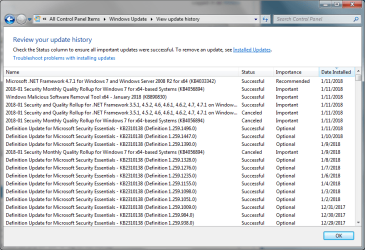
Did you check your installed updates to see if KB4056897 and in some cases like mine KB4056894 was installed? They both relate to the meltdown issue.
Instead of clicking on history, click on installed at the bottom, let the list populate then check.
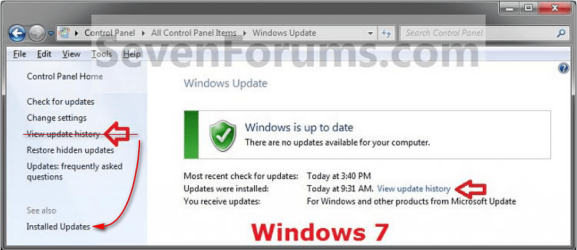
Image courtesy of
Brinks tutorial




 There was no indication of the updates D/L'ing. It could of also been the MS servers being slammed with not only the Intel fix but also a high demand on their update catalog site. I wasn't asked to re-boot after the .Net's but for those I always do.