Solved Japanese Input method does not work

rovf

New member
Local time
1:58 AM
Messages
30
I have configure my language bar to be selectable between German and Japanese.

I can switch to Japanese, but although I set the input method to "hiragana", only latin characters are displayed.

Any idea what could be missing? I don't have much experience with Windows 7 yet. I used Windows 2000 before, where Japanese input was easy.

Ronald
 

My Computer

OS
Windows 7
I do not know Japanese, but I was able to get Hiragana out of Windows 7 with Microsoft IME.

Start - Control Panel - Region and Language - Keyboards and Languages - Change keyboards- Add - Japanese - Microsoft IME - Apply.
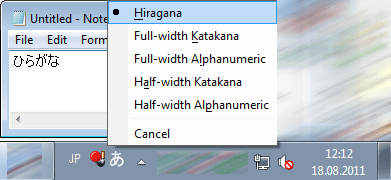
And then clicked and icon to the right of language sign and selected Hiragana.

Did you do the same and it doesn't work?
 

Attachments

  • Hiragana.png
    Hiragana.png
    13.9 KB · Views: 8

My Computer

Computer type
PC/Desktop
OS
Windows 8.1 ; Windows 7 x86 (Dec2008-Jan2013)
Other Info
"The scale icon at the top right of a post or tutorial is how you can give rep to the member."
Yes, this is how I set it up in the first place.

But in the meantime, I found one (weird) place where it DOES work: When I go to "Start", click into the "search" field (for searching programs), and switch to Japanese, I can type Hiragana!!!!

However, doing the same in, say, Word, Open Office, or Notepad, has no effect.
 

My Computer

OS
Windows 7
By default when you switch to Japanese with Ctrl+Shift (or Alt+Shift if you use that) it switches to Japanese Alphanumeric and you have to manually switch it to Hiragana (see screenshot in post 2).
 

My Computer

Computer type
PC/Desktop
OS
Windows 8.1 ; Windows 7 x86 (Dec2008-Jan2013)
Other Info
"The scale icon at the top right of a post or tutorial is how you can give rep to the member."
By default when you switch to Japanese with Ctrl+Shift (or Alt+Shift if you use that) it switches to Japanese Alphanumeric and you have to manually switch it to Hiragana (see screenshot in post 2).

I know, this was the same in Windows 2000. The Language Bar also shows correctly "Hiragana Input", but when I type letters, they show up as alphabetic.
 

My Computer

OS
Windows 7
Japanese Input method does not work (NEW FINDINGS)

I just got some advances:

(1) The problem seemed to be related to the applications. Most applications which I have tested, don't seem to sensitive to the language toolbar, while a few do.

In particular, Microsoft Word and Notepad still only show alphabetic character.

(2) Open Office (actually, I have installed the variant called "LibraOffice",
didn't work initially, but after changing the options, enabling "Asian Language
Support" and RESTARTING Libra Office, I can type Hiragana.

(3) Accidentally I found, that an extension to the Chrome Webbrowser, called "Chrome Notepad", also lets me type Hiragana. For example, I can type them in Chrome Notepad and paste them into Word; Word can show them, even if it does not allow them to be input.

However, one problems remains: The input is done "as if I had a Japanese
keyboard" attached. For example, when typing the letter k, the Japanese character の ("no") appears.

On Windows 2000 (and on the Mac), I'm using an input method called "Kotoeri", which is taylored to western keyboards. For example, for writing の, you type the letters "n" and "o" in sequence.

If I could solve this problem, I would be satisfied, since I can at least work with Libra Office and Chrome Notepad, which would be sufficient for my purpose.

 

My Computer

OS
Windows 7
However, one problems remains: The input is done "as if I had a Japanese
keyboard" attached. For example, when typing the letter k, the Japanese character の ("no") appears.

On Windows 2000 (and on the Mac), I'm using an input method called "Kotoeri", which is taylored to western keyboards. For example, for writing の, you type the letters "n" and "o" in sequence.

Remove Japanese keyboard and add it again select microsoft IME not japanese keyboard..

to change to hiragana you can use alt+`(~) when japanese keyboard selected
また
 

My Computer

Computer type
PC/Desktop
Computer Manufacturer/Model Number
Self Built PC
OS
Windows 7 pro 64bit. (SP1)
CPU
Intel core I5 2400
Motherboard
Gigabyte H61
Memory
8GB DDR3 Kingston
Graphics Card(s)
Gigabyte GF GTX650OC
Sound Card
Realtek HD audio
Monitor(s) Displays
LCD 20"
Screen Resolution
1600x900
Hard Drives
INTEL SSD 320 80GB +Seagate 7200.12 1TBx3
PSU
Coolermaster RX450W
Case
Coolermaster atx case
Cooling
stock cooler
Keyboard
logitech
Mouse
logitech
Internet Speed
FTTD 100mbps
remove japanese keyboard and add it again select microsoft ime not japanese keyboard..

To change to hiragana you can use alt+`(~) when japanese keyboard selected
また


どうも有り難うございました !!! :):):):)
 

My Computer

OS
Windows 7
remove japanese keyboard and add it again select microsoft ime not japanese keyboard..

To change to hiragana you can use alt+`(~) when japanese keyboard selected
また


どうも有り難うございました !!! :):):):)

どういたしまして
 

My Computer

Computer type
PC/Desktop
Computer Manufacturer/Model Number
Self Built PC
OS
Windows 7 pro 64bit. (SP1)
CPU
Intel core I5 2400
Motherboard
Gigabyte H61
Memory
8GB DDR3 Kingston
Graphics Card(s)
Gigabyte GF GTX650OC
Sound Card
Realtek HD audio
Monitor(s) Displays
LCD 20"
Screen Resolution
1600x900
Hard Drives
INTEL SSD 320 80GB +Seagate 7200.12 1TBx3
PSU
Coolermaster RX450W
Case
Coolermaster atx case
Cooling
stock cooler
Keyboard
logitech
Mouse
logitech
Internet Speed
FTTD 100mbps
Back
Top