Java 7 Update 4 will not verify after installation

KUDOSS

New member
Local time
8:05 PM
Messages
5
Hello all,

Does anybody have an answer to this question, anybody else experiencing the same problem, and/or similar issues with Java 7 (update 4)

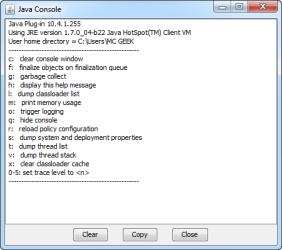
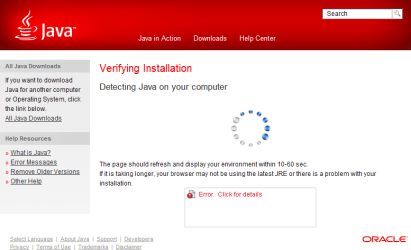
I recently updated to SSD and finished off installing everything today. When I installed Java I run the verification and it will not verify at all. Never come across this before with Java and I am a little stuck because I don't understand that is causing this to happen.

First of all I thought the cause of the problem was to do with MSIE9 scripts plug-ins were not enabled. They all all enabled bot on MSIE and Firefox, the same for Chrome as well. Back in May I installed Java 7 and it was working fine. I have installed it again today on SSD's and it will not work correctly. It will not verify at all. not in either browsers and I am clueless because I don't have any answers apart from uninstalling and trying Java 6 and see what happens.

The same goes for Java 7 Update 4 for MSIE9 x64 browsers.

Thanks in advance
 

Attachments
  • 10-06-2012 16-26-10.png
    10-06-2012 16-26-10.png
    9 KB · Views: 11
  • 10-06-2012 16-25-58.png
    10-06-2012 16-25-58.png
    9.6 KB · Views: 10
  • Java_7_Update_4_Error_on_Verification.png
    Java_7_Update_4_Error_on_Verification.png
    23.1 KB · Views: 10
Last edited:

My Computer

OS
Windows Vista 64-Bit
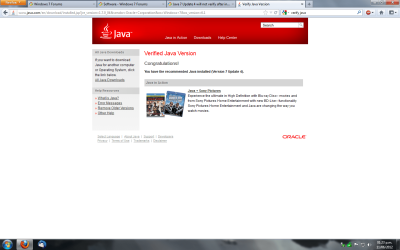
Works OK here, FF and IE9
 

Attachments

  • works ok.png
    works ok.png
    65.6 KB · Views: 40

My Computer

Computer type
PC/Desktop
OS
Microsoft Windows 10 Professional / Windows 7 Professional
CPU
Intel i5-3570
Motherboard
Lenovo Mahobay
Memory
16GB DDR3
Graphics Card(s)
AMD Radeon HD 7850 2GB
Sound Card
(1) Realtek HD Audio (2) AMD HD Audio
Monitor(s) Displays
LG LS192WS
Screen Resolution
1440 x 900 @ 32bit color
Hard Drives
(1) SUV300S37A/120G (2) ST3500413AS SATA Disk Device AHCI mode enabled.
PSU
Corsair HX620
Case
Thermaltake V4 Black Edition
Cooling
Cooler Master Hyper 212 + Artic Silver 5 on CPU/GPU
Keyboard
Dell SK-8115
Mouse
Razer Copperhead with MAPED mat (awesome!)
Internet Speed
100 Mbps up/down
Browser
Chrome
benmess

Hi,
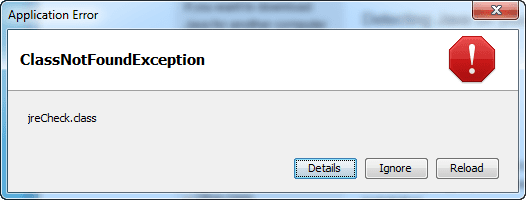
I have exactly the same problem on both 32bit and 64 bit versions of Java within 32bit browsers and 64 bit browsers. The same error EXACTLY and several programmes will not work. I have tried uninstalling and reinstalling several times all to no avail. Did you get this solved?
 

My Computer

OS
Windows 7 Home Premium 64 bit
Welcome to the Seven Forums.

Uninstall Java using this tool...
JavaRa | SingularLabs
...and then install the latest version.

Be sure to opt out of any junk that might come with the installer.
 

My Computer

Computer type
Laptop
Computer Manufacturer/Model Number
Employer provided Dell Latitude
OS
W7 Pro SP1 64bit
CPU
i7
Memory
8GB
Graphics Card(s)
Intel HD Graphics
Hard Drives
crappy SSD
Antivirus
Employer mandated Symantec Endpoint Protection
Browser
Pale Moon 64bit, IE11 64bit & Chrome 64bit
benmess

Thanks. I tried using that tool to uninstall and then reinstall, but still got the same issue. In fact I have done it several times all to no avail. So now I have completely removed java from my system and now some of the programmes work again. Go figure!!
 

My Computer

OS
Windows 7 Home Premium 64 bit
Been having this issue too. Running W7 Ent 32bit. Java 7 won't work at all, but rolling back to 6u37 does. I tried everything I could think of, and searched a good day on the web before posting here. Un-installed with self un-installer, with Revo, with Control Panel. Nothing works. I did find many users with this issue. I hope someone can find a solution.
 

My Computer

Computer type
Laptop
Computer Manufacturer/Model Number
Dell Inspiron
OS
Windows 7 Ultimate
Bobby Gynn did you contact your IT department about your problem with Windows 7 Enterprise and Java?
 

My Computer

Computer type
PC/Desktop
Computer Manufacturer/Model Number
Home made Desktop
OS
Windows 10 Pro. 64/ version 1709 Windows 7 Pro/64
CPU
Intel i7-6800K @ 4.3
Motherboard
ASUS X-99 Deluxe II
Memory
Corsair Platinum 16 gig @2400
Graphics Card(s)
EVGA GTX 1070 OC
Monitor(s) Displays
Asus 27" LED LCD/VE278Q
Screen Resolution
1920-1080 or 1280-720 HDMI
Hard Drives
INTEL SSD 730-240 Gb Sata 3.0/
PSU
EVGA Platium 1200W
Case
Phanteks Luxe Tempered Glass 8 fans/ one radiator
Cooling
XSPC/ Water Cooled CPU
Keyboard
Das 4 Professional
Mouse
Logitech M705/MX Anywhere 2-S
Internet Speed
100 mbits
Antivirus
Microsoft Security Essentials/ Malwarebytes Premium 3.0/ SAS
Browser
I.E. 11 default/Firefox/ ISP Time Warner Cable/Spectrum
Other Info
LG BluRay Burner/
Sound system-KLipsch-THX/
Icy Dock ssd Hot Swap bays.
I'm part of the IT dept. I'm running tests within our intranet site, and we really want to get current since v6 is going away in Feb. I'm the experimental subject so to speak, and I've tried everything we could think of short of contacting Sun/Oracle (Not that they would help I'm sure). Three different computers all are having the same result, and all three are 32bit. That's why I went to the web. I have a laptop running 64bit, and v7 works. I'm really lost on this one. I would think it was our own group policy, or something, but seeing there are many others out there with the same issue, I don't know where to turn.
 

My Computer

Computer type
Laptop
Computer Manufacturer/Model Number
Dell Inspiron
OS
Windows 7 Ultimate
Old Reg Entries an Files

I had some problems with Java 7 install myself. I tried all the things you mentioned with no success. Made numerous installs and uninstalls. (Win uninstall, Revo, etc.)
What worked for me was this JavaRA. I unistalled and then used JavaRA. Then reinstalled and it worked. The file can be found by doing a search for "JavaRA". Also you will find infor on it. Here is one link at source forge.

JavaRa | Free System Administration software downloads at SourceForge.net

I just noticed the version I have is 2.0. Here is a link to 2.0.

http://www.softpedia.com/get/System/System-Miscellaneous/JavaRa.shtml
 
Last edited:

My Computer

Computer Manufacturer/Model Number
BGC (Bob's Garage Crew)
OS
win 7 X64 Ultimate SP1
CPU
I3770K
Motherboard
Asus P8Z77-V Deluxe
Memory
G Skill F3-14900CL9-4GBXL x 4
Graphics Card(s)
NVIDIA GeForce GTX670 + Intel 4000
Sound Card
Realtek HD 5.1 (MOB)
Monitor(s) Displays
Asus VW224T (1)
Screen Resolution
1920 x 1080
Hard Drives
SATA Corsair Force GT 2.5" 180GB (System) Sata 3
OCZ Vertex3 120GB
OCZ Vertex 2 120GB 2.5" SATA II
ST31000524AS 1000.2GB
WD15EARS (External)
PSU
CoolerMaster 1000 Watt
Case
CoolerMaster HAF X
Cooling
CPU -- CoolerMaster 520N
Keyboard
MS Wireless 3000 V2
Mouse
MS Wireless 3000 V2
Internet Speed
Cable
Antivirus
Norton Internet Security
Browser
IE9
Other Info
AMI Bios 1805
OC'd 3%
I had some problems with Java 7 install myself. I tried all the things you mentioned with no success. Made numerous installs and uninstalls. (Win uninstall, Revo, etc.)
What worked for me was this JavaRA. I unistalled and then used JavaRA. Then reinstalled and it worked. The file can be found by doing a search for "JavaRA". Also you will find infor on it. Here is one link at source forge.

JavaRa | Free System Administration software downloads at SourceForge.net

I just noticed the version I have is 2.0. Here is a link to 2.0.

Download JavaRa 2.0 Free - Update the Java JRE and remove old versions of the JRE at the click of a button - Softpedia

I'll give it a shot. Thanks.
 

My Computer

Computer type
Laptop
Computer Manufacturer/Model Number
Dell Inspiron
OS
Windows 7 Ultimate
Back
Top