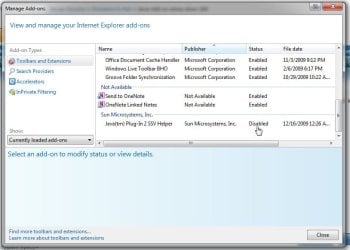
I've discovered that disabling the "Java Plug-In 2 SSV Helper" Add-on makes my home page load in 1 second instead of 8. The CPU and memory usage are both considerably lower as well.
Might be worth a look to see if you have it.
Name: Java(tm) Plug-In 2 SSV Helper
Publisher: Sun Microsystems, Inc.
Type: Browser Helper Object
Version: 6.0.160.1
File date:
Date last accessed: 27 October 2009, 23:46
Class ID: {DBC80044-A445-435B-BC74-9C25C1C588A9}
Use count: 282
Block count: 7
File: jp2ssv.dll
Folder: C:\Program Files (x86)\Java\jre6\bin
My Computer
At a glance
Windows 7 Professional x64Intel Core i5-2500K @ 3.3GHz8GBZotac ZONE GeForce GT 240 1GB [ZT-20404-20L]
I was just going to post about this and did a search. Your absolutely correct! I disabled the plugin and tabs open in IE almost instantly now. Big performance boost.
Apparently from what I've been researching the addin isnt needed for IE7 or 8. See this page and scroll down to VanguardLH's post.
That's interesting since the latest x64 version of java apparently lacks that altogether. When looking in the IE 8 tools>manage addons nothing by SUN is seen.
W7 Ultimate x64/W10 Pro x64/W11 Pro Triple Bo...AMD Phenom II X4 975 Deneb 3.6ghz - 965 2nd r...Kingston Hyper X DDR3 1600 1.5v 16gb - Hyper ...MSI HD Radeon 5750 1gb - MSI HD Radeon 6450 o...
Computer type
PC/Desktop
Computer Manufacturer/Model Number
Custom builds = 2
OS
W7 Ultimate x64/W10 Pro x64/W11 Pro Triple Boot - Main PC W7 Remote PC Micro ATX W7 Pro x64/W11 Pro
CPU
AMD Phenom II X4 975 Deneb 3.6ghz - 965 2nd remote pc
Motherboard
Gigabyte GA-790XTA-UD4-Gigabyte GA-880GM-D2H remote pc
Memory
Kingston Hyper X DDR3 1600 1.5v 16gb - Hyper X Fury 8gb 2nd
Graphics Card(s)
MSI HD Radeon 5750 1gb - MSI HD Radeon 6450 on mini tower
Sound Card
Creative Labs X-Fi Xtreme Audio P - Realtek onooard 2nd case
Monitor(s) Displays
ASUS VW199T-P 19" HP 2082a Main-HP 2082a 20" remote pc
Screen Resolution
Asus 1440x900 - HP 1600x900
Hard Drives
WD Black 1TB HD per OS W7, W10, and pending W11 presently on 500gb OS Drive - Pending Triple 1TB HDs for Spanned Storage/backup volume
Single 2TB external USB enclosure, single 1TB System 7 Host/Boot drive, Pending 8TB external HD for system image b
PSU
Corsair 750TX - primary / Corsair CX600 - second
Case
Antec 900-2 - SSD compatible / NZXT Vulcan mini tower
W7 Ultimate x64/W10 Pro x64/W11 Pro Triple Bo...AMD Phenom II X4 975 Deneb 3.6ghz - 965 2nd r...Kingston Hyper X DDR3 1600 1.5v 16gb - Hyper ...MSI HD Radeon 5750 1gb - MSI HD Radeon 6450 o...
Computer type
PC/Desktop
Computer Manufacturer/Model Number
Custom builds = 2
OS
W7 Ultimate x64/W10 Pro x64/W11 Pro Triple Boot - Main PC W7 Remote PC Micro ATX W7 Pro x64/W11 Pro
CPU
AMD Phenom II X4 975 Deneb 3.6ghz - 965 2nd remote pc
Motherboard
Gigabyte GA-790XTA-UD4-Gigabyte GA-880GM-D2H remote pc
Memory
Kingston Hyper X DDR3 1600 1.5v 16gb - Hyper X Fury 8gb 2nd
Graphics Card(s)
MSI HD Radeon 5750 1gb - MSI HD Radeon 6450 on mini tower
Sound Card
Creative Labs X-Fi Xtreme Audio P - Realtek onooard 2nd case
Monitor(s) Displays
ASUS VW199T-P 19" HP 2082a Main-HP 2082a 20" remote pc
Screen Resolution
Asus 1440x900 - HP 1600x900
Hard Drives
WD Black 1TB HD per OS W7, W10, and pending W11 presently on 500gb OS Drive - Pending Triple 1TB HDs for Spanned Storage/backup volume
Single 2TB external USB enclosure, single 1TB System 7 Host/Boot drive, Pending 8TB external HD for system image b
PSU
Corsair 750TX - primary / Corsair CX600 - second
Case
Antec 900-2 - SSD compatible / NZXT Vulcan mini tower
Just found it on the latest 64bit install seen on the new drive. The 32bit IE 8 seems to be a bit more responsive with that disabled while not necessarily seeing any tremendous speed boost.
I should simply right click on it and say bye bye since this apparently is a memory grabber to see IE 8 bog down.
W7 Ultimate x64/W10 Pro x64/W11 Pro Triple Bo...AMD Phenom II X4 975 Deneb 3.6ghz - 965 2nd r...Kingston Hyper X DDR3 1600 1.5v 16gb - Hyper ...MSI HD Radeon 5750 1gb - MSI HD Radeon 6450 o...
Computer type
PC/Desktop
Computer Manufacturer/Model Number
Custom builds = 2
OS
W7 Ultimate x64/W10 Pro x64/W11 Pro Triple Boot - Main PC W7 Remote PC Micro ATX W7 Pro x64/W11 Pro
CPU
AMD Phenom II X4 975 Deneb 3.6ghz - 965 2nd remote pc
Motherboard
Gigabyte GA-790XTA-UD4-Gigabyte GA-880GM-D2H remote pc
Memory
Kingston Hyper X DDR3 1600 1.5v 16gb - Hyper X Fury 8gb 2nd
Graphics Card(s)
MSI HD Radeon 5750 1gb - MSI HD Radeon 6450 on mini tower
Sound Card
Creative Labs X-Fi Xtreme Audio P - Realtek onooard 2nd case
Monitor(s) Displays
ASUS VW199T-P 19" HP 2082a Main-HP 2082a 20" remote pc
Screen Resolution
Asus 1440x900 - HP 1600x900
Hard Drives
WD Black 1TB HD per OS W7, W10, and pending W11 presently on 500gb OS Drive - Pending Triple 1TB HDs for Spanned Storage/backup volume
Single 2TB external USB enclosure, single 1TB System 7 Host/Boot drive, Pending 8TB external HD for system image b
PSU
Corsair 750TX - primary / Corsair CX600 - second
Case
Antec 900-2 - SSD compatible / NZXT Vulcan mini tower
What should I do if I get a Java tm Plug-in 2 ssv Helper jp2ssv.dll error? Sure, disabling this add-on won’t generate that error again, but what if I want this add-on to be enabled without getting that error message? As far as I found out about this Java tm Plug-in 2 ssv Helper jp2ssv.dll error the cause might be a possible malware, so I scanned my PC (Vista + IE10) using Avast AV and it didn’t detect anything…any idea how to solve this problem? (I suspect it's my IE 10 as I don’t remember having this in with IE9).