
Solved Java mysterious installations

Clairvaux

New member
Pro User
VIP
Local time
5:29 PM
Messages
247
Regretfully, I must reinstall Java after abandoning it years ago. I have gone into mind-mapping software, and it seems all of them need it. The reason I'm asking is that I have already installed my first Java-based software : X-Mind. It did not require any separate installation of Java, and it launched properly, so I presume it came "with its own Java".

Now I tried to install another one, an academic program named Docear. When I tried to launch it after install, a warning popped up, saying that Java Runtime Environment 1.60 (if I remember correctly) was missing. There were no instructions on Docear site about installing Java as a first step.

I was naïvely hoping that Docear (and the other Java-based programs I'm about to install) would be able to "share X-Mind's Java", but apparently this chap is jealous.

I went hunting for Java on my PC, by the way. There's nothing Java-looking in my installed programs under Control Panel. No obvious Java Control Center or somesuch either, as I seem to remember it existed ages ago. But I did find various bits and bytes obviously Java-related, which had not been there before.

I'm being told that it's easy to mess up the Java installs. What should I do ? Are there different sort of Javas (not taking the browsers' variety into account), the big ones shared by everybody, and the tiny ones sticking to a particular application ?
 

My Computer

Computer type
PC/Desktop
Computer Manufacturer/Model Number
Custom build
OS
Windows 7 Home Premium 64-bit (OEM)
CPU
AMD Athlon II X4 640 (3 GHz, 4 cores)
Motherboard
Asus M4A 89 GTD Pro/USB3
Memory
Patriot 16Gb DDR3 1600 (2 kits of 2)
Graphics Card(s)
ATI Radeon HD 4290 (integrated)
Sound Card
AMD + Realtek HD Audio (integrated)
Monitor(s) Displays
Hewlett-Packard ZR2440w (24")
Screen Resolution
1920 x 1200
Hard Drives
Internal : Samsung SSD 860 EVO 250 Gb (system), Seagate Barrcuda 1 Tb (data), Western Digital Caviar Blue 500 Gb (archives).
External (USB) : 2 x 1 Tb 2,5" Seagate Barracuda (backups).
PSU
Corsair VX 450 W
Case
Antec Solo
Cooling
Cooler Master Hyper 212 Plus, 2 Nexus Real Silent Case fans
Keyboard
Cherry KC 1000
Mouse
Logitech M 90
Internet Speed
Fiber, 300 Mbit/s down, 200 Mbit/s up
Antivirus
Microsoft Security Essentials
Browser
Vivaldi, Tor
Other Info
BIOS Date: 07/18/11 Ver: 08.00.15.
Modem-router : provided by ISP
Hi:

Yes, it's unfortunate that you need to reinstall Java.
Few programs or websites require it these days, which is a good thing, as it suffers from a notorious history of security vulnerabilities.

There is ONLY one safe place to download the current version: https://java.com/download

As a general rule, it's best NOT to have it on one's system unless absolutely necessary.
And it's vitally important that it be kept current -- older, outdated versions (even remnants) pose the greatest security risk:
http://java.com/olderversions

It's also notorious for leaving leftovers and remnants behind, even after uninstalling it.
There are two removal tools:
JavaRa is no longer being developed, but still works fine under Windows 7 (version 1.16 probably works best): https://singularlabs.com/software/javara/
Oracle also has their own removal tool now: https://java.com/en/download/help/uninstall_java.xml
And see here: https://java.com/en/download/help/manual_regedit.xml

If you have leftovers of old versions on your system, I suggest that you might want to first use one or both removal tools (and a manual removal, if needed) to fully clean out all Java on the system.
THEN, you might cleanly reinstall the current version from the link I mentioned earlier.

>>Be sure to read ALL of the dialog windows during the setup wizard and to opt-out of any bundled freebies that most assuredly will be offered to you.

Hope this helps,
MM
 

My Computer

Computer type
PC/Desktop
Computer Manufacturer/Model Number
Dell Studio XPS 8500
OS
OEM Windows 7 Ult (x64) SP1
CPU
Intel Core-i7 3770 @ 3.4 GHz
Motherboard
"Dell" branded
Memory
16 GB DDR3 SDRAM @ 1333 MHz
Graphics Card(s)
NVidia GeForce GT620 1 GB
Sound Card
THX TruStudio PC
Monitor(s) Displays
Dell U2410 Full HD
Hard Drives
2.0 TB SATA2 @ 7200 RPM
PSU
350W
Keyboard
MS 4000 Ergon - Wired
Mouse
Logitech Anywhere MX
Internet Speed
Cable HSI w/Turbo (router)
Antivirus
KIS-MBAM Premium-MBAE Premium
Browser
Fx (current version); IE
Other Info
And a Win7/64 Pro laptop; And a Win10/64 Pro desktop.

My Computer

Computer type
Laptop
Computer Manufacturer/Model Number
ASUS
OS
Microsoft Windows 7 Home Premium 64-bit 7601 Multiprocessor Free Service Pack 1
CPU
AMD C-60 APU with Radeon(tm) HD Graphics
Motherboard
ASUSTeK COMPUTER INC. X501U
Memory
4.00 GB
Graphics Card(s)
AMD Radeon HD 6290 Graphics
Sound Card
(1) AMD High Definition Audio Device (2) Realtek High Defi
Screen Resolution
1366 x 768 x 32 bits (4294967296 colors) @ 60 Hz
Hard Drives
Hitachi HTS545050A7E380 SATA Disk Device
Antivirus
Comodo CIS & FW, SecureAplus App Whitelisting, Threatfire
Browser
Cyberfox 64bit, Opera 64bit, Airfox
Other Info
Spy-The-Spy, HitmanPro.Alert, Norton Connect Safe, MJRegWatcher, BitDefender TrafficLight, Voodoo Shield, Zemana AntiMalware
Thanks, very helpful indeed, I'll keep those links. I don't have any problems with Java remnants now, although I might in the future...


  1. Do I understand correctly that I have now to download Java Version 8 Update 101 in order to make Docear work ?
  2. Is there a risk of conflict with the Java elements that Mind-X has obviously installed by itself ?
  3. How is it possible that Mind-X works, without Java showing in Control Panel ? Or the Java Control Panel being present ?
  4. I definitely don't have Java in my Firefox browser right now. I understand there's a difference beween the Java that sits on your PC, and the Java that sits in your browser. Will installing Java on my PC also install it in the browser ?

This mention on the Java site helps understand how confusing the whole situation is :

Java software for your computer, or the Java Runtime Environment, is also referred to as the Java Runtime, Runtime Environment, Runtime, JRE, Java Virtual Machine, Virtual Machine, Java VM, JVM, VM, Java plug-in, Java plugin, Java add-on or Java download.

Java may be referred to as Java Runtime Environment or the Java plug-in, but are they actually the same thing ?

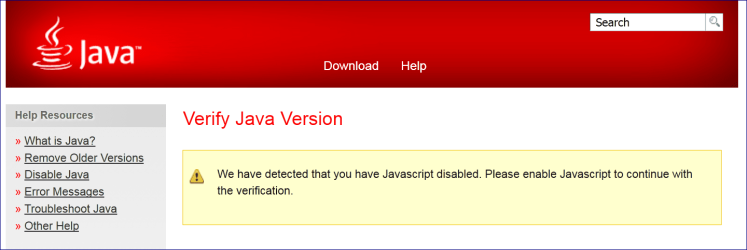
And just for laughs, here is what you get when you attempt to check if Java in installed on your PC, while having NoScript active :

Java version.PNG

(I have learned by now that Java and Javascript are two entirely different beasts, but just imagine the extra layer of confusion for someone who's not there yet...)
 

My Computer

Computer type
PC/Desktop
Computer Manufacturer/Model Number
Custom build
OS
Windows 7 Home Premium 64-bit (OEM)
CPU
AMD Athlon II X4 640 (3 GHz, 4 cores)
Motherboard
Asus M4A 89 GTD Pro/USB3
Memory
Patriot 16Gb DDR3 1600 (2 kits of 2)
Graphics Card(s)
ATI Radeon HD 4290 (integrated)
Sound Card
AMD + Realtek HD Audio (integrated)
Monitor(s) Displays
Hewlett-Packard ZR2440w (24")
Screen Resolution
1920 x 1200
Hard Drives
Internal : Samsung SSD 860 EVO 250 Gb (system), Seagate Barrcuda 1 Tb (data), Western Digital Caviar Blue 500 Gb (archives).
External (USB) : 2 x 1 Tb 2,5" Seagate Barracuda (backups).
PSU
Corsair VX 450 W
Case
Antec Solo
Cooling
Cooler Master Hyper 212 Plus, 2 Nexus Real Silent Case fans
Keyboard
Cherry KC 1000
Mouse
Logitech M 90
Internet Speed
Fiber, 300 Mbit/s down, 200 Mbit/s up
Antivirus
Microsoft Security Essentials
Browser
Vivaldi, Tor
Other Info
BIOS Date: 07/18/11 Ver: 08.00.15.
Modem-router : provided by ISP
From Docear User Manual

Java is the programming language in which Docear (and many other programs) is written in. To run a software written in Java, you need to install the free Java Runtime Environment (Java JRE). Probably you have already installed Java. If not, and Docear does not start, visit www.java.com if you are a Linux or Windows user.

So you need to download Java from here: http://www.java.com/en/download/windows_manual.jsp

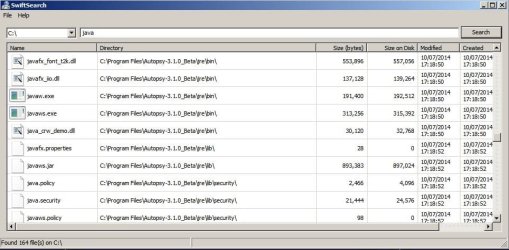
I have one application that uses it's own localized version of Java:

Java Localized.jpg

It's a standalone version of Java the developer added into their installation and it doesn’t have the security problems and annoyances that regular Java does.

That Java installation is only available to the program that installed it and running another app that requires Java to be installed means that Java has to be installed in it's own right.
 

My Computer

Computer type
Laptop
Computer Manufacturer/Model Number
ASUS
OS
Microsoft Windows 7 Home Premium 64-bit 7601 Multiprocessor Free Service Pack 1
CPU
AMD C-60 APU with Radeon(tm) HD Graphics
Motherboard
ASUSTeK COMPUTER INC. X501U
Memory
4.00 GB
Graphics Card(s)
AMD Radeon HD 6290 Graphics
Sound Card
(1) AMD High Definition Audio Device (2) Realtek High Defi
Screen Resolution
1366 x 768 x 32 bits (4294967296 colors) @ 60 Hz
Hard Drives
Hitachi HTS545050A7E380 SATA Disk Device
Antivirus
Comodo CIS & FW, SecureAplus App Whitelisting, Threatfire
Browser
Cyberfox 64bit, Opera 64bit, Airfox
Other Info
Spy-The-Spy, HitmanPro.Alert, Norton Connect Safe, MJRegWatcher, BitDefender TrafficLight, Voodoo Shield, Zemana AntiMalware

My Computer

Computer type
Laptop
Computer Manufacturer/Model Number
ASUS
OS
Microsoft Windows 7 Home Premium 64-bit 7601 Multiprocessor Free Service Pack 1
CPU
AMD C-60 APU with Radeon(tm) HD Graphics
Motherboard
ASUSTeK COMPUTER INC. X501U
Memory
4.00 GB
Graphics Card(s)
AMD Radeon HD 6290 Graphics
Sound Card
(1) AMD High Definition Audio Device (2) Realtek High Defi
Screen Resolution
1366 x 768 x 32 bits (4294967296 colors) @ 60 Hz
Hard Drives
Hitachi HTS545050A7E380 SATA Disk Device
Antivirus
Comodo CIS & FW, SecureAplus App Whitelisting, Threatfire
Browser
Cyberfox 64bit, Opera 64bit, Airfox
Other Info
Spy-The-Spy, HitmanPro.Alert, Norton Connect Safe, MJRegWatcher, BitDefender TrafficLight, Voodoo Shield, Zemana AntiMalware
Sorry, back from an Internet cutoff... Thanks for looking into the Docear manual which I did browse -- but I missed this bit.
I have one application that uses it's own localized version of Java. It's a standalone version of Java the developer added into their installation and it doesn’t have the security problems and annoyances that regular Java does. That Java installation is only available to the program that installed it and running another app that requires Java to be installed means that Java has to be installed in it's own right.
Now it's clear. I had never seen it explained that way.
Basically you need the 32bit Java offline installer.
Wouldn't it rather be the 64-bit installer ? I have a 64-bit Windows and Firefox. Java frowns upon 64-bit browsers because allegedly they would not render some sites properly (I suppose they mean sites which use Java), but anyway I plan to disable Java in the browser, I haven't needed it for ages.
 

My Computer

Computer type
PC/Desktop
Computer Manufacturer/Model Number
Custom build
OS
Windows 7 Home Premium 64-bit (OEM)
CPU
AMD Athlon II X4 640 (3 GHz, 4 cores)
Motherboard
Asus M4A 89 GTD Pro/USB3
Memory
Patriot 16Gb DDR3 1600 (2 kits of 2)
Graphics Card(s)
ATI Radeon HD 4290 (integrated)
Sound Card
AMD + Realtek HD Audio (integrated)
Monitor(s) Displays
Hewlett-Packard ZR2440w (24")
Screen Resolution
1920 x 1200
Hard Drives
Internal : Samsung SSD 860 EVO 250 Gb (system), Seagate Barrcuda 1 Tb (data), Western Digital Caviar Blue 500 Gb (archives).
External (USB) : 2 x 1 Tb 2,5" Seagate Barracuda (backups).
PSU
Corsair VX 450 W
Case
Antec Solo
Cooling
Cooler Master Hyper 212 Plus, 2 Nexus Real Silent Case fans
Keyboard
Cherry KC 1000
Mouse
Logitech M 90
Internet Speed
Fiber, 300 Mbit/s down, 200 Mbit/s up
Antivirus
Microsoft Security Essentials
Browser
Vivaldi, Tor
Other Info
BIOS Date: 07/18/11 Ver: 08.00.15.
Modem-router : provided by ISP
I'm not sure which version of Java is required by Docear or even if it matters.

RE: 64bit Java. You're correct in thinking that it's needed for 64bit browsers (if enabled in the browser)

Java states that you can run both 32bit and 64bit versions side by side.

They also state that 64bit Java must me manually kept up to date.

https://java.com/en/download/faq/java_win64bit.xml

I'm not really much of an expert on Java although I have used it in the past. I see the logic - 64bit machine and 64bit browser means I need 64bit Java but on my 64bit machine I always used 32bit Java without issues for software that required it.

I guess you can try 64bit Java and see if Docear works.
 

My Computer

Computer type
Laptop
Computer Manufacturer/Model Number
ASUS
OS
Microsoft Windows 7 Home Premium 64-bit 7601 Multiprocessor Free Service Pack 1
CPU
AMD C-60 APU with Radeon(tm) HD Graphics
Motherboard
ASUSTeK COMPUTER INC. X501U
Memory
4.00 GB
Graphics Card(s)
AMD Radeon HD 6290 Graphics
Sound Card
(1) AMD High Definition Audio Device (2) Realtek High Defi
Screen Resolution
1366 x 768 x 32 bits (4294967296 colors) @ 60 Hz
Hard Drives
Hitachi HTS545050A7E380 SATA Disk Device
Antivirus
Comodo CIS & FW, SecureAplus App Whitelisting, Threatfire
Browser
Cyberfox 64bit, Opera 64bit, Airfox
Other Info
Spy-The-Spy, HitmanPro.Alert, Norton Connect Safe, MJRegWatcher, BitDefender TrafficLight, Voodoo Shield, Zemana AntiMalware
Thanks, Callender.
They also state that 64bit Java must be manually kept up to date.
It seems there has been an upgrade to that, and you can now set 64-bit Java to automatically update as well. I guess I will now have to start polluting my machine with Java and see what works.
 

My Computer

Computer type
PC/Desktop
Computer Manufacturer/Model Number
Custom build
OS
Windows 7 Home Premium 64-bit (OEM)
CPU
AMD Athlon II X4 640 (3 GHz, 4 cores)
Motherboard
Asus M4A 89 GTD Pro/USB3
Memory
Patriot 16Gb DDR3 1600 (2 kits of 2)
Graphics Card(s)
ATI Radeon HD 4290 (integrated)
Sound Card
AMD + Realtek HD Audio (integrated)
Monitor(s) Displays
Hewlett-Packard ZR2440w (24")
Screen Resolution
1920 x 1200
Hard Drives
Internal : Samsung SSD 860 EVO 250 Gb (system), Seagate Barrcuda 1 Tb (data), Western Digital Caviar Blue 500 Gb (archives).
External (USB) : 2 x 1 Tb 2,5" Seagate Barracuda (backups).
PSU
Corsair VX 450 W
Case
Antec Solo
Cooling
Cooler Master Hyper 212 Plus, 2 Nexus Real Silent Case fans
Keyboard
Cherry KC 1000
Mouse
Logitech M 90
Internet Speed
Fiber, 300 Mbit/s down, 200 Mbit/s up
Antivirus
Microsoft Security Essentials
Browser
Vivaldi, Tor
Other Info
BIOS Date: 07/18/11 Ver: 08.00.15.
Modem-router : provided by ISP
I'm happy to report that I have now installed Java Runtime Environment version 8 update 101, 64-bit, and everything works fine, as far as I can tell : Docear now opens normally. My other Java-based application, X-Mind, which has its own embedded version of Java, still works.

I have de-activated Java in the browser through the Java Control Panel. The Java plug-in is nowhere to be seen in my various browsers (Firefox 64-bit, Opera, Internet Explorer, Maxthon), not even in a disabled state, so I like to believe I'm protected from the biggest dangers of Java.

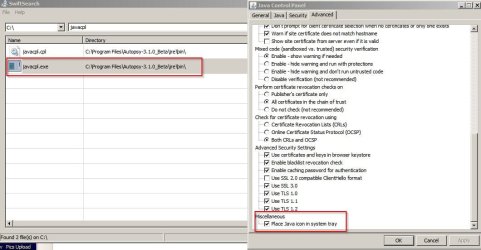
I have changed the automatic update from the default weekly to daily (warn me but do not download). I have also checked the option Suppress sponsor offers when installing or updating Java (thank you, Mr. Java), as well as another mysterious one, Enable the operating system's restricted environment (native sandbox) (because it feels a bit safer). Despite checking Place Java icon in system tray, there's no Java icon in the system tray. Oh, well.

Docear seems great, by the way, despite not being up-to-date with the way Windows 7 handles high resolution screens.
 

My Computer

Computer type
PC/Desktop
Computer Manufacturer/Model Number
Custom build
OS
Windows 7 Home Premium 64-bit (OEM)
CPU
AMD Athlon II X4 640 (3 GHz, 4 cores)
Motherboard
Asus M4A 89 GTD Pro/USB3
Memory
Patriot 16Gb DDR3 1600 (2 kits of 2)
Graphics Card(s)
ATI Radeon HD 4290 (integrated)
Sound Card
AMD + Realtek HD Audio (integrated)
Monitor(s) Displays
Hewlett-Packard ZR2440w (24")
Screen Resolution
1920 x 1200
Hard Drives
Internal : Samsung SSD 860 EVO 250 Gb (system), Seagate Barrcuda 1 Tb (data), Western Digital Caviar Blue 500 Gb (archives).
External (USB) : 2 x 1 Tb 2,5" Seagate Barracuda (backups).
PSU
Corsair VX 450 W
Case
Antec Solo
Cooling
Cooler Master Hyper 212 Plus, 2 Nexus Real Silent Case fans
Keyboard
Cherry KC 1000
Mouse
Logitech M 90
Internet Speed
Fiber, 300 Mbit/s down, 200 Mbit/s up
Antivirus
Microsoft Security Essentials
Browser
Vivaldi, Tor
Other Info
BIOS Date: 07/18/11 Ver: 08.00.15.
Modem-router : provided by ISP
My Computer

Computer type
Laptop
Computer Manufacturer/Model Number
ASUS
OS
Microsoft Windows 7 Home Premium 64-bit 7601 Multiprocessor Free Service Pack 1
CPU
AMD C-60 APU with Radeon(tm) HD Graphics
Motherboard
ASUSTeK COMPUTER INC. X501U
Memory
4.00 GB
Graphics Card(s)
AMD Radeon HD 6290 Graphics
Sound Card
(1) AMD High Definition Audio Device (2) Realtek High Defi
Screen Resolution
1366 x 768 x 32 bits (4294967296 colors) @ 60 Hz
Hard Drives
Hitachi HTS545050A7E380 SATA Disk Device
Antivirus
Comodo CIS & FW, SecureAplus App Whitelisting, Threatfire
Browser
Cyberfox 64bit, Opera 64bit, Airfox
Other Info
Spy-The-Spy, HitmanPro.Alert, Norton Connect Safe, MJRegWatcher, BitDefender TrafficLight, Voodoo Shield, Zemana AntiMalware
I thought the system tray option would give you a permanent access to Java Control Panel.

I do have EMET installed and I don't understand much about it. Sometimes, it closes Word when I've done something it does not like.

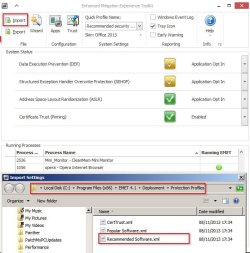
It already has several Java executables in its Application Configuration panel : java.exe, javaw.exe and javaws.exe. Do I get more protection by importing this Recommended Software.xml ?

Also, do I have something to do to make sure EMET is properly updated ? I don't see any menu item to that effect, and the help seems to be missing.

Edit : Microsoft says you have to download manually the help .pdf, rename it and copy it in the installation folder. Because they update it from time to time. Thanks, Microsoft. How many people work at your place ? Ten ? Twenty ? Now the Microsoft menu marked Help actually opens the help. If you have a pdf reader on your machine.
 
Last edited:

My Computer

Computer type
PC/Desktop
Computer Manufacturer/Model Number
Custom build
OS
Windows 7 Home Premium 64-bit (OEM)
CPU
AMD Athlon II X4 640 (3 GHz, 4 cores)
Motherboard
Asus M4A 89 GTD Pro/USB3
Memory
Patriot 16Gb DDR3 1600 (2 kits of 2)
Graphics Card(s)
ATI Radeon HD 4290 (integrated)
Sound Card
AMD + Realtek HD Audio (integrated)
Monitor(s) Displays
Hewlett-Packard ZR2440w (24")
Screen Resolution
1920 x 1200
Hard Drives
Internal : Samsung SSD 860 EVO 250 Gb (system), Seagate Barrcuda 1 Tb (data), Western Digital Caviar Blue 500 Gb (archives).
External (USB) : 2 x 1 Tb 2,5" Seagate Barracuda (backups).
PSU
Corsair VX 450 W
Case
Antec Solo
Cooling
Cooler Master Hyper 212 Plus, 2 Nexus Real Silent Case fans
Keyboard
Cherry KC 1000
Mouse
Logitech M 90
Internet Speed
Fiber, 300 Mbit/s down, 200 Mbit/s up
Antivirus
Microsoft Security Essentials
Browser
Vivaldi, Tor
Other Info
BIOS Date: 07/18/11 Ver: 08.00.15.
Modem-router : provided by ISP
If you navigate to Recommended Software.xml and right click to open/ edit it with your text editor you can check contents to see it would be useful. Basically it will import rules for anything listed. Since I don't use Java or much of the software listed I create my own rules for applications using wildcards.

Those applications would typically be:

* Any/all web browsers installed on your computer (Internet Explorer, Firefox, Chrome, Opera)
* Entire MS Office suite (Access, Excel, Outlook, PowerPoint, Word)
* Java
* Any media player (Windows Media Player, VLC, iTunes, RealPlayer, QuickTime, Winamp)
* Any software that waits and listens for a network connection
* Any application that can be automatically invoked by browsing the internet
* Any Adobe product that you see frequently listed within Adobe's Security bulletins and advisories - but NOT Flash Player.

RE: MS Word. If you open EMET GUI - Start> All Programs> EMET> EMET GUI

Go to "Apps" and untick EAF mitigation for Word. Then click OK.

If you still have issues disable all mitigations for Word then enable them a few at a time until you can reproduce the isssue. Then you can work out which mitigation is causing problems.
 

My Computer

Computer type
Laptop
Computer Manufacturer/Model Number
ASUS
OS
Microsoft Windows 7 Home Premium 64-bit 7601 Multiprocessor Free Service Pack 1
CPU
AMD C-60 APU with Radeon(tm) HD Graphics
Motherboard
ASUSTeK COMPUTER INC. X501U
Memory
4.00 GB
Graphics Card(s)
AMD Radeon HD 6290 Graphics
Sound Card
(1) AMD High Definition Audio Device (2) Realtek High Defi
Screen Resolution
1366 x 768 x 32 bits (4294967296 colors) @ 60 Hz
Hard Drives
Hitachi HTS545050A7E380 SATA Disk Device
Antivirus
Comodo CIS & FW, SecureAplus App Whitelisting, Threatfire
Browser
Cyberfox 64bit, Opera 64bit, Airfox
Other Info
Spy-The-Spy, HitmanPro.Alert, Norton Connect Safe, MJRegWatcher, BitDefender TrafficLight, Voodoo Shield, Zemana AntiMalware
RE: EMET updates. I have not updated since 4.1

I'm sure that updates need to be checked for manually by searching on the web. I'm not 100% sure if it#s okay to install a new version straight over the top of an old version either.
 

My Computer

Computer type
Laptop
Computer Manufacturer/Model Number
ASUS
OS
Microsoft Windows 7 Home Premium 64-bit 7601 Multiprocessor Free Service Pack 1
CPU
AMD C-60 APU with Radeon(tm) HD Graphics
Motherboard
ASUSTeK COMPUTER INC. X501U
Memory
4.00 GB
Graphics Card(s)
AMD Radeon HD 6290 Graphics
Sound Card
(1) AMD High Definition Audio Device (2) Realtek High Defi
Screen Resolution
1366 x 768 x 32 bits (4294967296 colors) @ 60 Hz
Hard Drives
Hitachi HTS545050A7E380 SATA Disk Device
Antivirus
Comodo CIS & FW, SecureAplus App Whitelisting, Threatfire
Browser
Cyberfox 64bit, Opera 64bit, Airfox
Other Info
Spy-The-Spy, HitmanPro.Alert, Norton Connect Safe, MJRegWatcher, BitDefender TrafficLight, Voodoo Shield, Zemana AntiMalware
RE: System Tray icon. I guess you should only see it when the application that uses Java is running. If you don't see it check your system tray icons:

Right Click "Start" orb > Properties> Taskbar> Notification Area> Customize

Does it show up in the list? If so set to always display.
 

My Computer

Computer type
Laptop
Computer Manufacturer/Model Number
ASUS
OS
Microsoft Windows 7 Home Premium 64-bit 7601 Multiprocessor Free Service Pack 1
CPU
AMD C-60 APU with Radeon(tm) HD Graphics
Motherboard
ASUSTeK COMPUTER INC. X501U
Memory
4.00 GB
Graphics Card(s)
AMD Radeon HD 6290 Graphics
Sound Card
(1) AMD High Definition Audio Device (2) Realtek High Defi
Screen Resolution
1366 x 768 x 32 bits (4294967296 colors) @ 60 Hz
Hard Drives
Hitachi HTS545050A7E380 SATA Disk Device
Antivirus
Comodo CIS & FW, SecureAplus App Whitelisting, Threatfire
Browser
Cyberfox 64bit, Opera 64bit, Airfox
Other Info
Spy-The-Spy, HitmanPro.Alert, Norton Connect Safe, MJRegWatcher, BitDefender TrafficLight, Voodoo Shield, Zemana AntiMalware
More info:

I launched Javacpl.exe from the localized version of Java and ticked the option to place an icon in the ststem tray. The message I got was that changes required a browser shutdown/ restart which indicates to me that that icon is only supposed to display when Java is running in the browser - which of course it will not do on my machine.

java in system tray.jpg
 

My Computer

Computer type
Laptop
Computer Manufacturer/Model Number
ASUS
OS
Microsoft Windows 7 Home Premium 64-bit 7601 Multiprocessor Free Service Pack 1
CPU
AMD C-60 APU with Radeon(tm) HD Graphics
Motherboard
ASUSTeK COMPUTER INC. X501U
Memory
4.00 GB
Graphics Card(s)
AMD Radeon HD 6290 Graphics
Sound Card
(1) AMD High Definition Audio Device (2) Realtek High Defi
Screen Resolution
1366 x 768 x 32 bits (4294967296 colors) @ 60 Hz
Hard Drives
Hitachi HTS545050A7E380 SATA Disk Device
Antivirus
Comodo CIS & FW, SecureAplus App Whitelisting, Threatfire
Browser
Cyberfox 64bit, Opera 64bit, Airfox
Other Info
Spy-The-Spy, HitmanPro.Alert, Norton Connect Safe, MJRegWatcher, BitDefender TrafficLight, Voodoo Shield, Zemana AntiMalware
If you navigate to Recommended Software.xml and right click to open/ edit it with your text editor you can check contents to see it would be useful.

Actually, there are very few applications in that file. It seems to be the same list which is active right now on my PC, by the way of the Recommended profile that I have applied when it was proposed at install. Popular Software.xml is not very long either, but it has some other software that I do use, such as 7-Zip and VLC.

Thanks for the Word trick, I will file it and use it if EMET misbehaves again.

[System tray] That icon is only supposed to display when Java is running in the browser - which of course it will not do on my machine.
Neither on mine, and that's the explanation, without any doubt :D.

RE: EMET updates. I have not updated since 4.1

I'm sure that updates need to be checked for manually by searching on the web. I'm not 100% sure if it#s okay to install a new version straight over the top of an old version either.
No it's not, at least for some upgrades in the past. That, from a quick glance on the user manual, which also has some unpleasant hints about deleting manually some registry keys in some cases. It definitely seems this is not a piece of software meant to be updated frequently and smoothly like an antivirus. Better be left alone I think, unless one is quite knowledgeable.

I'm on 5.5, which is the current version.
 

My Computer

Computer type
PC/Desktop
Computer Manufacturer/Model Number
Custom build
OS
Windows 7 Home Premium 64-bit (OEM)
CPU
AMD Athlon II X4 640 (3 GHz, 4 cores)
Motherboard
Asus M4A 89 GTD Pro/USB3
Memory
Patriot 16Gb DDR3 1600 (2 kits of 2)
Graphics Card(s)
ATI Radeon HD 4290 (integrated)
Sound Card
AMD + Realtek HD Audio (integrated)
Monitor(s) Displays
Hewlett-Packard ZR2440w (24")
Screen Resolution
1920 x 1200
Hard Drives
Internal : Samsung SSD 860 EVO 250 Gb (system), Seagate Barrcuda 1 Tb (data), Western Digital Caviar Blue 500 Gb (archives).
External (USB) : 2 x 1 Tb 2,5" Seagate Barracuda (backups).
PSU
Corsair VX 450 W
Case
Antec Solo
Cooling
Cooler Master Hyper 212 Plus, 2 Nexus Real Silent Case fans
Keyboard
Cherry KC 1000
Mouse
Logitech M 90
Internet Speed
Fiber, 300 Mbit/s down, 200 Mbit/s up
Antivirus
Microsoft Security Essentials
Browser
Vivaldi, Tor
Other Info
BIOS Date: 07/18/11 Ver: 08.00.15.
Modem-router : provided by ISP
Back
Top