Java Problem running IE9 in Win 7 64 bit

p23185

New member
Member
Local time
10:07 AM
Messages
46
Does anyone know how I can get rid of this error? I have scanned the web for so long for an answer that I finally realized I don't even understand the difference between Sun Java and Oracle Java nor do I know how to get rid of either and start over. Any help offered will be greatly appreciated. Most Java forums are for Java developers, and I am only a user (and really do not understand why I am a user).

javaerrorJacobPC_zpsa9488131.jpg
 
Last edited by a moderator:

My Computer

Computer Manufacturer/Model Number
me/na
OS
Windows 7 Ultimate x64
CPU
i7-2600
Motherboard
Asus P8P67eluxe_i7-2600
Memory
8Gb
Graphics Card(s)
BFGgts250
Sound Card
mobo
Monitor(s) Displays
Acer P236H
Hard Drives
500Gb system Hitachi
1000Gb video Seagate 6.0 Gp/s SATA
1000Gb special project Seagate 3.0Gb/s SATA
PSU
thermaltake_600w
Case
Antec_900
Cooling
fans
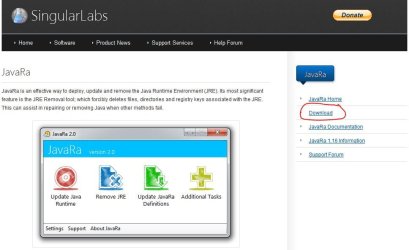
Try uninstalling Java. Sometimes uninstalling from control panel > programs and features leaves behind bits and pieces that can cause error messages or other problems. There's a free tool called JavaRa that can hopefully remove everything (files, directories, registry keys, etc) and also eliminate that error message.

JavaRa | SingularLabs

Because this is a free product you may see different download buttons on the JavaRa home page. I've circled the one you should use. Also, the product is now at version 2.1 so don't be concerned that the home page screenshot still shows version 2.0 :)

javara.JPG

Once you've uninstalled Java, you may find that you can do without it. If you come across a web page that says you need Java, you can always reinstall it from the official Java site. Until then, try running your computer without it.

java.com: Java + You

You might also consider checking your machine for damaged or corrupt system files by running a system file checker scan from an elevated command prompt (option two.) If problems are found, run the scan 3 times and immediately reboot the computer after each scan.

http://www.sevenforums.com/tutorials/1538-sfc-scannow-command-system-file-checker.html
 

My Computer

Computer type
Laptop
Computer Manufacturer/Model Number
Sony Vaio VPCEB47GM Laptop
OS
Win 7 Pro 64-bit
CPU
Intel i5 2.4 Ghz
Memory
8GB DDR3
Graphics Card(s)
Intel HD 3000
Sound Card
IDT High Definition
Monitor(s) Displays
15.6 WGXA Anti-Glare LED
Screen Resolution
1280x800
Hard Drives
640Gb 7200rpm
Antivirus
MSE
Browser
Opera (primary) with IE9 backup
I tried your solution of using JavaRa and that appeared to do the trick. I tried to track down where the Sun Java application came from and it appeared to have been installed that same time I installed Pinnacle Studio 14. We are going to operate the PC without reinstalling that and see if all is well. The error message has disappeared for now.

Thanks.
 

My Computer

Computer Manufacturer/Model Number
me/na
OS
Windows 7 Ultimate x64
CPU
i7-2600
Motherboard
Asus P8P67eluxe_i7-2600
Memory
8Gb
Graphics Card(s)
BFGgts250
Sound Card
mobo
Monitor(s) Displays
Acer P236H
Hard Drives
500Gb system Hitachi
1000Gb video Seagate 6.0 Gp/s SATA
1000Gb special project Seagate 3.0Gb/s SATA
PSU
thermaltake_600w
Case
Antec_900
Cooling
fans
Glad to hear things might be back to normal. Thanks for posting back! :thumbsup:
 

My Computer

Computer type
Laptop
Computer Manufacturer/Model Number
Sony Vaio VPCEB47GM Laptop
OS
Win 7 Pro 64-bit
CPU
Intel i5 2.4 Ghz
Memory
8GB DDR3
Graphics Card(s)
Intel HD 3000
Sound Card
IDT High Definition
Monitor(s) Displays
15.6 WGXA Anti-Glare LED
Screen Resolution
1280x800
Hard Drives
640Gb 7200rpm
Antivirus
MSE
Browser
Opera (primary) with IE9 backup
Back
Top