Java SE 7 Released

Airbot

----------------------
VIP
SF Team
Local time
6:56 PM
Messages
18,396
July 28, 2011

Appears that Java 7 SE is finally out of the preview/development stage, and is now in a stable build.


   Information
This release includes new features such as small language changes for improved developer productivity, a new Filesystem API, support for asynchronous I/O, a new fork/join framework for multicore performance, improved support for dynamic and script languages, updates to security, internationalization and web standards and much more.
Release Notes
Java SE Downloads
 

My Computer

Computer type
PC/Desktop
Computer Manufacturer/Model Number
Airbot 2.0
OS
Windows 7 Ultimate x64 SP1
CPU
Core i7 920 (D0) @ 4Ghz, *26c idle *65c full load on air
Motherboard
Asus P6X58D Premium - Sata 6Gb/s - USB 3.0
Memory
12GB DDR3 Corsair Dominator -CMD12GX3M6A1600C8 at 1600MHz
Graphics Card(s)
Zotac Geforce GTX 770
Sound Card
ASUS Xonar D2X
Monitor(s) Displays
1 LG 24" Flatron W2453V-PF 1 Samsung 24" P2450H both 2ms RT
Screen Resolution
1920x1080@60hz
Hard Drives
1 Samsung 250GB 840 Evo SSD
1 OCZ Vertex2 180GB SSD
1 TB Samsung Spinpoint F1 7200RPM 32MB cache
2 500GB WD Caviar Blacks 7200RPM 32MB cache (WD5001AALS)

Pioneer DVD Burner DVR-S18M
PSU
Corsair HX1000W
Case
Cooler Master HAF 932
Cooling
Case Fans *3 230mm, *1 140mm/CPU - *Tuniq Tower 120 Extreme
Keyboard
Logitech Wireless MK700
Mouse
Logitech Wireless MK700
Internet Speed
DL 15 Mbps UL 0.98 Mbps
Antivirus
None
Browser
Firefox Nightly
Other Info
Processor-7.7 *RAM- 7.9 *Graphics-7.9 *Gaming Graphics- 7.9 *SSD- 7.8 W.E.I final score= 7.7
*Phone- LG Nexus 5
Just a heads up for anyone installing Java 7, uninstall Java 6 first as it doesn't get updated/uninstalled by the java 7 installer, or at least it didn't for me.
 

My Computer

Computer type
PC/Desktop
Computer Manufacturer/Model Number
Me
OS
Win 7 Ultimate x64
CPU
FX-8350 @ 4.6 GHz so far
Motherboard
Asus M5A97 EVO
Memory
ADATA XPG V1 Series Black 8GB DDR3 1600
Graphics Card(s)
Sapphire R9 270x Dual-X
Sound Card
Xonar DGX w/ Corsair Vengence 1300
Monitor(s) Displays
Acer S232HL Abid
Screen Resolution
1920x1080
Hard Drives
120 GB OCZ Vertex 3
500 GB Seagate 7200.12
PSU
Antec Earthwatts 650W Green
Case
Antec Three Hundred
Cooling
Cooler Master 212 EVO
Keyboard
Logitech G510
Mouse
Logitech G500s
Internet Speed
35000/3000
Java 7 SE

Tell me I'm not alone. I have tried no less than 15 times to install Java 7. It doesn't work for me.

I deleted Java 6 before installation. When I go to the Java test page:
How do I test whether Java is working on my computer? it launches the little pinwheel telling me that it's thinking about it, but it eventually goes blank with no result, unlike the previous Java 6 did(within seconds). In desperation, I reverted to the Java 6_26-b03 that works.

<edit>
I tested it with Firefox 6, Google Chrome 14.0.835.8, and IE9. All fail.
</edit>

Any ideas what might be wrong.

Thanks,
Grouch
 

My Computer

Computer Manufacturer/Model Number
Dell Vostro 200
OS
Windows 7 Pro 32bit SP1
CPU
Intel Core 2 Duo E4500
Motherboard
Dell 0C4U409
Memory
4 GB
Graphics Card(s)
Intel G33 Chipset
Sound Card
Realtek High Def (on-board)
Monitor(s) Displays
Dell E207WFP
Hard Drives
238.2 GB
Case
Mini Tower
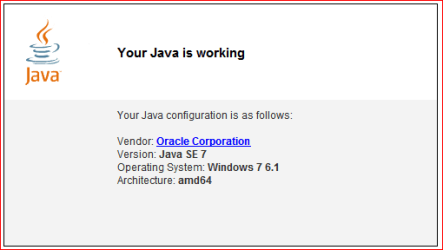
Sounds like something on your end might possibly be blocking it as it works fine here in both IE9 and Firefox/Nightly,

java.PNG
 

My Computer

Computer type
PC/Desktop
Computer Manufacturer/Model Number
Me
OS
Win 7 Ultimate x64
CPU
FX-8350 @ 4.6 GHz so far
Motherboard
Asus M5A97 EVO
Memory
ADATA XPG V1 Series Black 8GB DDR3 1600
Graphics Card(s)
Sapphire R9 270x Dual-X
Sound Card
Xonar DGX w/ Corsair Vengence 1300
Monitor(s) Displays
Acer S232HL Abid
Screen Resolution
1920x1080
Hard Drives
120 GB OCZ Vertex 3
500 GB Seagate 7200.12
PSU
Antec Earthwatts 650W Green
Case
Antec Three Hundred
Cooling
Cooler Master 212 EVO
Keyboard
Logitech G510
Mouse
Logitech G500s
Internet Speed
35000/3000

My Computer

Computer Manufacturer/Model Number
acer aspire 5935g
OS
Windows 7 Home Premium x64 SP1
CPU
intel(R)core(TM)2 duo CPU T6600 @ 2.20GHz
Motherboard
intel gm45/gm47 revision 07
Memory
3 gb ddr3
Graphics Card(s)
ati radeon hd4570/512mb
Monitor(s) Displays
lop156wh2-tle1 15.3 flat
Screen Resolution
1366x768
Hard Drives
OCZ-Agility3 60gig ssd
320gig external hdd
500gig external hdd
Mouse
Optical
Internet Speed
30Mbps Down/30Mbps Up
Tell me I'm not alone. I have tried no less than 15 times to install Java 7. It doesn't work for me.

I deleted Java 6 before installation. When I go to the Java test page:
How do I test whether Java is working on my computer? it launches the little pinwheel telling me that it's thinking about it, but it eventually goes blank with no result, unlike the previous Java 6 did(within seconds). In desperation, I reverted to the Java 6_26-b03 that works.

<edit>
I tested it with Firefox 6, Google Chrome 14.0.835.8, and IE9. All fail.
</edit>

Any ideas what might be wrong.

Thanks,
Grouch

You could try using the app I posted above to remove any leftover files after uninstall
then download the full standalone version from the link Airbot posted to see if that helps get it installed.

Danny
 

My Computer

Computer Manufacturer/Model Number
acer aspire 5935g
OS
Windows 7 Home Premium x64 SP1
CPU
intel(R)core(TM)2 duo CPU T6600 @ 2.20GHz
Motherboard
intel gm45/gm47 revision 07
Memory
3 gb ddr3
Graphics Card(s)
ati radeon hd4570/512mb
Monitor(s) Displays
lop156wh2-tle1 15.3 flat
Screen Resolution
1366x768
Hard Drives
OCZ-Agility3 60gig ssd
320gig external hdd
500gig external hdd
Mouse
Optical
Internet Speed
30Mbps Down/30Mbps Up
Java 7 installed here, but when i run a test at java.com, it wants to install the Java 6 Update 26 plugin for firefox 5.0.1 instead of using the installed Java 7 JRE. Any ideas here?
 

My Computer

Computer Manufacturer/Model Number
Home Built
OS
Windows 7 Ultimate x64
CPU
AMD Athlon II X4 630
Motherboard
ASUS M3A76-CM
Memory
8GB DDR2 PC-1066
Graphics Card(s)
nVidia Geforce GT240 (1GB GDDR3)
Sound Card
Via Audio (On-Board)
Monitor(s) Displays
Samsung 205BW
Screen Resolution
1680x1050 (32-bit)
Hard Drives
1TB Seagate (ST31000340AS)
2TB Seagate (ST32000542AS)
PSU
OCZ Fatal1ty 550W 80 Plus
Case
Thermaltake Lanbox Lite
Cooling
Stock Heatsink/Fan
Keyboard
HP Wireless Comfort Desktop
Mouse
HP Wireless Comfort Mouse
Internet Speed
3mbit/sec (down) - 384kb/sec (up)
Just curious but for the two of you having problems with it, did you use the online or offline installer? If the online, download the offline installer and try again after uninstalling what is already there.
 

My Computer

Computer type
PC/Desktop
Computer Manufacturer/Model Number
Me
OS
Win 7 Ultimate x64
CPU
FX-8350 @ 4.6 GHz so far
Motherboard
Asus M5A97 EVO
Memory
ADATA XPG V1 Series Black 8GB DDR3 1600
Graphics Card(s)
Sapphire R9 270x Dual-X
Sound Card
Xonar DGX w/ Corsair Vengence 1300
Monitor(s) Displays
Acer S232HL Abid
Screen Resolution
1920x1080
Hard Drives
120 GB OCZ Vertex 3
500 GB Seagate 7200.12
PSU
Antec Earthwatts 650W Green
Case
Antec Three Hundred
Cooling
Cooler Master 212 EVO
Keyboard
Logitech G510
Mouse
Logitech G500s
Internet Speed
35000/3000
Downloaded the full package from the site, both JDK and JRE...no dice...NetBeans 7.0 does recognized Java 7 JDK after I modified the netbeans.conf to have it point at the right path, so it would appear that Java does work, just not in some user(s) browsers. I know I could get it to work if I installed SE 6 U26, but kind of defeats the purpose of SE 7, does it not?
 

My Computer

Computer Manufacturer/Model Number
Home Built
OS
Windows 7 Ultimate x64
CPU
AMD Athlon II X4 630
Motherboard
ASUS M3A76-CM
Memory
8GB DDR2 PC-1066
Graphics Card(s)
nVidia Geforce GT240 (1GB GDDR3)
Sound Card
Via Audio (On-Board)
Monitor(s) Displays
Samsung 205BW
Screen Resolution
1680x1050 (32-bit)
Hard Drives
1TB Seagate (ST31000340AS)
2TB Seagate (ST32000542AS)
PSU
OCZ Fatal1ty 550W 80 Plus
Case
Thermaltake Lanbox Lite
Cooling
Stock Heatsink/Fan
Keyboard
HP Wireless Comfort Desktop
Mouse
HP Wireless Comfort Mouse
Internet Speed
3mbit/sec (down) - 384kb/sec (up)
For the record, I did uninstall the old version and ran JavaRa before. I also deleted all old JRE directories so it should think it was a 'virgin'.

I noted that all of you respondents are using [x64] version. I'd like some feedback from another [x86] user(like myself) to see if they have a success story. After the installation, I checked Java.cpl, and it said I had installed Java 7_147, but being installed and being functional are two different things. If I can't get success from Java's own site, it probably has a problem. If the Java 6 responds almost instantly, I must have the correct browser settings. As soon as I revert to Java 6, it responds normally.

Thanks,
Grouch

<edit>
Yes, I did install from the 19.2MB offline installer. I would never use an online install.
</edit>
 

My Computer

Computer Manufacturer/Model Number
Dell Vostro 200
OS
Windows 7 Pro 32bit SP1
CPU
Intel Core 2 Duo E4500
Motherboard
Dell 0C4U409
Memory
4 GB
Graphics Card(s)
Intel G33 Chipset
Sound Card
Realtek High Def (on-board)
Monitor(s) Displays
Dell E207WFP
Hard Drives
238.2 GB
Case
Mini Tower
I haven't had java installed on my machine for over 2yrs, and I can count on one hand the number of times I stumbled upon a website that needed it. Good riddance! :p
 

My Computer

OS
Windows 7 Home Premium x64 SP1
Solution! Sorta.

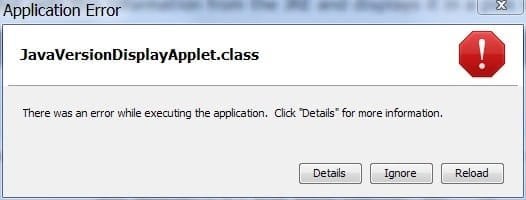
I went to another test page: Java Tester - Home Page and I got an error message:
Java error.jpg
and I tracked it back to my firewall(PCTools Firewall). If I kill the firewall, it works fine. I'll have to diddle with the settings to try to get it to play nice with Java 7. This will not be my first rodeo with those cowboys. They had a bug before that every 60 seconds, it would kill the current download. It took them months to resolve that one.

Thanks for your kind help and support,
Grouch
 

My Computer

Computer Manufacturer/Model Number
Dell Vostro 200
OS
Windows 7 Pro 32bit SP1
CPU
Intel Core 2 Duo E4500
Motherboard
Dell 0C4U409
Memory
4 GB
Graphics Card(s)
Intel G33 Chipset
Sound Card
Realtek High Def (on-board)
Monitor(s) Displays
Dell E207WFP
Hard Drives
238.2 GB
Case
Mini Tower
Another win7/64 user here. I normally just run the update as admin and all goes well. For Java 7, the installer just disappears. I have not uninstalled Java 6.

Edit: I'm using the offline installer having d/l the JRE package.
 

My Computer

OS
Windows 7 x64 home premium
CPU
Intel core i5-2500k
Motherboard
Asus P8Z68-V Pro
Memory
2x4GB G.Skill DDR3-1333, 2x2GB AData DDR3-1333
Graphics Card(s)
HD3000 graphics
Sound Card
on board
Monitor(s) Displays
Samsung 19" syncmaster
Screen Resolution
1280x1024
Hard Drives
Intel 80 GB X25-M SSD
Samsung HD321KJ 320 GB SATA
Samsung HD204UI 2.0 TB SATA
WD 1.5 TB Green eSATA in an external NexStar enclosure
PSU
Corsair HX520W
Case
Antec Solo
Cooling
CoolerMaster Hyper 212+ with dual fans
Keyboard
MS Natural Ergonomic 4000
Mouse
Logitech
Internet Speed
RoadRunner
Just a heads up for anyone installing Java 7, uninstall Java 6 first as it doesn't get updated/uninstalled by the java 7 installer, or at least it didn't for me.

Thanks for the heads-up there;)
 

My Computer

Computer type
PC/Desktop
Computer Manufacturer/Model Number
Custom Build
OS
Win7 Ultimate 64bit
CPU
AMD A8 5600K APU
Motherboard
Gigabyte F2A75MD3H
Memory
16gb DDR3
Graphics Card(s)
Radeon 7560
Sound Card
onboard
Monitor(s) Displays
kingston lcd 23inch wide
Hard Drives
WD 500gb (2)
WD 1TB
Antivirus
EAM + Online Armor Premium -- desktop
I hesitated to uninstall the older version, not having had to do that in the past, and seeing that others who have uninstalled still had issues.

But I went ahead and uninstalled the old version and the new version installed without a hitch.
 

My Computer

OS
Windows 7 x64 home premium
CPU
Intel core i5-2500k
Motherboard
Asus P8Z68-V Pro
Memory
2x4GB G.Skill DDR3-1333, 2x2GB AData DDR3-1333
Graphics Card(s)
HD3000 graphics
Sound Card
on board
Monitor(s) Displays
Samsung 19" syncmaster
Screen Resolution
1280x1024
Hard Drives
Intel 80 GB X25-M SSD
Samsung HD321KJ 320 GB SATA
Samsung HD204UI 2.0 TB SATA
WD 1.5 TB Green eSATA in an external NexStar enclosure
PSU
Corsair HX520W
Case
Antec Solo
Cooling
CoolerMaster Hyper 212+ with dual fans
Keyboard
MS Natural Ergonomic 4000
Mouse
Logitech
Internet Speed
RoadRunner
Back
Top