Java Uninstalling problem

mahdialkahtib

New member
Local time
11:39 AM
Messages
12
hello,
I have he deleted the Java files and folders which they are in the Program Files to reinstall it again...

but what I figured that I can uninstall from the "Uninstall or Change Program" list, even though I have deleted them from the programs files folder and restarted the machine the Java JDK is in the list.

I click to uninstall it, and it says in a message box called "Java(TM) 6 Update 20":
"Error 1723.There is a problem with this Windows Installer package. A DLL required for this install to complete could not be run. Contact your support personnel or package vendor."

So what's the problem I need to Uninstall as soon as possible to install new one...
Thanks in advance.
 

My Computer

Computer Manufacturer/Model Number
Toshiba A500
OS
Windows 7 Home Premuim
CPU
Intel Core2Duo 6600
Memory
4GB DDR3
Graphics Card(s)
intel 4500MHD

My Computer

Computer type
PC/Desktop
Computer Manufacturer/Model Number
Self Built
OS
Win 10 Pro x64
CPU
Intel I5-2500K @3.3GHz
Motherboard
Asrock P67 Extreme4
Memory
16GB G.Skill Ripjaws X (4x4GB)
Graphics Card(s)
EVGA GeForce 750 Ti SC 2GB
Sound Card
ASUS Xonar DG 5.1 Channels 24-bit 96KHz PCI Interface Sound
Monitor(s) Displays
auria eq2367
Screen Resolution
1920 x 1080
Hard Drives
250GB Samsung 850 EVO SSD
1TB WD Blue
1TB Hitachi
PSU
SeaSonic X 650W 80 Plus Gold
Case
Corsair Obsidian 750D
Cooling
Corsair H60, Three 140mm case fans
Keyboard
Logitech Wireless Keyboard K520
Mouse
Logitech Wireless Mouse M310
Internet Speed
Wave Broadband ~ 100 dn 5 up
Antivirus
Windows Defender, Malwarebytes Premium
Browser
Edge, IE11, Chrome
Other Info
Laptop specs: HP g7-1365dx /
CPU: AMD A6-3420M APU with Radeon(tm) HD Graphics /
RAM: Crucial 8Gb (2x4Gb) /
SSD: Crucial M4-CT128M4SSD2 ATA Device/ FW 000F /
GFX: AMD Radeon HD 6520G /
OS: Windows 10 Pro x64
thanks for replaying,
I had followed the link in the article, and in that article they said they removed the tool because it damages other files
so what do you think?
 

My Computer

Computer Manufacturer/Model Number
Toshiba A500
OS
Windows 7 Home Premuim
CPU
Intel Core2Duo 6600
Memory
4GB DDR3
Graphics Card(s)
intel 4500MHD
I have downloaded what the article need "windows installer clean up utility" and don't know from where to run it plus article didn't mention any further steps.
 

My Computer

Computer Manufacturer/Model Number
Toshiba A500
OS
Windows 7 Home Premuim
CPU
Intel Core2Duo 6600
Memory
4GB DDR3
Graphics Card(s)
intel 4500MHD

My Computer

Computer type
PC/Desktop
Computer Manufacturer/Model Number
Self Built
OS
Win 10 Pro x64
CPU
Intel I5-2500K @3.3GHz
Motherboard
Asrock P67 Extreme4
Memory
16GB G.Skill Ripjaws X (4x4GB)
Graphics Card(s)
EVGA GeForce 750 Ti SC 2GB
Sound Card
ASUS Xonar DG 5.1 Channels 24-bit 96KHz PCI Interface Sound
Monitor(s) Displays
auria eq2367
Screen Resolution
1920 x 1080
Hard Drives
250GB Samsung 850 EVO SSD
1TB WD Blue
1TB Hitachi
PSU
SeaSonic X 650W 80 Plus Gold
Case
Corsair Obsidian 750D
Cooling
Corsair H60, Three 140mm case fans
Keyboard
Logitech Wireless Keyboard K520
Mouse
Logitech Wireless Mouse M310
Internet Speed
Wave Broadband ~ 100 dn 5 up
Antivirus
Windows Defender, Malwarebytes Premium
Browser
Edge, IE11, Chrome
Other Info
Laptop specs: HP g7-1365dx /
CPU: AMD A6-3420M APU with Radeon(tm) HD Graphics /
RAM: Crucial 8Gb (2x4Gb) /
SSD: Crucial M4-CT128M4SSD2 ATA Device/ FW 000F /
GFX: AMD Radeon HD 6520G /
OS: Windows 10 Pro x64
I have downloaded what the article need "windows installer clean up utility" and don't know from where to run it plus article didn't mention any further steps.
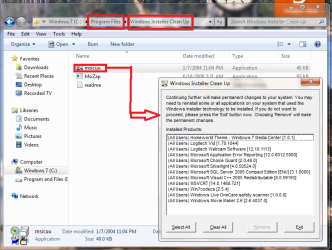
Well by default, Windows Installer Cleanup should be extracted to the following location:

C:\Program Files\Windows Installer Cleanup

When you open that folder, just click at the "msicuu" application, choose the Java entry and Remove. But do not touch any of the other things on the list such as MS Office because deleting them might cause you having to reinstall the programs they are associated with.
 

Attachments

  • yeryry.png
    yeryry.png
    63.6 KB · Views: 308

My Computer

Computer Manufacturer/Model Number
Custom Built
OS
Windows 7 Ultimate 32 Bit, Windows Developer Preview, Linux Mint 9 Gnome 32 Bit
CPU
Intel Pentium Dual CPU E2180@2GHz
Motherboard
Elitegroup 671T-M3
Graphics Card(s)
NVIDIA GeForce 7200 GS
Monitor(s) Displays
AOC TFT1560 15" LCD Monitor
Screen Resolution
1024x768
Keyboard
Logitech USB Keyboard
Back
Top