JavaRa: Java Cleanup and Other Tools

Oaken

New member
Guru
Local time
8:04 PM
Messages
270
Just finished updating Java on our home machines and thought I'd mention this little gem for anyone who's not come across it before...

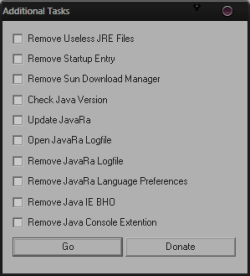
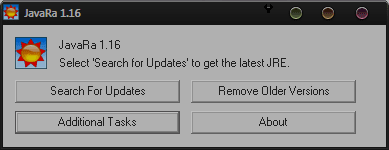
JavaRa (freeware) is little standalone executable that removes old and redundant versions of the Java Runtime Environment (JRE), as well as providing a convenient way to change other Java behaviors and settings.

You can see what it does in the following screenshots;
JavaRa#1.png

JavaRa#2.png

The program creates a log file C:JavaRa.log each time it runs which is then displayed to the user. Otherwise nothing is written outside of the installation folder.

System Requirements: Win2K, WinXP, Vista , Win7

Dependencies: Administrator rights

Simply download the ZIP archive and extract to a folder of your choice- then launch JavaRa.exe.

JavaRa is currently being taken over by the developer of CCEnhancer, though you can visit the original authors site here.

As always be sure to create a restore point before making any major changes to your system.

That said I've been using this for years without any issues at all.
 

My Computer

Computer type
PC/Desktop
OS
Windows 7
Thanks Oaken --- seems like a good app to have, when you need it!
 

My Computer

Computer Manufacturer/Model Number
HP Pavillion dv5t (generation 1)
OS
Vista 64 bit and 32 bit (SP2)
CPU
Intel(R) Core(TM)2 Duo Processor T9400 (2.53 GHz
Memory
4GB DDR2 System Memory (2 Dimm)
Graphics Card(s)
512 MB NVIDIA GeForce 9600M GT
Monitor(s) Displays
15.4" diagonal WSXGA+ High-Definition HP BrightView Widescre
Screen Resolution
1680 x 1050
Hard Drives
320GB 5400RPM SATA Hard Drive with HP ProtectSmart Hard Drive Protection
Keyboard
Built-in HP
Mouse
Built in - Synaptics TouchPad V6.5 on PS/2 Port
Internet Speed
Max
Other Info
~ Intel Next-Gen Wireless-N Mini-card w/Bluetooth ~ Blu-Ray ROM DVD+/-R/RW ~ Integ. HDTV Hybrid Tuner ~ 12 Cell Battery ~ MS Office (Home Premium) 2007 ~
Thanks Oaken --- seems like a good app to have, when you need it!
I have been using this for a few years. The first time I used it I had scads of old versions of Java accumulated, and it eliminated hundreds of MB when it deleted the old stuff. Thanks for reminding me to do a check. :cool:
 

My Computer

Computer Manufacturer/Model Number
DELLXPS 8300
OS
WIN7 x64 Home Premium SP1
CPU
Intel Core i5-2400 processor(6MB Cache, 3.1GHz)
Memory
8 GB RAM
Hard Drives
1.5TB C Drive
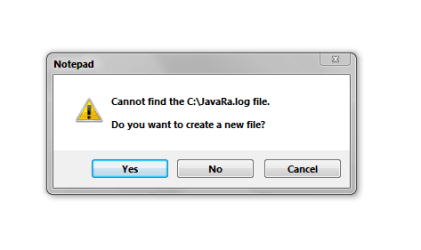
Nice little app but the log file isnt working for me this is what I get.

Capture.PNG

If I search the drive the javaRa.log is in %userprofile%\AppData\Local\Virtual Store.Is there a way to move it.

Thanks Danny
 

My Computer

Computer Manufacturer/Model Number
acer aspire 5935g
OS
Windows 7 Home Premium x64 SP1
CPU
intel(R)core(TM)2 duo CPU T6600 @ 2.20GHz
Motherboard
intel gm45/gm47 revision 07
Memory
3 gb ddr3
Graphics Card(s)
ati radeon hd4570/512mb
Monitor(s) Displays
lop156wh2-tle1 15.3 flat
Screen Resolution
1366x768
Hard Drives
OCZ-Agility3 60gig ssd
320gig external hdd
500gig external hdd
Mouse
Optical
Internet Speed
30Mbps Down/30Mbps Up
Nice little app but the log file isnt working for me this is what I get.

View attachment 158827

If I search the drive the javaRa.log is in %userprofile%\AppData\Local\Virtual Store.Is there a way to move it.

Thanks Danny

That's because there isn't one already, it will create one if you click yes.

You can also use the app to get rid of them.

Very handy tool.
 

My Computer

Computer type
PC/Desktop
Computer Manufacturer/Model Number
Self Built
OS
Win 10 Pro x64
CPU
Intel I5-2500K @3.3GHz
Motherboard
Asrock P67 Extreme4
Memory
16GB G.Skill Ripjaws X (4x4GB)
Graphics Card(s)
EVGA GeForce 750 Ti SC 2GB
Sound Card
ASUS Xonar DG 5.1 Channels 24-bit 96KHz PCI Interface Sound
Monitor(s) Displays
auria eq2367
Screen Resolution
1920 x 1080
Hard Drives
250GB Samsung 850 EVO SSD
1TB WD Blue
1TB Hitachi
PSU
SeaSonic X 650W 80 Plus Gold
Case
Corsair Obsidian 750D
Cooling
Corsair H60, Three 140mm case fans
Keyboard
Logitech Wireless Keyboard K520
Mouse
Logitech Wireless Mouse M310
Internet Speed
Wave Broadband ~ 100 dn 5 up
Antivirus
Windows Defender, Malwarebytes Premium
Browser
Edge, IE11, Chrome
Other Info
Laptop specs: HP g7-1365dx /
CPU: AMD A6-3420M APU with Radeon(tm) HD Graphics /
RAM: Crucial 8Gb (2x4Gb) /
SSD: Crucial M4-CT128M4SSD2 ATA Device/ FW 000F /
GFX: AMD Radeon HD 6520G /
OS: Windows 10 Pro x64
Nice little app but the log file isnt working for me this is what I get.

View attachment 158827

If I search the drive the javaRa.log is in %userprofile%\AppData\Local\Virtual Store.Is there a way to move it.

Thanks Danny

That's because there isn't one already, it will create one if you click yes.

You can also use the app to get rid of them.

Very handy tool.

Sorry it was me wasn't running as admin so it wouldn't create the log folder.
Does this check for 64bit java updates as-well as the 32bit flavor

Danny
 

My Computer

Computer Manufacturer/Model Number
acer aspire 5935g
OS
Windows 7 Home Premium x64 SP1
CPU
intel(R)core(TM)2 duo CPU T6600 @ 2.20GHz
Motherboard
intel gm45/gm47 revision 07
Memory
3 gb ddr3
Graphics Card(s)
ati radeon hd4570/512mb
Monitor(s) Displays
lop156wh2-tle1 15.3 flat
Screen Resolution
1366x768
Hard Drives
OCZ-Agility3 60gig ssd
320gig external hdd
500gig external hdd
Mouse
Optical
Internet Speed
30Mbps Down/30Mbps Up
Does this check for 64bit java updates as-well as the 32bit flavor

I'm not sure Danny as this is the one feature I've never used- I do my Java updates manually.
 

My Computer

Computer type
PC/Desktop
OS
Windows 7
Back
Top