
Solved Javascript trouble on 32-bit applications Windows 7 Home Basic x64

guldvog

New member
Local time
4:58 AM
Messages
8
Hi there :)

When I try to register in the SysWOW64 folder:
regsvr32 jscript.dll
running command prompt as Administrator, I get the dreadfully error code:
0x80004005

As of such, I am *not* able to run neither Yahoo! Messenger nor Skype as intended! :mad:

My wife Rhea Kristine's netbook is running Windows 7 starter (32 bits), there I don't have that trouble!
I suspect some kind of crappy stuff with the Registry.

The Acer Aspire 4752ZG came preinstalled when I bought that, as the shop had already done the whole setup procedure, there was nothing I could do with that.

Yeah, another things as well:
Although Javascript is installed both as 32-bits and 64-bits editions, only the Internet Explorer 9 64-bits edition works OK.
Looking at Internet Explorer 9 (32-bits) I don't even get up what kind of revision that software has! (!)
As far as I do remember, that browser has *never* got any updates through Windows Update as well?!:cry:

Any good ideas? ;)

Regards,
WWW.GULDVOG.NO Jan Guldvog
 

My Computer

Computer type
Laptop
Computer Manufacturer/Model Number
Acer Aspire 4752ZG
OS
Windows 7 Ultimate x64
CPU
Intel Core B960
Memory
2 GB
Graphics Card(s)
Intel integrated/nvidia GEFORCE GT 520M
Monitor(s) Displays
Integrated
Screen Resolution
1366x768
Hard Drives
640 GB HDD
Keyboard
Internal as well as Logitec K120 USB
Mouse
Synaptics internal mousepad as well as Connectland USB mouse
Internet Speed
1 Mbit/s
Antivirus
Microsoft Security Essentials
Browser
Internet Explorer 9 (both 32 and 64 bits editions)
Hello Jan and welcome to Seven Forums.

JavaScript is a programming language that's built into all major web browsers. It's used to make web pages interactive.

What Is JavaScript?

Since it's not something that is downloaded and installed, I'm thinking you may have a damaged or corrupt browser. Or perhaps other related system files are damaged or corrupt. You could try repairing IE9

How to reinstall or repair Internet Explorer in Windows 7, Windows Vista, and Windows XP

and then run a system file checker scan from an elevated command prompt (option two.) If problems are found, run the scan 3 times and reboot the computer after each scan.

http://www.sevenforums.com/tutorials/1538-sfc-scannow-command-system-file-checker.html

I would also run a manual Windows Update to make sure your computer (including IE9) has all necessary updates. You could click Start > All Programs > Windows Updates or Control Panel > Windows Updates > Check for Updates.

You could also try a different browser (Chrome, Opera, Firefox, etc) and see if the problem continues.
 

My Computer

Computer type
Laptop
Computer Manufacturer/Model Number
Sony Vaio VPCEB47GM Laptop
OS
Win 7 Pro 64-bit
CPU
Intel i5 2.4 Ghz
Memory
8GB DDR3
Graphics Card(s)
Intel HD 3000
Sound Card
IDT High Definition
Monitor(s) Displays
15.6 WGXA Anti-Glare LED
Screen Resolution
1280x800
Hard Drives
640Gb 7200rpm
Antivirus
MSE
Browser
Opera (primary) with IE9 backup
Thanks for a quick reply! :)

As for Internet Explorer 9 (32 bits edition) I am *not* able to reinstall that, as it came with my then brand new laptop! :(

Further on, as I do have Windows 7 Home Basic 64 bits edition, I do *not* have any original CD/DVD stuff.

I am running the scan now though. -> No errors found!
As goes for Windows Update: That is up to par ;)

I suggest we look at the Registry in the next step, as I ain't able to register the jscript.dll in the SysWOW64 directory!

Regards,
Jan
 
Last edited:

My Computer

Computer type
Laptop
Computer Manufacturer/Model Number
Acer Aspire 4752ZG
OS
Windows 7 Ultimate x64
CPU
Intel Core B960
Memory
2 GB
Graphics Card(s)
Intel integrated/nvidia GEFORCE GT 520M
Monitor(s) Displays
Integrated
Screen Resolution
1366x768
Hard Drives
640 GB HDD
Keyboard
Internal as well as Logitec K120 USB
Mouse
Synaptics internal mousepad as well as Connectland USB mouse
Internet Speed
1 Mbit/s
Antivirus
Microsoft Security Essentials
Browser
Internet Explorer 9 (both 32 and 64 bits editions)
As for Internet Explorer 9 (32 bits edition) I am *not* able to reinstall that, as it came with my then brand new laptop! :(

Did you try the repair option? This Microsoft forum thread has some additional suggestions for repairing JavaScript.

How do I reinstall/repair a corrupt javascript installation? - Microsoft Community

I'm not sure where in the registry the key(s) related to JavaScript are located. So this might be one of those times to try a registry cleaner. Before doing so I would definitely create a new restore point just in case something goes wrong.

http://www.sevenforums.com/tutorials/697-system-restore-point-create.html

http://www.sevenforums.com/tutorials/700-system-restore.html

A free utility that is often recommended on this Forum is CCleaner. It has a registry cleaner that might help. But I would first try the other repair options like disabling browser add-ons, re-registering vbsscript.dll and jscript.dll, etc.

CCleaner - PC Optimization and Cleaning - Free Download
 

My Computer

Computer type
Laptop
Computer Manufacturer/Model Number
Sony Vaio VPCEB47GM Laptop
OS
Win 7 Pro 64-bit
CPU
Intel i5 2.4 Ghz
Memory
8GB DDR3
Graphics Card(s)
Intel HD 3000
Sound Card
IDT High Definition
Monitor(s) Displays
15.6 WGXA Anti-Glare LED
Screen Resolution
1280x800
Hard Drives
640Gb 7200rpm
Antivirus
MSE
Browser
Opera (primary) with IE9 backup
I tried the repair option yeah, however - I did not get that to work either!
Reason: The Norwegian article ain't having the correct link (!).
After switching to Philippines (English) though I managed to run the Fix it (!).
I've tried the CCleaner.

ERROR:
Data Execution Prevention DISABLED!
Fixed.
Still NOT OK!
When running the Fix it a 2nd time, the same error with Data Execution came up?!

As Internet Explorer 9 is an inbuilt feature of Windows 7, it ain't that easy to deal with.
It's *only* the 32-bits edition I have trouble with though.
 
Last edited:

My Computer

Computer type
Laptop
Computer Manufacturer/Model Number
Acer Aspire 4752ZG
OS
Windows 7 Ultimate x64
CPU
Intel Core B960
Memory
2 GB
Graphics Card(s)
Intel integrated/nvidia GEFORCE GT 520M
Monitor(s) Displays
Integrated
Screen Resolution
1366x768
Hard Drives
640 GB HDD
Keyboard
Internal as well as Logitec K120 USB
Mouse
Synaptics internal mousepad as well as Connectland USB mouse
Internet Speed
1 Mbit/s
Antivirus
Microsoft Security Essentials
Browser
Internet Explorer 9 (both 32 and 64 bits editions)
I have check through the Registry, and guess - what I found?

As for vbscript.dll I found entries for both 32- and 64-bits editions, but for jscript.dll I *only* found entries, for the 64-bits entries (!).

Can anybody *please* point out which Registry keys that *should* have the 32-bits entries?
I do think that there are some keys for SysWOW64 that have/has access errors!

vbscript.dll is btw. registered for both 32- and 64 bits-editions, as for jscript.dll goes though, I get that dreadfully error code 0x80004005 whenever I try the 32-bits version!
 

My Computer

Computer type
Laptop
Computer Manufacturer/Model Number
Acer Aspire 4752ZG
OS
Windows 7 Ultimate x64
CPU
Intel Core B960
Memory
2 GB
Graphics Card(s)
Intel integrated/nvidia GEFORCE GT 520M
Monitor(s) Displays
Integrated
Screen Resolution
1366x768
Hard Drives
640 GB HDD
Keyboard
Internal as well as Logitec K120 USB
Mouse
Synaptics internal mousepad as well as Connectland USB mouse
Internet Speed
1 Mbit/s
Antivirus
Microsoft Security Essentials
Browser
Internet Explorer 9 (both 32 and 64 bits editions)
...As for Internet Explorer 9 (32 bits edition) I am *not* able to reinstall that, as it came with my then brand new laptop!...
IE8 comes with W7. It takes a bit to get IE9 off and then put it back on. See the info in this tutorial:
http://www.sevenforums.com/tutorials/112121-internet-explorer-9-uninstall.html
(I'm not saying that you need to uninstall IE9 and then re-install it... I'm just pointing you to some info.)


...Further on, as I do have Windows 7 Home Basic 64 bits edition, I do *not* have any original CD/DVD stuff.
You can legally download them.
Windows 7 Direct Download Links


....for jscript.dll....Can anybody *please* point out which Registry keys that *should* have the 32-bits entries?....
There are several so let's clarify somethings first... see the comments after my next quote of you.

....but for jscript.dll I *only* found entries, for the 64-bits entries (!).....
I cannot be positive - but I think that you said that you did this in your first post:

From an elevated command prompt:
cd \windows\syswow64
regsvr32 jscript.dll

...but have you also done this?
cd \Windows\system32
regsvr32 jscript.dll
 

My Computer

Computer type
Laptop
Computer Manufacturer/Model Number
Employer provided Dell Latitude
OS
W7 Pro SP1 64bit
CPU
i7
Memory
8GB
Graphics Card(s)
Intel HD Graphics
Hard Drives
crappy SSD
Antivirus
Employer mandated Symantec Endpoint Protection
Browser
Pale Moon 64bit, IE11 64bit & Chrome 64bit
I have taken the
cd \Windows\system32
regsvr32 jscript.dll

and that goes OK.

As goes for the Windows 7 x64 Home Basic, I have just checked the wb site that you recommended, there are - however - no downloadable version for that one.
I then - instead - decided, to download the Ultimate edition, as I plan - somewhat in the future to upgrade anyways! >:D

I think that when I can manage to take this - job, I will - of course - backup the needed stuff, then wipeout the whole installation, and then start with a fresh install!

That way I have a certain - decent - control! >:D

Regards,
Jan
 

My Computer

Computer type
Laptop
Computer Manufacturer/Model Number
Acer Aspire 4752ZG
OS
Windows 7 Ultimate x64
CPU
Intel Core B960
Memory
2 GB
Graphics Card(s)
Intel integrated/nvidia GEFORCE GT 520M
Monitor(s) Displays
Integrated
Screen Resolution
1366x768
Hard Drives
640 GB HDD
Keyboard
Internal as well as Logitec K120 USB
Mouse
Synaptics internal mousepad as well as Connectland USB mouse
Internet Speed
1 Mbit/s
Antivirus
Microsoft Security Essentials
Browser
Internet Explorer 9 (both 32 and 64 bits editions)
...
As goes for the Windows 7 x64 Home Basic, I have just checked the wb site that you recommended, there are - however - no downloadable version for that one.
I then - instead - decided, to download the Ultimate edition,....
You might want to read that web page again - under the heading of:
Activate a different language or bit edition
In particular the info on the cfg removal utility

...or you might look at this tutorial
http://www.sevenforums.com/tutorials/85813-windows-7-universal-installation-disc-create.html

A clean install is the best way to go - check this out:
http://www.sevenforums.com/tutorials/1649-clean-install-windows-7-a.html
There might be some info in there that you need.

If the elevated command prompt fails to create the proper registry entries, then attempting to merge reg files should fail too. If you have permission issues with some keys (as you mentioned) then a clean install is the best use of your time.

I saw keys being made in these locations:
HKEY_LOCAL_MACHINE\SOFTWARE\Classes\Wow6432Node\CLSID\...

...{cc5bbec3-db4a-4bed-828d-08d78ee3e1ed}
...{f414c260-6ac0-11cf-b6d1-00aa00bbbb58}
...{f414c261-6ac0-11cf-b6d1-00aa00bbbb58}
...{f414c262-6ac0-11cf-b6d1-00aa00bbbb58}

But like I mentioned - I would not waste too much time on it.

BTW, I would not change to W7 Ultimate unless I had a need for those features:
http://www.sevenforums.com/tutorials/14422-compare-windows-7-editions.html
W7 pro is a good middle ground for most users.
 

My Computer

Computer type
Laptop
Computer Manufacturer/Model Number
Employer provided Dell Latitude
OS
W7 Pro SP1 64bit
CPU
i7
Memory
8GB
Graphics Card(s)
Intel HD Graphics
Hard Drives
crappy SSD
Antivirus
Employer mandated Symantec Endpoint Protection
Browser
Pale Moon 64bit, IE11 64bit & Chrome 64bit
Thank you so much Sir! :)

The reason that I will - once again - go for Windows 7 Ultimate, is that I had that (in 32 bits edition though) on my old laptop, that unfortunately broke down last Year! :(

As for the other things that you mentioned, I will take a look at those, as soon as I've finished the ISO download! :)

Regards,
Jan
 

My Computer

Computer type
Laptop
Computer Manufacturer/Model Number
Acer Aspire 4752ZG
OS
Windows 7 Ultimate x64
CPU
Intel Core B960
Memory
2 GB
Graphics Card(s)
Intel integrated/nvidia GEFORCE GT 520M
Monitor(s) Displays
Integrated
Screen Resolution
1366x768
Hard Drives
640 GB HDD
Keyboard
Internal as well as Logitec K120 USB
Mouse
Synaptics internal mousepad as well as Connectland USB mouse
Internet Speed
1 Mbit/s
Antivirus
Microsoft Security Essentials
Browser
Internet Explorer 9 (both 32 and 64 bits editions)
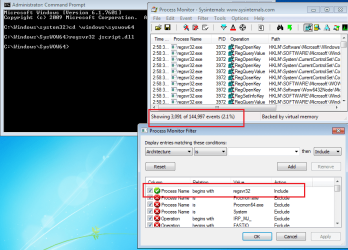
Process Monitor showed 3091 registry related events for
regsvr32 jscript.dll
reg.png

Process Monitor is free and there is nothing to install. Mouse over each icon on the tool bar and you'll know what to do. You can watch to see what key(s) the normal process has trouble with on your system. But all of this is just playing and learning. The solution is a clean install.

Another tool that is handy for troubleshooting stuff like this is a virtual machine. You can use the W7 ISO that you are downloading to create a fresh/clean VM - you can skip putting in the key since this is temporary. Here is a tutorial on making a VM http://www.sevenforums.com/tutorial...ndows-7-virtual-machine-using-virtualbox.html but it for W7, you just keep clicking next. The free VirtualBox software knows what settings to use.

Once you have a fresh VM running, you go to File > Take Snapshot and that will freeze everything in that state. You can then mess up the registry all you want and when you exit the VM you can tell it to drop the changes and revert back to your snapshot. It is really handy for troubleshooting and testing software.

Of course - you might have a real life :-)
 

My Computer

Computer type
Laptop
Computer Manufacturer/Model Number
Employer provided Dell Latitude
OS
W7 Pro SP1 64bit
CPU
i7
Memory
8GB
Graphics Card(s)
Intel HD Graphics
Hard Drives
crappy SSD
Antivirus
Employer mandated Symantec Endpoint Protection
Browser
Pale Moon 64bit, IE11 64bit & Chrome 64bit
Update as of Tuesday, February 26th, 2013 @ 21:56 (local time):

Backup, burned a Windows 7 Ultimate x64 edition and started - from - scratch.
*That* did the - *trick* (!)
Yahoo! Messenger OK, as well as Google Translate, Javascript now works OK in both Internet Explorer 9 versions! :)

Much job left still - of course - lacking drivers for 2 hardware devices.

I will try to get back to those 2 a bit later on.
Apart from hangs in both Internet explorer while trying to update drivers under Internet Explorer 8, that went OK under Internet Explorer 9! :)

Regards,
Jan
 

My Computer

Computer type
Laptop
Computer Manufacturer/Model Number
Acer Aspire 4752ZG
OS
Windows 7 Ultimate x64
CPU
Intel Core B960
Memory
2 GB
Graphics Card(s)
Intel integrated/nvidia GEFORCE GT 520M
Monitor(s) Displays
Integrated
Screen Resolution
1366x768
Hard Drives
640 GB HDD
Keyboard
Internal as well as Logitec K120 USB
Mouse
Synaptics internal mousepad as well as Connectland USB mouse
Internet Speed
1 Mbit/s
Antivirus
Microsoft Security Essentials
Browser
Internet Explorer 9 (both 32 and 64 bits editions)
Looks like I found the *culprits*! :)

2 missing drivers - found :)
But - may be most important (?) - Windows 8 upgrade advisor now *works* (!)

Regards,
Jan
 

My Computer

Computer type
Laptop
Computer Manufacturer/Model Number
Acer Aspire 4752ZG
OS
Windows 7 Ultimate x64
CPU
Intel Core B960
Memory
2 GB
Graphics Card(s)
Intel integrated/nvidia GEFORCE GT 520M
Monitor(s) Displays
Integrated
Screen Resolution
1366x768
Hard Drives
640 GB HDD
Keyboard
Internal as well as Logitec K120 USB
Mouse
Synaptics internal mousepad as well as Connectland USB mouse
Internet Speed
1 Mbit/s
Antivirus
Microsoft Security Essentials
Browser
Internet Explorer 9 (both 32 and 64 bits editions)
Back
Top