joester2000
New member
- Local time
- 4:41 PM
- Messages
- 4
Hi, I've had my PC for quite a few years, it's custom built and I'm very proud of it.
Now come's a time for various reasons I want to start again, wipe the Hard drives reboot Windows 7 and start new. (Aside from all my photo's/work which I will copy onto an external drive then copy back on later)
It then occurred to me that instead of having all the separate drive I could make it into one big volume where I could access everything in the same place.
Right now I have:
1x 500GB HDD
1x 1TB HDD
and a 2TB external HDD I Use for back up.
Obviously due to the size of my internal drives I'm leaning towards JBOD to optimise space but I'm willing to upgrade my 500gb to a 1TB if peoples opinions lean more towards RAID0.
There were also a few questions I had about JBOD if anyone out there knew?
Can I still partition the desperate drives? I've never done partitioning before but I hear it's a good idea to put windows on a separate partition on one drive. But I still don't know how to do this.
Is backing up to my 2TB external drive just as easy as before? Will there be any issues i need to know about?
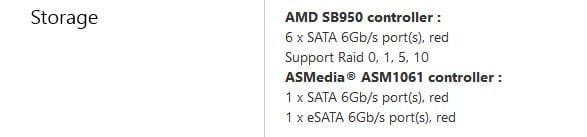
Controller? I've seen people talk about a controller when using JBOD? Do I need one? Are some better than others? are they necessary?
All in all I'm doing this for easier access to things, Speed would be nice but I wouldn't want it at the risk of loosing it all as I've heard can happen with RAID0. I'm only hoping to combine the two internal drives and leave the 2TB as back up to what ever configuration I end up with
Now come's a time for various reasons I want to start again, wipe the Hard drives reboot Windows 7 and start new. (Aside from all my photo's/work which I will copy onto an external drive then copy back on later)
It then occurred to me that instead of having all the separate drive I could make it into one big volume where I could access everything in the same place.
Right now I have:
1x 500GB HDD
1x 1TB HDD
and a 2TB external HDD I Use for back up.
Obviously due to the size of my internal drives I'm leaning towards JBOD to optimise space but I'm willing to upgrade my 500gb to a 1TB if peoples opinions lean more towards RAID0.
There were also a few questions I had about JBOD if anyone out there knew?
Can I still partition the desperate drives? I've never done partitioning before but I hear it's a good idea to put windows on a separate partition on one drive. But I still don't know how to do this.
Is backing up to my 2TB external drive just as easy as before? Will there be any issues i need to know about?
Controller? I've seen people talk about a controller when using JBOD? Do I need one? Are some better than others? are they necessary?
All in all I'm doing this for easier access to things, Speed would be nice but I wouldn't want it at the risk of loosing it all as I've heard can happen with RAID0. I'm only hoping to combine the two internal drives and leave the 2TB as back up to what ever configuration I end up with
My Computer
At a glance
Windows 7 64x bitAMD Phenom II X4 3.6 GHzCorsair DDR3 Vengence (4x4GB)1GB XFX HD 6870 DD Cooling
- Computer type
- PC/Desktop
- Computer Manufacturer/Model Number
- Custom Build
- OS
- Windows 7 64x bit
- CPU
- AMD Phenom II X4 3.6 GHz
- Motherboard
- Asus Crosshair V Formula
- Memory
- Corsair DDR3 Vengence (4x4GB)
- Graphics Card(s)
- 1GB XFX HD 6870 DD Cooling
- Hard Drives
- 500 GB Seagate Barracuda (OS)
1TB GB Seagate Barracuda
- Antivirus
- Kaspersky Anti-Virus 2013
- Browser
- Google Chrome