
Solved Jewel Legends GSP game

flogit

New member
Member
VIP
Local time
2:35 PM
Messages
359
Location
south wales uk
Hi,Went to install the above game on my wife's windows 7 laptop and first of all a box came up when she went to start the game (The program cant start because d3dx9_42.dll is missing).
Went on the Microsoft website and found a download called DirectX 9,So installed that bit of kit re started the laptop tried the games again no luck,So uninstalled the game re boot and fresh install of game no luck now she has this box coming up on screen now.
I,m no games so totally lost here.
Any help please for her indoors.

This is the box that comes on screen when she tries to open the game.Thanks in advance.
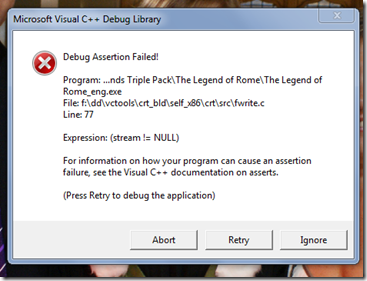
d5IcjGp.png


Many Thanks In Advance.
 

My Computer My Computer

At a glance

windows 7 home premium 64bit
Computer Manufacturer/Model Number
compaq presario CQ61
OS
windows 7 home premium 64bit
Update on above,If I select to ''Run As Administrator'' the game starts up okay.
Does that make any sense??
Hoping for some help here PLEASE.
Thanks.
 

My Computer My Computer

At a glance

windows 7 home premium 64bit
Computer Manufacturer/Model Number
compaq presario CQ61
OS
windows 7 home premium 64bit
Nobody??.
 

My Computer My Computer

At a glance

windows 7 home premium 64bit
Computer Manufacturer/Model Number
compaq presario CQ61
OS
windows 7 home premium 64bit
In that case, you just set the shortcut properties to run as admin so it always does, if I recall I had to do that on some old games.

So, right click on the shortcut, go to Properties, then Compatibility tab and it's the Privilege Level checkbox for Run this program as administrator, once checked, apply and OK out and should keep that for all future runs.

Why that happens, my best guess is the admin privilege is needed for access to a file, that is required by the game, and the installer was too ignorant to provide for this, at the time. (Usually a game released for a previous Windows version and/or limited (poor) testing by the developers) :devil:
 

My Computer My Computer

At a glance

Windows 7 Ultimate Retail Box (64-bit install...AMD FX-8350 CPU v1.15 (or 1.0F) BIOS was requ...8G CAS-7 G-Skill DDR3 @1333 (2 fours) [mobo n...Radeon HD 7950 [3 gigs of GDDR5] MSI Twin Fro...
Computer type
PC/Desktop
Computer Manufacturer/Model Number
Self Built Custom
OS
Windows 7 Ultimate Retail Box (64-bit installed) + Service Pack 1
CPU
AMD FX-8350 CPU v1.15 (or 1.0F) BIOS was required!
Motherboard
MSI 890FXA-GD70
Memory
8G CAS-7 G-Skill DDR3 @1333 (2 fours) [mobo nonOC max rec'd]
Graphics Card(s)
Radeon HD 7950 [3 gigs of GDDR5] MSI Twin Frozr model
Sound Card
Realtek High Definition Audio (onboard mobo, ALC-889 chip)
Monitor(s) Displays
2 WS LED Monitors: One LG One Viewsonic
Screen Resolution
1920 by 1080
Hard Drives
SSD for OS: Samsung 840 Pro
SSD for VM and utilities: Adata SX900
7200 RPM SATA HDs for the rest: Hitachi and Seagate
PSU
Corsair TX850 - 850W max, in service since August 2010.
Case
Thermaltake Armor A90
Cooling
Thermaltake Spin Q CPU Cooler, in service since August 2010
Keyboard
Logitech G11
Mouse
Logitech M310 Wireless
Internet Speed
100 Megabit broadband supposedly upgraded from 50 (Cable)
Antivirus
Bitdefender Internet Security 2014 suite
Browser
Pale Moon 64-bit main, also IceDragon, Opera, and Maxthon.
Other Info
CompTIA A+ certified (220-800 series) in July 2013.
Back
Top