Jimmy Rig

DustSailor

Capt. Cruncher
Guru
Gold Member
VIP
Local time
11:47 AM
Messages
2,587
Location
Southern California, USA
Head deep in a computer case after putting it together, I was getting kind of angry at seeing hard-to-place wires free-floating around and restricting air flow. I used scotch tape to stick the wires against the case and out of the way. Not sure if it was a good idea, since tape can fall off (then we have a piece of tape and wire floating around).

It'll do.

A few people said they used magnetic screwdrivers to place screws, no problem. Let me know some of the fun stuff you've tried, I'm dying to hear it. Pictures welcome if you have them!
 

My Computer

Computer type
PC/Desktop
Computer Manufacturer/Model Number
Custom Asus Build
OS
Microsoft Windows 8.1 Pro 64-bit
CPU
Intel(R) Core(TM) i3-4130 CPU @ 3.40GHz
Motherboard
B85M-E
Memory
8.00 GB
Graphics Card(s)
None
Sound Card
Realtek High Definition Audio
Monitor(s) Displays
Asus 23.6" Monitor
Screen Resolution
1920 x 1080 x 32 bits (4294967296 colors) @ 60 Hz
Hard Drives
INTEL SSDSC2BW180A4
Samsung SSD 840 PRO Series
PSU
Seasonic S12II-380Bronze
Case
Lian Li
Cooling
Fan, Passive
Keyboard
Logitech K120
Mouse
Microsoft Touch Mouse
Internet Speed
4ms Ping, 19.0 Mbps Download, 19.0 Mbps Upload
Antivirus
Eset Endpoint
Browser
Internet Explorer, Chrome
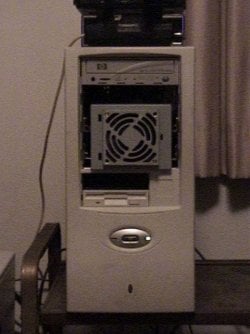
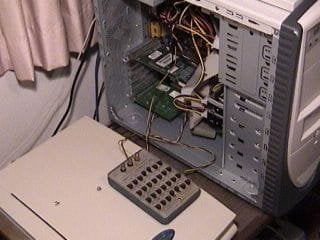
It took a while to dig up these pics, and they may not be exactly what you were looking for, but...here you go. :)

Sorry for the poor quality, they were taken about 2006 using the crappy still picture mode of my otherwise brilliant Sony Digital-8 Handycam. :geek:


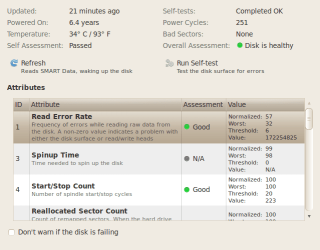
The first picture is a cooling mod for a Seagate 250GB HDD that ran at what I considered to be an elevated temperature (110F, 43C). As you can tell, it's part of a (dead) Compaq power supply. I guess it worked as that drive is still in service (see screenshot).


The other picture shows the use of a resistance decade box to adjust the Vcore of a K7S5A motherboard. The CPU (AMD Athlon XP 1700+) wouldn't run at its rated speed because the voltage was too low. I found the resistance that gave the necessary voltage, then soldered in a multi-turn pot of the correct value. About 2 years later the board suffered a Drive Controller failure so it was replaced.


Kent
 

Attachments

  • cooling.jpg
    cooling.jpg
    46.2 KB · Views: 600
  • Seagate250.png
    Seagate250.png
    23.7 KB · Views: 599
  • decade box.jpg
    decade box.jpg
    15.3 KB · Views: 586

My Computer

Computer type
PC/Desktop
Computer Manufacturer/Model Number
Custom Build
OS
Windows 7 Home Premium x64
CPU
Intel Core i7 5960X @3.0 GHz
Motherboard
Gigabyte GA-X99-SOC Force
Memory
4 x 4 GB G.Skill Ripjaws4 DDR4-2400
Graphics Card(s)
PNY GTX 780
Sound Card
Realtek on-board ALC1150
Monitor(s) Displays
HP Z30i + Asus PA246Q + Dell U2412M
Screen Resolution
2560x1600 + 1920x1200 + 1920x1200
Hard Drives
Samsung 830 256GB
PSU
Antec EarthWatts 650W
Case
Cooler Master HAF 932
Cooling
Corsair Hydro Series H105
Keyboard
Razer BlackWidow Tournament Edition Stealth
Mouse
Razer Naga
That's awesome ^

I've found a few people who don't use a computer case at all. A few area fans are all they use, and I imagine it is somewhat hard to transport such a system :D
 

My Computer

Computer type
PC/Desktop
Computer Manufacturer/Model Number
Custom Asus Build
OS
Microsoft Windows 8.1 Pro 64-bit
CPU
Intel(R) Core(TM) i3-4130 CPU @ 3.40GHz
Motherboard
B85M-E
Memory
8.00 GB
Graphics Card(s)
None
Sound Card
Realtek High Definition Audio
Monitor(s) Displays
Asus 23.6" Monitor
Screen Resolution
1920 x 1080 x 32 bits (4294967296 colors) @ 60 Hz
Hard Drives
INTEL SSDSC2BW180A4
Samsung SSD 840 PRO Series
PSU
Seasonic S12II-380Bronze
Case
Lian Li
Cooling
Fan, Passive
Keyboard
Logitech K120
Mouse
Microsoft Touch Mouse
Internet Speed
4ms Ping, 19.0 Mbps Download, 19.0 Mbps Upload
Antivirus
Eset Endpoint
Browser
Internet Explorer, Chrome
Back
Top