Join a Windows XP network group.

Charlesly

New member
Hey!

I'm the only one in my family (out of 4) who has Windows 7. Everyone else has XP. They're all in a network that my father named "Tungsten".

Now, I've spent countless hours troubleshooting this, to no avail. How do I join the "Tungsten" group, so that everyone else in my family can see my PC.

Also, I think at one point I fixed this, but I've reinstalled Windows twice since then (no problems, just regular maintenance, I reinstall every few months), but I still had a problem: my family had to put in a username and password to be able to access my PC's shared files/folders. How do I remove that, after I join the network?


Thanks!
 

My Computer

OS
Windows 7 Home Premium 64bit
Hey!

I'm the only one in my family (out of 4) who has Windows 7. Everyone else has XP. They're all in a network that my father named "Tungsten".

Now, I've spent countless hours troubleshooting this, to no avail. How do I join the "Tungsten" group, so that everyone else in my family can see my PC.

Also, I think at one point I fixed this, but I've reinstalled Windows twice since then (no problems, just regular maintenance, I reinstall every few months), but I still had a problem: my family had to put in a username and password to be able to access my PC's shared files/folders. How do I remove that, after I join the network?


Thanks!

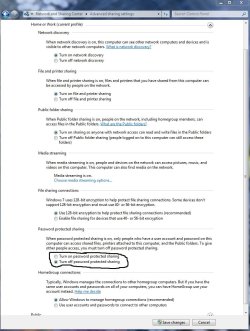
You could try turning off password protected sharing in the Advanced Sharing Settings. You may need to do this on both the Public and Home-Work windows.
 

Attachments

  • PASSWORD PROTECTED SHARING ON OR OFF.jpg
    PASSWORD PROTECTED SHARING ON OR OFF.jpg
    229.1 KB · Views: 333

My Computer

Computer type
PC/Desktop
Computer Manufacturer/Model Number
Home built
OS
Windows 7 Ult, Windows 8.1 Pro,
CPU
Q9650-4.275GHz, E8600 4.5GHz, E6750-3.8GHz
Motherboard
Evga 780i FTW
Memory
G.Skill PC2 9600 1200Mhz 5 5 5 15 2T
Graphics Card(s)
GTX480
Sound Card
Asus Xonar D2
Monitor(s) Displays
HannsG
Screen Resolution
1680X1050
Hard Drives
GSkill Phoenix Pro 120GB SSD
PSU
ThermalTake Toughpower 1000Watt modular
Case
ThermalTake XaserV
Cooling
Xigmatek S1283
Keyboard
Logitech G15
Mouse
Logitech G9
Internet Speed
T1
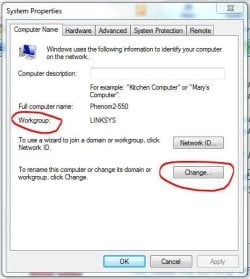
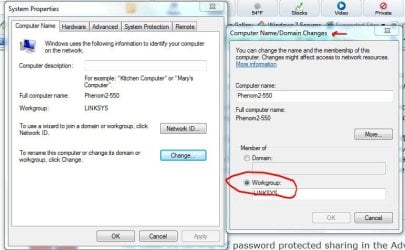
Start :ar: workgroup :ar: click on :ar: Change workgroup name :ar:
 

Attachments

  • Workgroup_Change.JPG
    Workgroup_Change.JPG
    46.1 KB · Views: 64
  • Workgroup_Change_02.JPG
    Workgroup_Change_02.JPG
    75.6 KB · Views: 82

My Computer

Computer type
PC/Desktop
Computer Manufacturer/Model Number
Built them myself, Science Experiments !
OS
Win7 Enterprise, Win7 x86 (Ult 7600), Win7 x64 Ult 7600, TechNet RTM on AMD x64 (2.8Ghz)
CPU
AMD fx8350 4ghz, AMD-32 2400mhz, AMD-64 3200mhz, AMDx64 2.8G
Motherboard
SIS 755, ECS-K8M890M-M (Ult 7600), GigaByte & others
Memory
2gb, 4gb on the Ult 7600, 4gb on Technet RTM, 32gb on FX8350
Graphics Card(s)
Draw my own Graphics, several nVidia cards
Sound Card
on motherboard
Monitor(s) Displays
19" flat scr, 28" I-Inc widescr,22" Emprex Widescr, 23" Acer
Screen Resolution
1280 x 1024, 1440 x 900, 1920 x 1080
Hard Drives
6 pata Ide HD's & 2 Sata HD's
added 80gb external on Ult 7600 computer,
numerous extra 1tb, 2TB, 3Tb SATA HD's
A collection of ext HD Docks w/ HDs
PSU
430w, 550w, 600w, 700, 800, etc
Case
All Generic Full Towers
Cooling
Open Air & a few fans, some w/ colored LEDs
Keyboard
Compaq & Dell recycled from GoodWill
Mouse
Made in China Optical Wired Mouse
Internet Speed
Fast Cable InterNet
Antivirus
AVG Free on 24 different Desktops, NO Problems!
Browser
IE 8 is preferred, but use FireFox sometimes
Other Info
Linksys Routers, switches, & Hubs
Too Many USB Flash Drives to count, Biggest is 64GB !
Eight computers in my home network.
Sixteen computers at my business network.
Linked via TeamViewer !
Lots of old used spare computer parts everywhere!
Thanks! BUMPPPP!

As Doc pointed out, you would need to change the name of the Workgroup on the Win7 machine to "Tungsten" just like the other XP machines are using.

Although this is so obvious I'm not sure if that is the question were asking or not.
 
Last edited:

My Computer

Computer type
PC/Desktop
Computer Manufacturer/Model Number
Home built
OS
Windows 7 Ult, Windows 8.1 Pro,
CPU
Q9650-4.275GHz, E8600 4.5GHz, E6750-3.8GHz
Motherboard
Evga 780i FTW
Memory
G.Skill PC2 9600 1200Mhz 5 5 5 15 2T
Graphics Card(s)
GTX480
Sound Card
Asus Xonar D2
Monitor(s) Displays
HannsG
Screen Resolution
1680X1050
Hard Drives
GSkill Phoenix Pro 120GB SSD
PSU
ThermalTake Toughpower 1000Watt modular
Case
ThermalTake XaserV
Cooling
Xigmatek S1283
Keyboard
Logitech G15
Mouse
Logitech G9
Internet Speed
T1
Thanks! BUMPPPP!

As Doc pointed out, you would need to change the name of the Workgroup on the Win7 machine to "Tungsten" just like the other XP machines are using.

Although this is so obvious I'm not sure if that is the question were asking or not.

That actually is the question I was asking. Pardon me for looking for a way to change the Workgroup name in the Networking options, I mean after all, a workgroup is a network.
 

My Computer

OS
Windows 7 Home Premium 64bit
Back
Top