
July 10, 2018 - KB4338818 (Monthly Rollup) Windows 7

Brink

Administrator
Staff member
Local time
12:11 AM
Messages
74,920
Location
Oklahoma
July 10, 2018 - KB4338818 (Monthly Rollup)

Applies to: Windows 7 Service Pack 1, Windows Server 2008 R2 Service Pack 1


Improvements and fixes

This security update includes improvements and fixes that were a part of update KB4284842 (released June 21, 2018) and addresses the following issues:

  • Provides protections for an additional vulnerability involving side-channel speculative execution known as Lazy Floating Point (FP) State Restore (CVE-2018-3665) for 64-Bit (x64) versions of Windows.
  • Updates Internet Explorer's Inspect Element feature to conform to the policy that disables the launch of Developer Tools.
  • Addresses an issue where DNS requests disregard proxy configurations in Internet Explorer and Microsoft Edge.
  • Security updates to Internet Explorer, Windows apps, Windows graphics, Windows Shell, Windows datacenter networking, Windows wireless networking, and Windows virtualization.
For more information about the resolved security vulnerabilities, see the Security Update Guide.

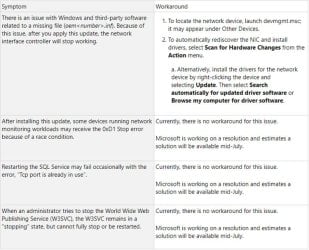
Known issues in this update

known_issues.jpg

How to get this update

This update will be downloaded and installed automatically from Windows Update.

To get the standalone package for this update, go to the Microsoft Update Catalog website.

File information

For a list of the files that are provided in this update, download the file information for update 4338818.

Source: https://support.microsoft.com/en-us/help/4338818


Direct download links for KB4338818 MSU file from Microsoft Update Catalog:

:ar: Download KB4338818 MSU for Windows 7 32-bit (x86) - 137.5 MB

:ar: Download KB4338818 MSU for Windows 7 64-bit (x64) - 227.9 MB
 
Last edited:

My Computer My Computer

At a glance

64-bit Windows 11 Pro for WorkstationsIntel i7-8700K OC'd to 5 GHz64 GB (4x16GB) G.SKILL TridentZ RGB DDR4 3600...ASUS ROG-STRIX-GTX1080TI-O11G-GAMING
Computer type
PC/Desktop
Computer Manufacturer/Model Number
Self built custom
OS
64-bit Windows 11 Pro for Workstations
CPU
Intel i7-8700K OC'd to 5 GHz
Motherboard
ASUS ROG Maximus XI Formula Z390
Memory
64 GB (4x16GB) G.SKILL TridentZ RGB DDR4 3600 MHz
Graphics Card(s)
ASUS ROG-STRIX-GTX1080TI-O11G-GAMING
Sound Card
Integrated
Monitor(s) Displays
2 x Samsung Odyssey G7 27"
Screen Resolution
2560x1440
Hard Drives
1TB Samsung 990 PRO M.2,
4TB Samsung 990 PRO PRO M.2,
TerraMaster F8 SSD Plus NAS
PSU
Seasonic Prime Titanium 850W
Case
Thermaltake Core P3
Cooling
Corsair Hydro H115i
Keyboard
Logitech wireless K800
Mouse
Logitech MX Master 4
Internet Speed
2 Gb/s Download and 100 Mb/s Upload
Antivirus
Malwarebyte Anti-Malware Premium
Browser
Google Chrome
Other Info
Logitech Z625 speaker system,
Logitech BRIO 4K Pro webcam,
HP Color LaserJet Pro MFP M477fdn,
APC SMART-UPS RT 1000 XL - SURT1000XLI,
Galaxy S23 Plus phone
Yesterday I installed this update on my pc, everything seemed in order.

But today I got the notice that there were several updates available, including Kb3185319, Kb2676562, Kb3123479 and Kb3118401. All very old updates. So uninstall KB4338818, and in effect, windows update no longer indicates these updates, but it does not mark me to download the monthly Rollup.

I only get the optional preview update KB4284842.

Why do not you show me the July update?

Windows dropped it or failed?
 

My Computer My Computer

At a glance

Windows 7 Profesional 64 Bits
Computer type
PC/Desktop
OS
Windows 7 Profesional 64 Bits
Also uninstall the update KB4284826 of June and when doing the search of updates, returns to show me the update Kb4338818, but it is not selected.

Then download and install KB4284826, and the July update continues to appear but again with the empty selection box.
 

My Computer My Computer

At a glance

Windows 7 Profesional 64 Bits
Computer type
PC/Desktop
OS
Windows 7 Profesional 64 Bits
Hi Guys

What does it mean when an update arrives with the tick box Unchecked? 3 of the 4 updates I've received are unchecked?

LB
 

My Computer My Computer

At a glance

Windows 7 Home Premium 64 Bit (Service Pack 1)Premium Dual Core P62004 GBIntel (R) HD Graphic
Computer type
Laptop
Computer Manufacturer/Model Number
Samsung S3511
OS
Windows 7 Home Premium 64 Bit (Service Pack 1)
CPU
Premium Dual Core P6200
Motherboard
Samsung S3511
Memory
4 GB
Graphics Card(s)
Intel (R) HD Graphic
Sound Card
Realtek High Definition Audio
Screen Resolution
1366 x 768
Hard Drives
C: D: E: (NTFS)
Cooling
Drive temperature: 38 / 100
Mouse
Wired Logitech B100
Antivirus
McAfee Total Protection
Browser
Supermium Portable and r3dfox
Hi Guys

What does it mean when an update arrives with the tick box Unchecked? 3 of the 4 updates I've received are unchecked?

LB

It means wait for a week before installing, in case MS decides to pull it! :D
 

My Computer My Computer

At a glance

Win 7 Ultimate, Win 8.1 Pro, Linux Mint 19 Ci...Intel i5 4690KCorsair Vengeance LP 32GB DDR3MSI GTX 1060 GAMING X 6GB
Computer type
PC/Desktop
Computer Manufacturer/Model Number
Custom Build
OS
Win 7 Ultimate, Win 8.1 Pro, Linux Mint 19 Cinnamon (All 64-Bit)
CPU
Intel i5 4690K
Motherboard
Gigabyte Z97X-UD3H
Memory
Corsair Vengeance LP 32GB DDR3
Graphics Card(s)
MSI GTX 1060 GAMING X 6GB
Sound Card
Onboard
Hard Drives
Samsung 850 EVO 250GB SSD (x2)
Samsung 860 EVO 1TB SSD (x2)
Crucial MX300 525GB SSD
WD Blue 2TB 5400rpm Intellipark Disabled (x2)
PSU
Corsair HX750i
Case
Phanteks Enthoo Pro
Cooling
CM Hyper 212 EVO on CPU, Noctua Redux NF-P14S 1500rpm (x6)
Keyboard
Corsair K70 RGB LUX
Mouse
Corsair Sabre RGB
Antivirus
Avast Free, MalwareBytes, SAS & CryptoPrevent
Browser
Chrome
Other Info
StarTech PEXESAT322I 2 Port PCI-E SATA Card
ASUS PCE-AC56 Dual-band AC1300 Wireless Card
Akasa FC.Six Manual Fan Controller
And a Partridge in a Pear Tree!
It means wait for a week before installing, in case MS decides to pull it! :D

Thank you for that, I didn't know that. So if MS pulls the update, will it magically disappear from my updates?

LB
 

My Computer My Computer

At a glance

Windows 7 Home Premium 64 Bit (Service Pack 1)Premium Dual Core P62004 GBIntel (R) HD Graphic
Computer type
Laptop
Computer Manufacturer/Model Number
Samsung S3511
OS
Windows 7 Home Premium 64 Bit (Service Pack 1)
CPU
Premium Dual Core P6200
Motherboard
Samsung S3511
Memory
4 GB
Graphics Card(s)
Intel (R) HD Graphic
Sound Card
Realtek High Definition Audio
Screen Resolution
1366 x 768
Hard Drives
C: D: E: (NTFS)
Cooling
Drive temperature: 38 / 100
Mouse
Wired Logitech B100
Antivirus
McAfee Total Protection
Browser
Supermium Portable and r3dfox
If they pull an update, the next time you check for updates it'll be removed from the list.

It's a good idea to wait for a week or two with all MS updates lately anyway. I haven't installed this months security updates yet. If you have decent security software and are careful online, then I wouldn't worry about delaying the updates a week or two.
 

My Computer My Computer

At a glance

Win 7 Ultimate, Win 8.1 Pro, Linux Mint 19 Ci...Intel i5 4690KCorsair Vengeance LP 32GB DDR3MSI GTX 1060 GAMING X 6GB
Computer type
PC/Desktop
Computer Manufacturer/Model Number
Custom Build
OS
Win 7 Ultimate, Win 8.1 Pro, Linux Mint 19 Cinnamon (All 64-Bit)
CPU
Intel i5 4690K
Motherboard
Gigabyte Z97X-UD3H
Memory
Corsair Vengeance LP 32GB DDR3
Graphics Card(s)
MSI GTX 1060 GAMING X 6GB
Sound Card
Onboard
Hard Drives
Samsung 850 EVO 250GB SSD (x2)
Samsung 860 EVO 1TB SSD (x2)
Crucial MX300 525GB SSD
WD Blue 2TB 5400rpm Intellipark Disabled (x2)
PSU
Corsair HX750i
Case
Phanteks Enthoo Pro
Cooling
CM Hyper 212 EVO on CPU, Noctua Redux NF-P14S 1500rpm (x6)
Keyboard
Corsair K70 RGB LUX
Mouse
Corsair Sabre RGB
Antivirus
Avast Free, MalwareBytes, SAS & CryptoPrevent
Browser
Chrome
Other Info
StarTech PEXESAT322I 2 Port PCI-E SATA Card
ASUS PCE-AC56 Dual-band AC1300 Wireless Card
Akasa FC.Six Manual Fan Controller
And a Partridge in a Pear Tree!
Known issues in first post updated. :-)
 

My Computer My Computer

At a glance

64-bit Windows 11 Pro for WorkstationsIntel i7-8700K OC'd to 5 GHz64 GB (4x16GB) G.SKILL TridentZ RGB DDR4 3600...ASUS ROG-STRIX-GTX1080TI-O11G-GAMING
Computer type
PC/Desktop
Computer Manufacturer/Model Number
Self built custom
OS
64-bit Windows 11 Pro for Workstations
CPU
Intel i7-8700K OC'd to 5 GHz
Motherboard
ASUS ROG Maximus XI Formula Z390
Memory
64 GB (4x16GB) G.SKILL TridentZ RGB DDR4 3600 MHz
Graphics Card(s)
ASUS ROG-STRIX-GTX1080TI-O11G-GAMING
Sound Card
Integrated
Monitor(s) Displays
2 x Samsung Odyssey G7 27"
Screen Resolution
2560x1440
Hard Drives
1TB Samsung 990 PRO M.2,
4TB Samsung 990 PRO PRO M.2,
TerraMaster F8 SSD Plus NAS
PSU
Seasonic Prime Titanium 850W
Case
Thermaltake Core P3
Cooling
Corsair Hydro H115i
Keyboard
Logitech wireless K800
Mouse
Logitech MX Master 4
Internet Speed
2 Gb/s Download and 100 Mb/s Upload
Antivirus
Malwarebyte Anti-Malware Premium
Browser
Google Chrome
Other Info
Logitech Z625 speaker system,
Logitech BRIO 4K Pro webcam,
HP Color LaserJet Pro MFP M477fdn,
APC SMART-UPS RT 1000 XL - SURT1000XLI,
Galaxy S23 Plus phone
Back
Top