July Updates Problem

BashirSabeel

New member
Member
Local time
1:49 AM
Messages
83
Location
England
Hi all, I have just had 4 important updates from Microsoft, Windows update software has downloaded them all and I have tried to install them but after my computer restarts, before the login screen it starts to install them but then it says update failed and restart the computer again. This has happened a few times now and I was just wondering why this was. Thanks in advanced for any help:)
 

My Computer

Computer type
PC/Desktop
Computer Manufacturer/Model Number
Custom
OS
Windows 7 Professional 64 bit
CPU
Intel Core i7 2600K OC @ 4.00GHz
Motherboard
Gigabyte Technology Z77X-UD5H
Memory
Corsair Vengance 16.0GB DDR3 (1600MHz)
Graphics Card(s)
Gigabyte AMD Radeon HD 7970
Sound Card
ASUS Xonar DG PCI Card
Monitor(s) Displays
AOC I2369VM 23 inch 1080p LED Monitors X2
Screen Resolution
1920X1080
Hard Drives
250GB Samsung SSD 840 EVO - Windows 7 and Software
2TB SATA Drive - Games
4TB SATA Drive - Personal Files
PSU
Corsair AX760
Case
Corsair 600T (Black with side mesh)
Cooling
120mm Exaust Fan, 2 120mm Exaust Fans (CPU),200mm Intake Fan
Keyboard
Corsair Vengeance K90
Mouse
Corsair Vengeance M60
Internet Speed
30MB Fiber Optic (Virgin Media)
Antivirus
Avast (Free)
Browser
Firefox
Other Info
AVerMedia Freeview TV Tuner Card and HD Capture Card (PCI)
Hi all, I have just had 4 important updates from Microsoft, Windows update software has downloaded them all and I have tried to install them but after my computer restarts, before the login screen it starts to install them but then it says update failed and restart the computer again. This has happened a few times now and I was just wondering why this was. Thanks in advanced for any help:)

I don't have the answer for you at this moment.

Suggest you copy and post those 4 updates back here so that the experts in that field will know what they are and have better idea how to help you.

Post their KB numbers and descriptions.
 

My Computer

Computer Manufacturer/Model Number
Acer Aspire 7741Z
OS
Windows 7 Home Premium 64-bit, SP1
CPU
Intel Pentium P6200, Cores 2, 2.13 GHz
Memory
4 GB
Graphics Card(s)
Intel HD
Sound Card
unknown
Monitor(s) Displays
17.3 inches
Screen Resolution
1600 x 900
Hard Drives
640 GB, 5400 PRM

My Computer

Computer type
PC/Desktop
Computer Manufacturer/Model Number
benchtec, built to personal specs
OS
Windows10 Pro - 64Bit vs.10547
CPU
i7-965 Extreme Edition (8 Cores) at 3.3GHz (no OC)
Motherboard
BloodRageX58 (Socket1366)
Memory
12G Corsair Dominator DDR3 - tripled
Graphics Card(s)
2xAMD SapphireNITRO R9 380(4G) crossfire
Sound Card
Sonar(SB)X-Fi onboard
Monitor(s) Displays
SyncMaster P2050 20"
Screen Resolution
1600x900 (widescreen)
Hard Drives
480G\OCZSolid3SSD, 64G\OCZVertex3SSD,60G\OCZVertex2SSD, 1TB\spinpointF1SATAHDD
PSU
1200w Power Station Gold
Case
ANTEC 900/2 all blue lights, etc..
Cooling
Noctua SE1366 NH-U12P - a tight fit, but a monster cooler!!
Keyboard
Logitech G19 (wired)
Mouse
Logitech G9 Laser (wired)
Internet Speed
150mb unlimited
Browser
IE11(RP)
Other Info
Xbox One, Nokia735 Windows10 mobile, LG HD/DVD/Blu-Ray r/w, CyberlinkPowerDVD15, LogitechZ5500-SS(5.1), LogitechG35Phones-SS(7.1),MSOffice 2007,CorelDrawX7,Painter2016, Wacom Intuos Pro-SE
Using system restore go back to before you first tried to install them then download/install one at a time.At least one of these four required installing on there own on my system.For future reference its always better to install updates a few at a time,or even one at a time to prevent problems like this.

Danny
 

My Computer

Computer Manufacturer/Model Number
acer aspire 5935g
OS
Windows 7 Home Premium x64 SP1
CPU
intel(R)core(TM)2 duo CPU T6600 @ 2.20GHz
Motherboard
intel gm45/gm47 revision 07
Memory
3 gb ddr3
Graphics Card(s)
ati radeon hd4570/512mb
Monitor(s) Displays
lop156wh2-tle1 15.3 flat
Screen Resolution
1366x768
Hard Drives
OCZ-Agility3 60gig ssd
320gig external hdd
500gig external hdd
Mouse
Optical
Internet Speed
30Mbps Down/30Mbps Up
At least one of these four required installing on there own on my system.

This happened to me with KB2532531 which was released on Tuesday. I installed it along with a few others, did the restart and figured everything was fine. Next day it appeared again in WU. Even though my status said it was installed succesfully looking at uninstall/change it was not listed. So I installed it again and this time it appears it has taken. Never had this happen before.

Not exactly what the OP is experiencing but it does appear there may have been a problem with at least one of the updates this week.
 

My Computer

Computer Manufacturer/Model Number
HP p6608f
OS
Win 7 Home Premium x64
CPU
Intel Core i3-540 3.07 GHz
Motherboard
MS-7613 (Iona-GL8E)
Memory
4 GB (2 X 2) Dual-Channel PC-10600 DDR3 @ 665MHz (9-9-9-24)
Graphics Card(s)
Integrated Intel H57
Sound Card
Integrated Realtek ALC888S Audio
Monitor(s) Displays
17" SDM-HS73 (a vestige from my old computer)
Screen Resolution
1280 X 1024
Hard Drives
750GB SATA 7200 RPM
PSU
250W
Keyboard
HP USB keyboard
Mouse
HP USB optical mouse
Internet Speed
15Mbps/1Mbps
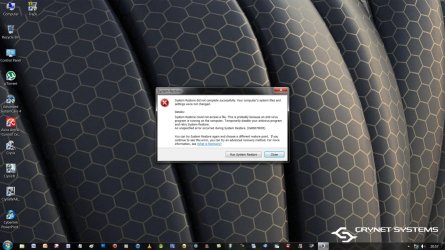
Thanks for the replying, the updates are KB2507938 (2.1MB), KB2532531 (406KB), KB2555917 (1.5MB) and KB2533623 (2.1MB). I have tried to do a system restore but it fails (see screenshot):cry:
 

Attachments

  • Untitled.jpg
    Untitled.jpg
    231.9 KB · Views: 51

My Computer

Computer type
PC/Desktop
Computer Manufacturer/Model Number
Custom
OS
Windows 7 Professional 64 bit
CPU
Intel Core i7 2600K OC @ 4.00GHz
Motherboard
Gigabyte Technology Z77X-UD5H
Memory
Corsair Vengance 16.0GB DDR3 (1600MHz)
Graphics Card(s)
Gigabyte AMD Radeon HD 7970
Sound Card
ASUS Xonar DG PCI Card
Monitor(s) Displays
AOC I2369VM 23 inch 1080p LED Monitors X2
Screen Resolution
1920X1080
Hard Drives
250GB Samsung SSD 840 EVO - Windows 7 and Software
2TB SATA Drive - Games
4TB SATA Drive - Personal Files
PSU
Corsair AX760
Case
Corsair 600T (Black with side mesh)
Cooling
120mm Exaust Fan, 2 120mm Exaust Fans (CPU),200mm Intake Fan
Keyboard
Corsair Vengeance K90
Mouse
Corsair Vengeance M60
Internet Speed
30MB Fiber Optic (Virgin Media)
Antivirus
Avast (Free)
Browser
Firefox
Other Info
AVerMedia Freeview TV Tuner Card and HD Capture Card (PCI)
Thanks for the replying, the updates are KB2507938 (2.1MB), KB2532531 (406KB), KB2555917 (1.5MB) and KB2533623 (2.1MB). I have tried to do a system restore but it fails (see screenshot):cry:


Did you try to install the updates one at a time as suggested to you ?

If that still fails, suggest that you do the followings. These are just temporay remedies until you can really solved the problem.......

1. Change your Windows Update method to MANUAL.

2. Hide the updates for now until experts can tell you how to fix that.
Use this tutorial to hide the updates:
http://www.sevenforums.com/tutorials/24376-windows-update-hide-restore-hidden-updates.html
Note : I must emphasize that hidding the updates is NOT a solution. Just tempaory measure.

3. Go to safe mode and do the system restore again. Make sure you pick the date BEFORE you tried the updates as your restore point.
How to go to safe mode :
Restart your computer > immediately and repeatedly tapping the F8 key until you see a black and white window. That is your safe mode > use the Up or Down arrow keys and select Safe Mode > now logon to your account and do system restore.

NOTE : I am no expert in Windows Updates. You'll have to wait for experts to tell you what to do with those updates you failed to install.
 
Last edited:

My Computer

Computer Manufacturer/Model Number
Acer Aspire 7741Z
OS
Windows 7 Home Premium 64-bit, SP1
CPU
Intel Pentium P6200, Cores 2, 2.13 GHz
Memory
4 GB
Graphics Card(s)
Intel HD
Sound Card
unknown
Monitor(s) Displays
17.3 inches
Screen Resolution
1600 x 900
Hard Drives
640 GB, 5400 PRM
Do manual download of KB's one at a time. Restart if prompted.

KB2507938
From evertything I find on Microsoft this is for Win XP.
No links to Vista or Win7.
Hide this update.
Tutorial to show you how to hide update. Here> http://www.sevenforums.com/tutorials/24376-windows-update-hide-restore-hidden-updates.html

KB2532531
Try a manual download of this update. Click orange Download button. This is for 64bit which your specs show you have.
Click here> Download Details - Microsoft Download Center - Security Update for Windows 7 for x64-based Systems (KB2532531)

KB2555917
Manual download.
Download Details - Microsoft Download Center - Security Update for Windows 7 for x64-based Systems (KB2555917)


KB2533623
I can't find a download for this for Win 7 64bit.
It is for Bluetooth. If you don't have a bluetooth device used on your PC just hide this one for now.

Try to install the two I found and we can go from there.

Mike
 

My Computer

Computer Manufacturer/Model Number
Hopalong/ Godzilla
OS
Windows7 Pro 64bit SP-1; Windows XP Pro 32bit
CPU
Intel Core i7-870 Lynnfield 2.93GHz LGA 1156 95W Quad-Core
Motherboard
ASUS P7P55D-E PRO
Memory
8GB@1400MHz Crucial Ballistix DDR3-1600 4x2GB
Graphics Card(s)
ASUS ENGTX460 DirectCU/2DI/1GD5 1GB 256-bit GDDR5
Sound Card
VIA Onboard
Monitor(s) Displays
Asus VS248H-P 24"; Samsung SyncMaster 941BW 19"ws
Screen Resolution
1920x1080; 1440x900
Hard Drives
Samsung 830 120GB SSD
Intel 320 120GB SSD
Western Digital Caviar Black WD7501AALS 750GB 7200 RPM SATA 3.0Gb/s
Western Digital Caviar Black WD6401AALS 640GB 7200 RPM SATA 3.0Gb/s
PSU
COOLER MASTER Silent Pro RS850-AMBAJ3-US 850W Modular
Case
COOLER MASTER HAF 932 RC-932-KKN5-GP Black
Cooling
Scythe "Mugen-2 Rev.B" (2 ScytheKaze-Jyuni PWM fans)
Keyboard
Logitech K-320
Mouse
Kensington
Antivirus
Avast Inernet Suite
Browser
IE 9 ; Chrome
Back
Top