Is there a way to stop individual programs showing up in the start menu jump list?
I have shortcuts on the desktop & don't need them in the jump list. Also pinned items get put into the jump list as well.
I did find a program called Jumplist Launcher but was hoping for a registry hack or similar.
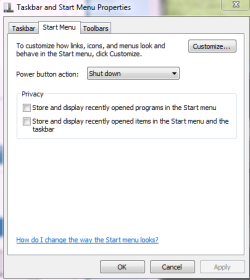
OK. I've utterly confused myself now. In 'customise start menu' there are two options at the bottom. 1/ Number of start menu items to display. 2/ Number of recent items to display in jump menu.
When I set it as in the screen shot the menu collapses to a more agreeable size.
So I still need any info on only letting certain programs reside there.
I have shortcuts on the desktop & don't need them in the jump list. Also pinned items get put into the jump list as well.
I did find a program called Jumplist Launcher but was hoping for a registry hack or similar.
OK. I've utterly confused myself now. In 'customise start menu' there are two options at the bottom. 1/ Number of start menu items to display. 2/ Number of recent items to display in jump menu.
When I set it as in the screen shot the menu collapses to a more agreeable size.
So I still need any info on only letting certain programs reside there.
Attachments

Last edited by a moderator:
My Computer
- Computer Manufacturer/Model Number
- Custom
- OS
- Windows 7 Pro x64 -- PCLinuxOS KDE4 FullMonty 2011
- CPU
- i7-875k @ Turbo - 7,6,5,5 - 3.6ghz
- Motherboard
- Asus P7P55D-E Deluxe
- Memory
- Corsair CMD8GX3M4A1600C8 8gb
- Graphics Card(s)
- Asus EAH5850 DirectCU/2DIS/1GD5
- Sound Card
- On Board
- Monitor(s) Displays
- Samsung SyncMaster T220 - Panasonic VT30a 50"
- Screen Resolution
- 1680x1050 -
- Hard Drives
- Corsair Force 3 SSD 120GB x 2 ::
WD VelociRaptor 150GB WD1500HLFS x 2
- PSU
- Corsair HX-850 Power Supply
- Case
- Coolmaster HAF 932
- Cooling
- Corsair H50
- Keyboard
- Logitech Wireless MK700
- Mouse
- Logitech Wireless MX620
- Internet Speed
- Good enough for now
- Other Info
- Voip. Insanely cheap phone calls.