Jump Lists not working on Start Menu

davet7

New member
Local time
9:07 PM
Messages
9
Hi I am new here so forgive me if this topic has already been covered. I have looked through many posts but cannot find the answer to my problem. Until recently I had jump lists appearing in my start menu but about a month ago I noticed that they had disappeared, also when I tried to restore to an earlier point to fix this problem I found that all my restore points had disappeared except one and this was from my last windows upgrade. I have tried the suggestion at one of the posts to delete any large files above 2MB found at
"%AppData%\Microsoft\Windows\Recent\AutomaticDestinations" but this did not work and when I checked my file string it is the same to Recent but there is no AutomaticDestinations folder?
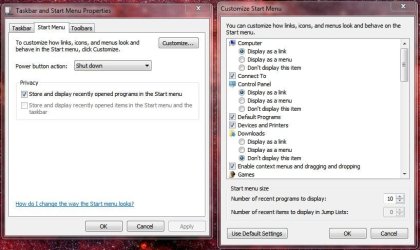
Under privacy in the properties of start menu and taskbar, the Store and display in Start and taskbar checkbox is grayed out, also in the customize window the "Number of recent items to display in jump lists" is also grayed out. If there is an answer to my problem I would be very thankful. I am including a copy of the Taskbar Properties and Customize Start Menu windows from my desktop.
 

Attachments
  • taskbar startup properties.JPG
    taskbar startup properties.JPG
    65 KB · Views: 16

My Computer

OS
windows 7 Professional x64bit - Service Pack 1
CPU
Intel(R) core(TM)2 Quad CPU Q8400 @ 2.66GHz 2.67GHz
Motherboard
Gigabyte Tech - EP41-UD3L
Memory
4.00 GB
Graphics Card(s)
NVIDIA GeForce 9500 GT
Monitor(s) Displays
viewsonic va1918wm series
Hello Dave, and welcome to Seven Forums.

It looks like your recent items has been disabled. You could use an option in the tutorial below to enable and turn back on recent items. Afterwards, your Jump Lists should start repopulating with recent/frequent items again as you open and close them.

http://www.sevenforums.com/tutorials/104503-recent-items-enable-disable.html

Hope this helps for now, :)
Shawn
 

My Computer

Computer type
PC/Desktop
Computer Manufacturer/Model Number
Self built custom
OS
64-bit Windows 11 Pro for Workstations
CPU
Intel i7-8700K OC'd to 5 GHz
Motherboard
ASUS ROG Maximus XI Formula Z390
Memory
64 GB (4x16GB) G.SKILL TridentZ RGB DDR4 3600 MHz
Graphics Card(s)
ASUS ROG-STRIX-GTX1080TI-O11G-GAMING
Sound Card
Integrated
Monitor(s) Displays
2 x Samsung Odyssey G7 27"
Screen Resolution
2560x1440
Hard Drives
1TB Samsung 990 PRO M.2,
4TB Samsung 990 PRO PRO M.2,
TerraMaster F8 SSD Plus NAS
PSU
Seasonic Prime Titanium 850W
Case
Thermaltake Core P3
Cooling
Corsair Hydro H115i
Keyboard
Logitech wireless K800
Mouse
Logitech MX Master 4
Internet Speed
2 Gb/s Download and 100 Mb/s Upload
Antivirus
Malwarebyte Anti-Malware Premium
Browser
Google Chrome
Other Info
Logitech Z625 speaker system,
Logitech BRIO 4K Pro webcam,
HP Color LaserJet Pro MFP M477fdn,
APC SMART-UPS RT 1000 XL - SURT1000XLI,
Galaxy S23 Plus phone
Does the "Use Default Settings" button work?
 

My Computer

Computer type
PC/Desktop
Computer Manufacturer/Model Number
n/a
OS
W7 Ultimate SP1, LM19.2 MATE, W10 Home 1703, W10 Pro 1703 VM, #All 64 bit
CPU
AMD Phenom II x6 1100T, 3.3 GHz
Motherboard
ASUS M4A88T-M/USB3 (AM3)
Memory
12GB DDR3 1333 G-Skill (4GB x 2), G-Skill (2GB x 2)
Graphics Card(s)
NVIDIA GeForce GTX 660
Sound Card
Realtek?
Monitor(s) Displays
Samsung S23B350
Screen Resolution
1920x1080
Hard Drives
WD Green 2TB (SATA), WD Green 3TB (SATA), WD Blue 4TB (SATA), WD Blue 6TB (SATA)
PSU
Cooler Master
Case
Antec GX300 Tower
Cooling
3x Antec TRICOOL 120mm Fans
Mouse
Wired Optical
Internet Speed
DSL
Antivirus
Avast
Browser
Pale Moon (64 bit)
Other Info
2018-12-27 Upgraded HDDs
2015-12-10 Upgraded case, graphics card, storage
2015-08-15 Upgraded motherboard & RAM
2015-07-15 Upgraded LM17.1 to LM17.2
Thanks Shawn but I have already checked the Local Group Policy Editor and it is as it should be
Hello Dave, and welcome to Seven Forums.

It looks like your recent items has been disabled. You could use an option in the tutorial below to enable and turn back on recent items. Afterwards, your Jump Lists should start repopulating with recent/frequent items again as you open and close them.

http://www.sevenforums.com/tutorials/104503-recent-items-enable-disable.html

Hope this helps for now, :)
Shawn
 

My Computer

OS
windows 7 Professional x64bit - Service Pack 1
CPU
Intel(R) core(TM)2 Quad CPU Q8400 @ 2.66GHz 2.67GHz
Motherboard
Gigabyte Tech - EP41-UD3L
Memory
4.00 GB
Graphics Card(s)
NVIDIA GeForce 9500 GT
Monitor(s) Displays
viewsonic va1918wm series
The REG file in OPTION ONE contains more than OPTION TWO, and may get it enabled for you. :)
 

My Computer

Computer type
PC/Desktop
Computer Manufacturer/Model Number
Self built custom
OS
64-bit Windows 11 Pro for Workstations
CPU
Intel i7-8700K OC'd to 5 GHz
Motherboard
ASUS ROG Maximus XI Formula Z390
Memory
64 GB (4x16GB) G.SKILL TridentZ RGB DDR4 3600 MHz
Graphics Card(s)
ASUS ROG-STRIX-GTX1080TI-O11G-GAMING
Sound Card
Integrated
Monitor(s) Displays
2 x Samsung Odyssey G7 27"
Screen Resolution
2560x1440
Hard Drives
1TB Samsung 990 PRO M.2,
4TB Samsung 990 PRO PRO M.2,
TerraMaster F8 SSD Plus NAS
PSU
Seasonic Prime Titanium 850W
Case
Thermaltake Core P3
Cooling
Corsair Hydro H115i
Keyboard
Logitech wireless K800
Mouse
Logitech MX Master 4
Internet Speed
2 Gb/s Download and 100 Mb/s Upload
Antivirus
Malwarebyte Anti-Malware Premium
Browser
Google Chrome
Other Info
Logitech Z625 speaker system,
Logitech BRIO 4K Pro webcam,
HP Color LaserJet Pro MFP M477fdn,
APC SMART-UPS RT 1000 XL - SURT1000XLI,
Galaxy S23 Plus phone
Shawn I have just tried your suggestion but it did not restore the grayed out checkboxes. Just a thought prior to all my problems I uninstalled 2 programs because one had hung whilst trying to unpack a downloaded file, the program causing this was National Geographic and the other was Adobe Air which runs the NG program. The uninstall program I use is not the Windows vesion but Revo Uninstaller which to me is better as it scans the computer for any files left after the normal uninstall program has been used this includes the registry, anyway when I uninstalled a few files in the registry were found, however I always check the files to make sure that they are only associated with the program concerned and only if they have the uninstalled programs name in front. I am now wondering if one or more of these files might have been common files the reason I say this is that when I tried to reinstall the NG, after first installing the Adobe Air program successfuly, the NG would not install with a not from the Adobe install that "the file found in the application folder called installer.exe could not be used as the program ended with an error exit code" it was about a week after this experience that I saw that my jump lists in the Start Menu were not working, however they are working in the Taskbar, and always have been. I hope this explanation is helpful.
Thanks David
 

My Computer

OS
windows 7 Professional x64bit - Service Pack 1
CPU
Intel(R) core(TM)2 Quad CPU Q8400 @ 2.66GHz 2.67GHz
Motherboard
Gigabyte Tech - EP41-UD3L
Memory
4.00 GB
Graphics Card(s)
NVIDIA GeForce 9500 GT
Monitor(s) Displays
viewsonic va1918wm series
No. I had already tried this before and it only changed some settings I had changed previously. Thanks for the suggestion anyway.
David
Does the "Use Default Settings" button work?
 

My Computer

OS
windows 7 Professional x64bit - Service Pack 1
CPU
Intel(R) core(TM)2 Quad CPU Q8400 @ 2.66GHz 2.67GHz
Motherboard
Gigabyte Tech - EP41-UD3L
Memory
4.00 GB
Graphics Card(s)
NVIDIA GeForce 9500 GT
Monitor(s) Displays
viewsonic va1918wm series

My Computer

Computer type
PC/Desktop
Computer Manufacturer/Model Number
Self built custom
OS
64-bit Windows 11 Pro for Workstations
CPU
Intel i7-8700K OC'd to 5 GHz
Motherboard
ASUS ROG Maximus XI Formula Z390
Memory
64 GB (4x16GB) G.SKILL TridentZ RGB DDR4 3600 MHz
Graphics Card(s)
ASUS ROG-STRIX-GTX1080TI-O11G-GAMING
Sound Card
Integrated
Monitor(s) Displays
2 x Samsung Odyssey G7 27"
Screen Resolution
2560x1440
Hard Drives
1TB Samsung 990 PRO M.2,
4TB Samsung 990 PRO PRO M.2,
TerraMaster F8 SSD Plus NAS
PSU
Seasonic Prime Titanium 850W
Case
Thermaltake Core P3
Cooling
Corsair Hydro H115i
Keyboard
Logitech wireless K800
Mouse
Logitech MX Master 4
Internet Speed
2 Gb/s Download and 100 Mb/s Upload
Antivirus
Malwarebyte Anti-Malware Premium
Browser
Google Chrome
Other Info
Logitech Z625 speaker system,
Logitech BRIO 4K Pro webcam,
HP Color LaserJet Pro MFP M477fdn,
APC SMART-UPS RT 1000 XL - SURT1000XLI,
Galaxy S23 Plus phone
System Cleaner?

Are you running a system cleaner (e.g. CCleaner)?

If so, it may be set to purge your "Jump Lists".

One of the cleaners I used to run (ASC?), used to purge my "Jump Lists", even though the option wasn't selected!


That wouldn't explain why you can't set the options though. :confused:
 
Last edited:

My Computer

Computer type
PC/Desktop
Computer Manufacturer/Model Number
n/a
OS
W7 Ultimate SP1, LM19.2 MATE, W10 Home 1703, W10 Pro 1703 VM, #All 64 bit
CPU
AMD Phenom II x6 1100T, 3.3 GHz
Motherboard
ASUS M4A88T-M/USB3 (AM3)
Memory
12GB DDR3 1333 G-Skill (4GB x 2), G-Skill (2GB x 2)
Graphics Card(s)
NVIDIA GeForce GTX 660
Sound Card
Realtek?
Monitor(s) Displays
Samsung S23B350
Screen Resolution
1920x1080
Hard Drives
WD Green 2TB (SATA), WD Green 3TB (SATA), WD Blue 4TB (SATA), WD Blue 6TB (SATA)
PSU
Cooler Master
Case
Antec GX300 Tower
Cooling
3x Antec TRICOOL 120mm Fans
Mouse
Wired Optical
Internet Speed
DSL
Antivirus
Avast
Browser
Pale Moon (64 bit)
Other Info
2018-12-27 Upgraded HDDs
2015-12-10 Upgraded case, graphics card, storage
2015-08-15 Upgraded motherboard & RAM
2015-07-15 Upgraded LM17.1 to LM17.2
Shawn, sorry to be so long but with time differences etc: I checked group policy in Computer/Administrative Templates and User Config/Admin Temps and all say "Not configured" including "Remove Recent Items menu from Start Menu" in User Config/Admin Temps.
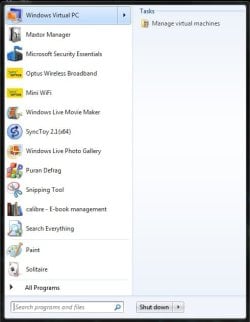
I am also including a screen shot of my Start menu with the only jump that is on it showing "Manage virtual machines" this used to also show a line under this heading then showing "Windows XP mode".
 

Attachments

  • Start Menu.jpg
    Start Menu.jpg
    32.2 KB · Views: 5

My Computer

OS
windows 7 Professional x64bit - Service Pack 1
CPU
Intel(R) core(TM)2 Quad CPU Q8400 @ 2.66GHz 2.67GHz
Motherboard
Gigabyte Tech - EP41-UD3L
Memory
4.00 GB
Graphics Card(s)
NVIDIA GeForce 9500 GT
Monitor(s) Displays
viewsonic va1918wm series
I do have CCleaner but I don't keep it running in the background. I only load it when I require it. I did check to see if it was set to purge jump lists but I couldn't find any references to jump lists in start menu only taskbar and it wasn't checked anyway and I'm not having any problems with my taskbar jumps only start menu ones. Thanks again.
Are you running a system cleaner (e.g. CCleaner)?

If so, it may be set to purge your "Jump Lists".

One of the cleaners I used to run (ASC?), used to purge my "Jump Lists", even though the option wasn't selected!


That wouldn't explain why you can't set the options though. :confused:
 

My Computer

OS
windows 7 Professional x64bit - Service Pack 1
CPU
Intel(R) core(TM)2 Quad CPU Q8400 @ 2.66GHz 2.67GHz
Motherboard
Gigabyte Tech - EP41-UD3L
Memory
4.00 GB
Graphics Card(s)
NVIDIA GeForce 9500 GT
Monitor(s) Displays
viewsonic va1918wm series
Shawn, sorry to be so long but with time differences etc: I checked group policy in Computer/Administrative Templates and User Config/Admin Temps and all say "Not configured" including "Remove Recent Items menu from Start Menu" in User Config/Admin Temps.
I am also including a screen shot of my Start menu with the only jump that is on it showing "Manage virtual machines" this used to also show a line under this heading then showing "Windows XP mode".

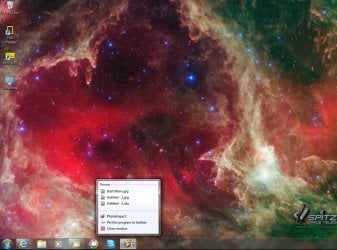
Quite frankly, I'm surprised you say that your Jump Lists on the taskbar work with your Recent Items disabled (grayed out). Could you also post a screenshot showing a working Jump List on the taskbar?

I don't think this will get fixed until we get Recent Items enabled and turned on for you.

For now, as a test, create a new user account for yourself, log on to it, and see if Jump Lists work in both of that account's Start Menu and Jump Lists. :)
 

My Computer

Computer type
PC/Desktop
Computer Manufacturer/Model Number
Self built custom
OS
64-bit Windows 11 Pro for Workstations
CPU
Intel i7-8700K OC'd to 5 GHz
Motherboard
ASUS ROG Maximus XI Formula Z390
Memory
64 GB (4x16GB) G.SKILL TridentZ RGB DDR4 3600 MHz
Graphics Card(s)
ASUS ROG-STRIX-GTX1080TI-O11G-GAMING
Sound Card
Integrated
Monitor(s) Displays
2 x Samsung Odyssey G7 27"
Screen Resolution
2560x1440
Hard Drives
1TB Samsung 990 PRO M.2,
4TB Samsung 990 PRO PRO M.2,
TerraMaster F8 SSD Plus NAS
PSU
Seasonic Prime Titanium 850W
Case
Thermaltake Core P3
Cooling
Corsair Hydro H115i
Keyboard
Logitech wireless K800
Mouse
Logitech MX Master 4
Internet Speed
2 Gb/s Download and 100 Mb/s Upload
Antivirus
Malwarebyte Anti-Malware Premium
Browser
Google Chrome
Other Info
Logitech Z625 speaker system,
Logitech BRIO 4K Pro webcam,
HP Color LaserJet Pro MFP M477fdn,
APC SMART-UPS RT 1000 XL - SURT1000XLI,
Galaxy S23 Plus phone
I have included a screen shot showing my recents from the taskbar from my photo program, and so am I confused about this as well:confused:. I opened a new account as you suggested and when I used paint in it and closed it low and behold I had a jump list for it in the start menu! I hope this tells you something which will help with my problem. Thanks again. I will be offline for a couple of hours so will resume then.
 

Attachments

  • taskbar recent jump list.jpg
    taskbar recent jump list.jpg
    159.5 KB · Views: 4

My Computer

OS
windows 7 Professional x64bit - Service Pack 1
CPU
Intel(R) core(TM)2 Quad CPU Q8400 @ 2.66GHz 2.67GHz
Motherboard
Gigabyte Tech - EP41-UD3L
Memory
4.00 GB
Graphics Card(s)
NVIDIA GeForce 9500 GT
Monitor(s) Displays
viewsonic va1918wm series
That is odd that the Jump Lists work on the taskbar when Recent Items shows as being disabled. :confused:

If you like, you could use the new account instead, copy what you want (shortcuts, etc...) from your old account into the new.
 

My Computer

Computer type
PC/Desktop
Computer Manufacturer/Model Number
Self built custom
OS
64-bit Windows 11 Pro for Workstations
CPU
Intel i7-8700K OC'd to 5 GHz
Motherboard
ASUS ROG Maximus XI Formula Z390
Memory
64 GB (4x16GB) G.SKILL TridentZ RGB DDR4 3600 MHz
Graphics Card(s)
ASUS ROG-STRIX-GTX1080TI-O11G-GAMING
Sound Card
Integrated
Monitor(s) Displays
2 x Samsung Odyssey G7 27"
Screen Resolution
2560x1440
Hard Drives
1TB Samsung 990 PRO M.2,
4TB Samsung 990 PRO PRO M.2,
TerraMaster F8 SSD Plus NAS
PSU
Seasonic Prime Titanium 850W
Case
Thermaltake Core P3
Cooling
Corsair Hydro H115i
Keyboard
Logitech wireless K800
Mouse
Logitech MX Master 4
Internet Speed
2 Gb/s Download and 100 Mb/s Upload
Antivirus
Malwarebyte Anti-Malware Premium
Browser
Google Chrome
Other Info
Logitech Z625 speaker system,
Logitech BRIO 4K Pro webcam,
HP Color LaserJet Pro MFP M477fdn,
APC SMART-UPS RT 1000 XL - SURT1000XLI,
Galaxy S23 Plus phone
I think I might try that,at least it's nice to know that I can come up with an "odd" error that is not easy to fix. I assume that I will have to convert the new account to an administrative account the same as the current one as I am the only user of the computer, so that it will give me access to all files and programs? Thanks for all your help Shawn and if you come up with an alternative explanation please let me know.:)
 

My Computer

OS
windows 7 Professional x64bit - Service Pack 1
CPU
Intel(R) core(TM)2 Quad CPU Q8400 @ 2.66GHz 2.67GHz
Motherboard
Gigabyte Tech - EP41-UD3L
Memory
4.00 GB
Graphics Card(s)
NVIDIA GeForce 9500 GT
Monitor(s) Displays
viewsonic va1918wm series
You're welcome. Yep, it will be need to be changed to an administrator type of account before deleting the old one, and to have access like the old one. :)
 

My Computer

Computer type
PC/Desktop
Computer Manufacturer/Model Number
Self built custom
OS
64-bit Windows 11 Pro for Workstations
CPU
Intel i7-8700K OC'd to 5 GHz
Motherboard
ASUS ROG Maximus XI Formula Z390
Memory
64 GB (4x16GB) G.SKILL TridentZ RGB DDR4 3600 MHz
Graphics Card(s)
ASUS ROG-STRIX-GTX1080TI-O11G-GAMING
Sound Card
Integrated
Monitor(s) Displays
2 x Samsung Odyssey G7 27"
Screen Resolution
2560x1440
Hard Drives
1TB Samsung 990 PRO M.2,
4TB Samsung 990 PRO PRO M.2,
TerraMaster F8 SSD Plus NAS
PSU
Seasonic Prime Titanium 850W
Case
Thermaltake Core P3
Cooling
Corsair Hydro H115i
Keyboard
Logitech wireless K800
Mouse
Logitech MX Master 4
Internet Speed
2 Gb/s Download and 100 Mb/s Upload
Antivirus
Malwarebyte Anti-Malware Premium
Browser
Google Chrome
Other Info
Logitech Z625 speaker system,
Logitech BRIO 4K Pro webcam,
HP Color LaserJet Pro MFP M477fdn,
APC SMART-UPS RT 1000 XL - SURT1000XLI,
Galaxy S23 Plus phone
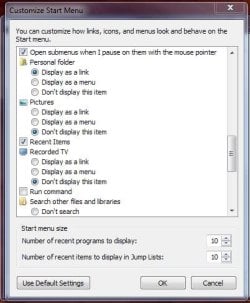
Shawn, sorry about this but as I was setting up my new account I noticed that on the customize start menu I have a checkbox for "Recent Items" which is not available on the old account, with the jump list problems. I mention this because I have tried everything I know (which is not a lot) to transfer this setting to the new account from the old account without success. Is there a way to add this to the start menu and if so is this the cause of my problems. Even if it isn't I wouldn't mind being able to use this instead of jump lists, even though it shows all of my "Recents".
I had lost my recents file from my user file so I have copied it over to the old file from the new file account which I thought might bring up the checkbox on the customize start menu but it hasn't.
One other thing when I tried Paint in the new account and had jump lists, today I tried my photo program in the new account and no jump lists have appeared? is this back to square one. I suspect so as having found this situation I tried Paint in the old account and you will not be suprised to hear that I have jump lists for it on the old start menu!
I am attaching screen shots of the customize menu new account and jump lists on paint from the old account, and I thought we had fixed the problem. Thanks again.

:geek:"Woops" as I was sending this note and it came up on the forum I noticed that on the picture of the old account start menu that there were arrows for jump lists and it appears that I have fixed the problem by copying that recents file to my old user account. I will let you know if this is successful after a few trials. by for now:geek:
 

Attachments

  • customize start menu new.JPG
    customize start menu new.JPG
    44.1 KB · Views: 3
  • paint jump lists old account.jpg
    paint jump lists old account.jpg
    61.3 KB · Views: 2
Last edited:

My Computer

OS
windows 7 Professional x64bit - Service Pack 1
CPU
Intel(R) core(TM)2 Quad CPU Q8400 @ 2.66GHz 2.67GHz
Motherboard
Gigabyte Tech - EP41-UD3L
Memory
4.00 GB
Graphics Card(s)
NVIDIA GeForce 9500 GT
Monitor(s) Displays
viewsonic va1918wm series
Back
Top