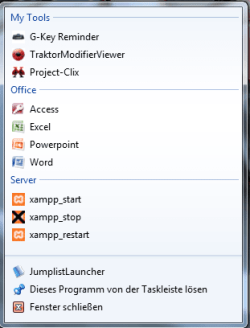
Jumplist Launcher - Create Custom Jump Lists

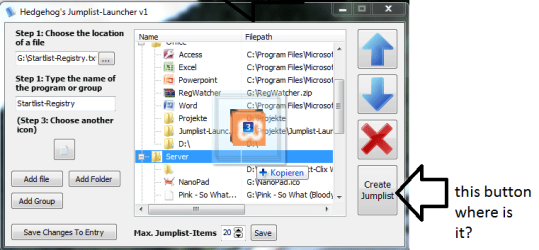
Here is a picture

THis button
 

Attachments

  • jumplistlauncher2.png
    jumplistlauncher2.png
    28.5 KB · Views: 451

My Computer My Computer

At a glance

Windows 7 UltimateTurion 64 Bit2 GIG
Computer Manufacturer/Model Number
Gateway
OS
Windows 7 Ultimate
CPU
Turion 64 Bit
Memory
2 GIG
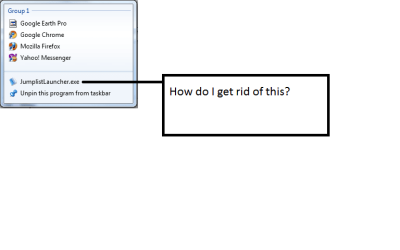
Get rid of this

How do I get rid of "Jumplist Launcher" in the launcher I just created? John
 

Attachments

  • jump.png
    jump.png
    8 KB · Views: 395

My Computer My Computer

At a glance

Windows 7 UltimateTurion 64 Bit2 GIG
Computer Manufacturer/Model Number
Gateway
OS
Windows 7 Ultimate
CPU
Turion 64 Bit
Memory
2 GIG
So adding a custom jumplist will only work on the Jumplist Launcher?
I was hoping I could make a jumplist for Internet Explorer...
 

My Computer My Computer

At a glance

10 Home x64Intel Core i5 4670KCorsair XMS3 8GB DDr3 1600MHzSapphire NITRO Radeon R9 Fury
Computer type
PC/Desktop
OS
10 Home x64
CPU
Intel Core i5 4670K
Motherboard
Gigabyte GA-Z87-D3HP
Memory
Corsair XMS3 8GB DDr3 1600MHz
Graphics Card(s)
Sapphire NITRO Radeon R9 Fury
Sound Card
Asus Xonar DX
Monitor(s) Displays
Acer H236HLbmjd
Screen Resolution
1920x1080
Hard Drives
Force GS 128GB - Seagate 320GB - WD Caviar Black 1TB - WD Caviar Blue 500GB
PSU
EVGA SuperNOVA 650 P2
Case
Silverstone Raven 3 RV03B-W
Keyboard
Topre Realforce 104UG-HiPro
Mouse
Mionix Naos 7000
Internet Speed
76/4 On a good day
Antivirus
SmartScreen
Browser
Internet Explorer 11
So adding a custom jumplist will only work on the Jumplist Launcher?
I was hoping I could make a jumplist for Internet Explorer...

Nope, It can only make custom a custom jumplist for itself :D
 

My Computer My Computer

At a glance

Windows 7 Ultimate x64 Service Pack 1AMD Athlon II x4 Propus 2.9 GHz2 x 4GB Corsair XMS 3 DDR3 -1600 CL9AMD Radeon HD 5850 1GB GDDR5
Computer type
PC/Desktop
Computer Manufacturer/Model Number
Custom Build
OS
Windows 7 Ultimate x64 Service Pack 1
CPU
AMD Athlon II x4 Propus 2.9 GHz
Motherboard
ASRock N68C-GS FX
Memory
2 x 4GB Corsair XMS 3 DDR3 -1600 CL9
Graphics Card(s)
AMD Radeon HD 5850 1GB GDDR5
Sound Card
On-board 6-Channel HD Audio
Monitor(s) Displays
18' LG Flatron E1942TC-BN on DVI, 18' Chimei 95ND on HDMI
Screen Resolution
1366 x 768 x 2
Hard Drives
1 x 500 GB Seagate
1 x 1 TB Western Digital Caviar Green
1 x 1 TB Hitachi Touro Mobile USB 3
PSU
Seasonic S12II 520W
Case
Generic with Cable Management
Cooling
Deep Cool Gammaxx 200
Keyboard
Dragonwar Desert Eagle
Mouse
Logitech B85
Internet Speed
5Mb/s DL, 0.9Mb/s UL
Antivirus
ESET Nod32
Browser
Google Chrome 64 Bit
Other Info
LG G4 H818P - Rooted with Xposed Framework
Dear Hedge, I using Win 7 Prof. recently had a Jump List problem with one of my frequently used software SONY VEGAS Pro 8. It was actually working fine all along till last week when the jump list suddenly disappeared. The thumbnail is still at the taskbar but no jumplist is available. Even on the start menu, Sony Vegas Pro 8 has no jump list. All the other softwares, internet and window explorers have jump list and even my sony vegas pro 9 is working fine. I've tried system restored, reactivated the start menu privacy property but to no avail. Appreciate if you can give me some advice. God bless & thank you!
 

My Computer My Computer

At a glance

Window 7 Professional 64bit
OS
Window 7 Professional 64bit
Apparently there's another different tools for obtain same result... i have tryed to use this but i can't obtain the jump list also after i have created some link...
I have found "JumpFolder" but at every restart i need to reopen the main .exe for obtain the Jump List appears and it's not a good solution...... someone can suggest to me some alternative ?

Only for purpose:
When i use this... and i click on Update Jumplist i obtain an error says:
EOLeexception error raised: Error not specified...........
 

My Computer My Computer

At a glance

Windows 7 X64
Computer type
PC/Desktop
OS
Windows 7 X64
Back
Top