
June 11, 2019 - KB4503292 (Monthly Rollup) for Windows 7

Brink

Administrator
Staff member
Local time
11:59 AM
Messages
74,940
Location
Oklahoma
June 11, 2019 - KB4503292 (Monthly Rollup)

Applies to: Windows 7 Service Pack 1, Windows Server 2008 R2 Service Pack 1


Starting with KB4493472 Monthly Rollup updates will no longer include PciClearStaleCache.exe. This installation utility addressees inconsistencies in the internal PCI cache. This can cause the symptoms listed below when installing monthly updates that do NOT include PciClearStaleCache:

  • Existing NIC definitions in control panel networks may be replaced with a new Ethernet Network Interface Card (NIC) but with default settings. Any custom settings on the previously NIC persist in the registry but were unused.
  • Static IP address settings were lost on network interfaces.
  • Wi-Fi profile settings were not displayed in the network flyout.
  • WIFI network adapters were disabled
These symptoms are especially common on guest virtual machines and on machines which have not been updated since March, 2018.

Administrators should ensure that any one or more of the Monthly rollups released between April 10, 2018 (KB4093118) and March 12, 2019 (KB4489878) have been installed prior to installing April 2019 and later updates. Each of these rollup updates includes PciClearStaleCache.exe.

Improvements and fixes

This security update includes improvements and fixes that were a part of update KB4499178 (released May 23, 2019) and addresses the following issues:

  • Addresses an issue with the HTTP and HTTPS string character limit for URLs when using Internet Explorer.
  • Security updates to Windows App Platform and Frameworks, Microsoft Graphics Component, Windows Input and Composition, Windows Shell, Windows Server, Windows Authentication, Windows Datacenter Networking, Windows Storage and Filesystems, Windows Virtualization, Internet Information Services, and the Microsoft JET Database Engine.
For more information about the resolved security vulnerabilities, please refer to the Security Update Guide.

Known issues in this update

[UPDATED 6/20]
6-20.jpg

How to get this update

Before installing this update

Microsoft strongly recommends you install the latest servicing stack update (SSU) for your operating system before installing the latest Rollup. SSUs improve the reliability of the update process to mitigate potential issues while installing the Rollup and applying Microsoft security fixes.

If you are using Windows Update, the latest SSU (KB4490628) will be offered to you automatically. To get the standalone package for the latest SSU, search for it in the Microsoft Update Catalog.

Install this update

This update will be downloaded and installed automatically from Windows Update.

To get the standalone package for this update, go to the Microsoft Update Catalog website.
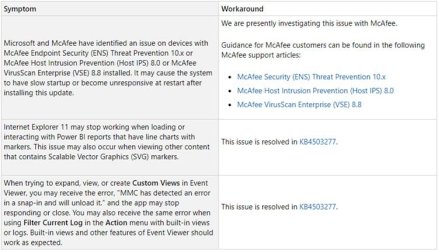

Source: https://support.microsoft.com/en-us/help/4503292

Direct download links for KB4503292 MSU file from Microsoft Update Catalog:

:ar: Download KB4503292 MSU for Windows 7 32-bit (x86) - 174.9 MB

:ar: Download KB4503292 MSU for Windows 7 64-bit (x64) - 270.7 MB
 
Last edited:

My Computer My Computer

At a glance

64-bit Windows 11 Pro for WorkstationsIntel i7-8700K OC'd to 5 GHz64 GB (4x16GB) G.SKILL TridentZ RGB DDR4 3600...ASUS ROG-STRIX-GTX1080TI-O11G-GAMING
Computer type
PC/Desktop
Computer Manufacturer/Model Number
Self built custom
OS
64-bit Windows 11 Pro for Workstations
CPU
Intel i7-8700K OC'd to 5 GHz
Motherboard
ASUS ROG Maximus XI Formula Z390
Memory
64 GB (4x16GB) G.SKILL TridentZ RGB DDR4 3600 MHz
Graphics Card(s)
ASUS ROG-STRIX-GTX1080TI-O11G-GAMING
Sound Card
Integrated
Monitor(s) Displays
2 x Samsung Odyssey G7 27"
Screen Resolution
2560x1440
Hard Drives
1TB Samsung 990 PRO M.2,
4TB Samsung 990 PRO PRO M.2,
TerraMaster F8 SSD Plus NAS
PSU
Seasonic Prime Titanium 850W
Case
Thermaltake Core P3
Cooling
Corsair Hydro H115i
Keyboard
Logitech wireless K800
Mouse
Logitech MX Master 4
Internet Speed
2 Gb/s Download and 100 Mb/s Upload
Antivirus
Malwarebyte Anti-Malware Premium
Browser
Google Chrome
Other Info
Logitech Z625 speaker system,
Logitech BRIO 4K Pro webcam,
HP Color LaserJet Pro MFP M477fdn,
APC SMART-UPS RT 1000 XL - SURT1000XLI,
Galaxy S23 Plus phone
Custom views snap in in windows 7 MMC crashes after update kb4503292. Repeatedly. I have to close and reopen the MMC. Other views work as expected. Cannot find an error code, but not seeing all the logs I am used to.

Any ideas for a fix?
 

My Computer My Computer

At a glance

Win 7 Pro 64 bitSome 17 Quad COre16 GBK1000?
Computer type
PC/Desktop
Computer Manufacturer/Model Number
Lenovo W530
OS
Win 7 Pro 64 bit
CPU
Some 17 Quad COre
Memory
16 GB
Graphics Card(s)
K1000?
Hard Drives
500GB SSD
Here is some info:

Description:
Stopped working

Problem signature:
Problem Event Name: CLR20r3
Problem Signature 01: mmc.exe
Problem Signature 02: 6.1.7601.23892
Problem Signature 03: 5990c6ab
Problem Signature 04: mscorlib
Problem Signature 05: 2.0.0.0
Problem Signature 06: 5c9c4d2b
Problem Signature 07: 34d3
Problem Signature 08: 1c5
Problem Signature 09: System.IO.IOException
OS Version: 6.1.7601.2.1.0.256.48
Locale ID: 1033

Read our privacy statement online:
Windows 7 Privacy Statement

If the online privacy statement is not available, please read our privacy statement offline:
C:\Windows\system32\en-US\erofflps.txt
 

My Computer My Computer

At a glance

Win 7 Pro 64 bitSome 17 Quad COre16 GBK1000?
Computer type
PC/Desktop
Computer Manufacturer/Model Number
Lenovo W530
OS
Win 7 Pro 64 bit
CPU
Some 17 Quad COre
Memory
16 GB
Graphics Card(s)
K1000?
Hard Drives
500GB SSD
Read that this could fix it:

%windir%\Microsoft.NET\Framework\v2.0.50727\ngen.exe update

Returns an error and did not fix it:

%windir%\Microsoft.NET\Framework\v2.0.50727\ngen.exe update
Microsoft (R) CLR Native Image Generator - Version 2.0.50727.5483
Copyright (c) Microsoft Corporation. All rights reserved.
Compiling assembly EventViewer, Version=6.1.0.0, Culture=Neutral, PublicKeyT
oken=31bf3856ad364e35, processorArchitecture=msil (CLR v2.0.50727) ...
EventViewer, Version=6.1.0.0, Culture=neutral, PublicKeyToken=31bf3856ad364e35
Compiling assembly TaskScheduler, Version=6.1.0.0, Culture=Neutral, PublicKe
yToken=31bf3856ad364e35, processorArchitecture=msil (CLR v2.0.50727) ...
TaskScheduler, Version=6.1.0.0, Culture=neutral, PublicKeyToken=31bf3856ad364e35

Failed to load dependency Microsoft.StdFormat of assembly Microsoft.VisualBasic.
Compatibility.Data, Version=10.0.0.0, Culture=neutral, PublicKeyToken=b03f5f7f11
d50a3a because of the following error : The system cannot find the file specifie
d. (Exception from HRESULT: 0x80070002)
 

My Computer My Computer

At a glance

Win 7 Pro 64 bitSome 17 Quad COre16 GBK1000?
Computer type
PC/Desktop
Computer Manufacturer/Model Number
Lenovo W530
OS
Win 7 Pro 64 bit
CPU
Some 17 Quad COre
Memory
16 GB
Graphics Card(s)
K1000?
Hard Drives
500GB SSD
Repairing .net did not help.

Now cannot find certlm.msc

I think I have to uninstall this update and hope I get functions back.

_____________________________________________________

Uninstalled and all works again.Would have rather found a fix, but life's too short.
 
Last edited:

My Computer My Computer

At a glance

Win 7 Pro 64 bitSome 17 Quad COre16 GBK1000?
Computer type
PC/Desktop
Computer Manufacturer/Model Number
Lenovo W530
OS
Win 7 Pro 64 bit
CPU
Some 17 Quad COre
Memory
16 GB
Graphics Card(s)
K1000?
Hard Drives
500GB SSD

My Computer My Computer

At a glance

64-bit Windows 11 Pro for WorkstationsIntel i7-8700K OC'd to 5 GHz64 GB (4x16GB) G.SKILL TridentZ RGB DDR4 3600...ASUS ROG-STRIX-GTX1080TI-O11G-GAMING
Computer type
PC/Desktop
Computer Manufacturer/Model Number
Self built custom
OS
64-bit Windows 11 Pro for Workstations
CPU
Intel i7-8700K OC'd to 5 GHz
Motherboard
ASUS ROG Maximus XI Formula Z390
Memory
64 GB (4x16GB) G.SKILL TridentZ RGB DDR4 3600 MHz
Graphics Card(s)
ASUS ROG-STRIX-GTX1080TI-O11G-GAMING
Sound Card
Integrated
Monitor(s) Displays
2 x Samsung Odyssey G7 27"
Screen Resolution
2560x1440
Hard Drives
1TB Samsung 990 PRO M.2,
4TB Samsung 990 PRO PRO M.2,
TerraMaster F8 SSD Plus NAS
PSU
Seasonic Prime Titanium 850W
Case
Thermaltake Core P3
Cooling
Corsair Hydro H115i
Keyboard
Logitech wireless K800
Mouse
Logitech MX Master 4
Internet Speed
2 Gb/s Download and 100 Mb/s Upload
Antivirus
Malwarebyte Anti-Malware Premium
Browser
Google Chrome
Other Info
Logitech Z625 speaker system,
Logitech BRIO 4K Pro webcam,
HP Color LaserJet Pro MFP M477fdn,
APC SMART-UPS RT 1000 XL - SURT1000XLI,
Galaxy S23 Plus phone
Back
Top