
June 2015 microcode update for Intel processors in Windows

NoN

New member
Guru
Gold Member
VIP
Local time
2:33 PM
Messages
4,101
Location
LostInSpace, Vol15 - Cool It
Today i did received through Windows Update, two optional updates.

One is for Intel processors.:)

-Article ID: 3064209 - Last Review: June 16, 2015 - Revision: 1.0
June 2015 microcode update for Intel processors in Windows

About this update:
This article describes a microcode update for Intel processors that are running Windows 8.1, Windows Server 2012 R2, Windows 8, Windows Server 2012, Windows 7 Service Pack 1 (SP1), or Windows Server 2008 R2 SP1.
This update improves the reliability of systems that use certain Intel processors. This update also fixes some issues that could cause the operating system to function incorrectly.
https://support.microsoft.com/fr-fr/kb/3064209/en-us


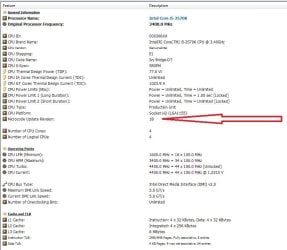
Did the Intel Microcode Update Revision number for Ivy bridge was "17" before?

I can't recall properly as now it shows: Microcode Update Revision "1B"...


The other one for language pack: https://support.microsoft.com/fr-fr/kb/3040272/en-us
 

Attachments
  • Capture.jpg
    Capture.jpg
    75.3 KB · Views: 6

My Computer

Computer type
PC/Desktop
Computer Manufacturer/Model Number
Custom Build
OS
Windows 7 Professional SP1 - x64 [Non-UEFI Boot]
CPU
Ivy Bridge Core i5 3570K (Delidded)
Motherboard
Asus P8Z77-V LE PLUS
Memory
G.Skill "Ares" DDR3 PC3-12800 - 1600MHz (16Gb)
Graphics Card(s)
Asus Dual-RX480-O4G
Sound Card
Creative Sound Blaster Z w/5.1 sound system
Monitor(s) Displays
Asus IPS 23"
Screen Resolution
16/9
Hard Drives
Internal:
500Go Sata 6Gb/s (x2)
500Go Sata 3Gb/s (x2)
SSD 60Go Sata 6Gb/s
PSU
In Win C 900W Series 80+ Platinum
Case
Thermaltake Chaser A71
Cooling
Custom Water Cooling Loop
Keyboard
Cooler Master QuickFire XTi
Mouse
Razer Imperator 2012 (4G)
Antivirus
MSE
Browser
IE 11.0.xxx Rtm
Other Info
"Raid0" with Intel Smart Response Technology (HDD/SSD)
I just checked updates and nothing for my i7 3770.
 

My Computer

Computer type
PC/Desktop
Computer Manufacturer/Model Number
My Own Build
OS
Windows 10 64 bit
CPU
Intel i7 6700K
Motherboard
ASUS ROG Maximus VIII Hero
Memory
16GB Corsair Dominator
Graphics Card(s)
Intel CPU Graphics
Sound Card
RealTek
Monitor(s) Displays
27" Dell S2719dgf
Screen Resolution
2560X1440
Hard Drives
1 TB Samsung 850 EVO SSD for Win 10 Pro
500GB Samsung 850 EVO SSD for Win 10 Insider
2 TB drive for backup
PSU
EVGA Supernova 750G2
Case
BeQuiet Silent Base 600
Cooling
Deepcool Captain 120EX
Keyboard
Microsoft Wireless 2000
Mouse
Microsoft wireless
Internet Speed
100 MB/sec (Cable)
Antivirus
Microsoft Defender and Malwarebytes
Browser
Edge/Firefox
Other Info
Cakewalk (Sonar) by BandLab and Studio One 4.1 Pro recording studio software. MOTU 896Mk3 Hybrid recording interface, Frontier Tranzport wireless control unit, Behringer X-Touch Control Surface.
Five USB connected optical drives for CD Audio production using Nero BurningROM
I just checked updates and nothing for my i7 3770.

Since its coming with Windows Update, those optional updates should be there sooner or later that day.
I do not think MS gives them to one part of the world only!:)

You could always have them as stand-alone installer.
 

My Computer

Computer type
PC/Desktop
Computer Manufacturer/Model Number
Custom Build
OS
Windows 7 Professional SP1 - x64 [Non-UEFI Boot]
CPU
Ivy Bridge Core i5 3570K (Delidded)
Motherboard
Asus P8Z77-V LE PLUS
Memory
G.Skill "Ares" DDR3 PC3-12800 - 1600MHz (16Gb)
Graphics Card(s)
Asus Dual-RX480-O4G
Sound Card
Creative Sound Blaster Z w/5.1 sound system
Monitor(s) Displays
Asus IPS 23"
Screen Resolution
16/9
Hard Drives
Internal:
500Go Sata 6Gb/s (x2)
500Go Sata 3Gb/s (x2)
SSD 60Go Sata 6Gb/s
PSU
In Win C 900W Series 80+ Platinum
Case
Thermaltake Chaser A71
Cooling
Custom Water Cooling Loop
Keyboard
Cooler Master QuickFire XTi
Mouse
Razer Imperator 2012 (4G)
Antivirus
MSE
Browser
IE 11.0.xxx Rtm
Other Info
"Raid0" with Intel Smart Response Technology (HDD/SSD)
I have KB3064209 offered as optional on 2 PC's that have AMD CPU's.

I am also offered optional updates KB3040272 and KB3065979.
 

My Computer

Computer type
PC/Desktop
Computer Manufacturer/Model Number
home built
OS
Multi-Boot W7_Pro_x64 W8.1_Pro_x64 W10_Pro_x64 +Linux_VMs +Chromium_VM
CPU
AMD Athlon II x4 620
Motherboard
Gigabyte GA-MA785G-UD3H
Memory
6GB GSkill DDR2 800
Graphics Card(s)
AMD 4670 GPU + AMD 4200 IGP
Sound Card
on board Realtek ALC889A
Monitor(s) Displays
RCA 40" LCD TV, Insignia 32" LCD TV, HP 15" LCD monitor
Screen Resolution
1680 x 1050
Hard Drives
OCZ Vertex 3 120GB,
Samsung F3 1TB (3),
Several others - WD, Seagate, Hitachi, ...
PSU
Corsair 500 W
Case
Rosewill mid tower
Cooling
CM 90mm rifle
Keyboard
Gyration wireless, Logitech wireless, Dell USB wired
Mouse
Gyration wireless, Logitech wireless, V7 USB wired
Internet Speed
Spectrum - 100Mbps D / 10Mbps U
Antivirus
Avast, MBAM3, EMET, WinPatrol
Browser
Pale Moon, Firefox, IE
Other Info
2 multi-boot PC's
Mainly HTPC/Office/Gen purpose (no gaming).
Trendnet USB KVM.
LG DVD burner/Blue Ray Player.
Tray system for removable SATA backup drives.

Not currently OCd, under-volted.
I use Hybrid sleep, rarely re-boot or shutdown.

Hauppauge HD-PVR, Avermedia PCIe TV Tuner, Hauppauge PCI TV Tuner.
I'm offered KB3064209 and KB3065979 - both optional. I have not installed them yet as I don't know what they are for.

Edit:

KB3064209 - a microcode update for Intel processors? My processor is AMD so don't know why this is offered.

KB3065979 - This issue occurs after you install security update 3045171. You experience a crash when you use Windows GDI+ to create text outline-based path objects on a computer that is running Windows 7 Service Pack 1 (SP1) or an earlier version of Windows.

See: Microsoft updates KB 3057110, KB 3045171 cause Windows 7 PCs to crash | InfoWorld
 
Last edited:

My Computer

Computer type
Laptop
Computer Manufacturer/Model Number
ASUS
OS
Microsoft Windows 7 Home Premium 64-bit 7601 Multiprocessor Free Service Pack 1
CPU
AMD C-60 APU with Radeon(tm) HD Graphics
Motherboard
ASUSTeK COMPUTER INC. X501U
Memory
4.00 GB
Graphics Card(s)
AMD Radeon HD 6290 Graphics
Sound Card
(1) AMD High Definition Audio Device (2) Realtek High Defi
Screen Resolution
1366 x 768 x 32 bits (4294967296 colors) @ 60 Hz
Hard Drives
Hitachi HTS545050A7E380 SATA Disk Device
Antivirus
Comodo CIS & FW, SecureAplus App Whitelisting, Threatfire
Browser
Cyberfox 64bit, Opera 64bit, Airfox
Other Info
Spy-The-Spy, HitmanPro.Alert, Norton Connect Safe, MJRegWatcher, BitDefender TrafficLight, Voodoo Shield, Zemana AntiMalware
KB3064209 - a microcode update for Intel processors? My processor is AMD so don't know why this is offered.

I agree, I don't understand why I'm offered this update on PC's with an AMD CPU and AMD GPU.
At least now i know I'm not the only one offered this update for an AMD PC.

I haven't installed any of these, I'll wait a few days to see how things play out.

I think i also understand why i'm offered KB3040272, that no one else has mentioned.
This OS is W7 Ultimate, and the update is for a language packs issue.
https://support.microsoft.com/en-us/kb/3040272
 

My Computer

Computer type
PC/Desktop
Computer Manufacturer/Model Number
home built
OS
Multi-Boot W7_Pro_x64 W8.1_Pro_x64 W10_Pro_x64 +Linux_VMs +Chromium_VM
CPU
AMD Athlon II x4 620
Motherboard
Gigabyte GA-MA785G-UD3H
Memory
6GB GSkill DDR2 800
Graphics Card(s)
AMD 4670 GPU + AMD 4200 IGP
Sound Card
on board Realtek ALC889A
Monitor(s) Displays
RCA 40" LCD TV, Insignia 32" LCD TV, HP 15" LCD monitor
Screen Resolution
1680 x 1050
Hard Drives
OCZ Vertex 3 120GB,
Samsung F3 1TB (3),
Several others - WD, Seagate, Hitachi, ...
PSU
Corsair 500 W
Case
Rosewill mid tower
Cooling
CM 90mm rifle
Keyboard
Gyration wireless, Logitech wireless, Dell USB wired
Mouse
Gyration wireless, Logitech wireless, V7 USB wired
Internet Speed
Spectrum - 100Mbps D / 10Mbps U
Antivirus
Avast, MBAM3, EMET, WinPatrol
Browser
Pale Moon, Firefox, IE
Other Info
2 multi-boot PC's
Mainly HTPC/Office/Gen purpose (no gaming).
Trendnet USB KVM.
LG DVD burner/Blue Ray Player.
Tray system for removable SATA backup drives.

Not currently OCd, under-volted.
I use Hybrid sleep, rarely re-boot or shutdown.

Hauppauge HD-PVR, Avermedia PCIe TV Tuner, Hauppauge PCI TV Tuner.
KB3064209 - a microcode update for Intel processors? My processor is AMD so don't know why this is offered.

I agree, I don't understand why I'm offered this update on PC's with an AMD CPU and AMD GPU.
At least now i know I'm not the only one offered this update for an AMD PC.

I haven't installed any of these, I'll wait a few days to see how things play out.

I think i also understand why i'm offered KB3040272, that no one else has mentioned.
This OS is W7 Ultimate, and the update is for a language packs issue.
https://support.microsoft.com/en-us/kb/3040272

I think MS did also offered for Intel Processor based back in AMD Bulldozer module architecture one or two updates. It became obvious with time that MS have worked between term of "Optional" & "Recommended". Since some .dll files are native to Windows 7 they might not do difference between AMD or Intel.

KB3040272 could impact most of Pro, Ultimate and Enterprise editions that usually use such pack.
 

My Computer

Computer type
PC/Desktop
Computer Manufacturer/Model Number
Custom Build
OS
Windows 7 Professional SP1 - x64 [Non-UEFI Boot]
CPU
Ivy Bridge Core i5 3570K (Delidded)
Motherboard
Asus P8Z77-V LE PLUS
Memory
G.Skill "Ares" DDR3 PC3-12800 - 1600MHz (16Gb)
Graphics Card(s)
Asus Dual-RX480-O4G
Sound Card
Creative Sound Blaster Z w/5.1 sound system
Monitor(s) Displays
Asus IPS 23"
Screen Resolution
16/9
Hard Drives
Internal:
500Go Sata 6Gb/s (x2)
500Go Sata 3Gb/s (x2)
SSD 60Go Sata 6Gb/s
PSU
In Win C 900W Series 80+ Platinum
Case
Thermaltake Chaser A71
Cooling
Custom Water Cooling Loop
Keyboard
Cooler Master QuickFire XTi
Mouse
Razer Imperator 2012 (4G)
Antivirus
MSE
Browser
IE 11.0.xxx Rtm
Other Info
"Raid0" with Intel Smart Response Technology (HDD/SSD)
I'm using an intel i5 but it's an old generation so i'd like to know what exactly this microcode update does, is it just a revision number change? I don't recall ever having one of these before, i checked the dll that it modifies and it's dated 2010 version 6.1.7601.17514

Isn't it the case that nobody really knows what microcode updates are other than the cpu manufacturers?
 

My Computer

OS
Windows 7 Home Premium 64 bit
I'm using an intel i5 but it's an old generation so i'd like to know what exactly this microcode update does, is it just a revision number change? I don't recall ever having one of these before, i checked the dll that it modifies and it's dated 2010 version 6.1.7601.17514

Isn't it the case that nobody really knows what microcode updates are other than the cpu manufacturers?

Its up to the processor brands to update their CPU microcode ID by a revision of it after retail to market, to correct bugs, errors or system lock-up, this is known by the manufacturer.

Motherboard brands can also update their CPU microcode within a bios update to improve the functioning of the CPU.

CPU Microcode

Processor microcode is akin to processor firmware. The kernel is able to update the processor's firmware without the need to update it via a BIOS update.
Processors from Intel and AMD may need updates to their microcode to operate correctly. These updates fix bugs/errata that can cause anything from incorrect processing, to code and data corruption, and system lockups.
It is very difficult to know for sure whether you need a microcode update or not, but it is not safe at all to just ignore them. You might not notice their effect and have precious data silently corrupted, or an important program silently misbehave. Or you could experience one of those unexplainable and infrequent software issues (such as kernel oops, application segfaults) or hardware issues (including sudden reboots and hangs).
Releases of new microcode updates are more frequent on young processors, but the release of new microcode updates for older processors do happen. The BIOS (or EFI) updates the CPU microcode during boot, however most of the time either the motherboard vendor won't issue frequent BIOS/EFI updates, or the user won't install such updates. For these reasons, the system processor is likely to be running with outdated microcode on a vast number of systems. SOURCE

You can find tips to update the Cpu microcode over the Net with some proper Bios tools and proper CPU Microcode modules for your processor ID.
Its always risky to update on the fly with Bios tools if you don't really need it, but when the manufacturer doesn't provide anymore any newer Bios for your motherboard you might stay stuck with an old Cpu microcode.


This is the second MS release update for Intel Cpu...

The previous Hotfix (not optional) provided by MS was: https://support.microsoft.com/en-us/kb/2493989/en-us

Mcupdate_genuineintel.dll 6.1.7601.17558
Mcupdate_genuineintel.dll 6.1.7601.21658


This article describes a microcode update for Intel processors. This update improves the reliability of x64-based versions of Windows that uses certain Intel processors. This update fixes an issue in which the operating system might function incorrectly. These issues are not common. These issues might affect processors that meet all the following conditions:
  • Designated as a Intel Xeon or Intel Core family processor that is based on the "Penryn" or "Merom" codenamed processors.
  • Has the Family, Model, and Stepping of family designations of 6, or a Model designation of 15, of 22, of 23, or of 29.

As for example i can also update manually the CPU Microcode ID for my Ivy Bridge with those two modules and a Bios Tool:

Intel CPU MicroCode Patch:
LGA1155over.ffs - SandBridgey 28 06A7/IvyBridge 19 06A9 (for Overclockers)
LGA1155.ffs - SandBridgey 29 06A7/IvyBridge 1B 06A9

Now, looks MS did the job for me and updated it from retail Microcode version 17 to version 1B.
 
Last edited:

My Computer

Computer type
PC/Desktop
Computer Manufacturer/Model Number
Custom Build
OS
Windows 7 Professional SP1 - x64 [Non-UEFI Boot]
CPU
Ivy Bridge Core i5 3570K (Delidded)
Motherboard
Asus P8Z77-V LE PLUS
Memory
G.Skill "Ares" DDR3 PC3-12800 - 1600MHz (16Gb)
Graphics Card(s)
Asus Dual-RX480-O4G
Sound Card
Creative Sound Blaster Z w/5.1 sound system
Monitor(s) Displays
Asus IPS 23"
Screen Resolution
16/9
Hard Drives
Internal:
500Go Sata 6Gb/s (x2)
500Go Sata 3Gb/s (x2)
SSD 60Go Sata 6Gb/s
PSU
In Win C 900W Series 80+ Platinum
Case
Thermaltake Chaser A71
Cooling
Custom Water Cooling Loop
Keyboard
Cooler Master QuickFire XTi
Mouse
Razer Imperator 2012 (4G)
Antivirus
MSE
Browser
IE 11.0.xxx Rtm
Other Info
"Raid0" with Intel Smart Response Technology (HDD/SSD)
Thanks for that.

I'm not sure i want to update this when i haven't been having any issues i can perceive but then it could be silently corrupting everything in the background! It's been going fine for several years now though with nothing but the very occasional windows hissy fit. But then do i install and find it causes problems requiring a bios update as well which i really do not want to do unless i have to... god, such an innocuous looking update and an optional one at that.

It doesn't look like that second update applies to mine if i'm reading the intel processor id utility correctly though.
 

My Computer

OS
Windows 7 Home Premium 64 bit
Thanks for that.

I'm not sure i want to update this when i haven't been having any issues i can perceive but then it could be silently corrupting everything in the background! It's been going fine for several years now though with nothing but the very occasional windows hissy fit. But then do i install and find it causes problems requiring a bios update as well which i really do not want to do unless i have to... god, such an innocuous looking update and an optional one at that.

It doesn't look like that second update applies to mine if i'm reading the intel processor id utility correctly though.

That's entirely up to you, you can hide kb3064209 and decide not to download the 2011 Hotfix Kb2493989 too, if you think your Bios is up to date and have the latest one.

"If it ain't broke, don't fix it" :)
 

My Computer

Computer type
PC/Desktop
Computer Manufacturer/Model Number
Custom Build
OS
Windows 7 Professional SP1 - x64 [Non-UEFI Boot]
CPU
Ivy Bridge Core i5 3570K (Delidded)
Motherboard
Asus P8Z77-V LE PLUS
Memory
G.Skill "Ares" DDR3 PC3-12800 - 1600MHz (16Gb)
Graphics Card(s)
Asus Dual-RX480-O4G
Sound Card
Creative Sound Blaster Z w/5.1 sound system
Monitor(s) Displays
Asus IPS 23"
Screen Resolution
16/9
Hard Drives
Internal:
500Go Sata 6Gb/s (x2)
500Go Sata 3Gb/s (x2)
SSD 60Go Sata 6Gb/s
PSU
In Win C 900W Series 80+ Platinum
Case
Thermaltake Chaser A71
Cooling
Custom Water Cooling Loop
Keyboard
Cooler Master QuickFire XTi
Mouse
Razer Imperator 2012 (4G)
Antivirus
MSE
Browser
IE 11.0.xxx Rtm
Other Info
"Raid0" with Intel Smart Response Technology (HDD/SSD)
Oh my bios is far from being up to date but i am of the school of thought which says to leave it alone unless you have very good reason to update it.
 

My Computer

OS
Windows 7 Home Premium 64 bit
The update finally showed up today for my system. I wasn't having any problems that I know of and it seems to be working OK with the update.
 

My Computer

Computer type
PC/Desktop
Computer Manufacturer/Model Number
My Own Build
OS
Windows 10 64 bit
CPU
Intel i7 6700K
Motherboard
ASUS ROG Maximus VIII Hero
Memory
16GB Corsair Dominator
Graphics Card(s)
Intel CPU Graphics
Sound Card
RealTek
Monitor(s) Displays
27" Dell S2719dgf
Screen Resolution
2560X1440
Hard Drives
1 TB Samsung 850 EVO SSD for Win 10 Pro
500GB Samsung 850 EVO SSD for Win 10 Insider
2 TB drive for backup
PSU
EVGA Supernova 750G2
Case
BeQuiet Silent Base 600
Cooling
Deepcool Captain 120EX
Keyboard
Microsoft Wireless 2000
Mouse
Microsoft wireless
Internet Speed
100 MB/sec (Cable)
Antivirus
Microsoft Defender and Malwarebytes
Browser
Edge/Firefox
Other Info
Cakewalk (Sonar) by BandLab and Studio One 4.1 Pro recording studio software. MOTU 896Mk3 Hybrid recording interface, Frontier Tranzport wireless control unit, Behringer X-Touch Control Surface.
Five USB connected optical drives for CD Audio production using Nero BurningROM
Was your bios already up to date, fireberd or did you just install the update as is?
 

My Computer

OS
Windows 7 Home Premium 64 bit
I have the latest BIOS. The motherboard I have, an ASRock Z77 Professional Fatal1ty is 3 years old and there hasn't been any BIOS update since 2013. I wouldn't expect to ever have another BIOS update.

I just installed the update, along with two other optional updates.
 

My Computer

Computer type
PC/Desktop
Computer Manufacturer/Model Number
My Own Build
OS
Windows 10 64 bit
CPU
Intel i7 6700K
Motherboard
ASUS ROG Maximus VIII Hero
Memory
16GB Corsair Dominator
Graphics Card(s)
Intel CPU Graphics
Sound Card
RealTek
Monitor(s) Displays
27" Dell S2719dgf
Screen Resolution
2560X1440
Hard Drives
1 TB Samsung 850 EVO SSD for Win 10 Pro
500GB Samsung 850 EVO SSD for Win 10 Insider
2 TB drive for backup
PSU
EVGA Supernova 750G2
Case
BeQuiet Silent Base 600
Cooling
Deepcool Captain 120EX
Keyboard
Microsoft Wireless 2000
Mouse
Microsoft wireless
Internet Speed
100 MB/sec (Cable)
Antivirus
Microsoft Defender and Malwarebytes
Browser
Edge/Firefox
Other Info
Cakewalk (Sonar) by BandLab and Studio One 4.1 Pro recording studio software. MOTU 896Mk3 Hybrid recording interface, Frontier Tranzport wireless control unit, Behringer X-Touch Control Surface.
Five USB connected optical drives for CD Audio production using Nero BurningROM
Ok, thanks. I'm not sure my ageing gigabyte p55 has anything newer either actually but i can't swear by that. I'm so dubious about these optional updates from microsoft now though that if they don't address any specific issue i am having then i just hide them. Not to mention the whole reclassification nonsense where some were classed as important.
 

My Computer

OS
Windows 7 Home Premium 64 bit
Was your bios already up to date, fireberd or did you just install the update as is?

Before going in an adventure way, i suggest you to check if your motherboard manufacturer have the latest Bios for you because it may have the proper CPU microcode inside. If not, then try to see the actual Cpu microcode you have.

Bios update is always risky as you might know but is the condition too. Double check manual instruction if not sure of yourself.

You can retrieve infos of your CPU ID with HWiNFO (x32 or x64) portable version or installer, launch Summary only will give the CPU µCU within the codename line.

The Kb3064209 might contain your Intel processor in the list too if not already in their latest Bios. A shame MS did not this time gives the conditions of this update and what particular Intel's Processors are inside. Finally i updated with a guess, i recon and my latest Bios is from May 07, 2014 (CPU Microcode was not updated inside)!!
 

My Computer

Computer type
PC/Desktop
Computer Manufacturer/Model Number
Custom Build
OS
Windows 7 Professional SP1 - x64 [Non-UEFI Boot]
CPU
Ivy Bridge Core i5 3570K (Delidded)
Motherboard
Asus P8Z77-V LE PLUS
Memory
G.Skill "Ares" DDR3 PC3-12800 - 1600MHz (16Gb)
Graphics Card(s)
Asus Dual-RX480-O4G
Sound Card
Creative Sound Blaster Z w/5.1 sound system
Monitor(s) Displays
Asus IPS 23"
Screen Resolution
16/9
Hard Drives
Internal:
500Go Sata 6Gb/s (x2)
500Go Sata 3Gb/s (x2)
SSD 60Go Sata 6Gb/s
PSU
In Win C 900W Series 80+ Platinum
Case
Thermaltake Chaser A71
Cooling
Custom Water Cooling Loop
Keyboard
Cooler Master QuickFire XTi
Mouse
Razer Imperator 2012 (4G)
Antivirus
MSE
Browser
IE 11.0.xxx Rtm
Other Info
"Raid0" with Intel Smart Response Technology (HDD/SSD)
You can retrieve infos of your CPU ID with HWiNFO (x32 or x64) portable version or installer, launch Summary only will give the CPU µCU within the codename line.

I was gonna ask about that, was the screenshot in your first post from this? I'm finding it difficult to locate any software which shows the microcode update revision.

But yes, microsoft fails in its lack of info yet again, there really should be conditions listed with this update.
 

My Computer

OS
Windows 7 Home Premium 64 bit
You can retrieve infos of your CPU ID with HWiNFO (x32 or x64) portable version or installer, launch Summary only will give the CPU µCU within the codename line.

I was gonna ask about that, was the screenshot in your first post from this? I'm finding it difficult to locate any software which shows the microcode update revision.

But yes, microsoft fails in its lack of info yet again, there really should be conditions listed with this update.

Yes, the screenshot is coming from HWiNFO when full Run. At start you can select with two boxes to check or uncheck if you want selected to display.
 

My Computer

Computer type
PC/Desktop
Computer Manufacturer/Model Number
Custom Build
OS
Windows 7 Professional SP1 - x64 [Non-UEFI Boot]
CPU
Ivy Bridge Core i5 3570K (Delidded)
Motherboard
Asus P8Z77-V LE PLUS
Memory
G.Skill "Ares" DDR3 PC3-12800 - 1600MHz (16Gb)
Graphics Card(s)
Asus Dual-RX480-O4G
Sound Card
Creative Sound Blaster Z w/5.1 sound system
Monitor(s) Displays
Asus IPS 23"
Screen Resolution
16/9
Hard Drives
Internal:
500Go Sata 6Gb/s (x2)
500Go Sata 3Gb/s (x2)
SSD 60Go Sata 6Gb/s
PSU
In Win C 900W Series 80+ Platinum
Case
Thermaltake Chaser A71
Cooling
Custom Water Cooling Loop
Keyboard
Cooler Master QuickFire XTi
Mouse
Razer Imperator 2012 (4G)
Antivirus
MSE
Browser
IE 11.0.xxx Rtm
Other Info
"Raid0" with Intel Smart Response Technology (HDD/SSD)
You can retrieve infos of your CPU ID with HWiNFO (x32 or x64) portable version or installer, launch Summary only will give the CPU µCU within the codename line.

Hi NoN,
is this what you used to get all the processor info displayed in your first post?

thank you
 

My Computer

Computer type
PC/Desktop
Computer Manufacturer/Model Number
Dell XPS 435MT
OS
Windows 7 Ultimate x64
CPU
Intel Core i7-950
Motherboard
Dell 0R849J
Memory
Elpida DDR3 12 Gb 1066
Graphics Card(s)
EVGA nVidia GeForce GTX 760 2GB GDDR5
Sound Card
Syba PCI-e VIA VT1723 Envy24DT
Monitor(s) Displays
Dell 3007WFP-HC, Nixeus Vue 30
Screen Resolution
1920 x 1200
Hard Drives
Crucial M500 240GB
1TB Seagate Barracuda
PSU
Corsair CX500M
Keyboard
Logitech MX 5500 combo
Mouse
Logitech MX 5500
Internet Speed
300Mbps
Antivirus
MSE
Browser
IE11 & Chrome
Other Info
MBAM Premium
Back
Top