Just another Game Explorer help thread...

sevenshotzzzz

New member
Member
Local time
8:11 PM
Messages
32
I wanted to create a shortcut for Battlefield Heroes (as you know you have to start it up in a Firefox first). So I decided to create a shortcut to the website, battlefieldheroes.com. Then, to save room on my desktop (right now it only has like 3 icons), I moved it into my Game Explorer.

The icon is like a Firefox, and it won't open. I tried to open/play it. Nothing happened. Then I right-clicked it, nothing happened. I spammed Delete, Esc, etc. I can't remove it. Right-clicking does not work, so you cannot hide the game. I went into my registry through http://www.sevenforums.com/tutorials/42496-games-explorer-folder-delete-game.html and I couldn't see anything that looked like Battlefield Heroes. And I don't really want to system restore, because... I did some important stuff before. Is there anyway to delete it without System Restoring?
 

My Computer

Computer type
PC/Desktop
Computer Manufacturer/Model Number
Custom Build
OS
Windows 7
CPU
Intel i5-2500k
Motherboard
Gigabyte P67-UD3-B3
Memory
8GB RAM
Graphics Card(s)
NVIDIA GTX 560 Ti
Monitor(s) Displays
FLATRON W2042TQ.
Screen Resolution
1680 x 1050
Hard Drives
Western Digital WD Black 1TB 7200 RPM 64MB Cache SATA 6.0Gb/s
PSU
Silverstone 500W
Case
Cooler Master Gladiator 600
Keyboard
Razer Blackwidow Ultimate
Mouse
Corsair
Internet Speed
4GB mbps (DLs @ 600kb/s)
Antivirus
Avast
Browser
Firefox
It stores the info in 2 places, and doesnt always delete both.
1st, make sure "show hidden folders" is on.


In start menu, search REGEDIT

Navigate to:
HKEY_LOCAL_MACHINE --> SOFTWARE --> MICROSOFT --> WINDOWS --> CURRENT VERSION --> Games UX

Expand the Games UX folder.


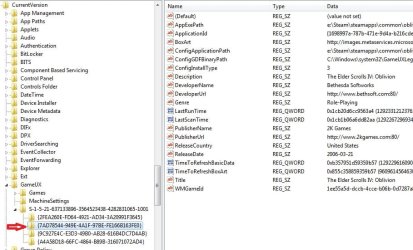
If you copy pasted or drag n dropped the FF shortcut into your games explorer, the key you need will likely be in the 3rd section .. Looks like S-1 ..........

Expand that folder and look through the keys. 1 of the keys will reference the shortcut. And will be named as it is in the games explorer.

Once you find that key, make note of it.

Navigate to COMPUTER // C // Users // "user name" // App Data // Local // microsoft // Windows // Game Explorer

Once here, look for the folder with the same key name as the registry entry you found earlier.
Open it & dbl check you have the right one, then delete the folder.

Now, delete the Registry key of the same name.

Screen shot shows an example of what the manually added games will look like in RegEdit.

technically, deleting the reg key should remove the shortcut from game Explorer. But you may as well clean it all up.
 

Attachments

  • Capture1.jpg
    Capture1.jpg
    76.4 KB · Views: 63

My Computer

Computer Manufacturer/Model Number
Custom (Self Build)
OS
Windows 7 Home Premium 64bit
CPU
Intel Core i7 2700k
Motherboard
eVGA P67 SLI
Memory
8GB Mushkin Redline Ridgebacks @1866
Graphics Card(s)
EVGA GTX570 SC
Sound Card
XiFi Titanium HD
Monitor(s) Displays
LG W2453V
Screen Resolution
1920x1080
Hard Drives
Intel 320 80GB -- Intel X25-V 40GB --WD Black 1TB x2 -- WD Blue 640GB
PSU
Seasonic x750
Case
Corsair 600T SE White
Cooling
eVGA Superclocked CPU Cooler
Keyboard
Saitek Cyborg
Antivirus
Kaspersky
Browser
IE
Other Info
LG BD/DVD
Go here,

C:\Users\Your Name\AppData\Local\Microsoft\Windows\GameExplorer

and locate the folder in there (will all be a series of letters and numbers) that is for BF:H. If you know the date you made the shortcut it will help in finding it, otherwise you will have to go through each of the folders till you find the correct one. If you haven't done so yet you will have to go into Folder Options and set it to "show hidden files and folders" to be able to see the AppData folder.

Haven't tried the regedit method myself, but the above has worked every time for me when removing shortcuts from the Games Explorer folder that I have added manually and don't get removed when the game is uninstalled.
 

My Computer

Computer type
PC/Desktop
Computer Manufacturer/Model Number
Me
OS
Win 7 Ultimate x64
CPU
FX-8350 @ 4.6 GHz so far
Motherboard
Asus M5A97 EVO
Memory
ADATA XPG V1 Series Black 8GB DDR3 1600
Graphics Card(s)
Sapphire R9 270x Dual-X
Sound Card
Xonar DGX w/ Corsair Vengence 1300
Monitor(s) Displays
Acer S232HL Abid
Screen Resolution
1920x1080
Hard Drives
120 GB OCZ Vertex 3
500 GB Seagate 7200.12
PSU
Antec Earthwatts 650W Green
Case
Antec Three Hundred
Cooling
Cooler Master 212 EVO
Keyboard
Logitech G510
Mouse
Logitech G500s
Internet Speed
35000/3000
Thanks Wishmaster, my wish has been granted =)
Didn't know there was a second folder for it. I also deleted some more unwanted stuff in my GameExplorer.

I'd say the Regedit is more effective that the "C:\Users\Your Name\AppData\Local\Microsoft\Windows\GameExplorer."
I tried it after, it does work (I undid the regedit deletion) but the Regedit way shows the Binary path and the Name. And you don't have to look through folders, you just have to click down one, look, down one, etc.
 

My Computer

Computer type
PC/Desktop
Computer Manufacturer/Model Number
Custom Build
OS
Windows 7
CPU
Intel i5-2500k
Motherboard
Gigabyte P67-UD3-B3
Memory
8GB RAM
Graphics Card(s)
NVIDIA GTX 560 Ti
Monitor(s) Displays
FLATRON W2042TQ.
Screen Resolution
1680 x 1050
Hard Drives
Western Digital WD Black 1TB 7200 RPM 64MB Cache SATA 6.0Gb/s
PSU
Silverstone 500W
Case
Cooler Master Gladiator 600
Keyboard
Razer Blackwidow Ultimate
Mouse
Corsair
Internet Speed
4GB mbps (DLs @ 600kb/s)
Antivirus
Avast
Browser
Firefox
Glad it worked out for you. :)

Either way should work. its just which way you prefer to go about it. I always like removing the reg Key as well is why I prefer this method.
Although it may not always be neccasary.
 

My Computer

Computer Manufacturer/Model Number
Custom (Self Build)
OS
Windows 7 Home Premium 64bit
CPU
Intel Core i7 2700k
Motherboard
eVGA P67 SLI
Memory
8GB Mushkin Redline Ridgebacks @1866
Graphics Card(s)
EVGA GTX570 SC
Sound Card
XiFi Titanium HD
Monitor(s) Displays
LG W2453V
Screen Resolution
1920x1080
Hard Drives
Intel 320 80GB -- Intel X25-V 40GB --WD Black 1TB x2 -- WD Blue 640GB
PSU
Seasonic x750
Case
Corsair 600T SE White
Cooling
eVGA Superclocked CPU Cooler
Keyboard
Saitek Cyborg
Antivirus
Kaspersky
Browser
IE
Other Info
LG BD/DVD
Back
Top