Solved Just bought computer, but available shrink space on C: is tiny

Zindar

New member
Local time
4:47 PM
Messages
18
Location
Austin, Texas
Hello, I read another thread on this forum that advocates creating a new drive partition by shrinking the C: drive, and keep all data files on the other drive letter. So in my attempt to do that (i have Windows 7 64 bit), I went into disk management / shrink volume and

size before shrinking of C = 152521 MB
size of available shrink = 263 MB

By the way, this is a refurbished Dell optiplex 780 I got from ebay. It came with Window 7 already freshly installed, as well as Office 2007.

The only things I've done on this computer since purchase are:

Installed Macrium Reflect free edition
Used it to make a rescue disk
Ran a restore test by using disk management to create a very small drive Y (by shrink C via disk managemnt)
Removed Y and recombined it with C

The funny thing is, I could swear that when I created Y, there was a considerable about of shrink space. I hypothesized maybe when I delete Y and recombined, that maybe some sectors on it still had data, so I tried doing a defrag on C, but it doesn't solve the problem. I still have a very small amount of shrink space.

Any ideas on what's causing this?
 

My Computer My Computer

At a glance

Windows 7 Home Premium 64 bit3.16GHz Core 2 Duo (E8500)4 GBATI Radeon HD2400
Computer type
PC/Desktop
Computer Manufacturer/Model Number
Dell OptiPlex 760 Mini Tower
OS
Windows 7 Home Premium 64 bit
CPU
3.16GHz Core 2 Duo (E8500)
Memory
4 GB
Graphics Card(s)
ATI Radeon HD2400
Hard Drives
250GB
Browser
Chrome
Post a shot of Disk Management.

Defragging does not create space.
 

My Computer My Computer

At a glance

Windows 10 Pro x64Intel Core i7 6700KGSkill TridentZ RGB 16GB 3600 16-16-16-36EVGA GTX 980 Ti SC x2
Computer type
PC/Desktop
Computer Manufacturer/Model Number
Skylake Special #666
OS
Windows 10 Pro x64
CPU
Intel Core i7 6700K
Motherboard
Asus Sabertooth Z170 Mark 1
Memory
GSkill TridentZ RGB 16GB 3600 16-16-16-36
Graphics Card(s)
EVGA GTX 980 Ti SC x2
Sound Card
Realtek High Definition
Monitor(s) Displays
AOC G2460PG
Screen Resolution
1920 x 1080 144Hz
Hard Drives
Samsung 860 Pro 256GB, Seagate Barracuda 4TB x2
PSU
EVGA 1000 P2, EVGA White Custom Braided Cables
Case
Corsair Vengeance C70 Gunmetal Black
Cooling
Corsair H100i v2, Corsair ML120 x2, Thermal Grizzly Kryonaut
Keyboard
Logitech G910 Orion Spectrum
Mouse
Logitech G700s
Internet Speed
Verizon Fios Quantum Gateway 75/75
Antivirus
Windows Defender, Malwarebytes Free 3.8.3
Browser
Chrome
Other Info
Corsair SP120 x4, LG Blu-ray Drive, Durabrand HT-395 100 Watt Dolby Digital Amp, Corsair H2100 Wireless 7.1 Headset
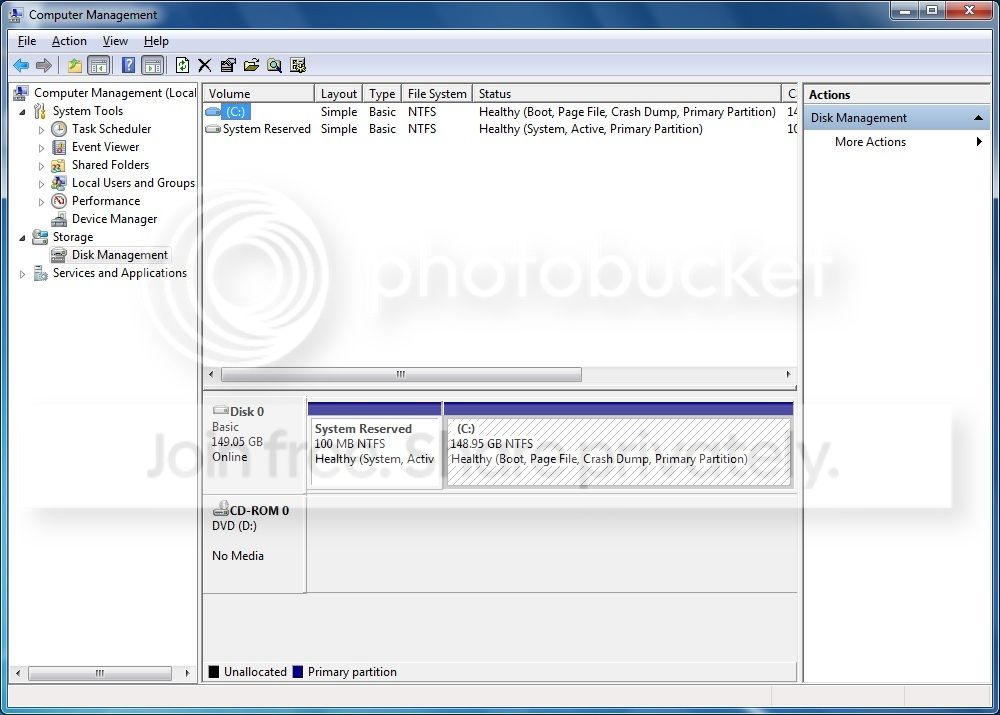
Okay, here's the disk management screen:

DiskManagement_zpsz5scsn0j.jpg


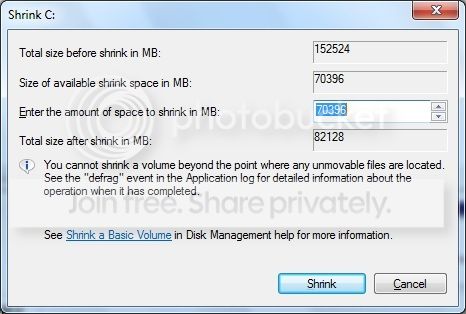
But something just happened... I rebooted because I think it wanted to apply a Windows update, and all of a sudden I have more shrink space now:

ShrinkVolume_zpsfyvwsvzx.jpg


It looks like now I can shrink C down to 82GB. Still seems kind of big to me, but I'm pretty sure that's the same number I saw when I first did my test shrinking earlier. Does 82GB seem reasonable for a drive intended to hold the OS plus installed programs? I was considering going down to 50GB, but I guess I can live with 82GB.

Update: as I speak, the computer wanted to do another Windows update, and I'm pretty sure the hard disk has more data on it now that it did before... A quick look at windows explorer shows that I have 32.7 GB of data on C: right now, and the only app installed besides Windows is Office 2007, so maybe 50 GB might be a little low to shoot for anyhow (not that I have a long list of things I want to install).

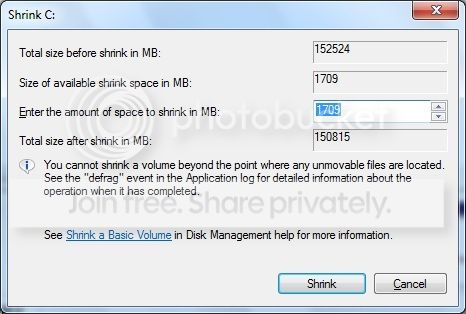
But oh no! After this second windows update, I again have very little shrink space:

ShrinkVolume2_zpsqziqers2.jpg


Only 1709 MB I can use for the new partition? What goes on here?
 

My Computer My Computer

At a glance

Windows 7 Home Premium 64 bit3.16GHz Core 2 Duo (E8500)4 GBATI Radeon HD2400
Computer type
PC/Desktop
Computer Manufacturer/Model Number
Dell OptiPlex 760 Mini Tower
OS
Windows 7 Home Premium 64 bit
CPU
3.16GHz Core 2 Duo (E8500)
Memory
4 GB
Graphics Card(s)
ATI Radeon HD2400
Hard Drives
250GB
Browser
Chrome
Windows Disk Manager has some limitations when resizing partitions and you will likely need to use a third party utility. There are some free alternatives available. When shrinking a partition the situation will often occur that files will need to be moved. Internally this can be an involved process which the built in utility is not capable of performing.

Microsoft could have provided a full featured disk management utility but that would leave competing products without a market and that would lead to serious legal problems, as has happened in the past.
 

My Computer My Computer

At a glance

Windows 7 Pro 64 bitXeon W35208 GBNvidia Geforce 210
Computer type
PC/Desktop
Computer Manufacturer/Model Number
HP
OS
Windows 7 Pro 64 bit
CPU
Xeon W3520
Memory
8 GB
Graphics Card(s)
Nvidia Geforce 210
I would just add another drive to the system, that`s a 160 GB drive you have there, I wouldn`t even bother shrinking it.

And we can`t see the free space available in your DM shot, it`s cut off.
 

My Computer My Computer

At a glance

Windows 10 Pro x64Intel Core i7 6700KGSkill TridentZ RGB 16GB 3600 16-16-16-36EVGA GTX 980 Ti SC x2
Computer type
PC/Desktop
Computer Manufacturer/Model Number
Skylake Special #666
OS
Windows 10 Pro x64
CPU
Intel Core i7 6700K
Motherboard
Asus Sabertooth Z170 Mark 1
Memory
GSkill TridentZ RGB 16GB 3600 16-16-16-36
Graphics Card(s)
EVGA GTX 980 Ti SC x2
Sound Card
Realtek High Definition
Monitor(s) Displays
AOC G2460PG
Screen Resolution
1920 x 1080 144Hz
Hard Drives
Samsung 860 Pro 256GB, Seagate Barracuda 4TB x2
PSU
EVGA 1000 P2, EVGA White Custom Braided Cables
Case
Corsair Vengeance C70 Gunmetal Black
Cooling
Corsair H100i v2, Corsair ML120 x2, Thermal Grizzly Kryonaut
Keyboard
Logitech G910 Orion Spectrum
Mouse
Logitech G700s
Internet Speed
Verizon Fios Quantum Gateway 75/75
Antivirus
Windows Defender, Malwarebytes Free 3.8.3
Browser
Chrome
Other Info
Corsair SP120 x4, LG Blu-ray Drive, Durabrand HT-395 100 Watt Dolby Digital Amp, Corsair H2100 Wireless 7.1 Headset
I would just add another drive to the system, that`s a 160 GB drive you have there, I wouldn`t even bother shrinking it.

Before I read this post, I followed LMiller7's advice and downloaded some freeware I found (called AOMEI partition assistant), and it seemed pretty easy and intuitive - I successfully shrunk C to 80 GB, and assigned the other 80 GB to an E drive. It did give an error message, and said it failed to assign a letter to the new partition (and I don't think I ever gave it one, but I remember seeing that by default it wanted to use E, which seemed fine to me.) It told me to reboot (and I inferred that after reboot, I'd have redo things and/or deal with this error) - I rebooted, and once done, it appeared to me that everything worked fine after all. Both AOMEI and Windows Disk Management are reporting both partitions, assigned to the correct letters, with the correct sizes, and the correct/expected amount of free space, so I think it all worked.

I know the drive isn't all that big, but I got the idea of doing this from a tutorial on this site that teaches us how to use Macrium Reflect Free (which I downloaded to backup Windows 7 and Microsoft Office, which both came included with this computer I just bought, but no CDs came with it, hence my desire to create a backup image). But the tutorial goes on to say how Macrium can be used to back up data as well, on a periodic basis, and he recommends keeping data in a different partition, to make it easier to back up data separately from the OS.

That being said, I'm open to the idea of adding a second drive (I've installed drives many times). I just read on another thread in this forum about one guy that recommends adding either a 64GB or a 128GB SSD drive, and making that the boot drive, and keeping the spinning drive as a data drive. I've never installed an SSD drive before though. I wonder if Macrium will care that it's an SSD, and let me restore my image to it. I'd also have to learn how to change which drive / partition is the boot partition, but I'd hope that wouldn't be too hard.
 

My Computer My Computer

At a glance

Windows 7 Home Premium 64 bit3.16GHz Core 2 Duo (E8500)4 GBATI Radeon HD2400
Computer type
PC/Desktop
Computer Manufacturer/Model Number
Dell OptiPlex 760 Mini Tower
OS
Windows 7 Home Premium 64 bit
CPU
3.16GHz Core 2 Duo (E8500)
Memory
4 GB
Graphics Card(s)
ATI Radeon HD2400
Hard Drives
250GB
Browser
Chrome
Back
Top