
Just did a Systems Health report through Windows 7, how do I fix a fa

squirtmph

New member
Member
VIP
Local time
9:35 PM
Messages
235
Location
PDX
Just did a Systems Health report through Windows 7, how do I fix a failed item?
I have RUN Sacan with:
Malware Byes Full acces software
Norton 360
AdwCleaner
ComboFix
I RUN all above UPDATED programs have found nothing was detected ON PC
Step # 2 Event viewer
Event Viewer = Start >Type in Search Box >eventvwr.msc
Warning - DNS Client Events - EventID:1014 Task:None
Error - Windows Media Player - EventID:1432 Task:None
Error - Service Control Manager - EventID:700,7001,7003,7009 Task:None
Warning - WLAN-Auto Config - EventID:4001 Task:None
Warning - DNS Client Events - EventID:1014 Task:None
Error - HAL - EventID:12 Task:None
Warning - CDRom - EventID:51,7,11 Task:None
Warning - Kernel-PnP EventID:225 Task:None
Information - Service Control Manager - EventID: 7036 Task:None
General Tab:The device, \DeviceCdRom0, has a bad block
 

Attachments
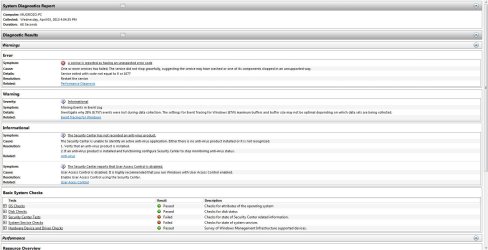
  • System Diagnostic Report 4-3-2013 4-25-49 PM.jpg
    System Diagnostic Report 4-3-2013 4-25-49 PM.jpg
    138.8 KB · Views: 20

My Computer My Computer

At a glance

Windows 10 Pro Version 22H2 64-bit EditionIntel(R) Core(TM) i7-10875H CPU @ 2.30GHz 2.3...2.0 GB (31.8 GB usable)
Computer type
Laptop
Computer Manufacturer/Model Number
Azure Blade 15.6
OS
Windows 10 Pro Version 22H2 64-bit Edition
CPU
Intel(R) Core(TM) i7-10875H CPU @ 2.30GHz 2.30 GHz
Memory
2.0 GB (31.8 GB usable)
Monitor(s) Displays
4K UHD OLED TOUCH
Screen Resolution
3840 x 2160
Hard Drives
1 TB
Mouse
Logitech MX Master 3S
Antivirus
Windows Security
Browser
Google Chrome
Other Info
______________________________________________


______________________________________________
Do you have performance problems? Win7 should never hang and always be instantaneous on adequate tested hardware with a perfect install of Win7.

If you have Norton 360 bloatware installed then why does it say no AV detected?

These Troubleshooting Steps for Windows 7 show how to resolve repeat errors in logs, utilize system resources to solve problems, test hardware and get a perfect reinstall.
 
Do you have performance problems?

Windows Experience Index assesses key system components on scale of 1.0 to 7.9
*I collect 5.9 Rate*
PC Model:
Toshiba Qosmio X505-Q894 Specs (18.4" - Core i7 740QM - Windows 7 Home Premium 64-bit - 4 GB RAM - 500 GB HDD) - Laptops - CNET Reviews
If you have Norton 360 bloatware installed then why does it say no AV detected?
I have contacted Norton sometimes this week, and the check Installed software, and the say everything was fine, They say It was behind what they can do for me, and I should contact Toshiba or Windows. But Toshiba they are not unable to give you support unless you shoe them $$$.
test hardware and get a perfect reinstall.
I just have windows Installed W7 last week, Because I was Running Uninstalled Windows, I have done all updates same day as well.
I have use Freeware software as well and other commands
Tweaking.com - Windows Repair (All in One)
Check Disk Utility chkdsk
sfc /scannow
Startup Programs - Change

For
64-bit Windows 7 only:
HKEY_LOCAL_MACHINE\SOFTWARE\Wow6432Node\Microsoft\Windows(File NO Show)\CurrentVersion(File NO Show)\Run(File NO Show)
AND
HKEY_LOCAL_MACHINE\SOFTWARE\Wow6432Node\Microsoft\Windows (File NO Show)\CurrentVersion(File NO Show) \RunOnce(File NO Show)
Under WOW6432Node shows ONLY
Microsoft\Active Setup\ Installed Components

What should I do know?

Thank you for you post!
 
Last edited:

My Computer My Computer

At a glance

Windows 10 Pro Version 22H2 64-bit EditionIntel(R) Core(TM) i7-10875H CPU @ 2.30GHz 2.3...2.0 GB (31.8 GB usable)
Computer type
Laptop
Computer Manufacturer/Model Number
Azure Blade 15.6
OS
Windows 10 Pro Version 22H2 64-bit Edition
CPU
Intel(R) Core(TM) i7-10875H CPU @ 2.30GHz 2.30 GHz
Memory
2.0 GB (31.8 GB usable)
Monitor(s) Displays
4K UHD OLED TOUCH
Screen Resolution
3840 x 2160
Hard Drives
1 TB
Mouse
Logitech MX Master 3S
Antivirus
Windows Security
Browser
Google Chrome
Other Info
______________________________________________


______________________________________________
I just have re-installed Windows by Microsoft technician last week!
Why would this folder are Missing?
METHOD FOUR - Manually in Registry Editor
Microsoft\Windows\CurrentVersion\Run
Microsoft\Windows\CurrentVersion\RunOnce


the most Important question is, how Important are they?

How do I know Windows is properly Installed another question I have in My head ):

I can post Image If you Like!

Thank you
 
Last edited:

My Computer My Computer

At a glance

Windows 10 Pro Version 22H2 64-bit EditionIntel(R) Core(TM) i7-10875H CPU @ 2.30GHz 2.3...2.0 GB (31.8 GB usable)
Computer type
Laptop
Computer Manufacturer/Model Number
Azure Blade 15.6
OS
Windows 10 Pro Version 22H2 64-bit Edition
CPU
Intel(R) Core(TM) i7-10875H CPU @ 2.30GHz 2.30 GHz
Memory
2.0 GB (31.8 GB usable)
Monitor(s) Displays
4K UHD OLED TOUCH
Screen Resolution
3840 x 2160
Hard Drives
1 TB
Mouse
Logitech MX Master 3S
Antivirus
Windows Security
Browser
Google Chrome
Other Info
______________________________________________


______________________________________________
Back
Top