
Just got a new 2T HDD - easiest way to transfer all media from 500g?

Ok the 2T is on the last lap of copying everything over via drag & drop in chunks.

From time to time the new HDD is making weird noises, then it goes silent...

I mean I know what a HDD sounds like when it normally runs, this one sounds weird from time to time... is there anything to be alarmed about, or is it normal?

I havent decided how I want to transfer the OS yet, I'm still going back through & reading everyones suggestions.

I should also state this: my OS HDD is in two partitions, one partition is for Win7 64 & the other is for Ubuntu 64 - and I want to transfer both OS... so what is the best program/way now that I've brought this wrench into the scenario?
 

My Computer My Computer

At a glance

Windows 7 64 & Ubuntu 64Intel Quad Core Q6600 2.40GHz8gNvidia 9600 GT & 9800 GT
Computer Manufacturer/Model Number
Built it myself
OS
Windows 7 64 & Ubuntu 64
CPU
Intel Quad Core Q6600 2.40GHz
Motherboard
Asus
Memory
8g
Graphics Card(s)
Nvidia 9600 GT & 9800 GT
Sound Card
Turtle Beach 5.1
Monitor(s) Displays
Three 19" Dell's & one 46" Samsung 750
For me, I use Acronis but mine is the older version but it still does its trick. Using that, you can transfer the entire OS from your 500GB HDD to your new 2TB HDD. Of course, the backup can help you select which partition to 'restore' back and you can adjust the partition size as you transfer to a new and bigger HDD size.

That's IMO.
Thanks for looking.
 

My Computer My Computer

At a glance

Microsoft Windows 7 Ultimate (x64) Build 7601Intel Core i5-3570KCorsair Vengeance 1600.9 (4GB x 3)MSI GeForce GTX-560Ti Twin Frozr II (OC Edition)
Computer type
PC/Desktop
OS
Microsoft Windows 7 Ultimate (x64) Build 7601
CPU
Intel Core i5-3570K
Motherboard
MSI Z77A-G45
Memory
Corsair Vengeance 1600.9 (4GB x 3)
Graphics Card(s)
MSI GeForce GTX-560Ti Twin Frozr II (OC Edition)
Monitor(s) Displays
Dell U2312HM
Screen Resolution
1920 x 1080
Hard Drives
Intel 330 SSD - 120GB, WD Black HDD - 1TB & WD Green HDD - 500GB
PSU
Seasonic S12II (620W)
Case
Corsair Carbide 400R
Cooling
Cooler Master Hyper 612 PWM
Keyboard
Logitech Gaming Keyboard G110
Mouse
Razer DeathAdder 3.5G
Antivirus
Kaspersky Internet Security 2013
Browser
Chrome
Other Info
Mouse Pad: Razer Goliathus Speed Edition - Medium: 355mm x 254mm x 3mm
Gamepad: Logitech Wireless Gamepad F710
Speaker: SonicGear Evo 7 Pro
Headset: SteelSeries Siberia V2 USB
Webcam: Logitech Webcam C170
Ok so all of the moving/copying is "done" but I dont think it all transfered...

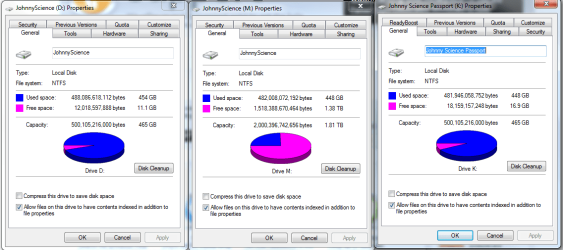
My old 500g of used space: 454 GB

My new 2T of used space: 446 GB

So clearly I'm missing something

How can I find out what files I'm missing with out going through them one by one? (there are obviously thousands)
 

My Computer My Computer

At a glance

Windows 7 64 & Ubuntu 64Intel Quad Core Q6600 2.40GHz8gNvidia 9600 GT & 9800 GT
Computer Manufacturer/Model Number
Built it myself
OS
Windows 7 64 & Ubuntu 64
CPU
Intel Quad Core Q6600 2.40GHz
Motherboard
Asus
Memory
8g
Graphics Card(s)
Nvidia 9600 GT & 9800 GT
Sound Card
Turtle Beach 5.1
Monitor(s) Displays
Three 19" Dell's & one 46" Samsung 750
I'm so stupid. I just remembered I had second copy n here.

damn it.
 

My Computer My Computer

At a glance

Windows 7 64 & Ubuntu 64Intel Quad Core Q6600 2.40GHz8gNvidia 9600 GT & 9800 GT
Computer Manufacturer/Model Number
Built it myself
OS
Windows 7 64 & Ubuntu 64
CPU
Intel Quad Core Q6600 2.40GHz
Motherboard
Asus
Memory
8g
Graphics Card(s)
Nvidia 9600 GT & 9800 GT
Sound Card
Turtle Beach 5.1
Monitor(s) Displays
Three 19" Dell's & one 46" Samsung 750
Hmm but now I'm running Secondcopy as an Exact Copy option and the profile runs for a second & then stops.

I wish I would have just remembered this before.
 

My Computer My Computer

At a glance

Windows 7 64 & Ubuntu 64Intel Quad Core Q6600 2.40GHz8gNvidia 9600 GT & 9800 GT
Computer Manufacturer/Model Number
Built it myself
OS
Windows 7 64 & Ubuntu 64
CPU
Intel Quad Core Q6600 2.40GHz
Motherboard
Asus
Memory
8g
Graphics Card(s)
Nvidia 9600 GT & 9800 GT
Sound Card
Turtle Beach 5.1
Monitor(s) Displays
Three 19" Dell's & one 46" Samsung 750
Ok its odd, so second copy is working & adding any new files when I run its profile.

But why is there such a large difference in the size of the used disk space? I mean almost 10g is a lot to just have dissapear...
 

My Computer My Computer

At a glance

Windows 7 64 & Ubuntu 64Intel Quad Core Q6600 2.40GHz8gNvidia 9600 GT & 9800 GT
Computer Manufacturer/Model Number
Built it myself
OS
Windows 7 64 & Ubuntu 64
CPU
Intel Quad Core Q6600 2.40GHz
Motherboard
Asus
Memory
8g
Graphics Card(s)
Nvidia 9600 GT & 9800 GT
Sound Card
Turtle Beach 5.1
Monitor(s) Displays
Three 19" Dell's & one 46" Samsung 750
Ok this just doesnt make any sense. I'm using secondcopy to mirror & make exact copies of my main 500g Media drive (D:)

I'm backing it up on my new 2T drive: (M:)

And also on my 500g passport (k:)

Now M & K actually have 2.32 g MORE files than the D

So why does D still have 454 while the other two have 448? (At least I'm getting 2 out of 3!)

But they are both being exactly copied off of just D:/ ?
 

Attachments

  • Untitled6.png
    Untitled6.png
    37.8 KB · Views: 3

My Computer My Computer

At a glance

Windows 7 64 & Ubuntu 64Intel Quad Core Q6600 2.40GHz8gNvidia 9600 GT & 9800 GT
Computer Manufacturer/Model Number
Built it myself
OS
Windows 7 64 & Ubuntu 64
CPU
Intel Quad Core Q6600 2.40GHz
Motherboard
Asus
Memory
8g
Graphics Card(s)
Nvidia 9600 GT & 9800 GT
Sound Card
Turtle Beach 5.1
Monitor(s) Displays
Three 19" Dell's & one 46" Samsung 750
And I was thinking for the OS situation, I was just going to use second copy to make an exact copy after I format the 500g drive

Should work & also copy the Ubuntu partitions properly shouldnt it?
 

My Computer My Computer

At a glance

Windows 7 64 & Ubuntu 64Intel Quad Core Q6600 2.40GHz8gNvidia 9600 GT & 9800 GT
Computer Manufacturer/Model Number
Built it myself
OS
Windows 7 64 & Ubuntu 64
CPU
Intel Quad Core Q6600 2.40GHz
Motherboard
Asus
Memory
8g
Graphics Card(s)
Nvidia 9600 GT & 9800 GT
Sound Card
Turtle Beach 5.1
Monitor(s) Displays
Three 19" Dell's & one 46" Samsung 750
Ok so I just went through every folder I moved (theres about 10 of them) and right clicked & hit properties on the old & the new and all of the folder sizes we the same, but for some reason the HDD's are still reading different overall used space?? Weird.

Anyways, now I wanted to format the old 500g media HDD (yes everything is backed up, twice!)

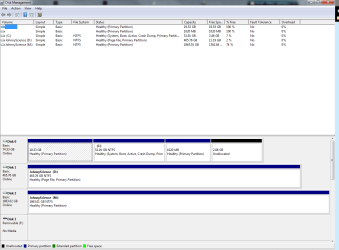
But under disk managment when I right click on that particular HDD, the Format option is ghosted out?

Any ideas on how to get this to un-ghost?
 

My Computer My Computer

At a glance

Windows 7 64 & Ubuntu 64Intel Quad Core Q6600 2.40GHz8gNvidia 9600 GT & 9800 GT
Computer Manufacturer/Model Number
Built it myself
OS
Windows 7 64 & Ubuntu 64
CPU
Intel Quad Core Q6600 2.40GHz
Motherboard
Asus
Memory
8g
Graphics Card(s)
Nvidia 9600 GT & 9800 GT
Sound Card
Turtle Beach 5.1
Monitor(s) Displays
Three 19" Dell's & one 46" Samsung 750
Hi there
Usually this is nothing to get worried about -- when for example you change a file a new cluster (or several) might be added to the file in say 4 or 6K chunks.

If a file is extended several times then there is also directory information linking the "pieces" of the file to it's physical locations on the disk.

Copying to a NEW file on a new disk will "merge" the "fragmented" pieces of the file into the base data area requiring less overall space even though the size of the file is reported as being the same.

Not a very technical explanation but I hope it helps.

For really in depth treatment you will have to look at how NTFS allocates files on disk.

Cheers
jimbo
 

My Computer My Computer

At a glance

Linux CENTOS 7 / various Windows OS'es and se...Intel i7 Intel i58GB, 16GBOn Motherboard
Computer type
PC/Desktop
Computer Manufacturer/Model Number
Custom built, several laptops HP/ASUS
OS
Linux CENTOS 7 / various Windows OS'es and servers
CPU
Intel i7 Intel i5
Memory
8GB, 16GB
Graphics Card(s)
On Motherboard
Sound Card
Realtek HD audio
Monitor(s) Displays
Apple Cinema display, Samsung LCD
Screen Resolution
1920 X 1080
Hard Drives
4 X 1TB SATA
Mouse
Toshiba wireless laser
Internet Speed
> 20MB up
Cool I understand what you're saying.

What about this:


Ok so I just went through every folder I moved (theres about 10 of them) and right clicked & hit properties on the old & the new and all of the folder sizes we the same, but for some reason the HDD's are still reading different overall used space?? Weird.

Anyways, now I wanted to format the old 500g media HDD (yes everything is backed up, twice!)

But under disk managment when I right click on that particular HDD, the Format option is ghosted out?

Any ideas on how to get this to un-ghost?
 

My Computer My Computer

At a glance

Windows 7 64 & Ubuntu 64Intel Quad Core Q6600 2.40GHz8gNvidia 9600 GT & 9800 GT
Computer Manufacturer/Model Number
Built it myself
OS
Windows 7 64 & Ubuntu 64
CPU
Intel Quad Core Q6600 2.40GHz
Motherboard
Asus
Memory
8g
Graphics Card(s)
Nvidia 9600 GT & 9800 GT
Sound Card
Turtle Beach 5.1
Monitor(s) Displays
Three 19" Dell's & one 46" Samsung 750
The only thing I can think of is that the difference in size is the data pulled over compared to the source drive. The Source drive will also have other things, such as a system voilume information which will be different from your two newer drives, which may also contain shadow copies of files previously. that will take up a percentage of the disk space and would be something you wouldn't pull over initially. Also with the other two drives, you probably have not enabled indexing or shadow copy, which will mean less disk spaced used due to lack of shadow copies or an indexing database.
 

My Computer My Computer

At a glance

Windows 7 Ultimate x64 and Home Premium x64Intel i7 960 (3.2 GHz Quad Core)12 Gigs (Triple Channel)Alienware OEM nVidia GTX 560 Ti (1.25 Gig)
Computer Manufacturer/Model Number
Alienware Area 51 Desktop and Dell Inspirion 17R (N7010)
OS
Windows 7 Ultimate x64 and Home Premium x64
CPU
Intel i7 960 (3.2 GHz Quad Core)
Motherboard
Alienware Intel based X58
Memory
12 Gigs (Triple Channel)
Graphics Card(s)
Alienware OEM nVidia GTX 560 Ti (1.25 Gig)
Sound Card
Creative Labs X-Fi Titanium
Monitor(s) Displays
Samsung PX2370 LED 23" Monitor
Screen Resolution
1920x1080
Hard Drives
2 320 Gig SATA in Raid 1 Configuration (System/App)
1 1 Tera SATA (Games)
1 1 Tera SATA (Data/Music/Videos)
PSU
750 Watt Power Supply
Case
Alienware Area 51 Desktop
Cooling
Liquid Cooled
Keyboard
Logitech G510
Mouse
Microsoft Trackball Explorer
Internet Speed
Cable
Please post back a screenshot of your full Disk Mgmt drive map and listings, using Snipping Tool in Start menu.

Your 500gb drive may have the System partition on it which is blocking deletion. It needs to be recovered into Win7 first, then force deleted. You don't want it formatted if you plan to reimage Win7 to it, just wiped to overwrite any code conflict or infection: http://www.sevenforums.com/tutorials/91339-ssd-hdd-optimize-windows-reinstallation.html

But let us see the screenshot first as there may be surprises.
 
Is there anything wrong with doing a "Quick Format"?

I unchecked it and it was just taking wayyy too long because its 2T.

But are there any disadvantages to using quick format? I'm just formatting the entire thing as one big partition.

For future reference, I find windows tediously slow when it comes to formatting drives. I generally use Acronis Disk Director for those duties. I've had no file system incompatibilities formatting for Win7 to NTFS at 4k cluster size, and it will format in a very small fragment of the time it takes Windows. I see that Paragon has the ability to format. Perhaps next time, you could try it and see if it is faster.

James
 

My Computer My Computer

At a glance

Win7U 64 RTMQ95508GB GskillASUS|EAH4850/HTDI/1GD3/A
OS
Win7U 64 RTM
CPU
Q9550
Motherboard
GA-EP45-UD3R
Memory
8GB Gskill
Graphics Card(s)
ASUS|EAH4850/HTDI/1GD3/A
Sound Card
xfi Plat
Monitor(s) Displays
Dell 2405fpw
Screen Resolution
1920x1200
Hard Drives
Seagate & WD sata Drives
PSU
Antec
Case
Antec
Keyboard
MS Natural Ergonomic 4000
Mouse
Logitech MX610 USB Cordless
Please post back a screenshot of your full Disk Mgmt drive map and listings, using Snipping Tool in Start menu.

Your 500gb drive may have the System partition on it which is blocking deletion. It needs to be recovered into Win7 first, then force deleted. You don't want it formatted if you plan to reimage Win7 to it, just wiped to overwrite any code conflict or infection: http://www.sevenforums.com/tutorials/91339-ssd-hdd-optimize-windows-reinstallation.html

But let us see the screenshot first as there may be surprises.

Ok here it is.

Cant I just drag & drop my entire C: drive to the 500g drive? Wouldnt that be easiest?
 

Attachments

  • Untitled7.png
    Untitled7.png
    26.2 KB · Views: 6

My Computer My Computer

At a glance

Windows 7 64 & Ubuntu 64Intel Quad Core Q6600 2.40GHz8gNvidia 9600 GT & 9800 GT
Computer Manufacturer/Model Number
Built it myself
OS
Windows 7 64 & Ubuntu 64
CPU
Intel Quad Core Q6600 2.40GHz
Motherboard
Asus
Memory
8g
Graphics Card(s)
Nvidia 9600 GT & 9800 GT
Sound Card
Turtle Beach 5.1
Monitor(s) Displays
Three 19" Dell's & one 46" Samsung 750
No, C will need to be cloned or imaged onto DISK1. What is the make of both HD's involved as they may have quality cloning freeware available to use. Look at the HD's or in Device Manager under Disk Drives to google serial to find out.

I would wipe DISK1 500gb using this method: SSD / HDD : Optimize for Windows Reinstallation If you get started on that now, we can find the best cloning or imaging app to use for transferring Win7 when it's done.
 
No, C will need to be cloned or imaged onto DISK1. What is the make of both HD's involved as they may have quality cloning freeware available to use. Look at the HD's or in Device Manager under Disk Drives to google serial to find out.

I would wipe DISK1 500gb using this method: SSD / HDD : Optimize for Windows Reinstallation If you get started on that now, we can find the best cloning or imaging app to use for transferring Win7 when it's done.

They are both Seagates (I got a WD this last time around... guess I should have kept them seagates, but the WD was a deal at $99.99

I'll try that read through now & see what I can do.
 

My Computer My Computer

At a glance

Windows 7 64 & Ubuntu 64Intel Quad Core Q6600 2.40GHz8gNvidia 9600 GT & 9800 GT
Computer Manufacturer/Model Number
Built it myself
OS
Windows 7 64 & Ubuntu 64
CPU
Intel Quad Core Q6600 2.40GHz
Motherboard
Asus
Memory
8g
Graphics Card(s)
Nvidia 9600 GT & 9800 GT
Sound Card
Turtle Beach 5.1
Monitor(s) Displays
Three 19" Dell's & one 46" Samsung 750
Seagate offers DiskWizard cloning which I believe is a free version of Acronis - one of the best.

Free Download link: http://www.seagate.com/www/en-us/support/downloads/discwizard

Read the User Manual here: http://www.seagate.com/support/discwizard/dw_ug.en.pdf

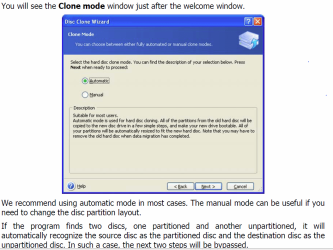
Starting on page 43 of Manual it shows how to clone. I recognize it as Acronis:
Capture.PNG

From this point forward it is automatic and will do it all for you unless you want to change partitioning on target drive in subsequent steps.

It should take about 15 minutes. Once you finish, power down to unplug the old OS drive and swap its cable to the new one, or set new one first to boot in BIOS setup.

Later after testing performance you can plug back in the old OS HD to wipe using tutorial, or boot using BIOS one-time Boot menu key.
 
Last edited:
Free Acronis Download link: | Seagate

Seagate offers free Acronis cloning which is one of the best.

I'm taking a look at it now to see what it offers in the free version. Have a look yourself.

Ok cool I'll have a look here shortly.

There isnt any easier way to wipe this disk without going through BIOS/restart?

Why isnt it just letting me format it through disk managment? It doesnt have any part of the OS on it...
 

My Computer My Computer

At a glance

Windows 7 64 & Ubuntu 64Intel Quad Core Q6600 2.40GHz8gNvidia 9600 GT & 9800 GT
Computer Manufacturer/Model Number
Built it myself
OS
Windows 7 64 & Ubuntu 64
CPU
Intel Quad Core Q6600 2.40GHz
Motherboard
Asus
Memory
8g
Graphics Card(s)
Nvidia 9600 GT & 9800 GT
Sound Card
Turtle Beach 5.1
Monitor(s) Displays
Three 19" Dell's & one 46" Samsung 750
If you now own a WD drive - Acronis True Image WD Edition Software
I have used it many times.

After checking out gregrockers seagate disk wizard link above it seems to be a similar version to the WD edition
 

My Computer My Computer

At a glance

Windows 10 Pro x 2/Windows 11 HomeIntel i7 2600K @ 3.40 GHzCorsair Vengeance 16GB DDR3 1600MHz CL8 Dual ...EVGA GeForce RTX 3080 XC3 ULTRA GAMING 10GB G...
Computer type
PC/Desktop
Computer Manufacturer/Model Number
My own abomination, I call it the Money Pit
OS
Windows 10 Pro x 2/Windows 11 Home
CPU
Intel i7 2600K @ 3.40 GHz
Motherboard
ASUS Sabertooth P67
Memory
Corsair Vengeance 16GB DDR3 1600MHz CL8 Dual Channel Kit
Graphics Card(s)
EVGA GeForce RTX 3080 XC3 ULTRA GAMING 10GB GDDR6X
Sound Card
Onboard Realtek or Nvidia High Definition Audio (HDMI)
Monitor(s) Displays
Samsung JS7000 50" SUHD TV or Samsung 27" FHD 60Hz 8ms GTG V
Screen Resolution
1920 x 1080
Hard Drives
1 x Samsung 870 EVO 250 GB SSD (Windows 10 Pro), 1 x Samsung 850 EVO 250 GB SSD (Windows 10 Pro)
PSU
Corsair AX860 - 860W Modular Power Supply
Case
Phanteks Enthoo Luxe Full Tower Case - Black
Cooling
CORSAIR Hydro Series H150i PRO RGB 360mm Liquid CPU Cooler
Keyboard
Logitech K830 Illuminated Living-Room Keyboard
Mouse
Logitech MX Anywhere 2S Wireless Mouse
Internet Speed
100 Mbps
Antivirus
ESET Internet Security
Browser
Latest Version Of Firefox & Microsoft Edge Chromium Stable
Other Info
LG Super Multi Blue Internal Blu-ray Disk Rewriter - BH10LS30
6x2 HDMI Switcher (6 inputs, 2 outputs) so I can send the output of my Cable Box, Roku, or any my 4 computers to either my TV or Monitor separately or simultaneously.
Back
Top