Solved Just how many video folders should there be??

Florio

New member
Member
Local time
4:04 PM
Messages
77
Location
Italy
Up until recently I had two video folders on my PC, one in with my collections (photos, music, videos etc), which I consider the principal folder, and another as a User subfolder (which is identical in terms of its contents to the main one, and which I don't really touch).

The other day, for some reason there was a third folder, containing exactly the same files as the other two, nested within the public videos subfolder of the main video folder. As my video folder contains numerous films, and is therefore very space consuming, I decided to delete the third folder; I received a message that the contents were too big to go in the bin. After about a minute I realised that the contents of this third folder were also being removed from the other two video folders, and so I cancelled the deletion, but not before a large number of video files had been completely removed.:cry:

I have managed to recover some of these (but by no means all of them) by using various software. But the problem still remains: why is there a third video folder, and how can I get rid of it and its contents without affecting my other video folders?:confused:
 

My Computer My Computer

At a glance

Windows 7 Home Premium 64bit
OS
Windows 7 Home Premium 64bit
Please post a screenshot. That will show the problem.

So you deleted files from Folder1, Folder2, or Folder3? Assume you deleted files from folder3.

Rightclick on folder3 and select "previous versions". Select some version and click "open". Now you can drag some old (deleted) files to the current folder.
 

My Computer My Computer

At a glance

Microsoft Windows 7 Home Premium 64-bits 7601...Intel(R) Core(TM) i3 CPU M 370 @ 2.40GHz4,00 GBATI Mobility Radeon HD 5400 Series
Computer type
Laptop
Computer Manufacturer/Model Number
ACER ASPIRE 5742G
OS
Microsoft Windows 7 Home Premium 64-bits 7601 Multiprocessor Free Service Pack 1
CPU
Intel(R) Core(TM) i3 CPU M 370 @ 2.40GHz
Motherboard
Acer Aspire 5742G
Memory
4,00 GB
Graphics Card(s)
ATI Mobility Radeon HD 5400 Series
Sound Card
(1) AMD High Definition Audio Device (2) Realtek High Defi
Screen Resolution
1366 x 768 x 32 bits (4294967296 colors) @ 60 Hz
Hard Drives
WDC WD5000BEVT-22ZAT0
Thanks for the reply, Kaktussoft.

I initially tried what you've suggested, but there were no restore points on my PC!!!
I used a couple of recovery tools (including Recuva), but many of the files I'd erased could not be restored.
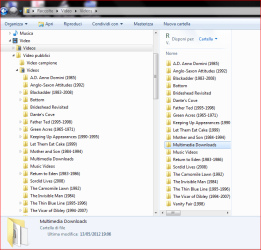
I've uploaded a screenshot but it is not terribly helpful. You can probably see, however, that the two video folders are identical (I wouldn't have been able to fit the User video folder on the same screenshot.)
 

Attachments

  • video folders.PNG
    video folders.PNG
    29 KB · Views: 12

My Computer My Computer

At a glance

Windows 7 Home Premium 64bit
OS
Windows 7 Home Premium 64bit
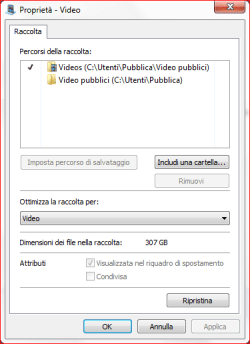
Rightclick on library Video just under musica. Select properties. Post screenshot

Under library Video I see 2 folders called Videos with an icon. Both folders have same contents? So if you add a file to one folder it is also in the older folder?

Does the problem folder contain Public or Private stuff? I mean should all users on pc be able to see them?
 
Last edited:

My Computer My Computer

At a glance

Microsoft Windows 7 Home Premium 64-bits 7601...Intel(R) Core(TM) i3 CPU M 370 @ 2.40GHz4,00 GBATI Mobility Radeon HD 5400 Series
Computer type
Laptop
Computer Manufacturer/Model Number
ACER ASPIRE 5742G
OS
Microsoft Windows 7 Home Premium 64-bits 7601 Multiprocessor Free Service Pack 1
CPU
Intel(R) Core(TM) i3 CPU M 370 @ 2.40GHz
Motherboard
Acer Aspire 5742G
Memory
4,00 GB
Graphics Card(s)
ATI Mobility Radeon HD 5400 Series
Sound Card
(1) AMD High Definition Audio Device (2) Realtek High Defi
Screen Resolution
1366 x 768 x 32 bits (4294967296 colors) @ 60 Hz
Hard Drives
WDC WD5000BEVT-22ZAT0
Hi Kaktussoft,

Sorry to have taken so long to get back to you (terrible week!!).

Here is the screenshot you asked for (you'll notice that my version of Windows 7 is in Italian, but I'm sure you can still understand what the commands etc. are).

If I add a file or subfolder to any one of the three video folders, it appears in the other two folders.

I am really the only one who uses this computer, and there is only one user profile (if my wife does use this laptop, she uses my profile; but she doesn't watch my videos!)

Florio
 

Attachments

  • Cattura.PNG
    Cattura.PNG
    10.6 KB · Views: 3

My Computer My Computer

At a glance

Windows 7 Home Premium 64bit
OS
Windows 7 Home Premium 64bit
It isn't a folder problem at all!! It's a library problem.

public video's are in: c:\utenti\pubblica\videos pubblica (the default , so fine)
private video's are in: c:\utenti\pubblica\videos pubblica\videos

So private video's are in subfolder of public video's!! Normally you see private and public video's. So some folders you see twice. They are actually the same!

Click on "reset to default settings" somewhere on bottom of screenshot. Click ok. Now again properties and post screenshot
 

My Computer My Computer

At a glance

Microsoft Windows 7 Home Premium 64-bits 7601...Intel(R) Core(TM) i3 CPU M 370 @ 2.40GHz4,00 GBATI Mobility Radeon HD 5400 Series
Computer type
Laptop
Computer Manufacturer/Model Number
ACER ASPIRE 5742G
OS
Microsoft Windows 7 Home Premium 64-bits 7601 Multiprocessor Free Service Pack 1
CPU
Intel(R) Core(TM) i3 CPU M 370 @ 2.40GHz
Motherboard
Acer Aspire 5742G
Memory
4,00 GB
Graphics Card(s)
ATI Mobility Radeon HD 5400 Series
Sound Card
(1) AMD High Definition Audio Device (2) Realtek High Defi
Screen Resolution
1366 x 768 x 32 bits (4294967296 colors) @ 60 Hz
Hard Drives
WDC WD5000BEVT-22ZAT0
Most likely you dragged on dropped your "private video" folder to c:\users\public\videos (but then in Italian). win7 is too smart and updates libary automatically as well.
 

My Computer My Computer

At a glance

Microsoft Windows 7 Home Premium 64-bits 7601...Intel(R) Core(TM) i3 CPU M 370 @ 2.40GHz4,00 GBATI Mobility Radeon HD 5400 Series
Computer type
Laptop
Computer Manufacturer/Model Number
ACER ASPIRE 5742G
OS
Microsoft Windows 7 Home Premium 64-bits 7601 Multiprocessor Free Service Pack 1
CPU
Intel(R) Core(TM) i3 CPU M 370 @ 2.40GHz
Motherboard
Acer Aspire 5742G
Memory
4,00 GB
Graphics Card(s)
ATI Mobility Radeon HD 5400 Series
Sound Card
(1) AMD High Definition Audio Device (2) Realtek High Defi
Screen Resolution
1366 x 768 x 32 bits (4294967296 colors) @ 60 Hz
Hard Drives
WDC WD5000BEVT-22ZAT0
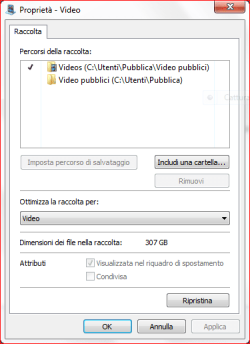
Have done as you say, but the screenshot is the same. I'm sure that you are right, and that I (accidentally) dragged and dropped one video folder into the other.
The 'ripristina' button doesn't seem to have done anything.
 

Attachments

  • Cattura.PNG
    Cattura.PNG
    11.8 KB · Views: 1

My Computer My Computer

At a glance

Windows 7 Home Premium 64bit
OS
Windows 7 Home Premium 64bit
In folder c:\utenti\pubblica\videos pubblica
you have a folder called "videos"
right click on it->properties.->tab location.->default settings. the location changes to C:\users\yourname\Music (yes?)
Now press OK and again OK I think.

Create screenshot again and post it
 

My Computer My Computer

At a glance

Microsoft Windows 7 Home Premium 64-bits 7601...Intel(R) Core(TM) i3 CPU M 370 @ 2.40GHz4,00 GBATI Mobility Radeon HD 5400 Series
Computer type
Laptop
Computer Manufacturer/Model Number
ACER ASPIRE 5742G
OS
Microsoft Windows 7 Home Premium 64-bits 7601 Multiprocessor Free Service Pack 1
CPU
Intel(R) Core(TM) i3 CPU M 370 @ 2.40GHz
Motherboard
Acer Aspire 5742G
Memory
4,00 GB
Graphics Card(s)
ATI Mobility Radeon HD 5400 Series
Sound Card
(1) AMD High Definition Audio Device (2) Realtek High Defi
Screen Resolution
1366 x 768 x 32 bits (4294967296 colors) @ 60 Hz
Hard Drives
WDC WD5000BEVT-22ZAT0
I'm doing it now, but all of the files are being copied!! Should this be happening? It's going to take an hour...
 

My Computer My Computer

At a glance

Windows 7 Home Premium 64bit
OS
Windows 7 Home Premium 64bit
Copying from what to what? to c:\users\yourname\videos?
There was u button "relocate" as well!

Let it copy now

Are you still in dialog?
 

My Computer My Computer

At a glance

Microsoft Windows 7 Home Premium 64-bits 7601...Intel(R) Core(TM) i3 CPU M 370 @ 2.40GHz4,00 GBATI Mobility Radeon HD 5400 Series
Computer type
Laptop
Computer Manufacturer/Model Number
ACER ASPIRE 5742G
OS
Microsoft Windows 7 Home Premium 64-bits 7601 Multiprocessor Free Service Pack 1
CPU
Intel(R) Core(TM) i3 CPU M 370 @ 2.40GHz
Motherboard
Acer Aspire 5742G
Memory
4,00 GB
Graphics Card(s)
ATI Mobility Radeon HD 5400 Series
Sound Card
(1) AMD High Definition Audio Device (2) Realtek High Defi
Screen Resolution
1366 x 768 x 32 bits (4294967296 colors) @ 60 Hz
Hard Drives
WDC WD5000BEVT-22ZAT0
cancel the copy

move the files/folders yourself from c:\utenti\pubblica\videos to pubblica\videos to c:\utenti\yourname\my videos
Now c:\utenti\pubblica\videos to pubblica\videos is empty and c:\utenti\yourname\my videos has all the stuff

then do again
In folder c:\utenti\pubblica\videos pubblica
you have a folder called "videos"
right click on it->properties.->tab location.->default settings. the location changes to C:\users\yourname\Videos (yes?)
Now press OK and again OK I think.

Create screenshot again and post it
-----
P.S. I posted Music in last post sorry
 

My Computer My Computer

At a glance

Microsoft Windows 7 Home Premium 64-bits 7601...Intel(R) Core(TM) i3 CPU M 370 @ 2.40GHz4,00 GBATI Mobility Radeon HD 5400 Series
Computer type
Laptop
Computer Manufacturer/Model Number
ACER ASPIRE 5742G
OS
Microsoft Windows 7 Home Premium 64-bits 7601 Multiprocessor Free Service Pack 1
CPU
Intel(R) Core(TM) i3 CPU M 370 @ 2.40GHz
Motherboard
Acer Aspire 5742G
Memory
4,00 GB
Graphics Card(s)
ATI Mobility Radeon HD 5400 Series
Sound Card
(1) AMD High Definition Audio Device (2) Realtek High Defi
Screen Resolution
1366 x 768 x 32 bits (4294967296 colors) @ 60 Hz
Hard Drives
WDC WD5000BEVT-22ZAT0
I cancelled the copying as it was going to take forever; I'm not sure exactly how much was copied or where it ended up!
I'll try following your latest suggestions. I'm a bit wary of losing my files again, but we'll see how it goes. I suppose I'll be told that the various files already exist and then asked if I want to replace them. I'll get back to you later, if not tonight then tomorrow.
 

My Computer My Computer

At a glance

Windows 7 Home Premium 64bit
OS
Windows 7 Home Premium 64bit
I cancelled the copying as it was going to take forever; I'm not sure exactly how much was copied or where it ended up!
I'll try following your latest suggestions. I'm a bit wary of losing my files again, but we'll see how it goes. I suppose I'll be told that the various files already exist and then asked if I want to replace them. I'll get back to you later, if not tonight then tomorrow.

Nothing is lost!!! Part of it let's say 30% has been copied. Move (don't copy) all files to the new folder. Win7 says "file already exists". Click "don't override" and put checkmark at "do same action for all files". I don't know exactly but it's something like that. Moving takes maybe 1 minute.
 

My Computer My Computer

At a glance

Microsoft Windows 7 Home Premium 64-bits 7601...Intel(R) Core(TM) i3 CPU M 370 @ 2.40GHz4,00 GBATI Mobility Radeon HD 5400 Series
Computer type
Laptop
Computer Manufacturer/Model Number
ACER ASPIRE 5742G
OS
Microsoft Windows 7 Home Premium 64-bits 7601 Multiprocessor Free Service Pack 1
CPU
Intel(R) Core(TM) i3 CPU M 370 @ 2.40GHz
Motherboard
Acer Aspire 5742G
Memory
4,00 GB
Graphics Card(s)
ATI Mobility Radeon HD 5400 Series
Sound Card
(1) AMD High Definition Audio Device (2) Realtek High Defi
Screen Resolution
1366 x 768 x 32 bits (4294967296 colors) @ 60 Hz
Hard Drives
WDC WD5000BEVT-22ZAT0
Everything now seems to be in the right place!!:D

I have my videos in the folder below images and music and also in my individual (utente) folder, with no other copies anywhere!

Thanks a lot for all your help and patience!:)
 

My Computer My Computer

At a glance

Windows 7 Home Premium 64bit
OS
Windows 7 Home Premium 64bit
it's fine now? c:\utenti\pubblica\videos to pubblica\videos is empty or gone? Or still some files there (files that you did copy and not move)

Delete that folder if you're sure everything is in the other place
 

My Computer My Computer

At a glance

Microsoft Windows 7 Home Premium 64-bits 7601...Intel(R) Core(TM) i3 CPU M 370 @ 2.40GHz4,00 GBATI Mobility Radeon HD 5400 Series
Computer type
Laptop
Computer Manufacturer/Model Number
ACER ASPIRE 5742G
OS
Microsoft Windows 7 Home Premium 64-bits 7601 Multiprocessor Free Service Pack 1
CPU
Intel(R) Core(TM) i3 CPU M 370 @ 2.40GHz
Motherboard
Acer Aspire 5742G
Memory
4,00 GB
Graphics Card(s)
ATI Mobility Radeon HD 5400 Series
Sound Card
(1) AMD High Definition Audio Device (2) Realtek High Defi
Screen Resolution
1366 x 768 x 32 bits (4294967296 colors) @ 60 Hz
Hard Drives
WDC WD5000BEVT-22ZAT0
Can't see any other video files for the moment, but if I do I'll just delete them (the other folder has disappeared).
Thanks once again for your help.
 

My Computer My Computer

At a glance

Windows 7 Home Premium 64bit
OS
Windows 7 Home Premium 64bit
Back
Top