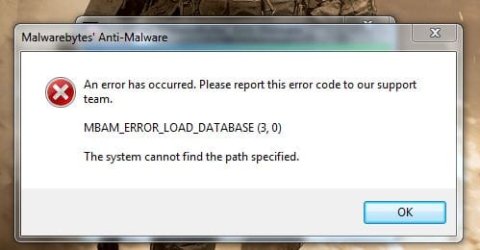
just installed new malwarbytes get this error

StealthyBoss

Banned
Local time
5:15 PM
Messages
183
i installed the new version but get an error when trying to start...
 

Attachments

  • Capture.JPG
    Capture.JPG
    29.5 KB · Views: 9

My Computer

Computer Manufacturer/Model Number
Acer Aspire 5935G
OS
Windows 7 Ultimate 32 Bit and 64 bit
CPU
intel core 2 duo
Memory
3.00GB
Graphics Card(s)
Intel powersaving gpu, ATI RADEON HD 4570
Screen Resolution
15.6" HD LED LCD
Hard Drives
320 GB
I got that too, I just pressed ok and it works fine for me.
 

My Computer

Computer type
PC/Desktop
Computer Manufacturer/Model Number
Self Built
OS
Win 10 Pro x64
CPU
Intel I5-2500K @3.3GHz
Motherboard
Asrock P67 Extreme4
Memory
16GB G.Skill Ripjaws X (4x4GB)
Graphics Card(s)
EVGA GeForce 750 Ti SC 2GB
Sound Card
ASUS Xonar DG 5.1 Channels 24-bit 96KHz PCI Interface Sound
Monitor(s) Displays
auria eq2367
Screen Resolution
1920 x 1080
Hard Drives
250GB Samsung 850 EVO SSD
1TB WD Blue
1TB Hitachi
PSU
SeaSonic X 650W 80 Plus Gold
Case
Corsair Obsidian 750D
Cooling
Corsair H60, Three 140mm case fans
Keyboard
Logitech Wireless Keyboard K520
Mouse
Logitech Wireless Mouse M310
Internet Speed
Wave Broadband ~ 100 dn 5 up
Antivirus
Windows Defender, Malwarebytes Premium
Browser
Edge, IE11, Chrome
Other Info
Laptop specs: HP g7-1365dx /
CPU: AMD A6-3420M APU with Radeon(tm) HD Graphics /
RAM: Crucial 8Gb (2x4Gb) /
SSD: Crucial M4-CT128M4SSD2 ATA Device/ FW 000F /
GFX: AMD Radeon HD 6520G /
OS: Windows 10 Pro x64
Here ya go:

1. Uninstall MBAM
2. Reboot
3. When you reinstall, right click and use "Run as Administrator"
 

My Computer

Computer Manufacturer/Model Number
Apple Macbook Pro (April 2009)
OS
W7 Ult. x64 | OS X
CPU
Intel Mobile Core 2 Duo 2.93Ghz [T9800 Penryn]
Motherboard
NVIDIA nForce 730i Rev. B1 [Mac-F2268EC8 (U2E1)]
Memory
4096MB Samsung DDR3 Dual Channel [PC3-8500F 1066Mhz]
Graphics Card(s)
NVIDIA GeForce 9600M GT 512MB [G96M Rev. C1]
Sound Card
SB X-Fi Surround 5.1 USB | Onboard Realtek (Disabled)
Monitor(s) Displays
Acer x223wbd 22" | Apple Anti-Glare 17" (Disabled)
Screen Resolution
{Current} 1440x900 {Acer} 1680x1050 {Apple} 1920x1200
Hard Drives
{Internal}
Seagate Momentus 320GB 2.5" 7200RPM [ST9320421AS]

{Externals}
LaCie 320GB USB 2.0 HDD [301284UR]
LaCie 750GB USB 2.0 FW400 eSATA HDD [301314U]
LaCie 1TB USB 2.0 HDD [301304UR]
PSU
Magsafe
Case
Aluminum/Unibody (MBP52)
Cooling
2 x 6000 RPM Fans
Keyboard
Logitech G-15v2 [PN 920-000379]
Mouse
Logitech G-9 [PN 910-000338]
Internet Speed
12Mbps/2.5Mbps w/ 24Mbps Speed Boost [Comcast]
Other Info
Logitech X-540 Speakers [PN 970223-0122]
Sennheiser PC-151 Headset
k ill try
 

My Computer

Computer Manufacturer/Model Number
Acer Aspire 5935G
OS
Windows 7 Ultimate 32 Bit and 64 bit
CPU
intel core 2 duo
Memory
3.00GB
Graphics Card(s)
Intel powersaving gpu, ATI RADEON HD 4570
Screen Resolution
15.6" HD LED LCD
Hard Drives
320 GB
it never worked :(
 

My Computer

Computer Manufacturer/Model Number
Acer Aspire 5935G
OS
Windows 7 Ultimate 32 Bit and 64 bit
CPU
intel core 2 duo
Memory
3.00GB
Graphics Card(s)
Intel powersaving gpu, ATI RADEON HD 4570
Screen Resolution
15.6" HD LED LCD
Hard Drives
320 GB
brb gonna restart again :(
 

My Computer

Computer Manufacturer/Model Number
Acer Aspire 5935G
OS
Windows 7 Ultimate 32 Bit and 64 bit
CPU
intel core 2 duo
Memory
3.00GB
Graphics Card(s)
Intel powersaving gpu, ATI RADEON HD 4570
Screen Resolution
15.6" HD LED LCD
Hard Drives
320 GB
That should work if the first method didn't...

Uninstall > Restart > Download & Run Cleaner > Restart > Download & Run MBAM as Admin > Restart?
 

My Computer

Computer Manufacturer/Model Number
Apple Macbook Pro (April 2009)
OS
W7 Ult. x64 | OS X
CPU
Intel Mobile Core 2 Duo 2.93Ghz [T9800 Penryn]
Motherboard
NVIDIA nForce 730i Rev. B1 [Mac-F2268EC8 (U2E1)]
Memory
4096MB Samsung DDR3 Dual Channel [PC3-8500F 1066Mhz]
Graphics Card(s)
NVIDIA GeForce 9600M GT 512MB [G96M Rev. C1]
Sound Card
SB X-Fi Surround 5.1 USB | Onboard Realtek (Disabled)
Monitor(s) Displays
Acer x223wbd 22" | Apple Anti-Glare 17" (Disabled)
Screen Resolution
{Current} 1440x900 {Acer} 1680x1050 {Apple} 1920x1200
Hard Drives
{Internal}
Seagate Momentus 320GB 2.5" 7200RPM [ST9320421AS]

{Externals}
LaCie 320GB USB 2.0 HDD [301284UR]
LaCie 750GB USB 2.0 FW400 eSATA HDD [301314U]
LaCie 1TB USB 2.0 HDD [301304UR]
PSU
Magsafe
Case
Aluminum/Unibody (MBP52)
Cooling
2 x 6000 RPM Fans
Keyboard
Logitech G-15v2 [PN 920-000379]
Mouse
Logitech G-9 [PN 910-000338]
Internet Speed
12Mbps/2.5Mbps w/ 24Mbps Speed Boost [Comcast]
Other Info
Logitech X-540 Speakers [PN 970223-0122]
Sennheiser PC-151 Headset
i installed at default location
 

My Computer

Computer Manufacturer/Model Number
Acer Aspire 5935G
OS
Windows 7 Ultimate 32 Bit and 64 bit
CPU
intel core 2 duo
Memory
3.00GB
Graphics Card(s)
Intel powersaving gpu, ATI RADEON HD 4570
Screen Resolution
15.6" HD LED LCD
Hard Drives
320 GB
That should work if the first method didn't...

Uninstall > Restart > Download & Run Cleaner > Restart > Download & Run MBAM as Admin > Restart
hi i also tried that, im gonna try installing on a virtual os
 

My Computer

Computer Manufacturer/Model Number
Acer Aspire 5935G
OS
Windows 7 Ultimate 32 Bit and 64 bit
CPU
intel core 2 duo
Memory
3.00GB
Graphics Card(s)
Intel powersaving gpu, ATI RADEON HD 4570
Screen Resolution
15.6" HD LED LCD
Hard Drives
320 GB
You followed the instructions in Corrine's link and it didn't work?
 

My Computer

Computer Manufacturer/Model Number
Apple Macbook Pro (April 2009)
OS
W7 Ult. x64 | OS X
CPU
Intel Mobile Core 2 Duo 2.93Ghz [T9800 Penryn]
Motherboard
NVIDIA nForce 730i Rev. B1 [Mac-F2268EC8 (U2E1)]
Memory
4096MB Samsung DDR3 Dual Channel [PC3-8500F 1066Mhz]
Graphics Card(s)
NVIDIA GeForce 9600M GT 512MB [G96M Rev. C1]
Sound Card
SB X-Fi Surround 5.1 USB | Onboard Realtek (Disabled)
Monitor(s) Displays
Acer x223wbd 22" | Apple Anti-Glare 17" (Disabled)
Screen Resolution
{Current} 1440x900 {Acer} 1680x1050 {Apple} 1920x1200
Hard Drives
{Internal}
Seagate Momentus 320GB 2.5" 7200RPM [ST9320421AS]

{Externals}
LaCie 320GB USB 2.0 HDD [301284UR]
LaCie 750GB USB 2.0 FW400 eSATA HDD [301314U]
LaCie 1TB USB 2.0 HDD [301304UR]
PSU
Magsafe
Case
Aluminum/Unibody (MBP52)
Cooling
2 x 6000 RPM Fans
Keyboard
Logitech G-15v2 [PN 920-000379]
Mouse
Logitech G-9 [PN 910-000338]
Internet Speed
12Mbps/2.5Mbps w/ 24Mbps Speed Boost [Comcast]
Other Info
Logitech X-540 Speakers [PN 970223-0122]
Sennheiser PC-151 Headset
none of them have worked :(
 

My Computer

Computer Manufacturer/Model Number
Acer Aspire 5935G
OS
Windows 7 Ultimate 32 Bit and 64 bit
CPU
intel core 2 duo
Memory
3.00GB
Graphics Card(s)
Intel powersaving gpu, ATI RADEON HD 4570
Screen Resolution
15.6" HD LED LCD
Hard Drives
320 GB
ahh got it working, i just had to run mbam cleaner as admin thanks
 

My Computer

Computer Manufacturer/Model Number
Acer Aspire 5935G
OS
Windows 7 Ultimate 32 Bit and 64 bit
CPU
intel core 2 duo
Memory
3.00GB
Graphics Card(s)
Intel powersaving gpu, ATI RADEON HD 4570
Screen Resolution
15.6" HD LED LCD
Hard Drives
320 GB
Great :)
 

My Computer

Computer Manufacturer/Model Number
Apple Macbook Pro (April 2009)
OS
W7 Ult. x64 | OS X
CPU
Intel Mobile Core 2 Duo 2.93Ghz [T9800 Penryn]
Motherboard
NVIDIA nForce 730i Rev. B1 [Mac-F2268EC8 (U2E1)]
Memory
4096MB Samsung DDR3 Dual Channel [PC3-8500F 1066Mhz]
Graphics Card(s)
NVIDIA GeForce 9600M GT 512MB [G96M Rev. C1]
Sound Card
SB X-Fi Surround 5.1 USB | Onboard Realtek (Disabled)
Monitor(s) Displays
Acer x223wbd 22" | Apple Anti-Glare 17" (Disabled)
Screen Resolution
{Current} 1440x900 {Acer} 1680x1050 {Apple} 1920x1200
Hard Drives
{Internal}
Seagate Momentus 320GB 2.5" 7200RPM [ST9320421AS]

{Externals}
LaCie 320GB USB 2.0 HDD [301284UR]
LaCie 750GB USB 2.0 FW400 eSATA HDD [301314U]
LaCie 1TB USB 2.0 HDD [301304UR]
PSU
Magsafe
Case
Aluminum/Unibody (MBP52)
Cooling
2 x 6000 RPM Fans
Keyboard
Logitech G-15v2 [PN 920-000379]
Mouse
Logitech G-9 [PN 910-000338]
Internet Speed
12Mbps/2.5Mbps w/ 24Mbps Speed Boost [Comcast]
Other Info
Logitech X-540 Speakers [PN 970223-0122]
Sennheiser PC-151 Headset
Good work Corrine :thumbsup:
 

My Computer

Computer Manufacturer/Model Number
tw33k
OS
Windows 7 Ultimate (x64) SP1
CPU
Intel 3770k 4.6GHz
Motherboard
ASUS Maximus V Formula
Memory
8GB (2x 4GB) Crucial Ballistix
Graphics Card(s)
Sapphire 7950 (1060/1600)
Sound Card
On Board Realtek HD Audio
Monitor(s) Displays
27" Acer B273HU (via HDMI)
Screen Resolution
2048 x 1152
Hard Drives
Crucial M4 128GB
2TB WD Black
1TB Samsung F3 SATA
1TB WD Elite External
2TB WD USB 3.0
PSU
Corsair AX750 Gold
Case
Corsair Obsidian 800DW
Cooling
Corsair H100 (2x AP-121/2x UK-3000 push/pull)
Keyboard
Microsoft Wireless 5000
Mouse
Microsoft Wireless 5000
Internet Speed
5mb/s
Other Info
Logitech z-2300 2.1 speakers
Lamptron FC-5 v2
hi, corrine,

[yes... this post is waaay off topic...]

how do i pm you?
there seems to be no such option here...

thx,
temmu the grate
 

My Computer

Computer Manufacturer/Model Number
Dell
OS
Windows 7
CPU
Yes
Motherboard
Yes
Memory
Yes
Graphics Card(s)
Yes
Sound Card
Yes
Monitor(s) Displays
Yes
Hard Drives
Yes
PSU
Yes
Case
Yes
Cooling
Yes
Hi, Temmu. Welcome!

The fast way is to click on my name and select View Public Profile. From there you will see a box to send a Visitor Message (that is public and anyone else can view it) or from the top of the forum page, click on "Quick Links". In the drop-down box is the option to Send PM.
 

My Computer

OS
Windows 7 & Windows Vista Ultimate
temmu, you do not have permission to access this page. This could be due to one of several reasons:

  1. Your user account may not have sufficient privileges to access this page. Are you trying to edit someone else's post, access administrative features or some other privileged system?
  2. If you are trying to post, the administrator may have disabled your account, or it may be awaiting activation.

3 characters
 

My Computer

Computer Manufacturer/Model Number
Dell
OS
Windows 7
CPU
Yes
Motherboard
Yes
Memory
Yes
Graphics Card(s)
Yes
Sound Card
Yes
Monitor(s) Displays
Yes
Hard Drives
Yes
PSU
Yes
Case
Yes
Cooling
Yes
Back
Top