Just reached 4.0 any suggestions?

crazyeyeschase

New member
Member
Local time
10:44 AM
Messages
74
Location
Quincy, IL
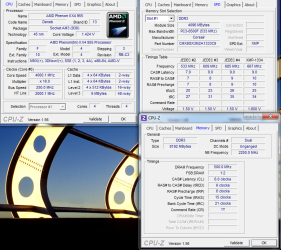
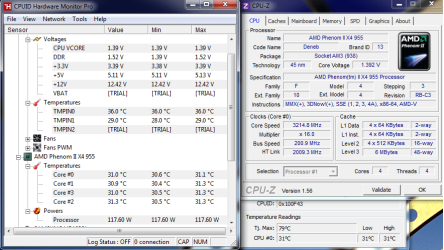
Well guys I just hit 4.0 on my 955 not really happy about the Memory aspect but here is a before and after pic.

OC…
CPU Clock Ratio - x16 - 4000
CPU NB Freq. -x9 - 2250
CPU Freq. - 250
HT Link Freq. - x8 - 2000
Memory Clock - x4.00 - 1000

CPU voltage is set at 1.425

My only other options on the RAM were x5.33 which gives me 1332 or x6.66 which gives me 1666 but if I set it to either I get BSODS.

I haven't ran a long test on LinX I will soon temps reached 53c max which is a little high for me but still decent for air cooling.
 

Attachments
  • BeforeOC.png
    BeforeOC.png
    41.9 KB · Views: 21
  • AfterOC.png
    AfterOC.png
    95.2 KB · Views: 26

My Computer My Computer

Computer Manufacturer/Model Number
Custome Build 1-1-2011
OS
Windows 7 OEM Home Pre. x64
CPU
Phenon II x4 n955 Black Ed.
Motherboard
GA 890FX UD5
Memory
Corsair XMS3 8GB (2x 4GB)
Graphics Card(s)
XFX Radeon HD 6850
Sound Card
On board
Monitor(s) Displays
ASUS 23"
Hard Drives
OCZ Agility 2 90GB SSD
Samsung Spinpoint F3 1TB
PSU
Rosewill 1000w
Case
CM Storm Scout
Cooling
5 case fans + Zalman 9900MAX
Nice OC.

What are you wanting the memory to be at 1066 or 1333?

With the CPU Clock speeds, you Memory should be just fine a 1000mhz.

EDIT:
I just realized 8GB.
If you have all 4 DIMM slots full, this will certainly make it a bit harder to OC. Being as its 1333 RAM, you should be able to get to run at that speed or lower.

You can run a quick Mem test to get a quick idea what kind of bandwidth you have.
Elevated CMD Prompt --> Winsat Mem

You may be just as well off leaving it at 1000mhz, or lower the CPU clocks if you must.
Im not all that familiar with AMD overclocking, but being as the memory controllers are on the chip ... my guess is it will require more Vcore to try and stabilize the RAM at higher speeds.
But I have no idea where you max voltages are.

Perahaps those with more AMD experience will be of more help :)


@ 4.0Ghz I would think 53C under Prime would be more than acceptable. Remember, youll never stress your PC that hard in a real world situation, so you probably will never see it get that warm even under heavier use.


At any count .. looking good so far.
 

My Computer My Computer

Computer Manufacturer/Model Number
Custom (Self Build)
OS
Windows 7 Home Premium 64bit
CPU
Intel Core i7 2700k
Motherboard
eVGA P67 SLI
Memory
8GB Mushkin Redline Ridgebacks @1866
Graphics Card(s)
EVGA GTX570 SC
Sound Card
XiFi Titanium HD
Monitor(s) Displays
LG W2453V
Screen Resolution
1920x1080
Hard Drives
Intel 320 80GB -- Intel X25-V 40GB --WD Black 1TB x2 -- WD Blue 640GB
PSU
Seasonic x750
Case
Corsair 600T SE White
Cooling
eVGA Superclocked CPU Cooler
Keyboard
Saitek Cyborg
Antivirus
Kaspersky
Browser
IE
Other Info
LG BD/DVD
I'm new-ish to the OC "scene" but if you're getting BSODs when trying to OC your ram the ram probably can't take it.

I'd invest a few bucks in higher-speed ram and make sure your board can handle it. You have an 890fx chipset board so I don't see that being a problem.

And for the record (since i have the Phenom II x4 925 OC'd to 3.4ghz) the max operating temperature for the Deneb chips is 55-71* C (131-160* F). Keep it on the low end if possible.

Are you using the stock cooler the processor came with?
 

My Computer My Computer

OS
Windows 7 Ultimate 64-bit
CPU
AMD Phenom II X6 1090T 3.2GHZ
Motherboard
MSI 890FXA-GD70
Memory
G.SKILL RipJaw 3x2GB DDR3-1066
Graphics Card(s)
2x HIS Radeon HD 6850 1 GB
Sound Card
VIA 8-channel
Monitor(s) Displays
2x 20 inch Acer LCDs, 1x 32" Sony LCD TV
Screen Resolution
4480x900
Hard Drives
1x Crucial 64GB SSD
3x 1TB HDDs (WD, Seagate, Hitatchi)
1x 500GB Seagate External
PSU
Kingwin 1000W Modular
Case
Coolermaster HAF 932
Cooling
1x 120mm, 3x 200mm, CoolerMaster Hyper 212+
Keyboard
Microsoft Wireless Keyboard 1000
Mouse
Microsoft Wiresless Mouse 5000
Internet Speed
20mbps
Other Info
Samsung BD-ROM/DVD-RW
I'm new-ish to the OC "scene" but if you're getting BSODs when trying to OC your ram the ram probably can't take it.

JL is correct. However you will also get BSOD's if your voltages are too low.

Once you start approaching 4gig and beyond you'll have to start upping voltages to run stable.

I've said it many a time - running at 4gig is one thing, doing it stable 24/7 is completely another.
 

My Computer My Computer

Computer type
PC/Desktop
Computer Manufacturer/Model Number
Custom built by me.
OS
Windows 10 Pro
CPU
Intel Core i7-4770K (3.5Ghz)
Motherboard
Gigabyte G1 Sniper 5 (F10 Bios)
Memory
32 gig Corsair Dominator Platinum (4x8Gig)
Graphics Card(s)
Sapphire Tri-X R9 Fury
Sound Card
Soundblaster ZXR
Monitor(s) Displays
NEC PA242W 24" LCD Monitor
Screen Resolution
1920 x 1200
Hard Drives
Primary - Samsung 850 Pro (512gig), Samsung 840 Pro (256gig), 2TB WD Caviar Black.
PSU
EVGA Supernova 1000 G2
Case
Cooler Master HAF X
Cooling
Corsair H100i with Corsair Air Series SP120 Quiet Fans
Keyboard
Logitech Wireless Wave
Mouse
Logitech Performance MX
Internet Speed
High Speed Cable
Antivirus
Norton Security
Browser
IE11
Other Info
Memory Timings - 1866MHz @ 9-9-9-27-1T @ 1.5 volts
Wishmaster, Thanks for the input the RAM is 2 4gb sticks. I was told by omeone else that raising the NB voltage should allow me to run at 1332 but I'm not sure waiting on some more input still vbery happy with what I have now.

Johnathan, from what I have read the max temps for the 955 is 60-65c but you generaly want to stay around 10c bveloy factory specifications and as wishmaster said you will hardley if ever put that much strain on your CPU. When I kick the RAM up it would restart give me a few beeps restart and give me BSODS so I knocked it back down no biggie. And I don’t plan on buying better RAM for some time LMAO heck they cost me a good 100 bucks as is.

This is my RAM
Newegg.com - CORSAIR XMS3 8GB (2 x 4GB) 240-Pin DDR3 SDRAM DDR3 1333 Desktop Memory Model CMX8GX3M2A1333C9

No I am not using the stock cooler I heard thgey are very loud and just didn’t look cool to me LMAO. I do wish now I bought an H70 but maybe when taxes come I can splurge or maybe ill just make a few payments on the car we will see.

My CPU cooler is the Zalman 9900 MAX
Newegg.com - ZALMAN CNPS9900MAX-R 135mm Long life bearing CPU Cooler Red LED
 

My Computer My Computer

Computer Manufacturer/Model Number
Custome Build 1-1-2011
OS
Windows 7 OEM Home Pre. x64
CPU
Phenon II x4 n955 Black Ed.
Motherboard
GA 890FX UD5
Memory
Corsair XMS3 8GB (2x 4GB)
Graphics Card(s)
XFX Radeon HD 6850
Sound Card
On board
Monitor(s) Displays
ASUS 23"
Hard Drives
OCZ Agility 2 90GB SSD
Samsung Spinpoint F3 1TB
PSU
Rosewill 1000w
Case
CM Storm Scout
Cooling
5 case fans + Zalman 9900MAX
I know nothing about AMD processors, but I'm thinking you could go higher than that. A lot of Intel users hit 70/80 especially hitting 4gig. Yes you want to stay below those thresholds, but a lot of people settle on 70's.

When I ran my i7-930 (2.8gig) overclocked to 3.52, my prime95 load temps were in the low 70's.

I would highly suggest you visit a forum like Overclockers Forums - The Performance Computing Community, register and ask some questions. Otherwise you may burn your processor or memory up.

Or since you have a gigabyte board go here - GIGABYTE. It's where I went to get some of my education on i7's ;)

My two cents.
 

My Computer My Computer

Computer type
PC/Desktop
Computer Manufacturer/Model Number
Custom built by me.
OS
Windows 10 Pro
CPU
Intel Core i7-4770K (3.5Ghz)
Motherboard
Gigabyte G1 Sniper 5 (F10 Bios)
Memory
32 gig Corsair Dominator Platinum (4x8Gig)
Graphics Card(s)
Sapphire Tri-X R9 Fury
Sound Card
Soundblaster ZXR
Monitor(s) Displays
NEC PA242W 24" LCD Monitor
Screen Resolution
1920 x 1200
Hard Drives
Primary - Samsung 850 Pro (512gig), Samsung 840 Pro (256gig), 2TB WD Caviar Black.
PSU
EVGA Supernova 1000 G2
Case
Cooler Master HAF X
Cooling
Corsair H100i with Corsair Air Series SP120 Quiet Fans
Keyboard
Logitech Wireless Wave
Mouse
Logitech Performance MX
Internet Speed
High Speed Cable
Antivirus
Norton Security
Browser
IE11
Other Info
Memory Timings - 1866MHz @ 9-9-9-27-1T @ 1.5 volts
I have been on OCN multiple times and have been reading tons and posting for that matter lol. For my processor being a C3 it is more than capable of reaching 4.0 and sometimes even higher but I'm only going to budge so much on voltages.

We just had a house fire don’t want to risk the new PC catching on fire as well LMAO. (I know ill prob be safe but until I get everything done on it I don’t want to push it to hard.)
 

My Computer My Computer

Computer Manufacturer/Model Number
Custome Build 1-1-2011
OS
Windows 7 OEM Home Pre. x64
CPU
Phenon II x4 n955 Black Ed.
Motherboard
GA 890FX UD5
Memory
Corsair XMS3 8GB (2x 4GB)
Graphics Card(s)
XFX Radeon HD 6850
Sound Card
On board
Monitor(s) Displays
ASUS 23"
Hard Drives
OCZ Agility 2 90GB SSD
Samsung Spinpoint F3 1TB
PSU
Rosewill 1000w
Case
CM Storm Scout
Cooling
5 case fans + Zalman 9900MAX
That's my point.... don't push too hard till you have an understanding on how voltages can affect performance and temps ;)

Again, BSOD's on an overclocked 4gig sysem = instability = voltage (low) problems.
 

My Computer My Computer

Computer type
PC/Desktop
Computer Manufacturer/Model Number
Custom built by me.
OS
Windows 10 Pro
CPU
Intel Core i7-4770K (3.5Ghz)
Motherboard
Gigabyte G1 Sniper 5 (F10 Bios)
Memory
32 gig Corsair Dominator Platinum (4x8Gig)
Graphics Card(s)
Sapphire Tri-X R9 Fury
Sound Card
Soundblaster ZXR
Monitor(s) Displays
NEC PA242W 24" LCD Monitor
Screen Resolution
1920 x 1200
Hard Drives
Primary - Samsung 850 Pro (512gig), Samsung 840 Pro (256gig), 2TB WD Caviar Black.
PSU
EVGA Supernova 1000 G2
Case
Cooler Master HAF X
Cooling
Corsair H100i with Corsair Air Series SP120 Quiet Fans
Keyboard
Logitech Wireless Wave
Mouse
Logitech Performance MX
Internet Speed
High Speed Cable
Antivirus
Norton Security
Browser
IE11
Other Info
Memory Timings - 1866MHz @ 9-9-9-27-1T @ 1.5 volts
Yup no BSODS or crashes since i put the RAM back down to 1000MHz
 

My Computer My Computer

Computer Manufacturer/Model Number
Custome Build 1-1-2011
OS
Windows 7 OEM Home Pre. x64
CPU
Phenon II x4 n955 Black Ed.
Motherboard
GA 890FX UD5
Memory
Corsair XMS3 8GB (2x 4GB)
Graphics Card(s)
XFX Radeon HD 6850
Sound Card
On board
Monitor(s) Displays
ASUS 23"
Hard Drives
OCZ Agility 2 90GB SSD
Samsung Spinpoint F3 1TB
PSU
Rosewill 1000w
Case
CM Storm Scout
Cooling
5 case fans + Zalman 9900MAX
I'm new-ish to the OC "scene" but if you're getting BSODs when trying to OC your ram the ram probably can't take it.

JL is correct. However you will also get BSOD's if your voltages are too low.

Once you start approaching 4gig and beyond you'll have to start upping voltages to run stable.

I've said it many a time - running at 4gig is one thing, doing it stable 24/7 is completely another.

Yup no BSODS or crashes since i put the RAM back down to 1000MHz

Yup, that too :D

Did you tweak your RAM voltage when you had it running at 1333?
 

My Computer My Computer

Computer type
PC/Desktop
Computer Manufacturer/Model Number
Custom built by me.
OS
Windows 10 Pro
CPU
Intel Core i7-4770K (3.5Ghz)
Motherboard
Gigabyte G1 Sniper 5 (F10 Bios)
Memory
32 gig Corsair Dominator Platinum (4x8Gig)
Graphics Card(s)
Sapphire Tri-X R9 Fury
Sound Card
Soundblaster ZXR
Monitor(s) Displays
NEC PA242W 24" LCD Monitor
Screen Resolution
1920 x 1200
Hard Drives
Primary - Samsung 850 Pro (512gig), Samsung 840 Pro (256gig), 2TB WD Caviar Black.
PSU
EVGA Supernova 1000 G2
Case
Cooler Master HAF X
Cooling
Corsair H100i with Corsair Air Series SP120 Quiet Fans
Keyboard
Logitech Wireless Wave
Mouse
Logitech Performance MX
Internet Speed
High Speed Cable
Antivirus
Norton Security
Browser
IE11
Other Info
Memory Timings - 1866MHz @ 9-9-9-27-1T @ 1.5 volts
I haven't touched my RAM voltage. The only Voltage I touched was the +.025 for the CPU.
 

My Computer My Computer

Computer Manufacturer/Model Number
Custome Build 1-1-2011
OS
Windows 7 OEM Home Pre. x64
CPU
Phenon II x4 n955 Black Ed.
Motherboard
GA 890FX UD5
Memory
Corsair XMS3 8GB (2x 4GB)
Graphics Card(s)
XFX Radeon HD 6850
Sound Card
On board
Monitor(s) Displays
ASUS 23"
Hard Drives
OCZ Agility 2 90GB SSD
Samsung Spinpoint F3 1TB
PSU
Rosewill 1000w
Case
CM Storm Scout
Cooling
5 case fans + Zalman 9900MAX
Well... you need to make sure the RAM is runing at it's rated speed if you want it to run at 1333. And if you didn't use XMP settings, or set the RAM manually, I'll be it wasn't even running at 1333 to begin with. Also CPU-Z shows them running at 1000MHz (500 x 2 = 1000)

I'm betting the RAM wasn't getting enough power to begin with, which is why you couldn't run them at 1333MHz.

What you need to do is set the RAM settings manually in the BIOS. You can get the info off the RAM sticks, then set them manually in the BIOS.

Give it a try.
 

My Computer My Computer

Computer type
PC/Desktop
Computer Manufacturer/Model Number
Custom built by me.
OS
Windows 10 Pro
CPU
Intel Core i7-4770K (3.5Ghz)
Motherboard
Gigabyte G1 Sniper 5 (F10 Bios)
Memory
32 gig Corsair Dominator Platinum (4x8Gig)
Graphics Card(s)
Sapphire Tri-X R9 Fury
Sound Card
Soundblaster ZXR
Monitor(s) Displays
NEC PA242W 24" LCD Monitor
Screen Resolution
1920 x 1200
Hard Drives
Primary - Samsung 850 Pro (512gig), Samsung 840 Pro (256gig), 2TB WD Caviar Black.
PSU
EVGA Supernova 1000 G2
Case
Cooler Master HAF X
Cooling
Corsair H100i with Corsair Air Series SP120 Quiet Fans
Keyboard
Logitech Wireless Wave
Mouse
Logitech Performance MX
Internet Speed
High Speed Cable
Antivirus
Norton Security
Browser
IE11
Other Info
Memory Timings - 1866MHz @ 9-9-9-27-1T @ 1.5 volts
They were running at 1066 before but ill look more into the RAM tomorrow morning the Fiancee has to run to STL and me and the baby will be home alone thanks for that info though.
 

My Computer My Computer

Computer Manufacturer/Model Number
Custome Build 1-1-2011
OS
Windows 7 OEM Home Pre. x64
CPU
Phenon II x4 n955 Black Ed.
Motherboard
GA 890FX UD5
Memory
Corsair XMS3 8GB (2x 4GB)
Graphics Card(s)
XFX Radeon HD 6850
Sound Card
On board
Monitor(s) Displays
ASUS 23"
Hard Drives
OCZ Agility 2 90GB SSD
Samsung Spinpoint F3 1TB
PSU
Rosewill 1000w
Case
CM Storm Scout
Cooling
5 case fans + Zalman 9900MAX
Good. BTW your CPU-Z did show them running at 1000MHz, not 1066.

Last CPU-Z shot in image.....


My Computer My Computer

Computer type
PC/Desktop
Computer Manufacturer/Model Number
Custom built by me.
OS
Windows 10 Pro
CPU
Intel Core i7-4770K (3.5Ghz)
Motherboard
Gigabyte G1 Sniper 5 (F10 Bios)
Memory
32 gig Corsair Dominator Platinum (4x8Gig)
Graphics Card(s)
Sapphire Tri-X R9 Fury
Sound Card
Soundblaster ZXR
Monitor(s) Displays
NEC PA242W 24" LCD Monitor
Screen Resolution
1920 x 1200
Hard Drives
Primary - Samsung 850 Pro (512gig), Samsung 840 Pro (256gig), 2TB WD Caviar Black.
PSU
EVGA Supernova 1000 G2
Case
Cooler Master HAF X
Cooling
Corsair H100i with Corsair Air Series SP120 Quiet Fans
Keyboard
Logitech Wireless Wave
Mouse
Logitech Performance MX
Internet Speed
High Speed Cable
Antivirus
Norton Security
Browser
IE11
Other Info
Memory Timings - 1866MHz @ 9-9-9-27-1T @ 1.5 volts
I completely agree with Sygnus here. You should manually input those values for the RAM. (Speed, Timings, and Voltages)
This very likely may have been the RAM issue.
So long as you are running at or below its rated speed there shouldnt be a problem here, although occasionally there can be, depending on clock speeds.


For now however, I would personally set the RAMs voltage to whats its specs are, but leave it @ the 1000Mhz setting for the time being.
Just until you know the CPU itself is completely stable, this way RAM should not be a factor with instabilities.

Then, once you are happy with CPU clocks, stability, and tempratures, start working with speeding up the RAM.
 

My Computer My Computer

Computer Manufacturer/Model Number
Custom (Self Build)
OS
Windows 7 Home Premium 64bit
CPU
Intel Core i7 2700k
Motherboard
eVGA P67 SLI
Memory
8GB Mushkin Redline Ridgebacks @1866
Graphics Card(s)
EVGA GTX570 SC
Sound Card
XiFi Titanium HD
Monitor(s) Displays
LG W2453V
Screen Resolution
1920x1080
Hard Drives
Intel 320 80GB -- Intel X25-V 40GB --WD Black 1TB x2 -- WD Blue 640GB
PSU
Seasonic x750
Case
Corsair 600T SE White
Cooling
eVGA Superclocked CPU Cooler
Keyboard
Saitek Cyborg
Antivirus
Kaspersky
Browser
IE
Other Info
LG BD/DVD
Back
Top