Just switched from Mac - Have Question

betelgeuse4721

New member
Local time
8:34 AM
Messages
28
Hey everyone,

Just got a Windows 7 Asus laptop and have a question.

I downloaded the student version of Autodesk Maya 2011.

I then uninstalled it, because I got confused w/ the trial vs the subscription prompt.

I then downloaded and installed it AGAIN because I found out how to get free registration codes from Autodesk.

It now works fine.

HERE IS MY QUESTION.

Why is it that when I go to start > all programs > I see the Autodesk folder highlighted (this color) along with most of it's contents? (besides readme's, uninstall options, etc.)

AND

How
do I un-highlight these??

Thanks,
Brady
 

My Computer My Computer

OS
Windows 7
Heh that's just an indicator that it is a newly installed program.

It'll go away by itself after a few days. When your start menu grows really large and you install a new program it definatly helps you find it quickly :)
 

My Computer My Computer

Computer Manufacturer/Model Number
Scratch built
OS
Windows 7 x64 Ultimate
CPU
i7 960
Motherboard
Asus P6X58D
Memory
12 Gig Corsair Dominator
Graphics Card(s)
Nvidia 480
Sound Card
Maudio Delta 44 + breakout box
Monitor(s) Displays
Dell UltraSharp U2410 24in and Samsung 21 dual monitors
Screen Resolution
1920x1200 and 1280x1024
Hard Drives
Primary: Intel X-25M G2 160G SSD
Secondary: Segate baracuda 1.0 TB
HDs in AHCI mode.
PSU
Corasair TX850
Case
Cooler Master HAF
Cooling
Corsair H50
Keyboard
Logitech G15 + N52 game pad
Mouse
Logitech MX518
Internet Speed
15kbs down 4.5kbps up
Other Info
WEI 7.6
CPU & RAM 7.6
Graphics 7.9
Hard disk 7.7
Ahhh this is comforting. I'm kind of a perfectionist when it comes to buying new tech.

Much appreciated my friend!!
 

My Computer My Computer

OS
Windows 7
You can disable this feature altogether if you wish. I did. I know what program I just installed. I don't need Windows to tell me that. :geek:

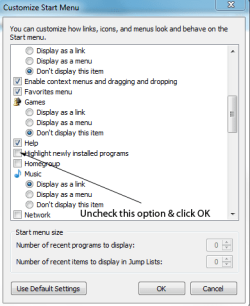
Right click on the Start orb and select Properties. Then, select Customize. You can the scroll down the menu 'till you see an item labeled "Highlight newly installed programs." Uncheck it and, bam, no more Windows telling you what you already knew! :cool:
 

My Computer My Computer

Computer Manufacturer/Model Number
Dell XPS 400
OS
Windows 7 X64 Professional
CPU
Intel® Pentium D Dual Core 3.6GHZ
Motherboard
DELL Dimension 9150 MotherBoard DXP051 XPS400 FJ030
Memory
4GB DDR2 PC2-5300
Graphics Card(s)
GeForce GT 440 (Fermi) 2GB 128-bit DDR3 PCI Express 2.0 x16
Sound Card
ASUS XONAR DG 5.1 Channels PCI Interface Xonar DG
Monitor(s) Displays
2 X 23" Apple Cinema Display
Screen Resolution
1920 X 1200p
Hard Drives
250GB Intel® 510 Series SSD SATA 6G (w/TRIM) [500MB/s Reads]
1.0TB Western Digital Caviar Black SATA 6G 7200rpm 64MB Cache
PSU
375 Watt Dell
Case
Dell XPS 400 BTX Case
Cooling
Dell XPS 400 Air Cooling
Keyboard
Logitech Illuminated Keyboard
Mouse
Logitech M705 Marathon
Internet Speed
+/- 9929 Kbps
Other Info
This machine was given to me when my dad bought a new computer. I keep throwing upgrades at it and it keeps on ticking. Think I've done everything to it that can be done outside a PSU upgrade so I can run an even BETTER GPU.
If it's bugging you, you can disable the option.

Right-click the Start button and choose Properties.

Click the Start Menu tab and click Customize.

Uncheck "Highlight newly installed programs".

Start menu.PNG

Click OK followed by Apply.

Newly-installed programs will no longer be highlighted in the Start folder.

Just seen your comment bug67 giving the OP the same solution. Sorry about that.
 

My Computer My Computer

Computer Manufacturer/Model Number
HP Pavilion Elite 495UK
OS
Windows 7 Ultimate SP1 64-Bit
CPU
Intel Core i7 870 @ 2.93GHz
Motherboard
MSI 2A9C (CPU1)
Memory
8Gb Dual-Channel DDR3 @ 664MHz
Graphics Card(s)
nVidia GeForce GTX 460 1024MB dedicated RAM
Sound Card
Realtek HD Audio
Monitor(s) Displays
HP2310i
Screen Resolution
1920 x 1080
Hard Drives
1x1954GB Hitachi HDS22020ALA 330 (RAID), 1x1954GB Hitachi External for backup and storage
PSU
460W
Case
HP Elite
Cooling
Air cooled
Keyboard
Logitech K750 solar-powered keyboard
Mouse
Logitech Wireless M180 mouse
Internet Speed
2Mb
Other Info
Pure Avanti Flow Internet Radio with iPod Dock, 64Gb iPod, HP USB Speakers, Sony MDR-V500 Headphones, Sony Vaio F-Series Laptop
Hey man i can't believe you switched from mac :)
i gotta ask you a few questions can i please get you email address or Skype or anything?
THANKS!
 

My Computer My Computer

OS
Windows 7
Back
Top