Just upgraded from Vista cannot access Microsoft programs

Falcodriver

New member
Local time
5:36 AM
Messages
20
I have an HP nx7400 laptop. I have just completed an upgrade from Vista Business to Windows 7 Professional. The system passed the upgrade advisor and no error messages were given during the upgrade process.
However, though all the programs (and data files) that I expected to see are there, I cannot start any Microsoft Office ones (running Office 2007). I can run Internet Explorer and Fierfox 8. I can run Adobe Acrobat X. I cannot run Norton 360 Premier, though the system tells me that it is switched off.
I have tried to run Control Panel and, after an initial open, a pop up box tells me that Explorer has stopped running and will restart. The open boxes close, the screen goes blank for a few seconds and then reopens at the home page. No attempts to run Control Panel will make it stay open.
Can anyone, please, help me find a diagnostics route to getting my PC back?
 

My Computer

Computer type
PC/Desktop
Computer Manufacturer/Model Number
HP dc5750 Tower
OS
Windows 7 Professional
CPU
AMD Athlon 64X2 Dual Core Processor 4200+ K8 2190 Mhz
Motherboard
HP 0A64h
Memory
RAM 3071 MB
Graphics Card(s)
ATI Radeon HD3650 PCIE 1GB memory
Sound Card
SoundMax Integrated Digital HD Audio
Monitor(s) Displays
HP L2245 wg
Screen Resolution
1280 x 1024
Hard Drives
Western Digital 465 GB NFTS
PSU
??
Case
Tower
Cooling
On board
Keyboard
HP
Mouse
HP
Internet Speed
15 mb/sec
Antivirus
Microsoft Essentials
Browser
Internet Explorer 9
Sounds like corruption that can sometimes result from the inferior in-place Upgrade install, particularly with HP which is absolute worst with the preinstalled bloatware.

You can work through the troubleshooting steps, reinstall Office, etc. but it may well take more time than cutting your losses plus getting a much superior install by Clean Reinstalling Windows.
 
OK. Thanks. It was what I was afraid of as it took me a while to get a fix for the practically uninstallable HP ProtectTools Security Manager, and Win 7 will not install whilst it is still in place. only by reinstalling it and then uninstalling it could I get there.

I only have an upgrade disk as I, stupidly, thought that this was the lest hassle option. I may have to just the the full edition and starts afresh.

Thanks, anyway. I thought that Vista was the pits but now I have a dead brick, rather than a laptop.

Best

Falcodriver
 

My Computer

Computer type
PC/Desktop
Computer Manufacturer/Model Number
HP dc5750 Tower
OS
Windows 7 Professional
CPU
AMD Athlon 64X2 Dual Core Processor 4200+ K8 2190 Mhz
Motherboard
HP 0A64h
Memory
RAM 3071 MB
Graphics Card(s)
ATI Radeon HD3650 PCIE 1GB memory
Sound Card
SoundMax Integrated Digital HD Audio
Monitor(s) Displays
HP L2245 wg
Screen Resolution
1280 x 1024
Hard Drives
Western Digital 465 GB NFTS
PSU
??
Case
Tower
Cooling
On board
Keyboard
HP
Mouse
HP
Internet Speed
15 mb/sec
Antivirus
Microsoft Essentials
Browser
Internet Explorer 9

My Computer

Computer type
PC/Desktop
Computer Manufacturer/Model Number
Me
OS
Win 7 Ultimate x64
CPU
FX-8350 @ 4.6 GHz so far
Motherboard
Asus M5A97 EVO
Memory
ADATA XPG V1 Series Black 8GB DDR3 1600
Graphics Card(s)
Sapphire R9 270x Dual-X
Sound Card
Xonar DGX w/ Corsair Vengence 1300
Monitor(s) Displays
Acer S232HL Abid
Screen Resolution
1920x1080
Hard Drives
120 GB OCZ Vertex 3
500 GB Seagate 7200.12
PSU
Antec Earthwatts 650W Green
Case
Antec Three Hundred
Cooling
Cooler Master 212 EVO
Keyboard
Logitech G510
Mouse
Logitech G500s
Internet Speed
35000/3000
^^^^^ +1
 

My Computer

Computer Manufacturer/Model Number
HP Pavilion Elite 495UK
OS
Windows 7 Ultimate SP1 64-Bit
CPU
Intel Core i7 870 @ 2.93GHz
Motherboard
MSI 2A9C (CPU1)
Memory
8Gb Dual-Channel DDR3 @ 664MHz
Graphics Card(s)
nVidia GeForce GTX 460 1024MB dedicated RAM
Sound Card
Realtek HD Audio
Monitor(s) Displays
HP2310i
Screen Resolution
1920 x 1080
Hard Drives
1x1954GB Hitachi HDS22020ALA 330 (RAID), 1x1954GB Hitachi External for backup and storage
PSU
460W
Case
HP Elite
Cooling
Air cooled
Keyboard
Logitech K750 solar-powered keyboard
Mouse
Logitech Wireless M180 mouse
Internet Speed
2Mb
Other Info
Pure Avanti Flow Internet Radio with iPod Dock, 64Gb iPod, HP USB Speakers, Sony MDR-V500 Headphones, Sony Vaio F-Series Laptop
You don't need a full version installer as you qualify for Upgrade version since Vista came with the computer, whether it is installed or not.

Back up your files and gather your program installers. Audit installed hardware and software including Product Keys using Belarc Advisor. Backup C:SWsetup and C:Windows/System32/Drivers to browse after install for any missing drivers or software.

When you boot the DVD to clean reinstall, the installer should see an OS and pass a flag allowing use of the Upgrade key during install. If not leave the key blank then after install do one of the workarounds given in the tutorial which Stormy posted to activate on a new or cleaned HD - the registry edit is easiest and takes only minutes.

Hopefully you made your Vista Recovery disks - if not see if you try making them now in All Programs. The Recovery partition will likely not run after Clean Reinstall although you can leave it until afterward then try cuing it up to see it it will run - if not you can delete it to extend Win7 into the space. If you have the disks you can also consider deleting all partitions during install using Custom install>Drive Options advanced. Illustrated steps here: Clean Install Windows 7

The installer is mostly driver-complete, with newer arriving quickly via optional Windows Updates. Just in case, have your Wireless driver on flash stick or CD so you can get online quickly. Then enable hardware driver auto-updating and check for optional Updates frequently.

Any drivers still missing in Device Manager can be found on the HP Support Downloads webpage for your model computer or device where there may be newer ones, or by browsing to any drivers files you backed up beforehand.

Install updates and then programs slowly over time to gauge performance changes after each. Don't let any programs write themselves into msconfig>Startup as they slow startup, become freeloaders on your RAM/CPU and can spy on you. I only allow AV and gadgets. Startup Programs - Change

Use a lightweight free AV like MS Security Essentials which works perfectly with Windows 7 Firewall. http://www.microsoft.com/security_essentials/

When it is finished, clean and order the HD perfectly using state-of-the-art free CCleaner Disk and Registry tabs, then Puran boot-time defragger + full Disk Check after adding Intelligent Optimizer on Additional Operations tab:
CCleaner - Free software downloads and software reviews - CNET Download.com
http://download.cnet.com/Puran-Defra...-75115626.html

Finally save a Windows 7 Backup image externally so you never have to reinstall again, just reimage the HD (or replacement) using DVD/Repair CD with the stored image. Backup Complete Computer - Create an Image Backup

You can extract HP apps and utilities from Recov Disks using this: Extract HP 3rd Party Software from RecovCD.
 
However you ultimately decide to proceed, I would lose the Norton as we see nothing but problems with it.

Use the AV's which most everyone here recommends Microsoft Security Essentials or Avast 6 with the Win7 firewall.

You can try entering Safe Mode now to uninstall it to see if it makes a difference.
 
Last edited:
Response to advice on faulty upgrade

Gregrocker, Stormy13 and PaulSoebekti,

firstly, apologies for the late response to you your generous replies - I have been travelling all day.
Secondly, very many thanks for your very comprehensive and constructive replies. It looks like there are some very practical steps that I can take to bring my favourite laptop back from the dead.
I will work on it an report back, in due course.
Great to find such community support!
Best
Falcodriver
 

My Computer

Computer type
PC/Desktop
Computer Manufacturer/Model Number
HP dc5750 Tower
OS
Windows 7 Professional
CPU
AMD Athlon 64X2 Dual Core Processor 4200+ K8 2190 Mhz
Motherboard
HP 0A64h
Memory
RAM 3071 MB
Graphics Card(s)
ATI Radeon HD3650 PCIE 1GB memory
Sound Card
SoundMax Integrated Digital HD Audio
Monitor(s) Displays
HP L2245 wg
Screen Resolution
1280 x 1024
Hard Drives
Western Digital 465 GB NFTS
PSU
??
Case
Tower
Cooling
On board
Keyboard
HP
Mouse
HP
Internet Speed
15 mb/sec
Antivirus
Microsoft Essentials
Browser
Internet Explorer 9
Gregrocker and Stormy13,
I took your advice and did a full install, using my upgrade Win 7 disc. I followed both your instructions to the letter, using also CCleaner and Puran Defragger - both really great freeware, by the way.
Not difficult at all and I now, in effect, have a new laptop. No HP bloatware; more hard disc space, having got rid of the partitions and it seems faster than when new.
I see that, of the 76.5 Gb in total, I have a whopping 34.6 Gb in Windows_old. Presumably, as the last Windows installation didn't work and I am not going to revert to it, I can delete the old OS files straight away and, once I am sure that I have restored my data from my backups, the remaining old files likewise?
I just need to take an image, but need an NFTS formatted external drive for that and I am done.
Very many thanks, again, to you both for your highly constructive help.
Win7 is really great, by the way.
Regards
Falcodriver
 

My Computer

Computer type
PC/Desktop
Computer Manufacturer/Model Number
HP dc5750 Tower
OS
Windows 7 Professional
CPU
AMD Athlon 64X2 Dual Core Processor 4200+ K8 2190 Mhz
Motherboard
HP 0A64h
Memory
RAM 3071 MB
Graphics Card(s)
ATI Radeon HD3650 PCIE 1GB memory
Sound Card
SoundMax Integrated Digital HD Audio
Monitor(s) Displays
HP L2245 wg
Screen Resolution
1280 x 1024
Hard Drives
Western Digital 465 GB NFTS
PSU
??
Case
Tower
Cooling
On board
Keyboard
HP
Mouse
HP
Internet Speed
15 mb/sec
Antivirus
Microsoft Essentials
Browser
Internet Explorer 9

My Computer

Computer Manufacturer/Model Number
HP Pavilion Elite 495UK
OS
Windows 7 Ultimate SP1 64-Bit
CPU
Intel Core i7 870 @ 2.93GHz
Motherboard
MSI 2A9C (CPU1)
Memory
8Gb Dual-Channel DDR3 @ 664MHz
Graphics Card(s)
nVidia GeForce GTX 460 1024MB dedicated RAM
Sound Card
Realtek HD Audio
Monitor(s) Displays
HP2310i
Screen Resolution
1920 x 1080
Hard Drives
1x1954GB Hitachi HDS22020ALA 330 (RAID), 1x1954GB Hitachi External for backup and storage
PSU
460W
Case
HP Elite
Cooling
Air cooled
Keyboard
Logitech K750 solar-powered keyboard
Mouse
Logitech Wireless M180 mouse
Internet Speed
2Mb
Other Info
Pure Avanti Flow Internet Radio with iPod Dock, 64Gb iPod, HP USB Speakers, Sony MDR-V500 Headphones, Sony Vaio F-Series Laptop
Deleting Windows_old after upgrade to Win 7 pro

Many thanks, Sea Vixen.

Will do. Reading the tutorial and, for anyone else's benefit, I only had a Win 7 Pro upgrade disc so I couldn't do a complete reformat pre the install as, I understand from other posts on this forum, that the upgrade application needs to read the key of the existing installation before you can use it successfully.
I did, however, the next best thing, and deleted all partitions and a format from that point, hence I have the Windows_old file.
I can now do as you say and take out the data files that I need - though I had backed these up - and delete the whole Windows_old file, giving me a lot more space.

By the way I love the real Sea Vixen. I fly two seat puddle jumpers myself and not sure how I would cope at twice the approach speed onto a runway that was moving 60 feet up, or down, and probably wasn't where I last left it, in any case! Profound respect to those that could.

Best regards

Falcodriver
 

My Computer

Computer type
PC/Desktop
Computer Manufacturer/Model Number
HP dc5750 Tower
OS
Windows 7 Professional
CPU
AMD Athlon 64X2 Dual Core Processor 4200+ K8 2190 Mhz
Motherboard
HP 0A64h
Memory
RAM 3071 MB
Graphics Card(s)
ATI Radeon HD3650 PCIE 1GB memory
Sound Card
SoundMax Integrated Digital HD Audio
Monitor(s) Displays
HP L2245 wg
Screen Resolution
1280 x 1024
Hard Drives
Western Digital 465 GB NFTS
PSU
??
Case
Tower
Cooling
On board
Keyboard
HP
Mouse
HP
Internet Speed
15 mb/sec
Antivirus
Microsoft Essentials
Browser
Internet Explorer 9
You're very welcome, Falcodriver.

You're not wrong about landing on a moving runway and I agree that anyone who does it commands great respect.

FAA083.jpg.jpg
 

My Computer

Computer Manufacturer/Model Number
HP Pavilion Elite 495UK
OS
Windows 7 Ultimate SP1 64-Bit
CPU
Intel Core i7 870 @ 2.93GHz
Motherboard
MSI 2A9C (CPU1)
Memory
8Gb Dual-Channel DDR3 @ 664MHz
Graphics Card(s)
nVidia GeForce GTX 460 1024MB dedicated RAM
Sound Card
Realtek HD Audio
Monitor(s) Displays
HP2310i
Screen Resolution
1920 x 1080
Hard Drives
1x1954GB Hitachi HDS22020ALA 330 (RAID), 1x1954GB Hitachi External for backup and storage
PSU
460W
Case
HP Elite
Cooling
Air cooled
Keyboard
Logitech K750 solar-powered keyboard
Mouse
Logitech Wireless M180 mouse
Internet Speed
2Mb
Other Info
Pure Avanti Flow Internet Radio with iPod Dock, 64Gb iPod, HP USB Speakers, Sony MDR-V500 Headphones, Sony Vaio F-Series Laptop
Sea Vixen

Nice image!
 

My Computer

Computer type
PC/Desktop
Computer Manufacturer/Model Number
HP dc5750 Tower
OS
Windows 7 Professional
CPU
AMD Athlon 64X2 Dual Core Processor 4200+ K8 2190 Mhz
Motherboard
HP 0A64h
Memory
RAM 3071 MB
Graphics Card(s)
ATI Radeon HD3650 PCIE 1GB memory
Sound Card
SoundMax Integrated Digital HD Audio
Monitor(s) Displays
HP L2245 wg
Screen Resolution
1280 x 1024
Hard Drives
Western Digital 465 GB NFTS
PSU
??
Case
Tower
Cooling
On board
Keyboard
HP
Mouse
HP
Internet Speed
15 mb/sec
Antivirus
Microsoft Essentials
Browser
Internet Explorer 9
Cheers Falcodriver.

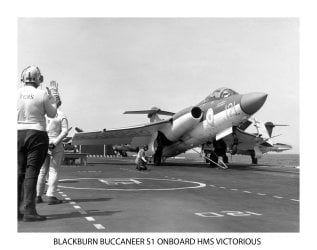
Obviously, the photograph was taken many years ago (1964) and was taken by a camera fitted to a Blackburn Buccaneer about to land onboard HMS Victorious.

However, there were times when a crash barrier was required to recover aircraft with major problems such as electrical or hydraulic failure.

FAA007.jpg

FAA008.jpg
 

My Computer

Computer Manufacturer/Model Number
HP Pavilion Elite 495UK
OS
Windows 7 Ultimate SP1 64-Bit
CPU
Intel Core i7 870 @ 2.93GHz
Motherboard
MSI 2A9C (CPU1)
Memory
8Gb Dual-Channel DDR3 @ 664MHz
Graphics Card(s)
nVidia GeForce GTX 460 1024MB dedicated RAM
Sound Card
Realtek HD Audio
Monitor(s) Displays
HP2310i
Screen Resolution
1920 x 1080
Hard Drives
1x1954GB Hitachi HDS22020ALA 330 (RAID), 1x1954GB Hitachi External for backup and storage
PSU
460W
Case
HP Elite
Cooling
Air cooled
Keyboard
Logitech K750 solar-powered keyboard
Mouse
Logitech Wireless M180 mouse
Internet Speed
2Mb
Other Info
Pure Avanti Flow Internet Radio with iPod Dock, 64Gb iPod, HP USB Speakers, Sony MDR-V500 Headphones, Sony Vaio F-Series Laptop
And these guys were probably in the early twenties! a bit more challenging than the X factor!
 

My Computer

Computer type
PC/Desktop
Computer Manufacturer/Model Number
HP dc5750 Tower
OS
Windows 7 Professional
CPU
AMD Athlon 64X2 Dual Core Processor 4200+ K8 2190 Mhz
Motherboard
HP 0A64h
Memory
RAM 3071 MB
Graphics Card(s)
ATI Radeon HD3650 PCIE 1GB memory
Sound Card
SoundMax Integrated Digital HD Audio
Monitor(s) Displays
HP L2245 wg
Screen Resolution
1280 x 1024
Hard Drives
Western Digital 465 GB NFTS
PSU
??
Case
Tower
Cooling
On board
Keyboard
HP
Mouse
HP
Internet Speed
15 mb/sec
Antivirus
Microsoft Essentials
Browser
Internet Explorer 9
these days the twenty somethings would do the same on an xbox. :D
 

My Computer

Computer Manufacturer/Model Number
Hewlett packard/p6512uk
OS
Microsoft Windows 7 Home Premium 64-bit 7600
CPU
IIx4 amd athelon 635 processor
Motherboard
FOXCONN 2AA9
Memory
2x2gb
Graphics Card(s)
ati radeon HD 5450
Sound Card
(1) Realtek High Definition Audio (2) AMD High Definition
Monitor(s) Displays
samsung lcd tv 32"
Screen Resolution
1360x 768
Hard Drives
(1) WDC WD10 01FAES-60Z2A0 SATA Disk Device (2) Maxtor OneTouch USB Device (3) ST310003 33AS USB Device (4) WD My Book 1111 USB Device
PSU
?
Cooling
air!
Keyboard
wireless hp
Mouse
wireless Hp,optical
Internet Speed
1.10mb/s
Antivirus
MSE
Browser
Firefox
Maybe so boohbah, but nowhere near as exciting as the real thing! :D

The launch is quite hair-raising too; 0-130 in a couple of seconds.

FAA006.jpg
 

My Computer

Computer Manufacturer/Model Number
HP Pavilion Elite 495UK
OS
Windows 7 Ultimate SP1 64-Bit
CPU
Intel Core i7 870 @ 2.93GHz
Motherboard
MSI 2A9C (CPU1)
Memory
8Gb Dual-Channel DDR3 @ 664MHz
Graphics Card(s)
nVidia GeForce GTX 460 1024MB dedicated RAM
Sound Card
Realtek HD Audio
Monitor(s) Displays
HP2310i
Screen Resolution
1920 x 1080
Hard Drives
1x1954GB Hitachi HDS22020ALA 330 (RAID), 1x1954GB Hitachi External for backup and storage
PSU
460W
Case
HP Elite
Cooling
Air cooled
Keyboard
Logitech K750 solar-powered keyboard
Mouse
Logitech Wireless M180 mouse
Internet Speed
2Mb
Other Info
Pure Avanti Flow Internet Radio with iPod Dock, 64Gb iPod, HP USB Speakers, Sony MDR-V500 Headphones, Sony Vaio F-Series Laptop
Back
Top