Kaspersky 2011 vs MSE v4

Local time
10:42 PM
Messages
94
Hey,
OK guys here my dilemma, I have been a die hard KAS customer since 2008, but recently i have been looking at MSE and from what i hear its surprisingly not bad :eek:
so i am considering the switch (i have no problem for paying for an AV by the way:D)
I want to know how does it (MSE v4) compare (RELATIVELY) with Kaspersky, in terms of:
  1. system overhead (CPU and RAM)
  2. Virus detection
  3. FEATURES
IF MSE is better optimized for my system then that is a definite motivator, Virus protection is about 85% important since i am apearantly one of the few people on the internet who posses the common sense to not press on the FREE full version of ***** Movie or whatever :geek:

Features, as in safe run, application activities reports etc.

Thank you in advance;)
 

My Computer

Computer Manufacturer/Model Number
Dell Studio XPS 16
OS
Windows 7 Ultimate x64
CPU
Intel(R) Core(TM)2 Duo CPU T9600 @ 2.80 GHz 6MB cache
Memory
6 GB DDR3
Graphics Card(s)
ATI Mobility Radeon HD 4670
Monitor(s) Displays
1
Screen Resolution
1920x1080
Cooling
NZXT Cryo LX
Mouse
Logitech G9X
Internet Speed
512 Kbps
Hi,

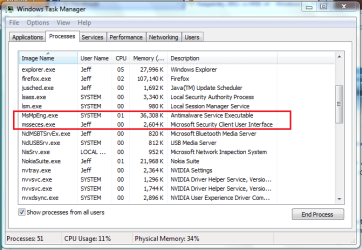
I'm running MSE now and it runs like a dream, I don't know what Kaspersky runs like :)

Idle
Task Manager 1.PNG

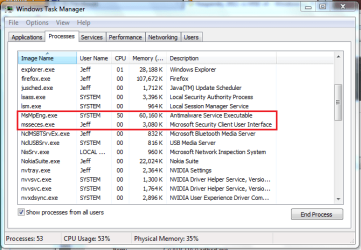
Running quick scan
Task Manager 2.PNG

I don't notice any slowdown and I have only 3GB of memory...lol
 

My Computer

Computer Manufacturer/Model Number
Compaq Desktop
OS
Windows 7 Ultimate x64
CPU
AMD Sempron Dual Core
Memory
3GB
Graphics Card(s)
NVIDIA GeForce 6150SE nForce 430
Screen Resolution
1024x768
Hard Drives
150GB Sata
Hi,

I'm running MSE now and it runs like a dream, I don't know what Kaspersky runs like :)

Idle
View attachment 187467

Running quick scan
View attachment 187468

I don't notice any slowdown and I have only 3GB of memory...lol

Hmm.:cool:
I have 6 gb ram and a 2.6GHz core Due 2 processor so i guess it will have a smaller impact on my system

My primary use of the computer is Gamming at home and note taking at school, so i guess start time and scan performance important form me

Anyone know the impact on start time
 

My Computer

Computer Manufacturer/Model Number
Dell Studio XPS 16
OS
Windows 7 Ultimate x64
CPU
Intel(R) Core(TM)2 Duo CPU T9600 @ 2.80 GHz 6MB cache
Memory
6 GB DDR3
Graphics Card(s)
ATI Mobility Radeon HD 4670
Monitor(s) Displays
1
Screen Resolution
1920x1080
Cooling
NZXT Cryo LX
Mouse
Logitech G9X
Internet Speed
512 Kbps
I used to run Kaspersky and it seemed to work very well.

I uninstalled it when I discovered that it prevented me from using System Restore to recover my system to an earlier state.

I'm now using MSE and have found it to be very light on resources and extremely effective. It easily caught two viruses I deliberately tried to install.

I work on the principle that nobody knows their own system better than the people who coded it. In this case that is Microsoft and I doubt very much if any antivirus maker has access to Win7's full root code.

I recommend it highly.
 

My Computer

Computer Manufacturer/Model Number
Mesh 955 XGS
OS
Windows 7 64 bit
CPU
Athlon X4 955 Black edition
Motherboard
ASUS M4A78 Pro
Memory
8GB DDR2
Graphics Card(s)
1x Radeon 4890
Monitor(s) Displays
IIyama ProLite E2208HDS
Screen Resolution
1920X1080p
Hard Drives
2x 1TB Samsung SATA2
1x 320GB IDE
PSU
600 watt
Cooling
Standard
Keyboard
MS wireless 6000
Mouse
MS wireless laser 7000
Internet Speed
Not as fast as it should be......
Hi,

If its light & nimble with little overhead that you want, then MSE is most definately the way to go - no doubt!

Regards,
Golden
 

My Computer

Computer type
PC/Desktop
Computer Manufacturer/Model Number
Golden Mk. I.4
OS
Windows 10 Pro x64 ; Xubuntu x64
CPU
Intel i7 860 @ 2.80 GHz O/C'ed to 4.0GHz
Motherboard
Gigabyte P55A-UD3R Rev.1. Award BIOS F13
Memory
16GB Corsair Vengance DDR3 @ 661 MHz Dual Channel (9-9-9-24)
Graphics Card(s)
EVGA NVidia GTX 560 1024MB
Sound Card
Realtek Integrated
Monitor(s) Displays
Dual Samsung SyncMaster 2494HS
Screen Resolution
1920*1080 and 1920*1080
Hard Drives
1*Samsung 840 EVO 120GB SSD;
1*OCZ Vertex 2 60GB SSD;
2*Samsung F3 SpinPoint 1TB in RAID0;
1*Samsung F1 SpinPoint 1TB;
2*Western Digital 1TB External USB 3.0
1*Western Digital 500GB External USB 3.0
1*Seagate 500GB External USB 2.0
PSU
Thermaltake ToughPower QFan 750W
Case
Thermaltake Element S VK60001W2Z
Cooling
Corsair H60 Water Cooling, 2*230mm and 2*80mm case fans
Keyboard
Logitech G110
Mouse
Logitech MX518
i use them both, and my answers to your questions are:

1: system overhead: i find that MSE uses more ram than KIS, but it's not a big problem, as ram is so cheap, and most people have lots of it.

2: virus detection: both products regularly do well in detecting viruses, with kaspersky having a little more success

3:features: mse is very basic, while the full kaspersky internet security suite offers more features such as a very good firewall, network monitor, ad-blocker etc

conclusion: mse offers very good protection for zero money, but you do get more if you spend a little on kis.

why don't you try mse for a while and see how you get on?
 

My Computer

Computer Manufacturer/Model Number
mickey megabyte 1234
OS
ultimate 64 sp1
CPU
i5 2500K [email protected]
Motherboard
MSI P67A-GD53
Memory
8 gigs GSkill Ripjaws 1600
Graphics Card(s)
amd hd6950
Sound Card
creative x-fi gamer
Monitor(s) Displays
samsung 24"
Screen Resolution
1920x1080
Hard Drives
ocz vertex 2e 60 gig, samsung f3 1tb, buffalo 2tb ext
PSU
antec 550
Case
antec three hundred
Cooling
i'm a cooling fan
Keyboard
saitek eclipse ii
Mouse
logitech g3
Internet Speed
about 4 Mbps
Other Info
i love win7
Thanks for your suggestions guys

I just installed KIS 2011 and installed MSE 2.1
One question though how do i get V4 and most importantly is V4 "STABLE"
 

My Computer

Computer Manufacturer/Model Number
Dell Studio XPS 16
OS
Windows 7 Ultimate x64
CPU
Intel(R) Core(TM)2 Duo CPU T9600 @ 2.80 GHz 6MB cache
Memory
6 GB DDR3
Graphics Card(s)
ATI Mobility Radeon HD 4670
Monitor(s) Displays
1
Screen Resolution
1920x1080
Cooling
NZXT Cryo LX
Mouse
Logitech G9X
Internet Speed
512 Kbps
i hope you haven't installed them both on the same machine?

mse v4 is still in beta. you can try signing up for it here. i have no idea as to its stability. personally i'm waiting until it gets officially released before sticking it on my laptop.
 

My Computer

Computer Manufacturer/Model Number
mickey megabyte 1234
OS
ultimate 64 sp1
CPU
i5 2500K [email protected]
Motherboard
MSI P67A-GD53
Memory
8 gigs GSkill Ripjaws 1600
Graphics Card(s)
amd hd6950
Sound Card
creative x-fi gamer
Monitor(s) Displays
samsung 24"
Screen Resolution
1920x1080
Hard Drives
ocz vertex 2e 60 gig, samsung f3 1tb, buffalo 2tb ext
PSU
antec 550
Case
antec three hundred
Cooling
i'm a cooling fan
Keyboard
saitek eclipse ii
Mouse
logitech g3
Internet Speed
about 4 Mbps
Other Info
i love win7
i hope you haven't installed them both on the same machine?

mse v4 is still in beta. you can try signing up for it here. i have no idea as to its stability. personally i'm waiting until it gets officially released before sticking it on my laptop.

Relax :p
I know not to install 2 av's on the same pc
 

My Computer

Computer Manufacturer/Model Number
Dell Studio XPS 16
OS
Windows 7 Ultimate x64
CPU
Intel(R) Core(TM)2 Duo CPU T9600 @ 2.80 GHz 6MB cache
Memory
6 GB DDR3
Graphics Card(s)
ATI Mobility Radeon HD 4670
Monitor(s) Displays
1
Screen Resolution
1920x1080
Cooling
NZXT Cryo LX
Mouse
Logitech G9X
Internet Speed
512 Kbps
EDIT: sorry i posted wrong comment :P
 
Last edited:

My Computer

Computer Manufacturer/Model Number
Dell Studio XPS 16
OS
Windows 7 Ultimate x64
CPU
Intel(R) Core(TM)2 Duo CPU T9600 @ 2.80 GHz 6MB cache
Memory
6 GB DDR3
Graphics Card(s)
ATI Mobility Radeon HD 4670
Monitor(s) Displays
1
Screen Resolution
1920x1080
Cooling
NZXT Cryo LX
Mouse
Logitech G9X
Internet Speed
512 Kbps

My Computer

Computer Manufacturer/Model Number
Compaq CQ 40- 330 TU laptop
OS
windows 7 ultimate 32 bit
CPU
Intel core 2 duo T6400 @ 2.00 GHz
Motherboard
Compal model 3607
Memory
2048 MB DDR 2 399.0 MHz
Sorry about the:

"
could some one please make an attempt on my request
Thanks ;)
"
Comment

I meant to post it somewhere else :P
because both threads open were scrolled to the bottom :)
 

My Computer

Computer Manufacturer/Model Number
Dell Studio XPS 16
OS
Windows 7 Ultimate x64
CPU
Intel(R) Core(TM)2 Duo CPU T9600 @ 2.80 GHz 6MB cache
Memory
6 GB DDR3
Graphics Card(s)
ATI Mobility Radeon HD 4670
Monitor(s) Displays
1
Screen Resolution
1920x1080
Cooling
NZXT Cryo LX
Mouse
Logitech G9X
Internet Speed
512 Kbps
Ok MSE isn't that bad but why (second foto from Orbital Shark) does it use a 50% cpu it also does that on my computer that's why I use avast
 

My Computer

Computer Manufacturer/Model Number
Homebuilt
OS
Windows 7 Home Premium x64
CPU
Core i7 2600K
Motherboard
Asus P8Z77-V LX
Memory
4GB DDR3 Kingston HyperX
Graphics Card(s)
Gigabyte GTX 670
Sound Card
Realtek HD Audio
Monitor(s) Displays
Delium Monitor
Screen Resolution
1360 x 768
Hard Drives
C: (500GB)
PSU
Corsair 620W
Case
Antec
Cooling
Cooling Master
Keyboard
Logitech
Mouse
Logitech wireless mouse M 505
Internet Speed
60MBPS
Ok MSE isn't that bad but why (second foto from Orbital Shark) does it use a 50% cpu it also does that on my computer that's why I use avast

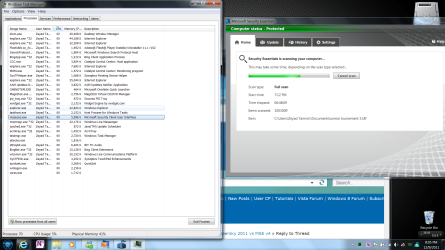
On mine it carries between 0-5% CPU usage DURING full scan
Only once during a full scan did it spike to 30-35%

Proof
0CPU.png
 

My Computer

Computer Manufacturer/Model Number
Dell Studio XPS 16
OS
Windows 7 Ultimate x64
CPU
Intel(R) Core(TM)2 Duo CPU T9600 @ 2.80 GHz 6MB cache
Memory
6 GB DDR3
Graphics Card(s)
ATI Mobility Radeon HD 4670
Monitor(s) Displays
1
Screen Resolution
1920x1080
Cooling
NZXT Cryo LX
Mouse
Logitech G9X
Internet Speed
512 Kbps

My Computer

Computer Manufacturer/Model Number
Homebuilt
OS
Windows 7 Home Premium x64
CPU
Core i7 2600K
Motherboard
Asus P8Z77-V LX
Memory
4GB DDR3 Kingston HyperX
Graphics Card(s)
Gigabyte GTX 670
Sound Card
Realtek HD Audio
Monitor(s) Displays
Delium Monitor
Screen Resolution
1360 x 768
Hard Drives
C: (500GB)
PSU
Corsair 620W
Case
Antec
Cooling
Cooling Master
Keyboard
Logitech
Mouse
Logitech wireless mouse M 505
Internet Speed
60MBPS
Ok MSE isn't that bad but why (second foto from Orbital Shark) does it use a 50% cpu it also does that on my computer that's why I use avast

On mine it carries between 0-5% CPU usage DURING full scan
Only once during a full scan did it spike to 30-35%

Proof
View attachment 187500
Ok but what cpu do you have if you have a super cpu than I think you don't see the differnces

look at my system specs (bottom of any of my posts)
 

My Computer

Computer Manufacturer/Model Number
Dell Studio XPS 16
OS
Windows 7 Ultimate x64
CPU
Intel(R) Core(TM)2 Duo CPU T9600 @ 2.80 GHz 6MB cache
Memory
6 GB DDR3
Graphics Card(s)
ATI Mobility Radeon HD 4670
Monitor(s) Displays
1
Screen Resolution
1920x1080
Cooling
NZXT Cryo LX
Mouse
Logitech G9X
Internet Speed
512 Kbps
On mine it carries between 0-5% CPU usage DURING full scan
Only once during a full scan did it spike to 30-35%

Proof
View attachment 187500
Ok but what cpu do you have if you have a super cpu than I think you don't see the differnces

look at my system specs (bottom of any of my posts)
Ok you have a very strong Intel Core 2 Duo cpu
my laptop has a Intel Core 2 Duo (T6400)
and my other computer (pentium 4) it sucks a 50% of cpu when the scanner is idle
and avast does use 0% when idle so...
 

My Computer

Computer Manufacturer/Model Number
Homebuilt
OS
Windows 7 Home Premium x64
CPU
Core i7 2600K
Motherboard
Asus P8Z77-V LX
Memory
4GB DDR3 Kingston HyperX
Graphics Card(s)
Gigabyte GTX 670
Sound Card
Realtek HD Audio
Monitor(s) Displays
Delium Monitor
Screen Resolution
1360 x 768
Hard Drives
C: (500GB)
PSU
Corsair 620W
Case
Antec
Cooling
Cooling Master
Keyboard
Logitech
Mouse
Logitech wireless mouse M 505
Internet Speed
60MBPS
Ok but what cpu do you have if you have a super cpu than I think you don't see the differnces

look at my system specs (bottom of any of my posts)
Ok you have a very strong Intel Core 2 Duo cpu
my laptop has a Intel Core 2 Duo (T6400)
and my other computer (pentium 4) it sucks a 50% of cpu when the scanner is idle
and avast does use 0% when idle so...

I hate to break it to you but 50% on idle is kinda... you know...
Something is wrong with your system or your MSE install i think!
As i said i only installed it today so im no expert :P
 

My Computer

Computer Manufacturer/Model Number
Dell Studio XPS 16
OS
Windows 7 Ultimate x64
CPU
Intel(R) Core(TM)2 Duo CPU T9600 @ 2.80 GHz 6MB cache
Memory
6 GB DDR3
Graphics Card(s)
ATI Mobility Radeon HD 4670
Monitor(s) Displays
1
Screen Resolution
1920x1080
Cooling
NZXT Cryo LX
Mouse
Logitech G9X
Internet Speed
512 Kbps
look at my system specs (bottom of any of my posts)
Ok you have a very strong Intel Core 2 Duo cpu
my laptop has a Intel Core 2 Duo (T6400)
and my other computer (pentium 4) it sucks a 50% of cpu when the scanner is idle
and avast does use 0% when idle so...

I hate to break it to you but 50% on idle is kinda... you know...
Something is wrong with your system or your MSE install i think!
As i said i only installed it today so im no expert :P
No because with avast it's ok (CPU Usage)
it's MSE it uses 50% when the scanner is idle. avast uses 0%
 

My Computer

Computer Manufacturer/Model Number
Homebuilt
OS
Windows 7 Home Premium x64
CPU
Core i7 2600K
Motherboard
Asus P8Z77-V LX
Memory
4GB DDR3 Kingston HyperX
Graphics Card(s)
Gigabyte GTX 670
Sound Card
Realtek HD Audio
Monitor(s) Displays
Delium Monitor
Screen Resolution
1360 x 768
Hard Drives
C: (500GB)
PSU
Corsair 620W
Case
Antec
Cooling
Cooling Master
Keyboard
Logitech
Mouse
Logitech wireless mouse M 505
Internet Speed
60MBPS
Gentlemen,

You can specify the amount of CPU resource that MSE uses. Have a look at this.

Regards,
Golden
 

Attachments

  • Capture.JPG
    Capture.JPG
    60.5 KB · Views: 25

My Computer

Computer type
PC/Desktop
Computer Manufacturer/Model Number
Golden Mk. I.4
OS
Windows 10 Pro x64 ; Xubuntu x64
CPU
Intel i7 860 @ 2.80 GHz O/C'ed to 4.0GHz
Motherboard
Gigabyte P55A-UD3R Rev.1. Award BIOS F13
Memory
16GB Corsair Vengance DDR3 @ 661 MHz Dual Channel (9-9-9-24)
Graphics Card(s)
EVGA NVidia GTX 560 1024MB
Sound Card
Realtek Integrated
Monitor(s) Displays
Dual Samsung SyncMaster 2494HS
Screen Resolution
1920*1080 and 1920*1080
Hard Drives
1*Samsung 840 EVO 120GB SSD;
1*OCZ Vertex 2 60GB SSD;
2*Samsung F3 SpinPoint 1TB in RAID0;
1*Samsung F1 SpinPoint 1TB;
2*Western Digital 1TB External USB 3.0
1*Western Digital 500GB External USB 3.0
1*Seagate 500GB External USB 2.0
PSU
Thermaltake ToughPower QFan 750W
Case
Thermaltake Element S VK60001W2Z
Cooling
Corsair H60 Water Cooling, 2*230mm and 2*80mm case fans
Keyboard
Logitech G110
Mouse
Logitech MX518
Back
Top