KB2882822 preventing upgrade to IE11

Celeras

New member
Local time
1:36 PM
Messages
51
I rolled back IE11 to IE8 to troubleshoot an issue by uninstalling from Control Panel. Now I am ready to go back to IE11 (which yes I have to use). The installation package has several KB prerequisites included and is throwing me a generic "Error applying patches" when I try to install the upgrade.

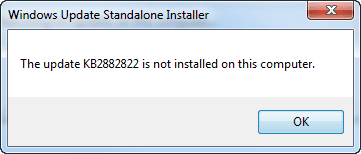
I check in Programs and Features>Installed updates and confirm which KBs are listed. All the KBs included in the package are listed here except one: KB2882822. Ok, I guess KB2882822 is not installed and the package is having issues. I go to manually install it:

attachment.php


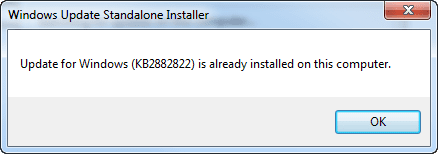
Well... it's not listed in Installed Updates? Alright, weird, let's try wusa.exe /uninstall /kb:2882822:

attachment.php


*twitch*

Any ideas how I can proceed? I ran sfc /scannow and attached the results.
 

Attachments
  • 1.png
    1.png
    6.4 KB · Views: 63
  • 2.png
    2.png
    5.5 KB · Views: 58
  • sfcdetails.txt
    sfcdetails.txt
    45.3 KB · Views: 3

My Computer My Computer

At a glance

Windows 7 x64[email protected]8gb CorsaireVGA 640mb 8800gts
OS
Windows 7 x64
CPU
[email protected]
Motherboard
Gigabyte P35C-DS3R
Memory
8gb Corsair
Graphics Card(s)
eVGA 640mb 8800gts
Screen Resolution
1920x1200
Hard Drives
WD Caviar 1TB
PSU
Rosewill 850W
Hi Celeras,
please run KB947821, (SURT/checkSur)

post the CBS results.


Roy
 

My Computer My Computer

At a glance

W7 home premium 32bit/W7HP 64bit/w10 tp insid...E5300 dual core3gbNvidia Geforce 7100 Nforce 630i
Computer type
PC/Desktop
Computer Manufacturer/Model Number
medionl/Aspire 6930G/acer x55a
OS
W7 home premium 32bit/W7HP 64bit/w10 tp insider ring
CPU
E5300 dual core
Motherboard
medion MS7366
Memory
3gb
Graphics Card(s)
Nvidia Geforce 7100 Nforce 630i
Monitor(s) Displays
avixc
Internet Speed
n (isp resticted to 72)
Antivirus
mse/pands
Browser
palemoon
Other Info
Belkin Fd7050 n USB using Railink RT2870 drivers, more upto date
Hi

Had the same problem that the installation of KB2882822 and the installation of IE11 resulted in a non-working OS. I’ve also installed the package KB947821 and the CBS log files showed as summary “No errors detected”.

After a lot of work and many trials, I have found out (log of IE11 Installation), that during the installation of IE11 automatically the package KB2882822 will be loaded and installed.
After downloading the latest Winfuture Update Pack (Januar 2020) and completely offline install (no connection to the internet) - IE11 was installed without problems.
KB2882822 is only a recommended package, so it is not needed for the installation of IE11.

Hope this helps somebody!
 

My Computer My Computer

At a glance

Windows 7 Ultimate x64
Computer type
PC/Desktop
OS
Windows 7 Ultimate x64
I do hope not.


IE11 is no longer supported on W7


Use another browser


Roy
 

My Computer My Computer

At a glance

W7 home premium 32bit/W7HP 64bit/w10 tp insid...E5300 dual core3gbNvidia Geforce 7100 Nforce 630i
Computer type
PC/Desktop
Computer Manufacturer/Model Number
medionl/Aspire 6930G/acer x55a
OS
W7 home premium 32bit/W7HP 64bit/w10 tp insider ring
CPU
E5300 dual core
Motherboard
medion MS7366
Memory
3gb
Graphics Card(s)
Nvidia Geforce 7100 Nforce 630i
Monitor(s) Displays
avixc
Internet Speed
n (isp resticted to 72)
Antivirus
mse/pands
Browser
palemoon
Other Info
Belkin Fd7050 n USB using Railink RT2870 drivers, more upto date
IE11 is no longer supported on W7
It is if you have Windows 7 set up and configured to keep receiving security updates after January 2020.
Its current version is 11.0.180
 

My Computer My Computer

At a glance

Windows 7 Professional SP1 64-bitIntel Core i7-4790 3.60 GHz32 GB DDR3-1600 MHzIntegrated Intel HD Graphics 4600
Computer type
PC/Desktop
Computer Manufacturer/Model Number
Dell OptiPlex 9020
OS
Windows 7 Professional SP1 64-bit
CPU
Intel Core i7-4790 3.60 GHz
Memory
32 GB DDR3-1600 MHz
Graphics Card(s)
Integrated Intel HD Graphics 4600
Monitor(s) Displays
Viewsonic 32" LCD
Hard Drives
Kingston SATA 3 240 GB SSD
Internet Speed
Spectrum Internet 1000 Mbps
um IE11 is included/bundled in the August 2018 Refresh Win7 SP1 ISOs (those ISOs with Aug. 2018 updates)
 

My Computer My Computer

At a glance

Windows 7 SP1 Home Premium 64bit [x64]Intel(R) Core(TM) i5-2310 CPU @ 2.90GHz6 GBIntel HD Graphics 2000
Computer type
PC/Desktop
Computer Manufacturer/Model Number
Dell Inspiron 620
OS
Windows 7 SP1 Home Premium 64bit [x64]
CPU
Intel(R) Core(TM) i5-2310 CPU @ 2.90GHz
Memory
6 GB
Graphics Card(s)
Intel HD Graphics 2000
Sound Card
Conexant CX20641 HD Audio
Hard Drives
Western Digital 1TB (1024GB) WD10EALX-759BA1
Internet Speed
Spectrum Cable Internet up to 100Mbps
My concern or problem was not to install IE11 – I normally use Mozilla Firefox / Thunderbird.


During the last month I had the problem that Windows update was not working and I had to less time to solve the problem.


Now WIN 7 is not supported anymore and because of this I wanted to have a final installation with all updates included (as long as I can find and download updates for WIN 7 easily). Also the updates for Microsoft Security Essentials made problems during the last view months. And I’m not willing to upgrade to WIN10, because I’ve seen on my notebook, that on WIN 10 some necessary software is not running well anymore.


Now I’ve found out, that my updates didn’t work any longer, because update package KB4474419 (and KB4490628) was not installed and because of this the SHA-2 update packages were not supported any longer.


I tried to install KB4474419 / KB4490628, but after installing these updates my OS was not bootable any more. I’ve installed two WIN7 without boot manager (select the 2’nd during bios start with F12) and I had the problems at both OS.


Thought, that maybe some previous updates were missing and tried to install them with the Winfuture Update Pack (Januar 2020). Thought I have a good chance to install the most of the updates, because they are selectable. But with this Update Pack I also had big problems during installation! KB2882822, KB3071756, KB3060716, KB3126587, KB3126593, KB3172605, … installing these updates always resulted in a non-bootable OS. Also the installation of KB KB4474419 / KB4490628 did not work after I had installed the most updates of the Winfuture Update Pack.


Because I had still the same problems like at the beginning, I googled for another update package. I’ve found my final solution for all my problems on sevenforums.com! I downloaded the update package from


Update your Win 7 installation media


and during installation of this update package I was really surprised and glad. I’ve got no error messages and everything ran smooth until all updates had been installed. Now also KB4474419 is installed and Windows Update works well again.


So - all my problems had been solved now. Thanks a lot to your excellent forum!!!
 

My Computer My Computer

At a glance

Windows 7 Ultimate x64
Computer type
PC/Desktop
OS
Windows 7 Ultimate x64
Back
Top