
KB3097877 re-issued?

UsernameIssues

a.k.a. UNI
Guru
Gold Member
Local time
8:35 PM
Messages
8,138
I installed KB3097877 on the 10th.

I saw posts that it broke TeamViewer.

Indeed, my TeamViewer would not connect to other computers.

I uninstalled KB3097877 on the 10th.

TeamViewer was still broken for me.

I installed KB3097877 on the 11th so that I could keep testing Outlook.

Now I am offered KB3097877 again.
[BTW, TeamViewer started working again on its own.]
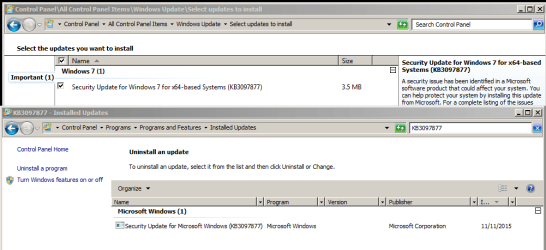
KB3097877.PNG


The catalog (and Windows Update) shows it was published on 12 Nov.
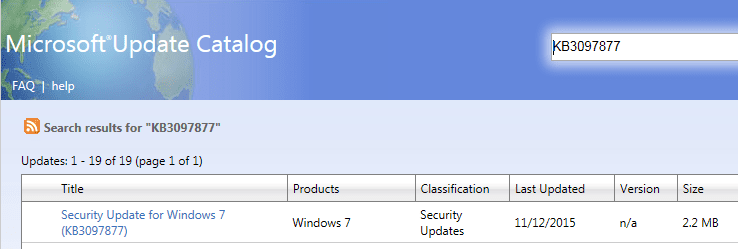
KB3097877-cat.PNG

https://support.microsoft.com/en-us/kb/3097877

I'm going to install it :-)
 

My Computer

Computer type
Laptop
Computer Manufacturer/Model Number
Employer provided Dell Latitude
OS
W7 Pro SP1 64bit
CPU
i7
Memory
8GB
Graphics Card(s)
Intel HD Graphics
Hard Drives
crappy SSD
Antivirus
Employer mandated Symantec Endpoint Protection
Browser
Pale Moon 64bit, IE11 64bit & Chrome 64bit
TeamViewer still works. Outlook 2010 still works... BUT: KB3097877 (version 1?) did not break Outlook on this laptop - even when viewing HTML format e-mails with images and tables. So, installing this version of KB3097877 over top of the old version of KB3097877 was not much of a test.

KB3097877 (version 1?) did break Outlook 2010 on my desktop - even if I did not open any e-mails. I can not test KB3097877 (version 2?) on my desktop again. It is busy doing stuff.
 

My Computer

Computer type
Laptop
Computer Manufacturer/Model Number
Employer provided Dell Latitude
OS
W7 Pro SP1 64bit
CPU
i7
Memory
8GB
Graphics Card(s)
Intel HD Graphics
Hard Drives
crappy SSD
Antivirus
Employer mandated Symantec Endpoint Protection
Browser
Pale Moon 64bit, IE11 64bit & Chrome 64bit

I have seen nothing that would lead me to believe that there's two versions of this update. Indeed, when I uninstalled it, everything it broke came back to life, but in spite of turning off auto-update, it insisted on continuing to try to install during Shutdown, and in fact did so on one laptop late on the 11th, and promptly broke everything again. I would expect there to be a different KB superseding this one rather than cause infinite confusion . . . so unless you've got something definitive by which you can actually identify different versions . . . other than anecdotal machine behavior after installing it . . . the presumption MUST be there is one, and only one version of this KB. Anything else is . . . literally . . . just a wild-ass guess . . . pure speculation.

I would also expect Microsloth to have announced quite loudly and extensively that is has reissued a new version of the update with instructions on how to uninstall and eradicate the bad one. Secretly changing it and not telling anyone is just as bad, if not worse, than having issued a KB that is breaking so many things as those like me who have uninstalled it are not about to install it again as it's breaking things I need to use, and that completely defeats fixing it and not telling anyone.

John
 

My Computer

Computer type
PC/Desktop
Computer Manufacturer/Model Number
HP 6515b & HP 6455b laptops; three custom build desktops
OS
Win7 Pro x64 and Win7 Ultimate x64 (depends on machine)
CPU
Custom Desktops: FX 8350, FX 8150, Phenom II X6 1100T
Motherboard
Custom Desktops: 990FXA-UD3, A890FX Deluxe4, M4A79T
Memory
8GB RAM in all machines, except HP 6515b laptop (4GB max)
Graphics Card(s)
Custom Desktops: XFX R9 270X, XFX R7870, and XFX HD6870
Monitor(s) Displays
Various HP and one Samsung 26" TV/monitor combo
Screen Resolution
1920 x 1080
Hard Drives
500GB WD (laptops) 1TB WD (desktops)
Internet Speed
30 Mbps cable
Antivirus
Avast!
Browser
Firefox
I have seen nothing that would lead me to believe that there's two versions of this update.
The version in the screenshots in my OP show an update that was published on 12 Nov.

Maybe the publish date can change without the KB changing... but it sure looks like a new offering. Those that hid the update will be offered it again if the update has indeed changed.


CBS.log indicates the install on the 10th and the 11th was:
KB3097877~31bf3856ad364e35~amd64~~6.1.1.1

CBS.log indicates the install on the 12th was:
KB3097877~31bf3856ad364e35~amd64~~6.1.1.2

Makes me wonder if I missed 6.1.1.0.


...or maybe those log entries don't mean what I think they mean.
 

My Computer

Computer type
Laptop
Computer Manufacturer/Model Number
Employer provided Dell Latitude
OS
W7 Pro SP1 64bit
CPU
i7
Memory
8GB
Graphics Card(s)
Intel HD Graphics
Hard Drives
crappy SSD
Antivirus
Employer mandated Symantec Endpoint Protection
Browser
Pale Moon 64bit, IE11 64bit & Chrome 64bit
My Computer

Computer type
Laptop
Computer Manufacturer/Model Number
MSI PE60 6QE
OS
Win 10 Pro x64, Win 7 Pro x64
CPU
Intel Core i7-6700HQ Skylake
Motherboard
MSI MS-16J5
Memory
16gb Crucial DDR4
Graphics Card(s)
NVIDIA GeForce GTX 960M 2 GB
Screen Resolution
1920 x 1080
Hard Drives
Samsung 850 EVO 250 GB M.2 SSD (MZ-N5E250BW)
HGST 1TB @7200 RPM HTS721010A9E630
Case
Plastic
Keyboard
Got one...
Mouse
Yep, one of those too.
Internet Speed
FIOS 75/75
Antivirus
Defender
Browser
Chrome/FFox/Ex-PLODE-r/(L)Edge
Other Info
Defender, Custom Hosts, uBlock, regular backups w/ Macrium (Free)
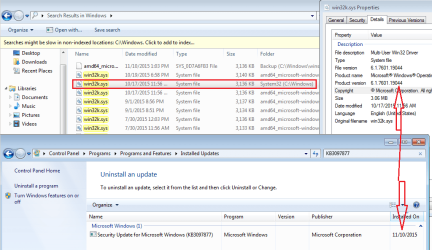
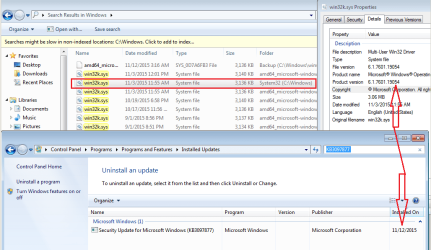
Here is one of the files that KB3097877 updates:

KB3097877-VM-10th.PNG

KB3097877-VM-12th.PNG

The first screenshot shows what KB3097877 installed into one of my VMs on 10 Nov.

The second screenshot shows what a different version of KB3097877 installed into that same VMs on 12 Nov.


edit:
So, a file dated 17 Oct is published on 10 Nov.
and a file dated 03 Nov is published on 12 Nov.
(released late on 11 Nov.)
I wonder if they new there were issues with the first version and were already testing the second version.
 

My Computer

Computer type
Laptop
Computer Manufacturer/Model Number
Employer provided Dell Latitude
OS
W7 Pro SP1 64bit
CPU
i7
Memory
8GB
Graphics Card(s)
Intel HD Graphics
Hard Drives
crappy SSD
Antivirus
Employer mandated Symantec Endpoint Protection
Browser
Pale Moon 64bit, IE11 64bit & Chrome 64bit
My Computer

Computer type
Laptop
Computer Manufacturer/Model Number
Employer provided Dell Latitude
OS
W7 Pro SP1 64bit
CPU
i7
Memory
8GB
Graphics Card(s)
Intel HD Graphics
Hard Drives
crappy SSD
Antivirus
Employer mandated Symantec Endpoint Protection
Browser
Pale Moon 64bit, IE11 64bit & Chrome 64bit
I've also had two. One was installed last night and I received it again today.
 

My Computer

Computer type
PC/Desktop
Computer Manufacturer/Model Number
Custom Build
OS
Win 7 Ultimate, Win 8.1 Pro, Linux Mint 19 Cinnamon (All 64-Bit)
CPU
Intel i5 4690K
Motherboard
Gigabyte Z97X-UD3H
Memory
Corsair Vengeance LP 32GB DDR3
Graphics Card(s)
MSI GTX 1060 GAMING X 6GB
Sound Card
Onboard
Hard Drives
Samsung 850 EVO 250GB SSD (x2)
Samsung 860 EVO 1TB SSD (x2)
Crucial MX300 525GB SSD
WD Blue 2TB 5400rpm Intellipark Disabled (x2)
PSU
Corsair HX750i
Case
Phanteks Enthoo Pro
Cooling
CM Hyper 212 EVO on CPU, Noctua Redux NF-P14S 1500rpm (x6)
Keyboard
Corsair K70 RGB LUX
Mouse
Corsair Sabre RGB
Antivirus
Avast Free, MalwareBytes, SAS & CryptoPrevent
Browser
Chrome
Other Info
StarTech PEXESAT322I 2 Port PCI-E SATA Card
ASUS PCE-AC56 Dual-band AC1300 Wireless Card
Akasa FC.Six Manual Fan Controller
And a Partridge in a Pear Tree!
I removed and hid KB3097877 Yesterday and got a new re-issue again today.
Just hid it again.
KB3097877 was screwing up my Realtek Audio on two computers.
 

My Computer

Computer type
PC/Desktop
Computer Manufacturer/Model Number
Home made Desktop
OS
Windows 10 Pro. 64/ version 1709 Windows 7 Pro/64
CPU
Intel i7-6800K @ 4.3
Motherboard
ASUS X-99 Deluxe II
Memory
Corsair Platinum 16 gig @2400
Graphics Card(s)
EVGA GTX 1070 OC
Monitor(s) Displays
Asus 27" LED LCD/VE278Q
Screen Resolution
1920-1080 or 1280-720 HDMI
Hard Drives
INTEL SSD 730-240 Gb Sata 3.0/
PSU
EVGA Platium 1200W
Case
Phanteks Luxe Tempered Glass 8 fans/ one radiator
Cooling
XSPC/ Water Cooled CPU
Keyboard
Das 4 Professional
Mouse
Logitech M705/MX Anywhere 2-S
Internet Speed
100 mbits
Antivirus
Microsoft Security Essentials/ Malwarebytes Premium 3.0/ SAS
Browser
I.E. 11 default/Firefox/ ISP Time Warner Cable/Spectrum
Other Info
LG BluRay Burner/
Sound system-KLipsch-THX/
Icy Dock ssd Hot Swap bays.
Hello all,

Found this error late yesterday on some of our 60 or so field devices, scattered all over the country. Today we managed to use Kaseya to run a couple of scripts and force the machine to log in as the administrator account, once it was logged in we could connect remotely, remove the update, disable automatic updates (these tablets are on the verge of being phased out anyway) and then change the registry keys we had changed in the scripts back to their defaults. All in all, close to a best case scenario considering where we were yesterday.
 

My Computer

Computer type
Tablet
Computer Manufacturer/Model Number
Motion J3500
OS
Windows 7 Professional 32-bit
I removed and hid KB3097877 Yesterday and got a new re-issue again today.
Just hid it again.
KB3097877 was screwing up my Realtek Audio on two computers.
It would be nice to know for sure if the new version still messes up Realtek Audio... but only if you have an image that you can restore to.
 

My Computer

Computer type
Laptop
Computer Manufacturer/Model Number
Employer provided Dell Latitude
OS
W7 Pro SP1 64bit
CPU
i7
Memory
8GB
Graphics Card(s)
Intel HD Graphics
Hard Drives
crappy SSD
Antivirus
Employer mandated Symantec Endpoint Protection
Browser
Pale Moon 64bit, IE11 64bit & Chrome 64bit
Hello all,

Found this error late yesterday on some of our 60 or so field devices, scattered all over the country. Today we managed to use Kaseya to run a couple of scripts and force the machine to log in as the administrator account, once it was logged in we could connect remotely, remove the update, disable automatic updates (these tablets are on the verge of being phased out anyway) and then change the registry keys we had changed in the scripts back to their defaults. All in all, close to a best case scenario considering where we were yesterday.
Nice job getting them operational.

Are you going to risk installing the new version?
 

My Computer

Computer type
Laptop
Computer Manufacturer/Model Number
Employer provided Dell Latitude
OS
W7 Pro SP1 64bit
CPU
i7
Memory
8GB
Graphics Card(s)
Intel HD Graphics
Hard Drives
crappy SSD
Antivirus
Employer mandated Symantec Endpoint Protection
Browser
Pale Moon 64bit, IE11 64bit & Chrome 64bit
Yesterday, I hid this update. After today's update check, it is gone from the hidden list and back in the update list. I will hide it again, not do this week's updates, and wonder how many times MS will re-issue it.
 

My Computer

Computer type
PC/Desktop
Computer Manufacturer/Model Number
ASUS
OS
Windows 7 Home Premium 64 bit SP1
CPU
i5-2320 @3.00 GHz
Memory
6GB
Graphics Card(s)
NVIDIA GeForce 7300 LE
Monitor(s) Displays
Acer S200HQL 19.5 LED
Screen Resolution
1280 x 800 (1900 x 900 max)
Hard Drives
Drive 1: 1 TB SATA internal: C drive
Drive 2: 250 GB SATA internal: User Data Backup
Drive 3: 500 GB SATA USB: Full System Backup 1, Father
Drive 4: 500 GB SATA USB: Full System Backup 2, Son
Drive 5: 40 GB IDE USB: Kindle, ASUS Tabl
Keyboard
ASUS KB34211
Mouse
Logitech m325 cordless
Internet Speed
27Mb down, 3 Mb up cable modem w/Netgear R6400 WiFi
Antivirus
NIS, Spybot S&D, CCleaner, Malwarebytes, MSERT, MRT
Browser
FF v44.0.2;IE11 v11.0.9600.18015,uv11.0.23;Chrome v44.0.2403
Other Info
FF has AdBlockPlus and Ghostery plugins,
I have seen nothing that would lead me to believe that there's two versions of this update.
The version in the screenshots in my OP show an update that was published on 12 Nov.

Maybe the publish date can change without the KB changing... but it sure looks like a new offering. Those that hid the update will be offered it again if the update has indeed changed.


CBS.log indicates the install on the 10th and the 11th was:
KB3097877~31bf3856ad364e35~amd64~~6.1.1.1

CBS.log indicates the install on the 12th was:
KB3097877~31bf3856ad364e35~amd64~~6.1.1.2

Makes me wonder if I missed 6.1.1.0.


...or maybe those log entries don't mean what I think they mean.

Yes . . . it was updated to a new version . . . but getting that to install on five machines here was a real chore. I found the reference to it buried in MS's docs on the update. You would think they would headline it instead of hiding it. For whatever reason v1 installed yesterday and it persisted as the version that would be installed on all the machines even after uninstalling it and trying a reinstall. The process I finally used to get the revised version to install:

1. Downloaded the standalone KB install and installed it instead of using Windows Update . . . after ensuring the KB had been uninstalled. All the stuff still broke and looking at file version numbers showed a mix of original files (prior to update) and v1 versions. I was left wondering if the standalone was still v1 (downloaded it this morning), but wasn't going to spend the time ripping into the msu file to investigate. It is (or was as of this morning) still v1, or in the process v1 was still present on the machines and that was used in lieu of the standalone file as the msu first looks for installed updates.

2. Without uninstalling v1 (or whatever it was) I went into Windows Update and discovered the KB listed there as a critical update waiting for installation. Directed Windows Update to download and install it to see what would happen. That apparently pulled down v2 and installed it over the top of v1. Everything magically worked again afterward.

This turned into a time consuming chore on five machines. Those with many more to support have my sympathy for the effort they will expend having to recover from this debacle. Too bad MS can't be billed for the manhours of time they consumed with this . . . the cost of that would convince them not to release stuff that obviously hasn't been adequately tested.
 

My Computer

Computer type
PC/Desktop
Computer Manufacturer/Model Number
HP 6515b & HP 6455b laptops; three custom build desktops
OS
Win7 Pro x64 and Win7 Ultimate x64 (depends on machine)
CPU
Custom Desktops: FX 8350, FX 8150, Phenom II X6 1100T
Motherboard
Custom Desktops: 990FXA-UD3, A890FX Deluxe4, M4A79T
Memory
8GB RAM in all machines, except HP 6515b laptop (4GB max)
Graphics Card(s)
Custom Desktops: XFX R9 270X, XFX R7870, and XFX HD6870
Monitor(s) Displays
Various HP and one Samsung 26" TV/monitor combo
Screen Resolution
1920 x 1080
Hard Drives
500GB WD (laptops) 1TB WD (desktops)
Internet Speed
30 Mbps cable
Antivirus
Avast!
Browser
Firefox
You could send MS a bill for your labor...
...then MS could start charging you for every update :-)
 

My Computer

Computer type
Laptop
Computer Manufacturer/Model Number
Employer provided Dell Latitude
OS
W7 Pro SP1 64bit
CPU
i7
Memory
8GB
Graphics Card(s)
Intel HD Graphics
Hard Drives
crappy SSD
Antivirus
Employer mandated Symantec Endpoint Protection
Browser
Pale Moon 64bit, IE11 64bit & Chrome 64bit
Back
Top