Good evening,
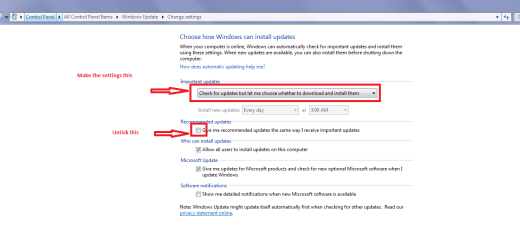
Windows Update keeps offering KB3114887 (a MS Office 2010, 32-bit update) despite the fact it was already installed on March 9th. I have confirmed this by looking at the list of installed updates.
My question: Could someone please explain why this is occurring and how to get Windows Update to quit offering an update it has already installed?
Thank you for your time and any help!
Windows Update keeps offering KB3114887 (a MS Office 2010, 32-bit update) despite the fact it was already installed on March 9th. I have confirmed this by looking at the list of installed updates.
My question: Could someone please explain why this is occurring and how to get Windows Update to quit offering an update it has already installed?
Thank you for your time and any help!
My Computer
At a glance
Win 7 Home Premium x64 SP1Intel Core i3, 3.07 gHz6 GBASUS VH198 (1440x900@60Hz) Intel Q965/Q963 Ex...
- Computer type
- PC/Desktop
- Computer Manufacturer/Model Number
- Dell Inspiron Desktop (refurbished)
- OS
- Win 7 Home Premium x64 SP1
- CPU
- Intel Core i3, 3.07 gHz
- Motherboard
- Dell
- Memory
- 6 GB
- Graphics Card(s)
- ASUS VH198 (1440x900@60Hz) Intel Q965/Q963 Express Chipset F
- Monitor(s) Displays
- Asus
- Hard Drives
- Western Digital 1 TB SATA HDD (Internal)
WD 1-TB "My Passport Ultra" (external drive used for system images)
- Keyboard
- Azio KB505U wired, standard, large print 3-color backlit
- Mouse
- Logitech (wired)
- Internet Speed
- Download: up to 50 Mbps | Upload: 5 Mbps
- Antivirus
- MSE
- Browser
- Firefox (default) and IE11
- Other Info
- MBAM 3xx (lifetime license) |
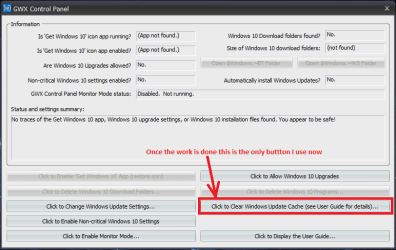
SAS (on-demand) | FF w/NoScript & IE11 | uBlock Origin | POP Peeper Pro | Aeris Calendar | GWX Control Panel Monitor | CPUID