Solved KB3185278 question

AirPower4ever

New member
Member
VIP
Local time
1:14 AM
Messages
269
I just went back to review some updates that I have not installed yet and came across this update; KB3185278. Reading what the fixes are one was the Windows Media Player option; that it was removed.

My question is that it was an option and on my system it was unchecked. So if I install this KB3185278, does that mean it is checked, meaning it is on all the time?
 

My Computer

Computer type
PC/Desktop
Computer Manufacturer/Model Number
Home Built
OS
Windows 10 Pro 64-bit
CPU
Core I7-6700
Motherboard
Asus Maximus VIII Hero
Memory
8GB Corsair Dominator
Graphics Card(s)
Asus STRIX GTX 980Ti
Monitor(s) Displays
Asus PG278Q, Dell U2410
Screen Resolution
2560 x 1440, 1920 x 1200
Hard Drives
1 x Samsung 950 Pro 512GB
1 x 1TB HGST
PSU
750W Seasonic
Case
Antec 900 v3
Cooling
Stock
Internet Speed
Cable Internet
Hi AirPower,
That KB installs is part of the cumulative (roll-up) update, it will appear every month in one form or another, it also clears other system problems.
Only you can remove the Windows media player option.

Roy
 

My Computer

Computer type
PC/Desktop
Computer Manufacturer/Model Number
medionl/Aspire 6930G/acer x55a
OS
W7 home premium 32bit/W7HP 64bit/w10 tp insider ring
CPU
E5300 dual core
Motherboard
medion MS7366
Memory
3gb
Graphics Card(s)
Nvidia Geforce 7100 Nforce 630i
Monitor(s) Displays
avixc
Internet Speed
n (isp resticted to 72)
Antivirus
mse/pands
Browser
palemoon
Other Info
Belkin Fd7050 n USB using Railink RT2870 drivers, more upto date

My Computer

Computer type
PC/Desktop
Computer Manufacturer/Model Number
Home Built
OS
Windows 10 Pro 64-bit
CPU
Core I7-6700
Motherboard
Asus Maximus VIII Hero
Memory
8GB Corsair Dominator
Graphics Card(s)
Asus STRIX GTX 980Ti
Monitor(s) Displays
Asus PG278Q, Dell U2410
Screen Resolution
2560 x 1440, 1920 x 1200
Hard Drives
1 x Samsung 950 Pro 512GB
1 x 1TB HGST
PSU
750W Seasonic
Case
Antec 900 v3
Cooling
Stock
Internet Speed
Cable Internet
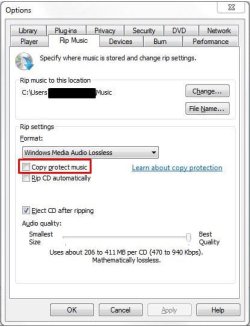
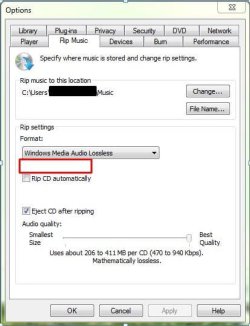
So my friend said it would be ok to install this update on her computer, but doing so before hand we took some "before" and "after" pics.

So on her system she had the option unchecked meaning that the copy protect was "off" which you can see in the pic called "before"

Then we updated (which went well) and then we went back to the options and you can see what happened in the pic called "after"

So now she asked as well.

* Is it still "off"?
* Or is it now "on" and we just cannot see it?
* Or is it removed completely so there is no "off" or "on"
* Is there a way to check what the system is set to?

Maybe in the registry or in gpedit? Just looking for some verification of what did this do to her Windows 7 system.
 

Attachments

  • Before.JPG
    Before.JPG
    38.6 KB · Views: 9
  • After.JPG
    After.JPG
    37.1 KB · Views: 9
Last edited:

My Computer

Computer type
PC/Desktop
Computer Manufacturer/Model Number
Home Built
OS
Windows 10 Pro 64-bit
CPU
Core I7-6700
Motherboard
Asus Maximus VIII Hero
Memory
8GB Corsair Dominator
Graphics Card(s)
Asus STRIX GTX 980Ti
Monitor(s) Displays
Asus PG278Q, Dell U2410
Screen Resolution
2560 x 1440, 1920 x 1200
Hard Drives
1 x Samsung 950 Pro 512GB
1 x 1TB HGST
PSU
750W Seasonic
Case
Antec 900 v3
Cooling
Stock
Internet Speed
Cable Internet
Back
Top