

February 11, 2020 - KB4537813 (Security-only update)
Applies to: Windows 7 Service Pack 1, Windows Server 2008 R2 Service Pack 1, Windows Embedded Standard 7 Service Pack 1, Windows Embedded POSReady 7, Windows Thin PC
IMPORTANT Verify that you have installed the required updates listed in the How to get this update section before installing this update.
NEW
IMPORTANT Some customers who use Windows Server 2008 R2 SP1 and have activated their ESU multiple activation key (MAK) add-on before installing the January 14, 2020 updates might need to re-activate their key. Re-activation on affected devices should only be required once. For information on activation, see this blog post.
NEW
IMPORTANT WSUS scan cab files will continue to be available for Windows 7 SP1 and Windows Server 2008 R2 SP1. If you have a subset of devices running these operating systems without ESU, they might show as non-compliant in your patch management and compliance toolsets.
UPDATED
IMPORTANT Customers who have purchased the Extended Security Update (ESU) for on-premises versions of these operating systems must follow the procedures in KB4522133 to continue receiving security updates after extended support ends on January 14, 2020. For more information on ESU and which editions are supported, see KB4497181.
IMPORTANT Starting on January 15, 2020, a full-screen notification will appear that describes the risk of continuing to use Windows 7 Service Pack 1 after it reaches end of support on January 14, 2020. The notification will remain on the screen until you interact with it. This notification will only appear on the following editions of Windows 7 Service Pack 1:
Note The notification will not appear on domain-joined machines or machines in kiosk mode.
- Starter.
- Home Basic.
- Home Premium.
- Professional. If you have purchased the Extended Security Update (ESU), the notification will not appear. For more information, see How to get Extended Security Updates for eligible Windows devices and Lifecycle FAQ-Extended Security Updates.
- Ultimate.
Improvements and fixes
This security update includes improvements and fixes that were a part of update KB4534310 (released January 14, 2020) and addresses the following issues:
For more information about the resolved security vulnerabilities, please refer to the Security Update Guide.
- Security updates to Internet Explorer, Microsoft Graphics Component, Windows Input and Composition, Windows Media, Windows Shell, Windows Fundamentals, Windows Cryptography, Windows Hyper-V, Windows Core Networking, Windows Peripherals, Windows Network Security and Containers, Windows Storage and Filesystems, the Microsoft Scripting Engine, and Windows Server.
Known issues in this update
How to get this update
Before installing this update
Prerequisite:
You must install the updates listed below and restart your device before installing the latest Rollup. Installing these updates improves the reliability of the update process and mitigates potential issues while installing the Rollup and applying Microsoft security fixes.
After installing the items above, Microsoft strongly recommends that you install the latest SSU (KB4537829). If you are using Windows Update, the latest SSU will be offered to you automatically if you are an ESU customer. To get the standalone package for the latest SSU, search for it in the Microsoft Update Catalog. For general information about SSUs, see Servicing stack updates and Servicing Stack Updates (SSU): Frequently Asked Questions.
- The March 12, 2019 servicing stack update (SSU) (KB4490628). To get the standalone package for this SSU, search for it in the Microsoft Update Catalog. This update is required to install updates that are only SHA-2 signed.
- The latest SHA-2 update (KB4474419) released September 10, 2019. If you are using Windows Update, the latest SHA-2 update will be offered to you automatically. This update is required to install updates that are only SHA-2 signed. For more information on SHA-2 updates, see 2019 SHA-2 Code Signing Support requirement for Windows and WSUS.
- The January 14, 2020 SSU (KB4536952) or later. To get the standalone package for this SSU, search for it in the Microsoft Update Catalog.
- The Extended Security Updates (ESU) Licensing Preparation Package (KB4538483) released February 11, 2020. The ESU licensing preparation package will be offered to you from WSUS. To get the standalone package for ESU licensing preparation package, search for it in the Microsoft Update Catalog.
Install this update
File information
For a list of the files that are provided in this update, download the file information for update 4537813.
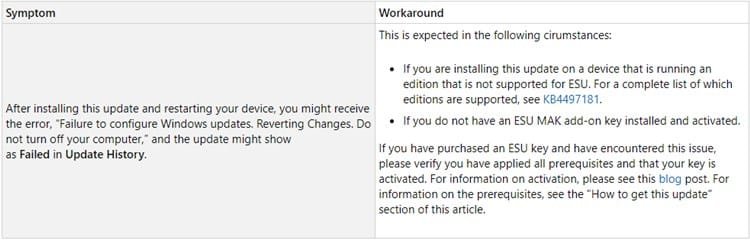
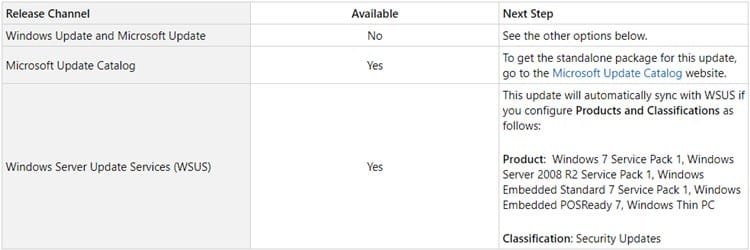
Source: https://support.microsoft.com/en-us/help/4537813
Direct download links for KB4537813 MSU file from Microsoft Update Catalog:
:ar: Download KB4537813 MSU for Windows 7 32-bit (x86) - 28.0 MB
:ar: Download KB4537813 MSU for Windows 7 64-bit (x64) - 49.7 MB
Last edited:
My Computer
At a glance
64-bit Windows 11 Pro for WorkstationsIntel i7-8700K OC'd to 5 GHz64 GB (4x16GB) G.SKILL TridentZ RGB DDR4 3600...ASUS ROG-STRIX-GTX1080TI-O11G-GAMING
- Computer type
- PC/Desktop
- Computer Manufacturer/Model Number
- Self built custom
- OS
- 64-bit Windows 11 Pro for Workstations
- CPU
- Intel i7-8700K OC'd to 5 GHz
- Motherboard
- ASUS ROG Maximus XI Formula Z390
- Memory
- 64 GB (4x16GB) G.SKILL TridentZ RGB DDR4 3600 MHz
- Graphics Card(s)
- ASUS ROG-STRIX-GTX1080TI-O11G-GAMING
- Sound Card
- Integrated
- Monitor(s) Displays
- 2 x Samsung Odyssey G7 27"
- Screen Resolution
- 2560x1440
- Hard Drives
- 1TB Samsung 990 PRO M.2,
4TB Samsung 990 PRO PRO M.2,
TerraMaster F8 SSD Plus NAS
- PSU
- Seasonic Prime Titanium 850W
- Case
- Thermaltake Core P3
- Cooling
- Corsair Hydro H115i
- Keyboard
- Logitech wireless K800
- Mouse
- Logitech MX Master 4
- Internet Speed
- 2 Gb/s Download and 100 Mb/s Upload
- Antivirus
- Malwarebyte Anti-Malware Premium
- Browser
- Google Chrome
- Other Info
- Logitech Z625 speaker system,
Logitech BRIO 4K Pro webcam,
HP Color LaserJet Pro MFP M477fdn,
APC SMART-UPS RT 1000 XL - SURT1000XLI,
Galaxy S23 Plus phone
