KB890830 Windows Malicious Software Removal Tool 5.102 - June 14

Brink

Administrator
Staff member
Local time
11:42 AM
Messages
74,862
Location
Oklahoma
Windows Malicious Software Removal Tool (MSRT) 5.102 helps remove malicious software from computers running Windows11, Windows 10, Windows 8.1, Windows Server 2012 R2, Windows 8, Windows Server 2012, Windows 7, or Windows Server 2008.

Microsoft generally releases MSRT monthly as part of Windows Update or as the standalone tool. Use this tool to find and remove specific prevalent threats and reverse the changes they have made (see covered threats). For comprehensive malware detection and removal, consider using Microsoft Safety Scanner.

This article contains information about how the tool differs from an antivirus or antimalware product, how you can download and run the tool, what happens when the tool finds malware, and tool release information. It also includes information for the administrators and advanced users, including information about supported command-line switches.

Note In compliance with the Microsoft Support Lifecycle policy, MSRT is no longer supported on Windows Vista and older platforms. For more information, go to Microsoft Support Lifecycle.


Read more: Remove specific prevalent malware with Windows Malicious Software Removal Tool (KB890830)


Manual download:


My Computer My Computer

At a glance

64-bit Windows 11 Pro for WorkstationsIntel i7-8700K OC'd to 5 GHz64 GB (4x16GB) G.SKILL TridentZ RGB DDR4 3600...ASUS ROG-STRIX-GTX1080TI-O11G-GAMING
Computer type
PC/Desktop
Computer Manufacturer/Model Number
Self built custom
OS
64-bit Windows 11 Pro for Workstations
CPU
Intel i7-8700K OC'd to 5 GHz
Motherboard
ASUS ROG Maximus XI Formula Z390
Memory
64 GB (4x16GB) G.SKILL TridentZ RGB DDR4 3600 MHz
Graphics Card(s)
ASUS ROG-STRIX-GTX1080TI-O11G-GAMING
Sound Card
Integrated
Monitor(s) Displays
2 x Samsung Odyssey G7 27"
Screen Resolution
2560x1440
Hard Drives
1TB Samsung 990 PRO M.2,
4TB Samsung 990 PRO PRO M.2,
TerraMaster F8 SSD Plus NAS
PSU
Seasonic Prime Titanium 850W
Case
Thermaltake Core P3
Cooling
Corsair Hydro H115i
Keyboard
Logitech wireless K800
Mouse
Logitech MX Master 4
Internet Speed
2 Gb/s Download and 100 Mb/s Upload
Antivirus
Malwarebyte Anti-Malware Premium
Browser
Google Chrome
Other Info
Logitech Z625 speaker system,
Logitech BRIO 4K Pro webcam,
HP Color LaserJet Pro MFP M477fdn,
APC SMART-UPS RT 1000 XL - SURT1000XLI,
Galaxy S23 Plus phone
KB890830 downloaded yesterday 15.06.2022 No report after scan?

Hello, Thank you very much downloading this MSRT latest tool. I download it every month, it is very useful tool.
Actually I run it straight away, (last night) even I have Malwarebytes Premium, F-Secure Safe (Total, with VPN) antivirus,
and it was running over 14 hours, promised "After this operation completes, the tool will provide you with a
report of viruses, spyware, and other potentially unwanted software that was detected." During running the test
I saw Files Infected over 120 ( !! ) Even usually it has never found any harm. I run Malwarebytes Pre, F-Secure
Safe virus -scanning every day (full scans). Also I run Windows Defender Offline, before going anywhere in the net.
The issue is, that now I am running MSRT (version 5.102, June 14) again, because I did not get any results. And I am
wondering why, because during the scan it showed there is over 120 infected files, but nothing in the end. Now I am
running it again, to see if I get also the results of the scan, (at the moment I've been running almost three hours, and
there is 13 Files Infected). Why I did not get report of the scan in the end? My Malware Pro, F-Secure Safe (and I randomly
scan with some Free tool also, to make sure my PC is virus -free). How it is possible, that during scan already there
seems to be Infected Files, but Microsoft Safety Scanner (MSRT) does not give any report, as promised. I would be very
grateful for someone explaining, why I do not get the report. In my opinion, my PC should not be this slow, and I am
strongly suspecting there are something, which my virus -scanner, Malwarebytes and Windows Defender cannot find.

- - - Updated - - -

Hi again, I see one person has answered to my question, but cannot find it. I also cannot add any screenshots of my second MSRT scan. I do not get an option "View detailed results of the scan" also at all. (??) I think I am gonna report about this to Microsoft. Too many visitors on my profile, but no solution. Disappointed.
 

My Computers My Computers

  • At a glance

    21H2 x64
    Computer type
    PC/Desktop
    Computer Manufacturer/Model Number
    build
    OS
    21H2 x64
  • Computer type
    PC/Desktop

My Computer My Computer

At a glance

W7 home premium 32bit/W7HP 64bit/w10 tp insid...E5300 dual core3gbNvidia Geforce 7100 Nforce 630i
Computer type
PC/Desktop
Computer Manufacturer/Model Number
medionl/Aspire 6930G/acer x55a
OS
W7 home premium 32bit/W7HP 64bit/w10 tp insider ring
CPU
E5300 dual core
Motherboard
medion MS7366
Memory
3gb
Graphics Card(s)
Nvidia Geforce 7100 Nforce 630i
Monitor(s) Displays
avixc
Internet Speed
n (isp resticted to 72)
Antivirus
mse/pands
Browser
palemoon
Other Info
Belkin Fd7050 n USB using Railink RT2870 drivers, more upto date
HI

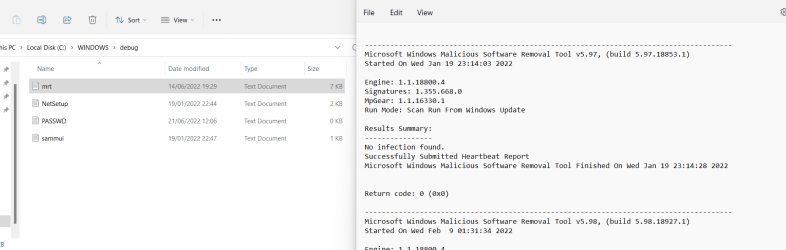
the log can be found here

1. Press Windows key + R.
2. Type %WINDIR%\debug folder and hit enter.
3. Open mrt.log file and check for the result summary.


If you would like to investigate further
Shootover to BleepingComputers--- Am i infected for a check-up
follow the instructions in this link

Preparation Guide For Use Before Using Malware Removal Tools and Requesting Help - Virus, Trojan, Spyware, and Malware Removal Help
Hi, and thank you very much! But I guess the person who is fixing (repairing) my PC has made such settings, I do not access the results. I dunno why. I tried this Windows key + R, wrote %WINDIR%\debug folder + Enter, and got this result: (Under Program files, Windows, debug. There is a file called "PASSWD.LOG" And when I open it, there is just nonsense.

But thank you very much for your advice. And that link you gave is also very important and interesting. But the topic is locked : ( Cannot see it either.
 

My Computers My Computers

  • At a glance

    21H2 x64
    Computer type
    PC/Desktop
    Computer Manufacturer/Model Number
    build
    OS
    21H2 x64
  • Computer type
    PC/Desktop
hi,,
according to your specs your running W11, and this is mine on 11

tip...... join our sister W11 forum a lot more people there
 

Attachments

  • mrt.png
    mrt.png
    30.1 KB · Views: 0

My Computer My Computer

At a glance

W7 home premium 32bit/W7HP 64bit/w10 tp insid...E5300 dual core3gbNvidia Geforce 7100 Nforce 630i
Computer type
PC/Desktop
Computer Manufacturer/Model Number
medionl/Aspire 6930G/acer x55a
OS
W7 home premium 32bit/W7HP 64bit/w10 tp insider ring
CPU
E5300 dual core
Motherboard
medion MS7366
Memory
3gb
Graphics Card(s)
Nvidia Geforce 7100 Nforce 630i
Monitor(s) Displays
avixc
Internet Speed
n (isp resticted to 72)
Antivirus
mse/pands
Browser
palemoon
Other Info
Belkin Fd7050 n USB using Railink RT2870 drivers, more upto date
Back
Top