KDE-like smart window placement for Windows 7?

diovanti

New member
Local time
10:31 AM
Messages
4
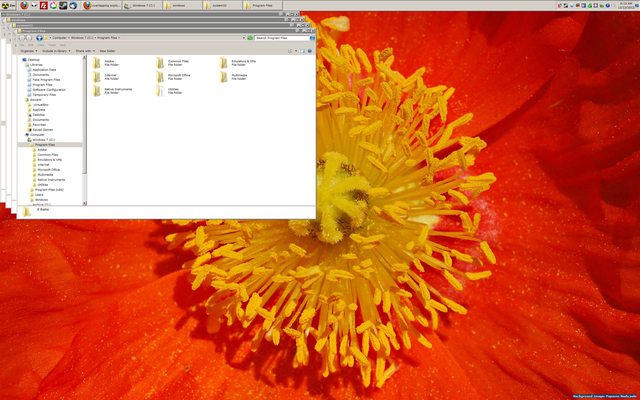
When I open multiple explorer windows on my computer I get this:

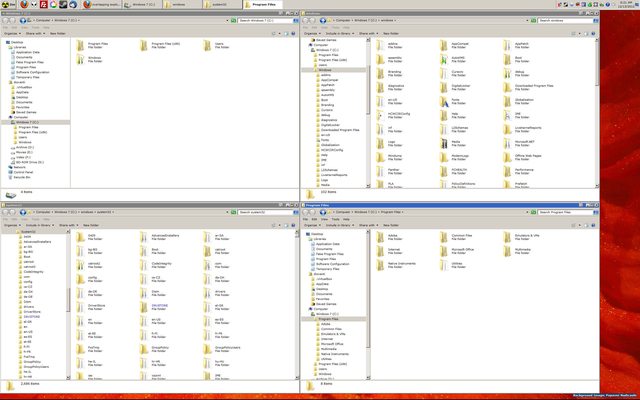
I want it to look this this by default (I believe Linux calls it 'smart windows placement')

Any suggestions?
 

My Computer My Computer

Computer type
PC/Desktop
Computer Manufacturer/Model Number
Custom
OS
Windows 7 x64
CPU
Core i7
Motherboard
ASRock
Memory
8GB
Graphics Card(s)
GTX 560
Sound Card
Some motherboard thing...
Monitor(s) Displays
Dell U2412M / Dell U3011
Screen Resolution
Left Monitor 1200x1920 (portrait ) - Right Monitor 2560x1600
Hard Drives
Lots of 'em
Internet Speed
10-20Mbps
Antivirus
MSE
Browser
Firefox

My Computer My Computer

Computer type
PC/Desktop
Computer Manufacturer/Model Number
n/a
OS
W7 Ultimate SP1, LM19.2 MATE, W10 Home 1703, W10 Pro 1703 VM, #All 64 bit
CPU
AMD Phenom II x6 1100T, 3.3 GHz
Motherboard
ASUS M4A88T-M/USB3 (AM3)
Memory
12GB DDR3 1333 G-Skill (4GB x 2), G-Skill (2GB x 2)
Graphics Card(s)
NVIDIA GeForce GTX 660
Sound Card
Realtek?
Monitor(s) Displays
Samsung S23B350
Screen Resolution
1920x1080
Hard Drives
WD Green 2TB (SATA), WD Green 3TB (SATA), WD Blue 4TB (SATA), WD Blue 6TB (SATA)
PSU
Cooler Master
Case
Antec GX300 Tower
Cooling
3x Antec TRICOOL 120mm Fans
Mouse
Wired Optical
Internet Speed
DSL
Antivirus
Avast
Browser
Pale Moon (64 bit)
Other Info
2018-12-27 Upgraded HDDs
2015-12-10 Upgraded case, graphics card, storage
2015-08-15 Upgraded motherboard & RAM
2015-07-15 Upgraded LM17.1 to LM17.2

My Computer My Computer

Computer type
PC/Desktop
Computer Manufacturer/Model Number
Custom
OS
Windows 7 x64
CPU
Core i7
Motherboard
ASRock
Memory
8GB
Graphics Card(s)
GTX 560
Sound Card
Some motherboard thing...
Monitor(s) Displays
Dell U2412M / Dell U3011
Screen Resolution
Left Monitor 1200x1920 (portrait ) - Right Monitor 2560x1600
Hard Drives
Lots of 'em
Internet Speed
10-20Mbps
Antivirus
MSE
Browser
Firefox
When I open multiple explorer windows on my computer I get this:


I want it to look this this by default (I believe Linux calls it 'smart windows placement')


Any suggestions?

Hi there
Why not use Virtual Desktops -- works now for W7 (and surprisingly W8 too). Download from the sysinternals suite.

You get 4 Virtual desktops -- works exactly like Virtual desktops in most Linux distros. You might find this a better solution for running multiple IE sessions.

more of good stuff in the whole package too. The utility you want is called DESKTOPS.

Sysinternals Suite

Cheers
jimbo
 

My Computer My Computer

Computer type
PC/Desktop
Computer Manufacturer/Model Number
Custom built, several laptops HP/ASUS
OS
Linux CENTOS 7 / various Windows OS'es and servers
CPU
Intel i7 Intel i5
Memory
8GB, 16GB
Graphics Card(s)
On Motherboard
Sound Card
Realtek HD audio
Monitor(s) Displays
Apple Cinema display, Samsung LCD
Screen Resolution
1920 X 1080
Hard Drives
4 X 1TB SATA
Mouse
Toshiba wireless laser
Internet Speed
> 20MB up
I probably wasn't clear on what I wanted in the first place with all the emphasis on explorer only. I'd like windows to open on first launch to empty screen space that another window isn't currently occupying if sufficient screen space is available -- basically don't overlap if there's enough room not to. Here's an better example of what I'd like to happen:
M4PIXuU.jpgttp:

1BcFmIu.jpg


Note in the second picture I've moved the windows manually to get it to look like that.

Also tried using the software: DisplayFusion, WinSplit Revoultion & WindowSpace, as these were recommend to me on the SA forums, but to no avail. There's got to be some software out there that will do this...
 
Last edited:

My Computer My Computer

Computer type
PC/Desktop
Computer Manufacturer/Model Number
Custom
OS
Windows 7 x64
CPU
Core i7
Motherboard
ASRock
Memory
8GB
Graphics Card(s)
GTX 560
Sound Card
Some motherboard thing...
Monitor(s) Displays
Dell U2412M / Dell U3011
Screen Resolution
Left Monitor 1200x1920 (portrait ) - Right Monitor 2560x1600
Hard Drives
Lots of 'em
Internet Speed
10-20Mbps
Antivirus
MSE
Browser
Firefox
I don't think that Windows Explorer will do that.

You can specify the starting position/size of the Command Prompt window, so you might be able to write a script to do what you want.
 

My Computer My Computer

Computer type
PC/Desktop
Computer Manufacturer/Model Number
n/a
OS
W7 Ultimate SP1, LM19.2 MATE, W10 Home 1703, W10 Pro 1703 VM, #All 64 bit
CPU
AMD Phenom II x6 1100T, 3.3 GHz
Motherboard
ASUS M4A88T-M/USB3 (AM3)
Memory
12GB DDR3 1333 G-Skill (4GB x 2), G-Skill (2GB x 2)
Graphics Card(s)
NVIDIA GeForce GTX 660
Sound Card
Realtek?
Monitor(s) Displays
Samsung S23B350
Screen Resolution
1920x1080
Hard Drives
WD Green 2TB (SATA), WD Green 3TB (SATA), WD Blue 4TB (SATA), WD Blue 6TB (SATA)
PSU
Cooler Master
Case
Antec GX300 Tower
Cooling
3x Antec TRICOOL 120mm Fans
Mouse
Wired Optical
Internet Speed
DSL
Antivirus
Avast
Browser
Pale Moon (64 bit)
Other Info
2018-12-27 Upgraded HDDs
2015-12-10 Upgraded case, graphics card, storage
2015-08-15 Upgraded motherboard & RAM
2015-07-15 Upgraded LM17.1 to LM17.2
Hi there
Have you tried the Virtual Desktops solution I suggested -- It isn't EXACTLY what you ask but it makes this sort of stuff much easier to manage - especially if you only have ONE physical screen.


Cheers
jimbo
 

My Computer My Computer

Computer type
PC/Desktop
Computer Manufacturer/Model Number
Custom built, several laptops HP/ASUS
OS
Linux CENTOS 7 / various Windows OS'es and servers
CPU
Intel i7 Intel i5
Memory
8GB, 16GB
Graphics Card(s)
On Motherboard
Sound Card
Realtek HD audio
Monitor(s) Displays
Apple Cinema display, Samsung LCD
Screen Resolution
1920 X 1080
Hard Drives
4 X 1TB SATA
Mouse
Toshiba wireless laser
Internet Speed
> 20MB up
I use VirtuaWin + KvasdoPager for multiple desktops in Windows.
 

My Computer My Computer

Computer type
PC/Desktop
Computer Manufacturer/Model Number
n/a
OS
W7 Ultimate SP1, LM19.2 MATE, W10 Home 1703, W10 Pro 1703 VM, #All 64 bit
CPU
AMD Phenom II x6 1100T, 3.3 GHz
Motherboard
ASUS M4A88T-M/USB3 (AM3)
Memory
12GB DDR3 1333 G-Skill (4GB x 2), G-Skill (2GB x 2)
Graphics Card(s)
NVIDIA GeForce GTX 660
Sound Card
Realtek?
Monitor(s) Displays
Samsung S23B350
Screen Resolution
1920x1080
Hard Drives
WD Green 2TB (SATA), WD Green 3TB (SATA), WD Blue 4TB (SATA), WD Blue 6TB (SATA)
PSU
Cooler Master
Case
Antec GX300 Tower
Cooling
3x Antec TRICOOL 120mm Fans
Mouse
Wired Optical
Internet Speed
DSL
Antivirus
Avast
Browser
Pale Moon (64 bit)
Other Info
2018-12-27 Upgraded HDDs
2015-12-10 Upgraded case, graphics card, storage
2015-08-15 Upgraded motherboard & RAM
2015-07-15 Upgraded LM17.1 to LM17.2
Back
Top