
Solved Keep dropping internet(new situation)_Default Gateway Not Available

kangyijin

New member
Local time
6:17 AM
Messages
3
I am running Windows 7 64-bit. My Internet connection keeps getting dropped, and when I run the troubleshooter, I can get the messages: "The default gateway is not available." After that, the problem can be fixed, but it is only good for a few minutes. Any amount of time later, my connection is dropped again. I am connecting to the work-place wi-fi. My Lenovo T410 worked perfectly fine with this wi-fi in past years. This problem is new, and only started happening since a few days ago. BTW, my colleagues do not have this problem, and my other computers also do not have this problem.

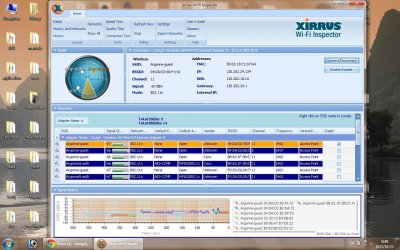
Here I attached WiFi inspector result. I really appreciate experts' help. Thank you very much.
 

Attachments
  • Wifi.jpg
    Wifi.jpg
    171.6 KB · Views: 4

My Computer My Computer

At a glance

Windows 7 Home Premium 64biti5 2.4GHz2GBdont know
Computer type
Laptop
Computer Manufacturer/Model Number
Lenovo
OS
Windows 7 Home Premium 64bit
CPU
i5 2.4GHz
Motherboard
don't know
Memory
2GB
Graphics Card(s)
dont know
Hard Drives
dont know, 300GB
Antivirus
microsoft security essentials
Browser
Chrome
I can tell you that the wireless landscape here is not good with multiple unsecured A/P's most of which are working on the same channel 11 won't make for a reliable connection.

I personally wouldn't expect a reliable connection from this set up and would at least secure these networks and adjust the channels so they weren't all overlapping.

You might try some of the solutions listed in the link below, the comments section also has some good advice.
Windows 7 Unidentified Network, Limited Access, No Internet Connection Problem Resolved
 

My Computer My Computer

At a glance

Windows 7 Ult, Windows 8.1 Pro,Q9650-4.275GHz, E8600 4.5GHz, E6750-3.8GHzG.Skill PC2 9600 1200Mhz 5 5 5 15 2TGTX480
Computer type
PC/Desktop
Computer Manufacturer/Model Number
Home built
OS
Windows 7 Ult, Windows 8.1 Pro,
CPU
Q9650-4.275GHz, E8600 4.5GHz, E6750-3.8GHz
Motherboard
Evga 780i FTW
Memory
G.Skill PC2 9600 1200Mhz 5 5 5 15 2T
Graphics Card(s)
GTX480
Sound Card
Asus Xonar D2
Monitor(s) Displays
HannsG
Screen Resolution
1680X1050
Hard Drives
GSkill Phoenix Pro 120GB SSD
PSU
ThermalTake Toughpower 1000Watt modular
Case
ThermalTake XaserV
Cooling
Xigmatek S1283
Keyboard
Logitech G15
Mouse
Logitech G9
Internet Speed
T1
Hi Chev65

Thank you. But how did this happen suddenly, as this Wifi has been good for years. And all other computers do not have this problem. Isn't it something related to my own PC, please? Thank you for your time.
 

My Computer My Computer

At a glance

Windows 7 Home Premium 64biti5 2.4GHz2GBdont know
Computer type
Laptop
Computer Manufacturer/Model Number
Lenovo
OS
Windows 7 Home Premium 64bit
CPU
i5 2.4GHz
Motherboard
don't know
Memory
2GB
Graphics Card(s)
dont know
Hard Drives
dont know, 300GB
Antivirus
microsoft security essentials
Browser
Chrome
Hi Chev65

Thank you. But how did this happen suddenly, as this Wifi has been good for years. And all other computers do not have this problem. Isn't it something related to my own PC, please? Thank you for your time.

Honestly this default gateway problem can be one of a million different problems so it's nearly impossible to nail down a single cause other than by process of elimination. The fact that it once worked and now doesn't really narrow it down.

In fact the persistent use of channel 11 tells me that nobody is really paying attention to these unsecured networks. Overlapping channels is the number one cause for connection drop outs.

The following link shows some solutions that may help but they mostly have to do with a default gateway not showing up which results in the Unidentified Network problem.

I'd need to see the ipconfig /all from this machine in order to be more helpful. :)

http://pocketpccentral.net/blog/200...cess-no-internet-connection-problem-resolved/
 

My Computer My Computer

At a glance

Windows 7 Ult, Windows 8.1 Pro,Q9650-4.275GHz, E8600 4.5GHz, E6750-3.8GHzG.Skill PC2 9600 1200Mhz 5 5 5 15 2TGTX480
Computer type
PC/Desktop
Computer Manufacturer/Model Number
Home built
OS
Windows 7 Ult, Windows 8.1 Pro,
CPU
Q9650-4.275GHz, E8600 4.5GHz, E6750-3.8GHz
Motherboard
Evga 780i FTW
Memory
G.Skill PC2 9600 1200Mhz 5 5 5 15 2T
Graphics Card(s)
GTX480
Sound Card
Asus Xonar D2
Monitor(s) Displays
HannsG
Screen Resolution
1680X1050
Hard Drives
GSkill Phoenix Pro 120GB SSD
PSU
ThermalTake Toughpower 1000Watt modular
Case
ThermalTake XaserV
Cooling
Xigmatek S1283
Keyboard
Logitech G15
Mouse
Logitech G9
Internet Speed
T1
Hi Chev

Maybe you are right. Overlapping channels is the number one cause for connection drop outs. The problem is gone, although I did nothing. Thanks.
 

My Computer My Computer

At a glance

Windows 7 Home Premium 64biti5 2.4GHz2GBdont know
Computer type
Laptop
Computer Manufacturer/Model Number
Lenovo
OS
Windows 7 Home Premium 64bit
CPU
i5 2.4GHz
Motherboard
don't know
Memory
2GB
Graphics Card(s)
dont know
Hard Drives
dont know, 300GB
Antivirus
microsoft security essentials
Browser
Chrome
Back
Top