Solved (Round 8:) Win7 "Not connected, No connections are available"

slim003

New member
Local time
8:29 AM
Messages
17
(Round 8:) Win7 "Not connected, No connections are available"

I've read through a few other posts regarding this; can't figure it out....

I decided to "downgrade" to Windows 7 Pro (64-bit) from Win10 Pro. I backed up my data from my Win10 HDD before removing and reinstalling a 500 GB Samsung SSD in addition to not messing with the Win10 HDD at all. (I bought a new HDD to use solely for data, etc., whatever folders Win7 allows me to relocate. I won't install that new HDD until Win7 is fully working.)

Some history: I've had my computer (HP pavilion HPE) for several years, and it came with Win7 installed. It always connected with the internet by way direct connections to my modem or (for the past few years) my router via ethernet. I've no problem connecting with Win10 -- always worked well, never had a glitch.

Installing Win7 from the DVD was not easy; I never had so much trouble. But after finding out what "GPD" is and modifying the SSD to that, it went fairly well. The problem is that Win7 reports that the computer is not connected whatsoever. I've tried looking for settings adjustments, troubleshooting, etc., all without success, all attempts reporting "Not connected / No connections available." I tired searching for a fix; the most straight-forward one was to unplug the modem and router -- no help there (I didn't expect it, as we have Roku-connected TVs and iPads working just fine while I was trying to figure this out. Checked ethernet connection -- OK, so no connection success.

So, I wanted to double-check my connection/operability of my computer with Win10 again, so I re-installed my Win10 HDD and here I am, connected with you (and the rest of the world) and all is well. I have no idea why Win7 cannot detect any connection whatsoever while clearly there is a working connection via my well-working router. It seems to me that there must be some sort of software/setting tweak needed, as all the hardware seems to be working OK. (I thought I might be able to activate this Win7 somehow without an internet connection/verifying via product key code, but no-go; says I have no connection.)

The only thing I can think of is that (I *think*) I started using a new, better router *after* installing Win10 (possibly not ever using this router & Win7). So, maybe there's something there, but I've never had any problem connecting with any of several connected devices around the house -- always automatic and flawless. I guess I could open up the router's settings page and maybe see what's going on, but I really don't know what to look for. But this seems to me to be a long shot.

Any suggestions for a fix? Thanks.
 

My Computers My Computers

  • At a glance

    Windows 7 Professional, SP1, 64-bitIntel Core i7 377016 GB DDR3-1600 (expanded from 12 GB)Radeon HD 7450
    Computer type
    PC/Desktop
    Computer Manufacturer/Model Number
    HP Pavilion HPE h8-1287c
    OS
    Windows 7 Professional, SP1, 64-bit
    CPU
    Intel Core i7 3770
    Motherboard
    Pegatron IPMMB-FM (Formosa)
    Memory
    16 GB DDR3-1600 (expanded from 12 GB)
    Graphics Card(s)
    Radeon HD 7450
    Sound Card
    Integrated IDT 92HD73E Audio
    Hard Drives
    Samsung V-NAND SSD, 860 EVO, 500 GB (Primary/Boot drive)
    Western Digital WD2003FZEX, 2 TB (Secondary, user data drive)
    PSU
    HP DPS-300AB-73A, Int. 300W (100V-240V)
    Case
    Mid-size ATX
    Cooling
    Three fans: rear case, CPU and graphics card
    Keyboard
    HP, Standard, typical corded
    Mouse
    HP, Standard, typical corded
    Internet Speed
    approx. 400 Mbs/s, via cable
    Antivirus
    none yet (probable: Bitdefender Free)
    Browser
    ? -- part of Win7
    Other Info
    Networking: 802.11 wireless b/g/n & Bluetooth 3.0 half-length
    PCI-Express Mini card;
    Elect. interface: WLAN: PCIe 2.0, CEM 1.1 compliant with no Vaux support
    Operating band: 2.4 GHz single band
    LAN: 1000BASE-T (Atheros AR8161L)
  • Computer type
    PC/Desktop

My Computers My Computers

  • At a glance

    7 X64i5 84002x8gb 3200mhz
    Computer type
    PC/Desktop
    OS
    7 X64
    CPU
    i5 8400
    Motherboard
    gigabyte b365m ds3h
    Memory
    2x8gb 3200mhz
    Hard Drives
    various
    PSU
    pure power 11 400w cm
    Case
    Coolermaster
    Cooling
    cryorig m9i
  • At a glance

    7x64g54008gb ddr4 2400
    Computer type
    PC/Desktop
    OS
    7x64
    CPU
    g5400
    Motherboard
    ga b365m ds3h
    Memory
    8gb ddr4 2400
    PSU
    xfx pro 450w
Thanks! (I add more configuration specs later today….). But yes, my computer is an HP 1287c. Your helpful link quickly led to a few available download options. I’ll download load everything and copy these onto a flash drive before I reinstall the Win7 SSD. I’ll check back with a progress report.

- - - Updated - - -

HP Pavilion HPE h8-1280d Desktop PC Software and Driver Downloads | HP® Support

This page list the categories of available software and updates. Within "Driver-Original" there are two network controller drivers available:

1. Original Broadcom Wireless Network Controller Driver

2.
Original Realtek Network Controller Driver

I have the computer's specs info, and within the Networking section there is no mention of "Broadcom" or "Realtek." (see my updated specs for this website at the bottom/additional information). Do you know which of these I should install? Both?

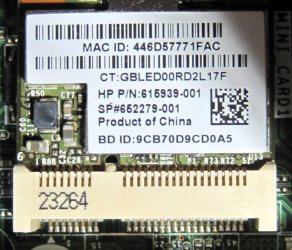
(... wait.... I just took a photo of what I think is the network card. I'll come back and post the photo.)

Yes, this is it: WLAN & Bluetooth combo.


Attachments

  • network card.jpg
    network card.jpg
    105.3 KB · Views: 40
Last edited:

My Computers My Computers

  • At a glance

    Windows 7 Professional, SP1, 64-bitIntel Core i7 377016 GB DDR3-1600 (expanded from 12 GB)Radeon HD 7450
    Computer type
    PC/Desktop
    Computer Manufacturer/Model Number
    HP Pavilion HPE h8-1287c
    OS
    Windows 7 Professional, SP1, 64-bit
    CPU
    Intel Core i7 3770
    Motherboard
    Pegatron IPMMB-FM (Formosa)
    Memory
    16 GB DDR3-1600 (expanded from 12 GB)
    Graphics Card(s)
    Radeon HD 7450
    Sound Card
    Integrated IDT 92HD73E Audio
    Hard Drives
    Samsung V-NAND SSD, 860 EVO, 500 GB (Primary/Boot drive)
    Western Digital WD2003FZEX, 2 TB (Secondary, user data drive)
    PSU
    HP DPS-300AB-73A, Int. 300W (100V-240V)
    Case
    Mid-size ATX
    Cooling
    Three fans: rear case, CPU and graphics card
    Keyboard
    HP, Standard, typical corded
    Mouse
    HP, Standard, typical corded
    Internet Speed
    approx. 400 Mbs/s, via cable
    Antivirus
    none yet (probable: Bitdefender Free)
    Browser
    ? -- part of Win7
    Other Info
    Networking: 802.11 wireless b/g/n & Bluetooth 3.0 half-length
    PCI-Express Mini card;
    Elect. interface: WLAN: PCIe 2.0, CEM 1.1 compliant with no Vaux support
    Operating band: 2.4 GHz single band
    LAN: 1000BASE-T (Atheros AR8161L)
  • Computer type
    PC/Desktop
thats the WiFi card NOT your Ethernet connection

post the MS32info details, and a copy of any Unknown drivers in Device manager

notes
depending upon your DVD W7 install disc wouldn't be surprised if it was only W7 not W7 SP1
Wifi would require you to MANUALLY connect.... SSID and Password
(right side of taskbar-- Square = Ethernet ... Bars = wifi)
see that desktop has USB3 ports if note 1 is correct you will require those drivers
for a Deep Dive, follow this link.... Ignore the title provides a wealth of info
Blue Screen of Death (BSOD) Posting Instructions
 
Last edited:

My Computer My Computer

At a glance

W7 home premium 32bit/W7HP 64bit/w10 tp insid...E5300 dual core3gbNvidia Geforce 7100 Nforce 630i
Computer type
PC/Desktop
Computer Manufacturer/Model Number
medionl/Aspire 6930G/acer x55a
OS
W7 home premium 32bit/W7HP 64bit/w10 tp insider ring
CPU
E5300 dual core
Motherboard
medion MS7366
Memory
3gb
Graphics Card(s)
Nvidia Geforce 7100 Nforce 630i
Monitor(s) Displays
avixc
Internet Speed
n (isp resticted to 72)
Antivirus
mse/pands
Browser
palemoon
Other Info
Belkin Fd7050 n USB using Railink RT2870 drivers, more upto date
thats the WiFi card NOT your Ethernet connection
post the MS32info details, and a copy of any Unknown drivers in Device manager
notes
depending upon your DVD W7 install disc wouldn't be surprised if it was only W7 not W7 SP1
Wifi would require you to MANUALLY connect.... SSID and Password
(right side of taskbar-- Square = Ethernet ... Bars = wifi)
see that desktop has USB3 ports if note 1 is correct you will require those drivers
for a Deep Dive, follow this link.... Ignore the title provides a wealth of info
Blue Screen of Death (BSOD) Posting Instructions

Thanks for the reply.

No, the Win7 installation disk is SP1 -- bought this new, in a sealed DVD box, fancy multi-colored product key label.

I've printed out your link and downloaded the DM Log Collector .exe file. I don't understand what the "note 1" you are referring to is; hopefully MS32 (??) info will become apparent as I poke around. I'll reinstall my SSD with Win7 on that and run the log collector tomorrow.
 

My Computers My Computers

  • At a glance

    Windows 7 Professional, SP1, 64-bitIntel Core i7 377016 GB DDR3-1600 (expanded from 12 GB)Radeon HD 7450
    Computer type
    PC/Desktop
    Computer Manufacturer/Model Number
    HP Pavilion HPE h8-1287c
    OS
    Windows 7 Professional, SP1, 64-bit
    CPU
    Intel Core i7 3770
    Motherboard
    Pegatron IPMMB-FM (Formosa)
    Memory
    16 GB DDR3-1600 (expanded from 12 GB)
    Graphics Card(s)
    Radeon HD 7450
    Sound Card
    Integrated IDT 92HD73E Audio
    Hard Drives
    Samsung V-NAND SSD, 860 EVO, 500 GB (Primary/Boot drive)
    Western Digital WD2003FZEX, 2 TB (Secondary, user data drive)
    PSU
    HP DPS-300AB-73A, Int. 300W (100V-240V)
    Case
    Mid-size ATX
    Cooling
    Three fans: rear case, CPU and graphics card
    Keyboard
    HP, Standard, typical corded
    Mouse
    HP, Standard, typical corded
    Internet Speed
    approx. 400 Mbs/s, via cable
    Antivirus
    none yet (probable: Bitdefender Free)
    Browser
    ? -- part of Win7
    Other Info
    Networking: 802.11 wireless b/g/n & Bluetooth 3.0 half-length
    PCI-Express Mini card;
    Elect. interface: WLAN: PCIe 2.0, CEM 1.1 compliant with no Vaux support
    Operating band: 2.4 GHz single band
    LAN: 1000BASE-T (Atheros AR8161L)
  • Computer type
    PC/Desktop
re note 1 ......No standard W7 install disk included usb3 drivers
(certain OEM install disks may have, IF USB3 ports were included during manufacture)
 

My Computer My Computer

At a glance

W7 home premium 32bit/W7HP 64bit/w10 tp insid...E5300 dual core3gbNvidia Geforce 7100 Nforce 630i
Computer type
PC/Desktop
Computer Manufacturer/Model Number
medionl/Aspire 6930G/acer x55a
OS
W7 home premium 32bit/W7HP 64bit/w10 tp insider ring
CPU
E5300 dual core
Motherboard
medion MS7366
Memory
3gb
Graphics Card(s)
Nvidia Geforce 7100 Nforce 630i
Monitor(s) Displays
avixc
Internet Speed
n (isp resticted to 72)
Antivirus
mse/pands
Browser
palemoon
Other Info
Belkin Fd7050 n USB using Railink RT2870 drivers, more upto date
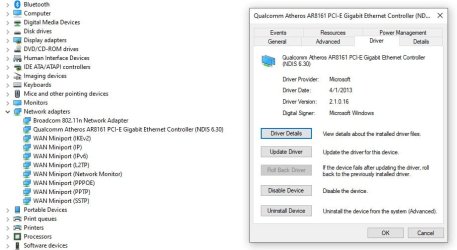
Thanks. Is there something listed in the device manager that relates to Ethernet? Right now, I'm on my Win10 setup and I cannot find anything "Ethernet" among any of the device manager listings.

---------------------------------

PS - I kept checking the device mgr. and finally saw this. Helpful? This is from my Win10 setup (which works well).

Screenshot 2025-03-16 210124.jpg

- - - Updated - - -

Found this list of available Qualcomm Ethernet drivers. Included is the one I currently have with my computer/Win10.

Download Qualcomm Atheros AR8131 PCI-E Gigabit Ethernet Controller Network Adapter Drivers for Windows 11, 10, 8.1, 8, or 7 - 64-bit and 32-bit - Treexy
 
Last edited:

My Computers My Computers

  • At a glance

    Windows 7 Professional, SP1, 64-bitIntel Core i7 377016 GB DDR3-1600 (expanded from 12 GB)Radeon HD 7450
    Computer type
    PC/Desktop
    Computer Manufacturer/Model Number
    HP Pavilion HPE h8-1287c
    OS
    Windows 7 Professional, SP1, 64-bit
    CPU
    Intel Core i7 3770
    Motherboard
    Pegatron IPMMB-FM (Formosa)
    Memory
    16 GB DDR3-1600 (expanded from 12 GB)
    Graphics Card(s)
    Radeon HD 7450
    Sound Card
    Integrated IDT 92HD73E Audio
    Hard Drives
    Samsung V-NAND SSD, 860 EVO, 500 GB (Primary/Boot drive)
    Western Digital WD2003FZEX, 2 TB (Secondary, user data drive)
    PSU
    HP DPS-300AB-73A, Int. 300W (100V-240V)
    Case
    Mid-size ATX
    Cooling
    Three fans: rear case, CPU and graphics card
    Keyboard
    HP, Standard, typical corded
    Mouse
    HP, Standard, typical corded
    Internet Speed
    approx. 400 Mbs/s, via cable
    Antivirus
    none yet (probable: Bitdefender Free)
    Browser
    ? -- part of Win7
    Other Info
    Networking: 802.11 wireless b/g/n & Bluetooth 3.0 half-length
    PCI-Express Mini card;
    Elect. interface: WLAN: PCIe 2.0, CEM 1.1 compliant with no Vaux support
    Operating band: 2.4 GHz single band
    LAN: 1000BASE-T (Atheros AR8161L)
  • Computer type
    PC/Desktop
Hi
checked my W7 device manager listings for both, neither is included on a W7 set-up disk

They will therefor show-up as >>Unknown devices<< within device manager

To get you started, download the Broadcom driver you referenced in post 3 to a usb and then update your system
(you will need the Routers SSID and Password for internet access)

The Treexy driver is wrong

I used SnappyDrivers LIGHT tool to update >>all<< my drivers
not sure if it will pick up the Atheros driver, an earlier driver is in the MS catalogue
 

My Computer My Computer

At a glance

W7 home premium 32bit/W7HP 64bit/w10 tp insid...E5300 dual core3gbNvidia Geforce 7100 Nforce 630i
Computer type
PC/Desktop
Computer Manufacturer/Model Number
medionl/Aspire 6930G/acer x55a
OS
W7 home premium 32bit/W7HP 64bit/w10 tp insider ring
CPU
E5300 dual core
Motherboard
medion MS7366
Memory
3gb
Graphics Card(s)
Nvidia Geforce 7100 Nforce 630i
Monitor(s) Displays
avixc
Internet Speed
n (isp resticted to 72)
Antivirus
mse/pands
Browser
palemoon
Other Info
Belkin Fd7050 n USB using Railink RT2870 drivers, more upto date
Well, I installed the Broadcom driver. Now I have a connection to my router — says I’m connected. However, I can’t get on the internet: “Internet Explorer cannot display the webpage”. Can you advise a fix?

My attempts to activate Win7 always gets me the error 0x80072F8F….. may be due to lack of internet access…? I have entered/changed my product key, but if this activation relies on a working internet connection….

I have not installed any other drivers yet. I did find a promising Atheros driver, which I’ll try later. I’d like to get online to download and install an antivirus program as well as maybe getting in touch with Microsoft about this activation (failure).
 

My Computers My Computers

  • At a glance

    Windows 7 Professional, SP1, 64-bitIntel Core i7 377016 GB DDR3-1600 (expanded from 12 GB)Radeon HD 7450
    Computer type
    PC/Desktop
    Computer Manufacturer/Model Number
    HP Pavilion HPE h8-1287c
    OS
    Windows 7 Professional, SP1, 64-bit
    CPU
    Intel Core i7 3770
    Motherboard
    Pegatron IPMMB-FM (Formosa)
    Memory
    16 GB DDR3-1600 (expanded from 12 GB)
    Graphics Card(s)
    Radeon HD 7450
    Sound Card
    Integrated IDT 92HD73E Audio
    Hard Drives
    Samsung V-NAND SSD, 860 EVO, 500 GB (Primary/Boot drive)
    Western Digital WD2003FZEX, 2 TB (Secondary, user data drive)
    PSU
    HP DPS-300AB-73A, Int. 300W (100V-240V)
    Case
    Mid-size ATX
    Cooling
    Three fans: rear case, CPU and graphics card
    Keyboard
    HP, Standard, typical corded
    Mouse
    HP, Standard, typical corded
    Internet Speed
    approx. 400 Mbs/s, via cable
    Antivirus
    none yet (probable: Bitdefender Free)
    Browser
    ? -- part of Win7
    Other Info
    Networking: 802.11 wireless b/g/n & Bluetooth 3.0 half-length
    PCI-Express Mini card;
    Elect. interface: WLAN: PCIe 2.0, CEM 1.1 compliant with no Vaux support
    Operating band: 2.4 GHz single band
    LAN: 1000BASE-T (Atheros AR8161L)
  • Computer type
    PC/Desktop
Hi

please go to Programs & Features, then Features (top left)... a small window will open please check which version of internet explorer your on, IE8????

Use Opera GRX myself.. still supported
for your AV MS's Microsoft security Essentials is good enough
as for Activation follow the link here i'll look it over.... wrong error code for no internet connection
Windows Genuine and Activation Issue Posting Instructions
 

My Computer My Computer

At a glance

W7 home premium 32bit/W7HP 64bit/w10 tp insid...E5300 dual core3gbNvidia Geforce 7100 Nforce 630i
Computer type
PC/Desktop
Computer Manufacturer/Model Number
medionl/Aspire 6930G/acer x55a
OS
W7 home premium 32bit/W7HP 64bit/w10 tp insider ring
CPU
E5300 dual core
Motherboard
medion MS7366
Memory
3gb
Graphics Card(s)
Nvidia Geforce 7100 Nforce 630i
Monitor(s) Displays
avixc
Internet Speed
n (isp resticted to 72)
Antivirus
mse/pands
Browser
palemoon
Other Info
Belkin Fd7050 n USB using Railink RT2870 drivers, more upto date
Yes, the browser is IE8. I searched for solutions and tried those, except one that used a command (cmd) line (clear some dsn cache), but that came up with my name rather than windows. I recall that you can change that cmd line. But that alone seems to reveal that I’m just a user and not The Administrator, even though I am presented as an admin within settings. Anyway, without an internet connection I’m unable to download anything.

I successfully installed what seemed to be the most promising Atheros driver; it took a long while to get my connection switched to that within the Network settings.

I’ll go through the info you linked later regarding activation. Thanks.

- - - Updated - - -

This may look a little weird. The results seem to copy OK, but there was no paste option (grayed out) to my designated folder on my external HDD ---> I have to engage the Win7 SSD to run stuff, and I have to save to the external drive in order to copy & paste on the forum. So, I had to create a text box and save that to the external HDD. Here's the report, which seems a little different than the report displayed at Win7. Maybe it's more complete, more details?

(IS THIS THE SAME AS THE DM LOG COLLECTOR?


Code:
Diagnostic Report (1.9.0027.0):-----------------------------------------Windows Validation Data-->Validation Code: 0Cached Online Validation Code: N/A, hr = 0xc004f012Windows Product Key: *****-*****-8KJ6V-2T44J-KQRT7Windows Product Key Hash: xHARlMSAsIHLHVTlC84z2R+XtbM=Windows Product ID: 00371-OEM-9045082-12384Windows Product ID Type: 3Windows License Type: OEM System BuilderWindows OS version: 6.1.7601.2.00010100.1.0.048ID: {C9015BE4-BB49-4BF5-B761-974617EBF4B4}(1)Is Admin: YesTestCab: 0x0LegitcheckControl ActiveX: N/A, hr = 0x80070002Signed By: N/A, hr = 0x80070002Product Name: Windows 7 ProfessionalArchitecture: 0x00000009Build lab: 7601.win7sp1_rtm.101119-1850TTS Error: Validation Diagnostic: Resolution Status: N/AVista WgaER Data-->ThreatID(s): N/A, hr = 0x80070002Version: N/A, hr = 0x80070002Windows XP Notifications Data-->Cached Result: N/A, hr = 0x80070002File Exists: NoVersion: N/A, hr = 0x80070002WgaTray.exe Signed By: N/A, hr = 0x80070002WgaLogon.dll Signed By: N/A, hr = 0x80070002OGA Notifications Data-->Cached Result: N/A, hr = 0x80070002Version: N/A, hr = 0x80070002OGAExec.exe Signed By: N/A, hr = 0x80070002OGAAddin.dll Signed By: N/A, hr = 0x80070002OGA Data-->Office Status: 109 N/AOGA Version: N/A, 0x80070002Signed By: N/A, hr = 0x80070002Office Diagnostics: 025D1FF3-364-80041010_025D1FF3-229-80041010_025D1FF3-230-1_025D1FF3-517-80040154_025D1FF3-237-80040154_025D1FF3-238-2_025D1FF3-244-80070002_025D1FF3-258-3Browser Data-->Proxy settings: N/AUser Agent: Mozilla/4.0 (compatible; MSIE 8.0; Win32)Default Browser: C:\Program Files (x86)\Internet Explorer\iexplore.exeDownload signed ActiveX controls: PromptDownload unsigned ActiveX controls: DisabledRun ActiveX controls and plug-ins: AllowedInitialize and script ActiveX controls not marked as safe: DisabledAllow scripting of Internet Explorer Webbrowser control: DisabledActive scripting: AllowedScript ActiveX controls marked as safe for scripting: AllowedFile Scan Data-->File Mismatch: C:\Windows\system32\wat\watadminsvc.exe[Hr = 0x80070003]File Mismatch: C:\Windows\system32\wat\npwatweb.dll[Hr = 0x80070003]File Mismatch: C:\Windows\system32\wat\watux.exe[Hr = 0x80070003]File Mismatch: C:\Windows\system32\wat\watweb.dll[Hr = 0x80070003]Other data-->Office Details: <GenuineResults><MachineData><UGUID>{C9015BE4-BB49-4BF5-B761-974617EBF4B4}</UGUID><Version>1.9.0027.0</Version><OS>6.1.7601.2.00010100.1.0.048</OS><Architecture>x64</Architecture><PKey>*****-*****-*****-*****-KQRT7</PKey><PID>00371-OEM-9045082-12384</PID><PIDType>3</PIDType><SID>S-1-5-21-812768650-3272050809-1739814565</SID><SYSTEM><Manufacturer>Hewlett-Packard</Manufacturer><Model>h8-1287c</Model></SYSTEM><BIOS><Manufacturer>AMI</Manufacturer><Version>7.09</Version><SMBIOSVersion major="2" minor="7"/><Date>20120314000000.000000+000</Date></BIOS><HWID>C2153207018400FE</HWID><UserLCID>0409</UserLCID><SystemLCID>0409</SystemLCID><TimeZone>Central Standard Time(GMT-06:00)</TimeZone><iJoin>0</iJoin><SBID><stat>3</stat><msppid></msppid><name></name><model></model></SBID><OEM><OEMID>HPQOEM</OEMID><OEMTableID>SLIC-CPC</OEMTableID></OEM><GANotification/></MachineData><Software><Office><Result>109</Result><Products/><Applications/></Office></Software></GenuineResults>  Spsys.log Content: 0x80070002Licensing Data-->Software licensing service version: 6.1.7601.17514Name: Windows(R) 7, Professional editionDescription: Windows Operating System - Windows(R) 7, OEM_COA_NSLP channelActivation ID: e120e868-3df2-464a-95a0-b52fa5ada4bfApplication ID: 55c92734-d682-4d71-983e-d6ec3f16059fExtended PID: 00371-00180-450-812384-02-1033-7601.0000-0762025Installation ID: 002210879452964223649906797420175743513496250811167984Processor Certificate URL: [URL="http://go.microsoft.com/fwlink/?LinkID=88338Machine"]Search - Microsoft Bing[/URL] Certificate URL: [URL="http://go.microsoft.com/fwlink/?LinkID=88339Use"]Search - Microsoft Bing[/URL] License URL: [URL="http://go.microsoft.com/fwlink/?LinkID=88341Product"]Search - Microsoft Bing[/URL] Key Certificate URL: [URL="http://go.microsoft.com/fwlink/?LinkID=88340Partial"]Search - Microsoft Bing[/URL] Product Key: KQRT7License Status: Initial grace periodTime remaining: 40140 minute(s) (27 day(s))Remaining Windows rearm count: 3Trusted time: 3/17/2025 7:22:26 PMWindows Activation Technologies-->HrOffline: 0x00000000HrOnline: N/AHealthStatus: 0x0000000000000000Event Time Stamp: N/AActiveX: Not Registered - 0x80040154Admin Service: Not Registered - 0x80040154HealthStatus Bitmask Output:HWID Data-->HWID Hash Current: NAAAAAIAAgABAAEAAAACAAAAAwABAAEAHKLAeEjM3ngSwthyRANUDGI9NDRCvUQIwqyWYw==OEM Activation 1.0 Data-->N/AOEM Activation 2.0 Data-->BIOS valid for OA 2.0: yesWindows marker version: 0x20001OEMID and OEMTableID Consistent: yesBIOS Information:   ACPI Table Name    OEMID Value    OEMTableID Value  APIC            HPQOEM        SLIC-CPC  FACP            HPQOEM        SLIC-CPC  DBGP            HPQOEM        SLIC-CPC  HPET            HPQOEM        SLIC-CPC  MCFG            HPQOEM        SLIC-CPC  SLIC            HPQOEM        SLIC-CPC  SSDT            HPQOEM        SLIC-CPC  SSDT            HPQOEM        SLIC-CPC  SSDT            HPQOEM        SLIC-CPC  DMAR            HPQOEM        SLIC-CPC


What does: "Remaining Windows rearm count: 3" mean, signify? (The partial key is correct, so the key must be recorded properly within Win7.....)

- - - Updated - - -

I ran the DM Log Collector and posted the zip file in BSOD.
 
Last edited by a moderator:

My Computers My Computers

  • At a glance

    Windows 7 Professional, SP1, 64-bitIntel Core i7 377016 GB DDR3-1600 (expanded from 12 GB)Radeon HD 7450
    Computer type
    PC/Desktop
    Computer Manufacturer/Model Number
    HP Pavilion HPE h8-1287c
    OS
    Windows 7 Professional, SP1, 64-bit
    CPU
    Intel Core i7 3770
    Motherboard
    Pegatron IPMMB-FM (Formosa)
    Memory
    16 GB DDR3-1600 (expanded from 12 GB)
    Graphics Card(s)
    Radeon HD 7450
    Sound Card
    Integrated IDT 92HD73E Audio
    Hard Drives
    Samsung V-NAND SSD, 860 EVO, 500 GB (Primary/Boot drive)
    Western Digital WD2003FZEX, 2 TB (Secondary, user data drive)
    PSU
    HP DPS-300AB-73A, Int. 300W (100V-240V)
    Case
    Mid-size ATX
    Cooling
    Three fans: rear case, CPU and graphics card
    Keyboard
    HP, Standard, typical corded
    Mouse
    HP, Standard, typical corded
    Internet Speed
    approx. 400 Mbs/s, via cable
    Antivirus
    none yet (probable: Bitdefender Free)
    Browser
    ? -- part of Win7
    Other Info
    Networking: 802.11 wireless b/g/n & Bluetooth 3.0 half-length
    PCI-Express Mini card;
    Elect. interface: WLAN: PCIe 2.0, CEM 1.1 compliant with no Vaux support
    Operating band: 2.4 GHz single band
    LAN: 1000BASE-T (Atheros AR8161L)
  • Computer type
    PC/Desktop
Hi

going to answer this in bits and pieces

first off
please download/install via usb a browser off your choice this will get you on-line
IE8 is long gone, and once you have your browser installed TURN it OFF(uncheck in Features)
Please turn OFF windows updates for the moment

end of part 1

- - - Updated - - -

Part2

once on-line and with Windows updates still OFF ..(you only have 2 atm)
download/run Simplex, it will install about 60 updates takes a little while and a couple of reboots but a lot quicker than MS
i downloaded from Majorgeeks
Just a moment...

re an AV as i said MSE is OK, install it
note update it from its dashboard numerous probs lately with people getting failures if trying to update via windows update

- - - Updated - - -

part 3

the validation report is showing a number of errors, the key being reported appears valid, System Builder, it is likely not being accepted because of IE8, once a newer browser is installed it should pass the checks and set your system as genuine
The Rearm count is nothing to worry about, 3 is standard.. means you get upto another 90 days of grace before the system becomes non-genuine
As a matter of interest if that comp came with W7 there should be a COA certificate on the side of it somewhere, thats a Back-up key, is it for Pro
 

My Computer My Computer

At a glance

W7 home premium 32bit/W7HP 64bit/w10 tp insid...E5300 dual core3gbNvidia Geforce 7100 Nforce 630i
Computer type
PC/Desktop
Computer Manufacturer/Model Number
medionl/Aspire 6930G/acer x55a
OS
W7 home premium 32bit/W7HP 64bit/w10 tp insider ring
CPU
E5300 dual core
Motherboard
medion MS7366
Memory
3gb
Graphics Card(s)
Nvidia Geforce 7100 Nforce 630i
Monitor(s) Displays
avixc
Internet Speed
n (isp resticted to 72)
Antivirus
mse/pands
Browser
palemoon
Other Info
Belkin Fd7050 n USB using Railink RT2870 drivers, more upto date
Thank you for this. I just booted Win7 just to poke around, so I turned off Windows update. I’m booting Win10 now and will be working on your directions.

I really don’t know much about alternative browsers. Years ago I tried Firefox — too complicated and opaque. I have a zillion Favorites and I do like how Edge allows me to organize and access those, as well as being able to save new favorites in the proper spot of my saved favorites. Are you aware of any browser that comes close to Edge’s Favorites organizational capabilities?

I’m big on privacy and for a while have been considering installing the browser from DuckDuckGo; I usually use their search engine….. I will check to see if that is compatible with Win7.

I do not understand what “AV” is that you’ve mentioned a couple of times…. and I’m not sure what MS Security Essentials is and its use. Anyway, you’ve given me things to do that will keep me busy for awhile. Thanks again.
 

My Computers My Computers

  • At a glance

    Windows 7 Professional, SP1, 64-bitIntel Core i7 377016 GB DDR3-1600 (expanded from 12 GB)Radeon HD 7450
    Computer type
    PC/Desktop
    Computer Manufacturer/Model Number
    HP Pavilion HPE h8-1287c
    OS
    Windows 7 Professional, SP1, 64-bit
    CPU
    Intel Core i7 3770
    Motherboard
    Pegatron IPMMB-FM (Formosa)
    Memory
    16 GB DDR3-1600 (expanded from 12 GB)
    Graphics Card(s)
    Radeon HD 7450
    Sound Card
    Integrated IDT 92HD73E Audio
    Hard Drives
    Samsung V-NAND SSD, 860 EVO, 500 GB (Primary/Boot drive)
    Western Digital WD2003FZEX, 2 TB (Secondary, user data drive)
    PSU
    HP DPS-300AB-73A, Int. 300W (100V-240V)
    Case
    Mid-size ATX
    Cooling
    Three fans: rear case, CPU and graphics card
    Keyboard
    HP, Standard, typical corded
    Mouse
    HP, Standard, typical corded
    Internet Speed
    approx. 400 Mbs/s, via cable
    Antivirus
    none yet (probable: Bitdefender Free)
    Browser
    ? -- part of Win7
    Other Info
    Networking: 802.11 wireless b/g/n & Bluetooth 3.0 half-length
    PCI-Express Mini card;
    Elect. interface: WLAN: PCIe 2.0, CEM 1.1 compliant with no Vaux support
    Operating band: 2.4 GHz single band
    LAN: 1000BASE-T (Atheros AR8161L)
  • Computer type
    PC/Desktop
you still have a few problem drivers Intel and your printer, can see no trace of USB3 drivers, for these use the link in SIW2 post
i highly recommend using SnappyDrivers light to update your drivers
in your specs your quoting a Radeon graphics card cannot see any related drivers for it
(does it show in your W10 set-up??

AV = Anti-Virus, thats what MSE is... did i notice a comment re Bitdefender free thats still has W7 support


browsers
there is a Edge browser for 7, but no longer supported, i use OperaGX, has Duckduckgo as a search engine

- - - Updated - - -

CORRECT download page for this comp.... hehe has the graphics card driver

HP Pavilion HPE h8-1287c Desktop PC Software and Driver Downloads | HP® Support
 

My Computer My Computer

At a glance

W7 home premium 32bit/W7HP 64bit/w10 tp insid...E5300 dual core3gbNvidia Geforce 7100 Nforce 630i
Computer type
PC/Desktop
Computer Manufacturer/Model Number
medionl/Aspire 6930G/acer x55a
OS
W7 home premium 32bit/W7HP 64bit/w10 tp insider ring
CPU
E5300 dual core
Motherboard
medion MS7366
Memory
3gb
Graphics Card(s)
Nvidia Geforce 7100 Nforce 630i
Monitor(s) Displays
avixc
Internet Speed
n (isp resticted to 72)
Antivirus
mse/pands
Browser
palemoon
Other Info
Belkin Fd7050 n USB using Railink RT2870 drivers, more upto date
Thanks. The printer works OK for simple printing (e.g., docs). (There is an installed driver for the OfficeJet Pro printer within "Portable Devices.") When I finally get an internet connection, I'll be able to download the entire ensemble for this printer and it will have everything I need to print, scan, manage the printer, diagnose problems, etc. as well as the drivers. I'm going to wait for now.

I really can't run anything without a connection. I downloaded both Edge (for Win7) and Opera. The Edge I downloaded and installed turned out to be just a gateway to Microsoft to actually download the browser. The Opera browser was installed all at once. The neat thing is that I *COULD* get out into the web - pretty normal. So, I was hoping that maybe the Opera installation tweaked something in my computer and maybe IE8 would work or Win7 activation. No-go, nothing worked--just like always--nothing had really changed; same error code (re: security problem) with activation attempts.

I noticed that in my Network settings. that I have IPv4 connectivity, but not IPv6. I don't know if this has anything to do with not being able to access the internet. I'll have to go into my router's settings and see what I can see. I'm going to go into my Win10 network settings and do some comparative examination.

It would have been nice to let HP examine my drivers and tell me which ones I needed, but... no internet connection. So, I downloaded and saved all available drivers to my external HDD. I'll figure out which ones to install and do that manually. I went through the entire Win7 device manager listing and noted which devices did not have a driver installed.

That's all for now. That's a very curious thing about Opera getting through to the web while nothing else can.
 

My Computers My Computers

  • At a glance

    Windows 7 Professional, SP1, 64-bitIntel Core i7 377016 GB DDR3-1600 (expanded from 12 GB)Radeon HD 7450
    Computer type
    PC/Desktop
    Computer Manufacturer/Model Number
    HP Pavilion HPE h8-1287c
    OS
    Windows 7 Professional, SP1, 64-bit
    CPU
    Intel Core i7 3770
    Motherboard
    Pegatron IPMMB-FM (Formosa)
    Memory
    16 GB DDR3-1600 (expanded from 12 GB)
    Graphics Card(s)
    Radeon HD 7450
    Sound Card
    Integrated IDT 92HD73E Audio
    Hard Drives
    Samsung V-NAND SSD, 860 EVO, 500 GB (Primary/Boot drive)
    Western Digital WD2003FZEX, 2 TB (Secondary, user data drive)
    PSU
    HP DPS-300AB-73A, Int. 300W (100V-240V)
    Case
    Mid-size ATX
    Cooling
    Three fans: rear case, CPU and graphics card
    Keyboard
    HP, Standard, typical corded
    Mouse
    HP, Standard, typical corded
    Internet Speed
    approx. 400 Mbs/s, via cable
    Antivirus
    none yet (probable: Bitdefender Free)
    Browser
    ? -- part of Win7
    Other Info
    Networking: 802.11 wireless b/g/n & Bluetooth 3.0 half-length
    PCI-Express Mini card;
    Elect. interface: WLAN: PCIe 2.0, CEM 1.1 compliant with no Vaux support
    Operating band: 2.4 GHz single band
    LAN: 1000BASE-T (Atheros AR8161L)
  • Computer type
    PC/Desktop
were getting there:D

you can safely ignore IPV6

via Opera download and run the Intel usb3 and ATI (radeon) drivers.... from HP see post 14 link
this link DOES have a let me examine/update your system its the green box below the tick mark
you didn't answer whether the ATI radeon driver is showing in W10 display adapter options
REBOOT
run Simplex
Just a moment...
 
Last edited:

My Computer My Computer

At a glance

W7 home premium 32bit/W7HP 64bit/w10 tp insid...E5300 dual core3gbNvidia Geforce 7100 Nforce 630i
Computer type
PC/Desktop
Computer Manufacturer/Model Number
medionl/Aspire 6930G/acer x55a
OS
W7 home premium 32bit/W7HP 64bit/w10 tp insider ring
CPU
E5300 dual core
Motherboard
medion MS7366
Memory
3gb
Graphics Card(s)
Nvidia Geforce 7100 Nforce 630i
Monitor(s) Displays
avixc
Internet Speed
n (isp resticted to 72)
Antivirus
mse/pands
Browser
palemoon
Other Info
Belkin Fd7050 n USB using Railink RT2870 drivers, more upto date
Yes, the AMD Radeon HD 7450 driver is what is installed on my Win10 system.

As I mentioned, I downloaded all of the available drivers on the HP support site for this specific computer. I (tried to) installed them this morning. I was going to let HP scan my devices/drivers and select/install the ones that were needed, but I needed to install a .NET Framework v4.0. I looked this up. The v4.0 is the oldest version and not supported, but I guess it would still work if that's what HP needs. I think I have v3.5 installed, but I'm jumping around so much that my head is swimming!

As I mentioned, I saved everything under my "User" folder in Win10 to my external HDD. When I was in Win7 device manager, I tried to have it find (via driver update/install) my drivers on the HDD but every attempt resulted in it not finding any driver, no matter which device I was addressing. I am going to try that again.

I'm pretty sure the Snappy Driver Installer will not work since I don't have an internet connection, but I'll try. I did not see any .exe file within the downloaded program. Which of these applications is best? ---> SDI Auto, SDI R2503, SDI x64 R2503 (last one seems likely).

Anyway, after updating most/all drivers that HP offered, it did nothing to allow internet access; still a no-go with IE8 connecting with the web. I have to make this a priority so that I can activate Win7. I'm still looking, comparing, etc.
 

My Computers My Computers

  • At a glance

    Windows 7 Professional, SP1, 64-bitIntel Core i7 377016 GB DDR3-1600 (expanded from 12 GB)Radeon HD 7450
    Computer type
    PC/Desktop
    Computer Manufacturer/Model Number
    HP Pavilion HPE h8-1287c
    OS
    Windows 7 Professional, SP1, 64-bit
    CPU
    Intel Core i7 3770
    Motherboard
    Pegatron IPMMB-FM (Formosa)
    Memory
    16 GB DDR3-1600 (expanded from 12 GB)
    Graphics Card(s)
    Radeon HD 7450
    Sound Card
    Integrated IDT 92HD73E Audio
    Hard Drives
    Samsung V-NAND SSD, 860 EVO, 500 GB (Primary/Boot drive)
    Western Digital WD2003FZEX, 2 TB (Secondary, user data drive)
    PSU
    HP DPS-300AB-73A, Int. 300W (100V-240V)
    Case
    Mid-size ATX
    Cooling
    Three fans: rear case, CPU and graphics card
    Keyboard
    HP, Standard, typical corded
    Mouse
    HP, Standard, typical corded
    Internet Speed
    approx. 400 Mbs/s, via cable
    Antivirus
    none yet (probable: Bitdefender Free)
    Browser
    ? -- part of Win7
    Other Info
    Networking: 802.11 wireless b/g/n & Bluetooth 3.0 half-length
    PCI-Express Mini card;
    Elect. interface: WLAN: PCIe 2.0, CEM 1.1 compliant with no Vaux support
    Operating band: 2.4 GHz single band
    LAN: 1000BASE-T (Atheros AR8161L)
  • Computer type
    PC/Desktop
Use Opera, its connected to the web according to you
then download Simplex, and Netframework should be offered if you do a manual Windws update check
then run the HP checker

i'm doing this in a logical order .....please do the above
dont worry about IE8
 
Last edited:

My Computer My Computer

At a glance

W7 home premium 32bit/W7HP 64bit/w10 tp insid...E5300 dual core3gbNvidia Geforce 7100 Nforce 630i
Computer type
PC/Desktop
Computer Manufacturer/Model Number
medionl/Aspire 6930G/acer x55a
OS
W7 home premium 32bit/W7HP 64bit/w10 tp insider ring
CPU
E5300 dual core
Motherboard
medion MS7366
Memory
3gb
Graphics Card(s)
Nvidia Geforce 7100 Nforce 630i
Monitor(s) Displays
avixc
Internet Speed
n (isp resticted to 72)
Antivirus
mse/pands
Browser
palemoon
Other Info
Belkin Fd7050 n USB using Railink RT2870 drivers, more upto date
Solved

:D:D:D:D:D Of course, I appreciate everyone who contributed to my thread, but torchwood -- you're the man! Thank you so much! You have been very patient with me.

Here's what I did, how I now stand: I opened Opera (and left it open throughout) and using that I downloaded and ran the Simplix UpdatePack 7 25.3.12 -- that utility is simply amazing. It installed 34 updates, including IE11. I tried repeatedly to run that HP driver check thing they have -- no-go, even with .NET Framework installed. Somewhere, somehow, I was offered the download of (the unsupported) MS Edge and of course I did this; it's what I'm familiar with; no problem installing that. The next big test was to see if I could activate my copy of Win7 Pro -- and it activated successfully!

I can't say why I could not get on the web (except via Opera) before. One of those new driver installations must have fixed something. Maybe the .NET Framework, but I don't think so (???).

I'll mark this thread as solved and then go over to BSOD and close that out, too. (I'm not seeing any sort of "Solved" button....)

I have a lot of stuff to install, and data to move to my new HDD, and if it doesn't go well, I'll be back. Well, I have an email client question/seeking recommendation -will post elsewhere.

Thanks again. :D
 

My Computers My Computers

  • At a glance

    Windows 7 Professional, SP1, 64-bitIntel Core i7 377016 GB DDR3-1600 (expanded from 12 GB)Radeon HD 7450
    Computer type
    PC/Desktop
    Computer Manufacturer/Model Number
    HP Pavilion HPE h8-1287c
    OS
    Windows 7 Professional, SP1, 64-bit
    CPU
    Intel Core i7 3770
    Motherboard
    Pegatron IPMMB-FM (Formosa)
    Memory
    16 GB DDR3-1600 (expanded from 12 GB)
    Graphics Card(s)
    Radeon HD 7450
    Sound Card
    Integrated IDT 92HD73E Audio
    Hard Drives
    Samsung V-NAND SSD, 860 EVO, 500 GB (Primary/Boot drive)
    Western Digital WD2003FZEX, 2 TB (Secondary, user data drive)
    PSU
    HP DPS-300AB-73A, Int. 300W (100V-240V)
    Case
    Mid-size ATX
    Cooling
    Three fans: rear case, CPU and graphics card
    Keyboard
    HP, Standard, typical corded
    Mouse
    HP, Standard, typical corded
    Internet Speed
    approx. 400 Mbs/s, via cable
    Antivirus
    none yet (probable: Bitdefender Free)
    Browser
    ? -- part of Win7
    Other Info
    Networking: 802.11 wireless b/g/n & Bluetooth 3.0 half-length
    PCI-Express Mini card;
    Elect. interface: WLAN: PCIe 2.0, CEM 1.1 compliant with no Vaux support
    Operating band: 2.4 GHz single band
    LAN: 1000BASE-T (Atheros AR8161L)
  • Computer type
    PC/Desktop
@slim003

lets try and get your hardware upto date now..... Snappydrivers
Dont forget your anti-virus, you currenly have Windows Defender(really old and depracted
You mentioned Bitdefender, its quite light but they will nag you to upgrade
or you can install Microsoft Security Essentials

Snappy Driver Installer - Install and Update Drivers for Free
 

My Computer My Computer

At a glance

W7 home premium 32bit/W7HP 64bit/w10 tp insid...E5300 dual core3gbNvidia Geforce 7100 Nforce 630i
Computer type
PC/Desktop
Computer Manufacturer/Model Number
medionl/Aspire 6930G/acer x55a
OS
W7 home premium 32bit/W7HP 64bit/w10 tp insider ring
CPU
E5300 dual core
Motherboard
medion MS7366
Memory
3gb
Graphics Card(s)
Nvidia Geforce 7100 Nforce 630i
Monitor(s) Displays
avixc
Internet Speed
n (isp resticted to 72)
Antivirus
mse/pands
Browser
palemoon
Other Info
Belkin Fd7050 n USB using Railink RT2870 drivers, more upto date
Back
Top