Keep getting disconnected from the internet, unable to reconnect

tino768

New member
Local time
6:08 AM
Messages
6
Hi, new guy here.

Here's what happens, whenever I start up my computer and connect to the internet I always have about half an hour before a little yellow rectangle pops up over my wifi signal bars. When I disconnect the yellow triangle is replaced by a red x and I am unable to reconnect. I don't think it's a problem with the router because my roommate can connect to the internet fine while this is happening. I can get back online if I restart my computer but it just goes away again after half an hour. I can't disable and re-enable the network adapter or its driver because that just freezes the computer. I've also tried updating my network adapter drivers but my computer just tells me the drivers are up to date. I've had this problem for the past month.
 

My Computer My Computer

At a glance

Windows 7 Home Premium 64 BitIntel Core i5-2405m698 GBIntel HD Graphics 3000
Computer type
Laptop
Computer Manufacturer/Model Number
Asus U56E
OS
Windows 7 Home Premium 64 Bit
CPU
Intel Core i5-2405m
Memory
698 GB
Graphics Card(s)
Intel HD Graphics 3000
Antivirus
Avira Free Antivirus 14.0.6.552
Browser
Google Chrome 36
I would completely uninstall any and all network devices and then reboot and hopefully windows will reinstall them and the correct drivers for them and hopefully that will resolve the issue for ya. If it does not; post back here and we can go from there.
 

My Computer My Computer

At a glance

Windows 7 ultimate 64-bitIntel I7 2600K 3.4ghzCorsair 16gb ddr3 1600mhzNvidia Geforce gt 430
Computer type
PC/Desktop
Computer Manufacturer/Model Number
custom built
OS
Windows 7 ultimate 64-bit
CPU
Intel I7 2600K 3.4ghz
Motherboard
Asus Evo P8P67
Memory
Corsair 16gb ddr3 1600mhz
Graphics Card(s)
Nvidia Geforce gt 430
Sound Card
Sound Blaster Titanium x-fi pci express
Monitor(s) Displays
Dell E198WFP
Hard Drives
1 western digital 2TB drive.
PSU
Antec 1200 watt
Case
Inwin Dragon Rider
Cooling
6 case supplied cooling fans
Keyboard
logitech mk700
Mouse
logitech m705
Internet Speed
25-50mbps download; 10mbps upload(i think)
Antivirus
avg free 2014
Browser
mozilla firefox
Other Info
Also have a pretty bad speaker setup which is a klipsch promedia 5.1 surround speaker setup with huge subwoofer and lg blu ray player/writer. Also a hp officejet pro 8600 plus wireless all in one and a logitech s7500 webcam.
I would completely uninstall any and all network devices and then reboot and hopefully windows will reinstall them and the correct drivers for them and hopefully that will resolve the issue for ya. If it does not; post back here and we can go from there.

No go, I'm still getting kicked off.
 

My Computer My Computer

At a glance

Windows 7 Home Premium 64 BitIntel Core i5-2405m698 GBIntel HD Graphics 3000
Computer type
Laptop
Computer Manufacturer/Model Number
Asus U56E
OS
Windows 7 Home Premium 64 Bit
CPU
Intel Core i5-2405m
Memory
698 GB
Graphics Card(s)
Intel HD Graphics 3000
Antivirus
Avira Free Antivirus 14.0.6.552
Browser
Google Chrome 36
Ok, I tried uninstalling and reinstalling the network devices and I'm still getting kicked off.
 

My Computer My Computer

At a glance

Windows 7 Home Premium 64 BitIntel Core i5-2405m698 GBIntel HD Graphics 3000
Computer type
Laptop
Computer Manufacturer/Model Number
Asus U56E
OS
Windows 7 Home Premium 64 Bit
CPU
Intel Core i5-2405m
Memory
698 GB
Graphics Card(s)
Intel HD Graphics 3000
Antivirus
Avira Free Antivirus 14.0.6.552
Browser
Google Chrome 36

My Computer My Computer

At a glance

Win7 & Win8 64bitIntel i5
Computer Manufacturer/Model Number
Lenovo Desktop/Samsung Laptop
OS
Win7 & Win8 64bit
CPU
Intel i5
Internet Speed
Charter-20 Mbps
Antivirus
Avast
Browser
FF, IE9 and Chrome
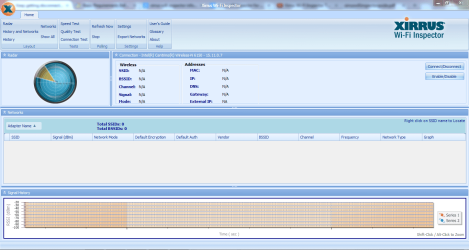
Here's my ipconfg and my xirrus:

Microsoft Windows [Version 6.1.7601]
Copyright (c) 2009 Microsoft Corporation. All rights reserved.

C:\Windows\system32>ipconfig /all

Windows IP Configuration

Host Name . . . . . . . . . . . . : USER-PC
Primary Dns Suffix . . . . . . . :
Node Type . . . . . . . . . . . . : Hybrid
IP Routing Enabled. . . . . . . . : No
WINS Proxy Enabled. . . . . . . . : No

Wireless LAN adapter Wireless Network Connection 6:

Media State . . . . . . . . . . . : Media disconnected
Connection-specific DNS Suffix . :
Description . . . . . . . . . . . : Microsoft Virtual WiFi Miniport Adapter #
3
Physical Address. . . . . . . . . : 40-25-C2-A1-A1-69
DHCP Enabled. . . . . . . . . . . : Yes
Autoconfiguration Enabled . . . . : Yes

Ethernet adapter Local Area Connection 2:

Connection-specific DNS Suffix . :
Description . . . . . . . . . . . : Atheros AR8151 PCI-E Gigabit Ethernet Con
troller (NDIS 6.20)
Physical Address. . . . . . . . . : C8-60-00-1F-43-36
DHCP Enabled. . . . . . . . . . . : Yes
Autoconfiguration Enabled . . . . : Yes
Link-local IPv6 Address . . . . . : fe80::ed95:5a1c:fa2a:cdc0%27(Preferred)
IPv4 Address. . . . . . . . . . . : 192.168.1.115(Preferred)
Subnet Mask . . . . . . . . . . . : 255.255.255.0
Lease Obtained. . . . . . . . . . : Monday, September 08, 2014 3:57:15 PM
Lease Expires . . . . . . . . . . : Tuesday, September 09, 2014 3:57:16 PM
Default Gateway . . . . . . . . . : 192.168.1.1
DHCPv6 IAID . . . . . . . . . . . : 717774848
DHCPv6 Client DUID. . . . . . . . : 00-01-00-01-1B-98-65-22-40-25-C2-A1-A1-68

DNS Servers . . . . . . . . . . . : 192.168.1.1
NetBIOS over Tcpip. . . . . . . . : Enabled

Wireless LAN adapter Wireless Network Connection:

Media State . . . . . . . . . . . : Media disconnected
Connection-specific DNS Suffix . :
Description . . . . . . . . . . . : Intel(R) Centrino(R) Wireless-N 6150
Physical Address. . . . . . . . . : 40-25-C2-A1-A1-68
DHCP Enabled. . . . . . . . . . . : Yes
Autoconfiguration Enabled . . . . : Yes

Ethernet adapter Local Area Connection:

Media State . . . . . . . . . . . : Media disconnected
Connection-specific DNS Suffix . :
Description . . . . . . . . . . . : Intel(R) Centrino(R) WiMAX 6150
Physical Address. . . . . . . . . : 64-D4-DA-68-DD-84
DHCP Enabled. . . . . . . . . . . : Yes
Autoconfiguration Enabled . . . . : Yes

Tunnel adapter isatap.{3C50D782-6E42-48DD-BB65-C88B2807FEA3}:

Connection-specific DNS Suffix . :
Description . . . . . . . . . . . : Microsoft ISATAP Adapter
Physical Address. . . . . . . . . : 00-00-00-00-00-00-00-E0
DHCP Enabled. . . . . . . . . . . : No
Autoconfiguration Enabled . . . . : Yes
Link-local IPv6 Address . . . . . : fe80::5efe:192.168.1.103%31(Preferred)
Default Gateway . . . . . . . . . :
DNS Servers . . . . . . . . . . . : 192.168.1.1
NetBIOS over Tcpip. . . . . . . . : Disabled

Tunnel adapter isatap.{8D28DE07-3F36-41EC-AF10-ED11EE6709E5}:

Media State . . . . . . . . . . . : Media disconnected
Connection-specific DNS Suffix . :
Description . . . . . . . . . . . : Microsoft ISATAP Adapter #2
Physical Address. . . . . . . . . : 00-00-00-00-00-00-00-E0
DHCP Enabled. . . . . . . . . . . : No
Autoconfiguration Enabled . . . . : Yes

Tunnel adapter isatap.{CE40EE5D-C4D9-4956-8894-DF6117468C2E}:

Connection-specific DNS Suffix . :
Description . . . . . . . . . . . : Microsoft ISATAP Adapter #3
Physical Address. . . . . . . . . : 00-00-00-00-00-00-00-E0
DHCP Enabled. . . . . . . . . . . : No
Autoconfiguration Enabled . . . . : Yes
Default Gateway . . . . . . . . . :
NetBIOS over Tcpip. . . . . . . . : Disabled

Tunnel adapter Local Area Connection* 17:

Connection-specific DNS Suffix . :
Description . . . . . . . . . . . : Teredo Tunneling Pseudo-Interface
Physical Address. . . . . . . . . : 00-00-00-00-00-00-00-E0
DHCP Enabled. . . . . . . . . . . : No
Autoconfiguration Enabled . . . . : Yes
IPv6 Address. . . . . . . . . . . : 2001:0:9d38:90d7:2c30:1d8d:3f57:fe8c(Pref
erred)
Link-local IPv6 Address . . . . . : fe80::2c30:1d8d:3f57:fe8c%24(Preferred)
Default Gateway . . . . . . . . . : ::
NetBIOS over Tcpip. . . . . . . . : Disabled

Tunnel adapter isatap.{51DB24DD-BD46-4005-ACE9-6A5CCC3D036E}:

Media State . . . . . . . . . . . : Media disconnected
Connection-specific DNS Suffix . :
Description . . . . . . . . . . . : Microsoft ISATAP Adapter #4
Physical Address. . . . . . . . . : 00-00-00-00-00-00-00-E0
DHCP Enabled. . . . . . . . . . . : No
Autoconfiguration Enabled . . . . : Yes

C:\Windows\system32>

 

Attachments

  • Capture3.PNG
    Capture3.PNG
    50.9 KB · Views: 1

My Computer My Computer

At a glance

Windows 7 Home Premium 64 BitIntel Core i5-2405m698 GBIntel HD Graphics 3000
Computer type
Laptop
Computer Manufacturer/Model Number
Asus U56E
OS
Windows 7 Home Premium 64 Bit
CPU
Intel Core i5-2405m
Memory
698 GB
Graphics Card(s)
Intel HD Graphics 3000
Antivirus
Avira Free Antivirus 14.0.6.552
Browser
Google Chrome 36
Thanks for the info. provided. Can you please post another Xirrus, next time that you can connect to the internet using your wireless connection?
 

My Computer My Computer

At a glance

Win7 & Win8 64bitIntel i5
Computer Manufacturer/Model Number
Lenovo Desktop/Samsung Laptop
OS
Win7 & Win8 64bit
CPU
Intel i5
Internet Speed
Charter-20 Mbps
Antivirus
Avast
Browser
FF, IE9 and Chrome
Also: have you tried this simple thing and that is to power cycle your modem and router. Unplug both of
Them then wait about a minute or so then plug the modem back in first then let that boot
Then plug the router back in and let that boot. Hopefully
Doing this will reset the connection.
 

My Computer My Computer

At a glance

Windows 7 ultimate 64-bitIntel I7 2600K 3.4ghzCorsair 16gb ddr3 1600mhzNvidia Geforce gt 430
Computer type
PC/Desktop
Computer Manufacturer/Model Number
custom built
OS
Windows 7 ultimate 64-bit
CPU
Intel I7 2600K 3.4ghz
Motherboard
Asus Evo P8P67
Memory
Corsair 16gb ddr3 1600mhz
Graphics Card(s)
Nvidia Geforce gt 430
Sound Card
Sound Blaster Titanium x-fi pci express
Monitor(s) Displays
Dell E198WFP
Hard Drives
1 western digital 2TB drive.
PSU
Antec 1200 watt
Case
Inwin Dragon Rider
Cooling
6 case supplied cooling fans
Keyboard
logitech mk700
Mouse
logitech m705
Internet Speed
25-50mbps download; 10mbps upload(i think)
Antivirus
avg free 2014
Browser
mozilla firefox
Other Info
Also have a pretty bad speaker setup which is a klipsch promedia 5.1 surround speaker setup with huge subwoofer and lg blu ray player/writer. Also a hp officejet pro 8600 plus wireless all in one and a logitech s7500 webcam.
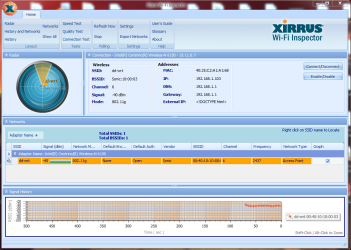
Here's my xirrus (power cycling didn't work):Capture45.PNG
 

My Computer My Computer

At a glance

Windows 7 Home Premium 64 BitIntel Core i5-2405m698 GBIntel HD Graphics 3000
Computer type
Laptop
Computer Manufacturer/Model Number
Asus U56E
OS
Windows 7 Home Premium 64 Bit
CPU
Intel Core i5-2405m
Memory
698 GB
Graphics Card(s)
Intel HD Graphics 3000
Antivirus
Avira Free Antivirus 14.0.6.552
Browser
Google Chrome 36
Hi Tino,

Thanks for the Xirrus snip. I think that the issue lies on your open Wi-Fi network. Does the broadband belong to you? Others might be using your open Wi-Fi and hogging all the bandwidth. Who has access to the router? I'd suggest to secure your network with a WPA2 AES encryption, this way you'll have a peace and mind. Hopefully this will resolve your issue.
 

My Computer My Computer

At a glance

Win7 & Win8 64bitIntel i5
Computer Manufacturer/Model Number
Lenovo Desktop/Samsung Laptop
OS
Win7 & Win8 64bit
CPU
Intel i5
Internet Speed
Charter-20 Mbps
Antivirus
Avast
Browser
FF, IE9 and Chrome
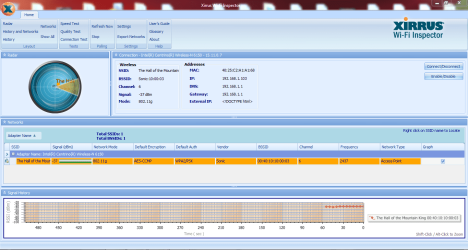
Alright, I set up encryption and it still didn't work. I had it in the first place, but after power cycling, I had to set it up again in the router settings. Anyway here's a xirrus from after I set up encryption. I live out in the sticks so there's really no one around, although I do have a lot of devices that can connect to the internet.

Capture46.PNG
 

My Computer My Computer

At a glance

Windows 7 Home Premium 64 BitIntel Core i5-2405m698 GBIntel HD Graphics 3000
Computer type
Laptop
Computer Manufacturer/Model Number
Asus U56E
OS
Windows 7 Home Premium 64 Bit
CPU
Intel Core i5-2405m
Memory
698 GB
Graphics Card(s)
Intel HD Graphics 3000
Antivirus
Avira Free Antivirus 14.0.6.552
Browser
Google Chrome 36
Back
Top