Keep loosing my static IP address

Beerman

New member
Local time
2:48 AM
Messages
20
I got a new Netgear 3700 router and I can't figure out why, each time I boot, I loose network connectivity. If I run a 'diagnose', it asks me to apply a fix and it then sets the next IP address. Example....I set it up for 192.168.1.113 and it wants to use .114. .113 works fine until I reboot and I get the same message. If I apply the fix, the very next boot, it wants to go to the next open IP address. I've confirmed that nothing is using this address.
This is on a wired network and 2 other boxes on this network don't have this problem. It's worked fine for years with my Linksys before it crapped out. I'm not sure if it's the router or another problem causing this.
One last thing, when I force the change to .113, it does work but only until the next reboot.
Thanks for any help you can give me.
 

My Computer

OS
Win 7
Sounds like your static IP address is in the middle of the DHCP range that the router uses to issue out IP addresses. Have you configured your router to either not provide DHCP addresses, or shrunk the range so that your static IP addresses are outside of the DHCP range?
 

My Computer

Computer Manufacturer/Model Number
Dell XPS 15 L502x
OS
Windows 7 Ultimate x64 SP1
CPU
Core i7-2670QM
Memory
8GB DDR3 PC3-10600
Graphics Card(s)
Intel HD Graphics 3000 + GeForce GT 540M
Screen Resolution
1920x1080
Hard Drives
1TB 5400RPM Seagate
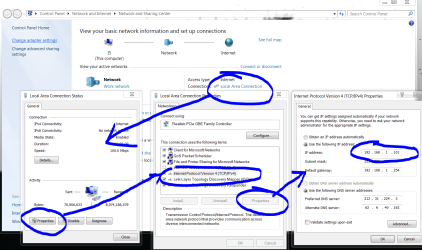
you should be able to give your computer a permanent (static) ip address so:

dhcp2.PNG

ignore the DNS server settings, and make sure the default gateway is your router.
 

My Computer

Computer Manufacturer/Model Number
mickey megabyte 1234
OS
ultimate 64 sp1
CPU
i5 2500K [email protected]
Motherboard
MSI P67A-GD53
Memory
8 gigs GSkill Ripjaws 1600
Graphics Card(s)
amd hd6950
Sound Card
creative x-fi gamer
Monitor(s) Displays
samsung 24"
Screen Resolution
1920x1080
Hard Drives
ocz vertex 2e 60 gig, samsung f3 1tb, buffalo 2tb ext
PSU
antec 550
Case
antec three hundred
Cooling
i'm a cooling fan
Keyboard
saitek eclipse ii
Mouse
logitech g3
Internet Speed
about 4 Mbps
Other Info
i love win7
you should be able to give your computer a permanent (static) ip address so:

View attachment 183378

ignore the DNS server settings, and make sure the default gateway is your router.
I've set up the static exactly as your image and it's worked for years that way.

Sounds like your static IP address is in the middle of the DHCP range that the router uses to issue out IP addresses. Have you configured your router to either not provide DHCP addresses, or shrunk the range so that your static IP addresses are outside of the DHCP range?


As far as the IP being in the middle of the range, no, it's not. It's very near the beginning. I can change it to be higher and see if that helps.
 

My Computer

OS
Win 7
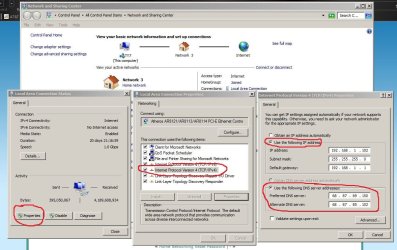
first--read the Router Manual to find out how to setup static IP addresses--then go to control panel 'Network and Sharing Center' to setup static IP (see attached) don't use the numbers in the photo-use the numbers from your router (make sure you select 'use the following IP address' radio button.
 

Attachments

  • static ip.JPG
    static ip.JPG
    123.4 KB · Views: 95

My Computer

Computer Manufacturer/Model Number
SALEON model 2.2b
OS
win7 ultimate 32bit
CPU
core2 Extreme QX6850-OCd to 3.15 GHz
Motherboard
ASUS P5G41-M LE
Memory
4 GB
Graphics Card(s)
NVidia 8600 GT
Monitor(s) Displays
23" acer
Hard Drives
one SATA 250GB partitioned equally in half
one SATA 160GB-internal storage
PSU
500W Thermaltake
Case
mini tower
I've done what you show and my router is set for static IP addresses and other boxes set up the same way work just fine. But not this box.
I'm going to try using an address that's near the end of the address range and see if that makes any difference.
 

Attachments

  • Capture.JPG
    Capture.JPG
    37.1 KB · Views: 16

My Computer

OS
Win 7
If you don't need static IP addresses, I'd just let the router assign the IPs. If you do need them, you can still let the router do all of the work - check to see if your router has static DHCP. Basically the router checks the MAC address of the computer attempting to connect, and it assigns the same IP address all the time.
 

My Computer

Computer Manufacturer/Model Number
Dell XPS 15 L502x
OS
Windows 7 Ultimate x64 SP1
CPU
Core i7-2670QM
Memory
8GB DDR3 PC3-10600
Graphics Card(s)
Intel HD Graphics 3000 + GeForce GT 540M
Screen Resolution
1920x1080
Hard Drives
1TB 5400RPM Seagate
Set your static IP to an address that is outside of the address rang your router gives out via DHCP. If its say 100 to 199 use 99 or lower.
 

My Computer

Computer type
PC/Desktop
Computer Manufacturer/Model Number
Home Built
OS
Windows 10 Education 64 bit
CPU
AMD Phenom II X4 980 Black Edition Deneb 3.7GHz
Motherboard
Asus M4N68T-M V2 µATX Motherboard
Memory
8GB 4GBx2 Kingston PC10600 DDR3 1333 Memory
Graphics Card(s)
Zotac NVIDIA Geforce GT640 2 Gig DDR3 PCIe
Sound Card
VIA VT1708s High Definition Audio 8-channel Onboard
Monitor(s) Displays
22" LG E2242 1080p and 2 19" I-INC AG191D
Screen Resolution
1280x1024 - 1920x1080 - 1280x1024
Hard Drives
Crucial M100 256 GB SSD and 500 GB WD Blue SATA
PSU
Thermaltake TR 620
Case
Power Up Black ATX Mid-Tower Case
Cooling
Stock heatsink and fan
Keyboard
Logitech Wireless K350 Wave
Mouse
Logitech Wireless M570 Trackman Wheel
Internet Speed
80 Mbps Down 30 Mbps Up
Antivirus
Windows Defender
Browser
Internet Explorer 11
Other Info
HP DVD1040e Lightscribe - External USB2
I tried setting a static IP below 100 and it made no difference. After a reboot, I had no connectivity and I once again use 'diagnose' and applied the fix which then set the ip back to 113 where I wanted it. However, I"m sure if I reboot again, it will do the same thing and move the address to 114 and so on.
This is what diagnose said was the problem:
 

Attachments

  • Capture.JPG
    Capture.JPG
    31.2 KB · Views: 25

My Computer

OS
Win 7
Static IP replaced with DHCP IP in Windows7

I faced similar problem when tried to assign static IP address which was falling in the range of IPs which were assigned by DHCP server. So, static IP was getting replaced with DHCP IP.

Run services.msc and disable DHCP and WinHTTP Web Proxy Auto-Discovery Services. Also stop both services.
Run msconfig.exe and disable DHCP from startup.

Reboot your computer. Ensure DHCP service is not running using services.msc

Now assign static IP and it should remain unchanged
 

My Computer

Computer type
PC/Desktop
OS
Windows 7 32 bit
Back
Top