Kernel Error, might be harddrive problem

JoHn87

New member
Member
Local time
1:07 AM
Messages
68
Location
England
Kernel_data_inpage_error

Hi guys and girls.

Just had a blue 'death' screen this evening. it was some kernel error. not sure, hopefully you guys can help me.

mini dump and System Health Report in attachments - I done the mini dump process before.

The Story:

The last thing I remember was coping files to the hard drive, then a blue screen showed up. and it tried to restarted itself, but it wouldn't boot up, so I unplug that hard drive I copied the files to, then it boots up fine.

Then I gave it another try, shutdown pc, plug hard drive back in. it boots up apparently. then check for errors on hard drive, found some errors, prompted to fix errors on next restart. restart PC, and im here now.
before you guys say it a hard drive problem, well i had this similar problem on my old hard drive a while back, and i decide to get a new hard drive instead(i still managed to back up the content on the old hard drive to the new hard drive)

this new hard drive we talking about is roughly 4 months old.


Other info: ( you'll find it in mini-dumps anyway)
Windows 7 Pro (64bits) - Full retail version. Installation date December 2009
most of the hardware is about 3~4 year old.


Non-related:
Is there any other software beside 'Debugging Tools for Windows' to read the mini dumps. I'm trying to learn to understand how to read and see where my problem is on the mini dump. but keep getting the symbols errors and other errors on debugging tool.
EDIT: done some googling which should have done first, i found BlueScreenView better than windows one.
one thing i dont get, there no February mini dumps? latest dump is 03/01/2011...


Looking forward to heard from you :D


EDIT: update nvidia drivers to latest.
 
Last edited:

My Computer

OS
Windows 7 Pro x64
CPU
Intel Core 2 Quad Q6600 [2.4Ghz] OC speeds 3.2Ghz
Motherboard
ASUS P5QL-E
Memory
Kingston HyperX KHX8500D2K2-4G 1066Mhz 8GB (2GB*4)
Graphics Card(s)
ASUS GeForce GTX 550 Ti
Sound Card
OnBoard
Monitor(s) Displays
Samsung SyncMaster T220
Screen Resolution
1680*1050
Hard Drives
Intel SSD 320 Series 80GB
PSU
Corsair TX750W
Case
CM 690 II
Cooling
Cooler Master Hyper 212+
Keyboard
Logitech G510
Mouse
Logitech G400
Internet Speed
50Mb :D
Hi guys and girls.

Just had a blue 'death' screen this evening. it was some kernel error. not sure, hopefully you guys can help me.

mini dump and System Health Report in attachments - I done the mini dump process before.

The Story:

The last thing I remember was coping files to the hard drive, then a blue screen showed up. and it tried to restarted itself, but it wouldn't boot up, so I unplug that hard drive I copied the files to, then it boots up fine.

Then I gave it another try, shutdown pc, plug hard drive back in. it boots up apparently. then check for errors on hard drive, found some errors, prompted to fix errors on next restart. restart PC, and im here now.
before you guys say it a hard drive problem, well i had this similar problem on my old hard drive a while back, and i decide to get a new hard drive instead(i still managed to back the content on the old hard drive to the new hard drive)

this new hard drive we talking about is roughly 4 months old.


Other info: ( you'll find it in mini-dumps anyway)
Windows 7 Pro (64bits) - Full retail version. Installation date December 2009
most of the hardware is about 3~4 year old.


Non-related:
Is there any other software beside 'Debugging Tools for Windows' to read the mini dumps. I'm trying to learn to understand how to read and see where my problem is on the mini dump. but keep getting the symbols errors and other errors on debugging tool.
EDIT: done some googling which should have done first, i found BlueScreenView better than windows one.
one thing i dont get, there no February mini dumps? latest dump is 03/01/2011...


Looking forward to heard from you :D


EDIT: update nvidia drivers to latest.


First and foremost. Stop overclocking. The nvoclk64.sys driver has been verified by driver verifier 3 times as the cause of 3 diff crashes. The rest point to memory corruption which also may by because of the OC (nvidia) driver.

Remove the driver run memtest then do the rest of the below things
Download a copy of Memtest86 and burn the ISO to a CD using Iso Recorder or another ISO burning program. Boot from the CD, and leave it running for at least 5 or 6 passes.


Just remember, any time Memtest reports errors, it can be either bad RAM or a bad motherboard slot. Test the sticks individually, and if you find a good one, test it in all slots.


Old, really old drivers from as far back as 2005. At least these need to be updated
Code:
RTCore64.sys    5/25/2005 1:39:12    0x42941d90    fffff880`07ab9000    fffff880`07abf000        0x00006000                    
speedfan.sys    9/24/2006 8:26:48    0x45168798    fffff880`01662000    fffff880`01669000        0x00007000                    
pcouffin.sys    12/5/2006 9:39:30    0x457584a2    fffff880`056f3000    fffff880`05707380        0x00014380                    
VMNetSrv.sys    1/24/2007 7:05:46    0x45b74b9a    fffff880`03fea000    fffff880`03fff000        0x00015000                    
adfs.SYS    6/26/2008 15:52:37    0x48640195    fffff880`0709e000    fffff880`070b6000        0x00018000                    
mcdbus.sys    2/24/2009 5:34:07    0x49a3cd1f    fffff880`05722000    fffff880`0575e880        0x0003c880                    
ALSysIO64.sys    4/19/2009 14:41:04    0x49eb7e50    fffff880`07ab1000    fffff880`07ab9000        0x00008000                    
spldr.sys    5/11/2009 11:56:27    0x4a0858bb    fffff880`0165a000    fffff880`01662000        0x00008000                    
ASACPI.sys    5/13/2009 20:25:17    0x4a0b72fd    fffff880`043ed000    fffff880`043f5000        0x00008000                    
vmm.sys    5/15/2009 7:28:12    0x4a0d5fdc    fffff880`03e00000    fffff880`03e4d000        0x0004d000                    
lirsgt.sys    5/17/2009 8:06:57    0x4a100bf1    fffff880`070c7000    fffff880`070d4000        0x0000d000                    
atksgt.sys    5/17/2009 8:36:34    0x4a1012e2    fffff880`055a6000    fffff880`055f5000        0x0004f000                    
amdxata.sys    5/19/2009 12:56:59    0x4a12f2eb    fffff880`01162000    fffff880`0116d000        0x0000b000                    
RTKVHD64.sys    5/22/2009 13:04:20    0x4a16e924    fffff880`0682e000    fffff880`069da900        0x001ac900
How To Find Drivers:
- search Google for the name of the driver
- compare the Google results with what's installed on your system to figure out which device/program it belongs to
- visit the web site of the manufacturer of the hardware/program to get the latest drivers (DON'T use Windows Update or the Update driver function of Device Manager).
- if there are difficulties in locating them, post back with questions and someone will try and help you locate the appropriate program.
- - The most common drivers are listed on this page: Driver Reference Driver Reference
- - Driver manufacturer links are on this page: Drivers and Downloads

There are a few thing I wold remove.

ESET
Bit Defender
ALL the Vbox stuff
 

My Computer

Computer Manufacturer/Model Number
HP Pavillion dv-7 1005 Tx
OS
Win 8 Release candidate 8400
CPU
[email protected]
Memory
4 gigs
Graphics Card(s)
Nvidia 9600M
Sound Card
HD built-in
Monitor(s) Displays
17" Wxga
Screen Resolution
1440x900
Cooling
none
Internet Speed
45Mb down 5Mb up
I don't overclock. I've never done any overclocking at all. I only use the EVGA Precision to control my gpu fan, that not overclocking.

So what can I do about this? if the mini-dumps are saying that I overclock, which I dont, how do i get rid of it if you say that main cause/crashes.

My previous problem on here also mention about the really old drivers and gpu drivers.
http://www.sevenforums.com/crashes-...-freezes-crashdump-included-2.html#post868895
about the old drivers, I've only built this computer from new in 2007. is my pc time travelling?

what if it's a fault gpu device?

I have no problems with ESET, what would you recommend?
Bit Defender, I no longer have that on my pc.
Vbox stuff, please explain what my ISP put on my PC, they should add stuff, and i didnt download any VBox stuff on my pc either. i guess you talking about VirtualBox. I got a thing call Vbox downstairs, for the TV. :p

I'll do a search and get rid of it.

I will run another memtest86 overnight.


Thanks for reply.
 

My Computer

OS
Windows 7 Pro x64
CPU
Intel Core 2 Quad Q6600 [2.4Ghz] OC speeds 3.2Ghz
Motherboard
ASUS P5QL-E
Memory
Kingston HyperX KHX8500D2K2-4G 1066Mhz 8GB (2GB*4)
Graphics Card(s)
ASUS GeForce GTX 550 Ti
Sound Card
OnBoard
Monitor(s) Displays
Samsung SyncMaster T220
Screen Resolution
1680*1050
Hard Drives
Intel SSD 320 Series 80GB
PSU
Corsair TX750W
Case
CM 690 II
Cooling
Cooler Master Hyper 212+
Keyboard
Logitech G510
Mouse
Logitech G400
Internet Speed
50Mb :D
I uninstall all gpu drivers, with Driver Sweeper in safe mode. then install latest gpu drivers.

I don't see nvoclk64.sys driver in the driver sweeper program at all. but I did found it in windows dir, when searching for it.

C:\Windows\System32\DriverStore\FileRepository\nvoclock.inf_amd64_neutral_879a6ff07d68a2f1

no problem with RAM, did memtest86, took 15 hours, 7 passes. see screenshot below(click on image for full screen)

direct link to image
 

My Computer

OS
Windows 7 Pro x64
CPU
Intel Core 2 Quad Q6600 [2.4Ghz] OC speeds 3.2Ghz
Motherboard
ASUS P5QL-E
Memory
Kingston HyperX KHX8500D2K2-4G 1066Mhz 8GB (2GB*4)
Graphics Card(s)
ASUS GeForce GTX 550 Ti
Sound Card
OnBoard
Monitor(s) Displays
Samsung SyncMaster T220
Screen Resolution
1680*1050
Hard Drives
Intel SSD 320 Series 80GB
PSU
Corsair TX750W
Case
CM 690 II
Cooling
Cooler Master Hyper 212+
Keyboard
Logitech G510
Mouse
Logitech G400
Internet Speed
50Mb :D
had another BSOD this evening, it said KERNEL_DATA_INPAGE_ERROR.

Still there no latest mini dumps. why isnt it logging the BSOD?.
 

My Computer

OS
Windows 7 Pro x64
CPU
Intel Core 2 Quad Q6600 [2.4Ghz] OC speeds 3.2Ghz
Motherboard
ASUS P5QL-E
Memory
Kingston HyperX KHX8500D2K2-4G 1066Mhz 8GB (2GB*4)
Graphics Card(s)
ASUS GeForce GTX 550 Ti
Sound Card
OnBoard
Monitor(s) Displays
Samsung SyncMaster T220
Screen Resolution
1680*1050
Hard Drives
Intel SSD 320 Series 80GB
PSU
Corsair TX750W
Case
CM 690 II
Cooling
Cooler Master Hyper 212+
Keyboard
Logitech G510
Mouse
Logitech G400
Internet Speed
50Mb :D
Uninstall EVGA Precision/MSI Afterburner/RivaTuner as it is a known cause of BSOD with Windows 7.

If you are getting more BSOD, upload them.
 

My Computer

Computer Manufacturer/Model Number
Macbook Pro 15" (2011) (Matte Version)
OS
Win 7 Pro x64 SP1 OS X Snow Leopard 10.6.7
CPU
Intel Core i7 2820QM 2.3GHz (Quad-Core)
Motherboard
N/A
Memory
8GB 1333 MHz PC3-10600 DDR3 SDRAM
Graphics Card(s)
ATI Radeon HD 6750M (1GB, GDDR5)
Sound Card
N/A
Monitor(s) Displays
1 Display
Screen Resolution
1,680 x 1050 (Matte Screen, Anti-Glare)
Hard Drives
750GB SATA (5400 rpm)
WD My Passport Essential 1TB Portable Hard Drive
PSU
N/A
Case
N/A
Cooling
N/A
Keyboard
Apple Wireless Keyboard
Mouse
Apple Wireless Magic Mouse
Internet Speed
Max - 2.2MB/sec; DSL provided by Telecom NZ
Other Info
MS Office Professional 2010
McAfee Total Protection 2011
On a Laptop Stand (Hand-Built)
Uninstall EVGA Precision/MSI Afterburner/RivaTuner as it is a known cause of BSOD with Windows 7.

If you are getting more BSOD, upload them.

OK, I unistalled EVGA Precision, that the only software I had.

DeanP, what other alternative software you recommend to monitor and change the gpu temperatures?

nTune, some said it also cause BSOD in windows 7 too and it outdated, havent been update since 2007.

Speedfan, I still don't understand how it work, it not simple as the EVGA Precision.


The reason why I would like to control an keep and eye out for my temps, so I dont overheat it and the default setting are too low, also when playing a game, the fan will only increase when it over 70c. that ridiculous.

Cheers ;)
 

My Computer

OS
Windows 7 Pro x64
CPU
Intel Core 2 Quad Q6600 [2.4Ghz] OC speeds 3.2Ghz
Motherboard
ASUS P5QL-E
Memory
Kingston HyperX KHX8500D2K2-4G 1066Mhz 8GB (2GB*4)
Graphics Card(s)
ASUS GeForce GTX 550 Ti
Sound Card
OnBoard
Monitor(s) Displays
Samsung SyncMaster T220
Screen Resolution
1680*1050
Hard Drives
Intel SSD 320 Series 80GB
PSU
Corsair TX750W
Case
CM 690 II
Cooling
Cooler Master Hyper 212+
Keyboard
Logitech G510
Mouse
Logitech G400
Internet Speed
50Mb :D
:( had another BSOD after reply to the previous post.

it said cause by the following file dfsc.sys.

also when it restart, and it hang for a while on the windows logo. so I reset/restart. the first screen shown when powering it up,you know RAM 8191MB OK etc, sata 1- 'hdd name', sata 3 'hdd name', and the next one is suppose to be sata 2, which is the new hdd i bought 6 months ago. it hang/freeze there. so i shutdown, and unplug sata 2 cable from the moterboard. it loads fine. back on windows now, boots up within 1min.

I still dont see any new mini dumps?

but I ran the dump collector again if it helps.

also FYI, I updated to SP1 two night ago.
 

My Computer

OS
Windows 7 Pro x64
CPU
Intel Core 2 Quad Q6600 [2.4Ghz] OC speeds 3.2Ghz
Motherboard
ASUS P5QL-E
Memory
Kingston HyperX KHX8500D2K2-4G 1066Mhz 8GB (2GB*4)
Graphics Card(s)
ASUS GeForce GTX 550 Ti
Sound Card
OnBoard
Monitor(s) Displays
Samsung SyncMaster T220
Screen Resolution
1680*1050
Hard Drives
Intel SSD 320 Series 80GB
PSU
Corsair TX750W
Case
CM 690 II
Cooling
Cooler Master Hyper 212+
Keyboard
Logitech G510
Mouse
Logitech G400
Internet Speed
50Mb :D
other information regarding the new hdd.
I had some trouble with it when I bought it, very slow read and writing speed.
I was advised to flash the patch update from Samsung.

It much better and faster after the patch.

Also just run the ESTOOL, it found no errors.
 

My Computer

OS
Windows 7 Pro x64
CPU
Intel Core 2 Quad Q6600 [2.4Ghz] OC speeds 3.2Ghz
Motherboard
ASUS P5QL-E
Memory
Kingston HyperX KHX8500D2K2-4G 1066Mhz 8GB (2GB*4)
Graphics Card(s)
ASUS GeForce GTX 550 Ti
Sound Card
OnBoard
Monitor(s) Displays
Samsung SyncMaster T220
Screen Resolution
1680*1050
Hard Drives
Intel SSD 320 Series 80GB
PSU
Corsair TX750W
Case
CM 690 II
Cooling
Cooler Master Hyper 212+
Keyboard
Logitech G510
Mouse
Logitech G400
Internet Speed
50Mb :D
nTune doesn't have compatibility with Windows 7 - only Vista and XP. Try this - NVIDIA DRIVERS 6.05

If you don't like it - let me know.

These dumps are old - upload the latest 5 from :\Windows\Minidump
 

My Computer

Computer Manufacturer/Model Number
Macbook Pro 15" (2011) (Matte Version)
OS
Win 7 Pro x64 SP1 OS X Snow Leopard 10.6.7
CPU
Intel Core i7 2820QM 2.3GHz (Quad-Core)
Motherboard
N/A
Memory
8GB 1333 MHz PC3-10600 DDR3 SDRAM
Graphics Card(s)
ATI Radeon HD 6750M (1GB, GDDR5)
Sound Card
N/A
Monitor(s) Displays
1 Display
Screen Resolution
1,680 x 1050 (Matte Screen, Anti-Glare)
Hard Drives
750GB SATA (5400 rpm)
WD My Passport Essential 1TB Portable Hard Drive
PSU
N/A
Case
N/A
Cooling
N/A
Keyboard
Apple Wireless Keyboard
Mouse
Apple Wireless Magic Mouse
Internet Speed
Max - 2.2MB/sec; DSL provided by Telecom NZ
Other Info
MS Office Professional 2010
McAfee Total Protection 2011
On a Laptop Stand (Hand-Built)
nTune doesn't have compatibility with Windows 7 - only Vista and XP. Try this - NVIDIA DRIVERS 6.05

If you don't like it - let me know.

These dumps are old - upload the latest 5 from :\Windows\Minidump


thanks, I'll give that a go.

Also I mention already, why isn't it logging the dumps. The last 3 BSOD crash I had, none of it been logged into mini dumps. latest is 03/01/2011 :shock:

Here screenshot.

a35m.png


Also i did the driver verifier thing, and had about 2 BSOD and none of them have been logged either.
:cry:
 

My Computer

OS
Windows 7 Pro x64
CPU
Intel Core 2 Quad Q6600 [2.4Ghz] OC speeds 3.2Ghz
Motherboard
ASUS P5QL-E
Memory
Kingston HyperX KHX8500D2K2-4G 1066Mhz 8GB (2GB*4)
Graphics Card(s)
ASUS GeForce GTX 550 Ti
Sound Card
OnBoard
Monitor(s) Displays
Samsung SyncMaster T220
Screen Resolution
1680*1050
Hard Drives
Intel SSD 320 Series 80GB
PSU
Corsair TX750W
Case
CM 690 II
Cooling
Cooler Master Hyper 212+
Keyboard
Logitech G510
Mouse
Logitech G400
Internet Speed
50Mb :D
nTune doesn't have compatibility with Windows 7 - only Vista and XP. Try this - NVIDIA DRIVERS 6.05

If you don't like it - let me know.
[/B]

This is similar like ntune, also I tried to change the settings and save a profile settings too. After restart, it goes back to it defualt settings.
Also, the settings are not right when I set it. Set manual control to 40%, it show on the gpu gadget as 59% ? :confused:
 

My Computer

OS
Windows 7 Pro x64
CPU
Intel Core 2 Quad Q6600 [2.4Ghz] OC speeds 3.2Ghz
Motherboard
ASUS P5QL-E
Memory
Kingston HyperX KHX8500D2K2-4G 1066Mhz 8GB (2GB*4)
Graphics Card(s)
ASUS GeForce GTX 550 Ti
Sound Card
OnBoard
Monitor(s) Displays
Samsung SyncMaster T220
Screen Resolution
1680*1050
Hard Drives
Intel SSD 320 Series 80GB
PSU
Corsair TX750W
Case
CM 690 II
Cooling
Cooler Master Hyper 212+
Keyboard
Logitech G510
Mouse
Logitech G400
Internet Speed
50Mb :D
No BSOD since last post. But will get back here if one occurs.

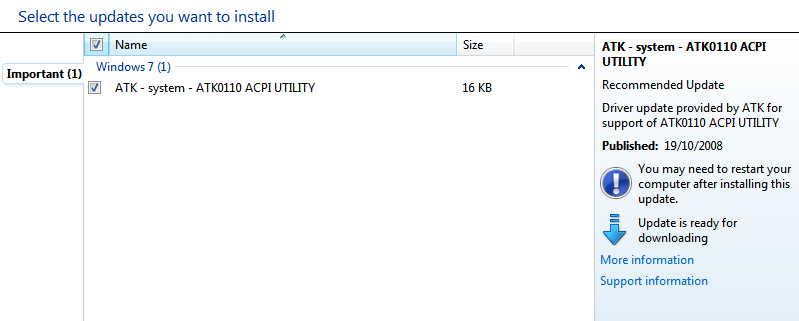
I got this update, important update on Windows Update.

That I need to install ATK0110 ACPI Utility

3_68.png


I have not uninstalled any other drivers beside the NVIDIA DRIVERS 6.0.

Last time I checked, I installed that a while ago. Reinstall it again from official ASUS P5QL-E Site
 

My Computer

OS
Windows 7 Pro x64
CPU
Intel Core 2 Quad Q6600 [2.4Ghz] OC speeds 3.2Ghz
Motherboard
ASUS P5QL-E
Memory
Kingston HyperX KHX8500D2K2-4G 1066Mhz 8GB (2GB*4)
Graphics Card(s)
ASUS GeForce GTX 550 Ti
Sound Card
OnBoard
Monitor(s) Displays
Samsung SyncMaster T220
Screen Resolution
1680*1050
Hard Drives
Intel SSD 320 Series 80GB
PSU
Corsair TX750W
Case
CM 690 II
Cooling
Cooler Master Hyper 212+
Keyboard
Logitech G510
Mouse
Logitech G400
Internet Speed
50Mb :D
I found out why my mini dumps weren't logging, apparently my pagefile.sys was full. no more mini dumps were created.
I thought it would keep creating mini dumps as long there's free space on the hdd. :confused:

so I did some googling, and found a link to a dump configurator.
original thread

tweak it.restarted it, cleared old mini and memory dumps. did the driver verifier. only two BSOD come up which they the same thing.

It the Trusteer Rapport creating the BSOD. but I do not know if this is the main cause from my previous BSOD.
Code:
Microsoft (R) Windows Debugger Version 6.12.0002.633 AMD64
Copyright (c) Microsoft Corporation. All rights reserved.


Loading Dump File [C:\Users\John\Desktop\Windows_NT6_BSOD_jcgriff2\022811-29733-01.dmp]
Mini Kernel Dump File: Only registers and stack trace are available

Symbol search path is: SRV*C:\Debugging Tools\SymCache*http://msdl.microsoft.com/download/symbols
Executable search path is: 
Windows 7 Kernel Version 7601 (Service Pack 1) MP (4 procs) Free x64
Product: WinNt, suite: TerminalServer SingleUserTS
Built by: 7601.17514.amd64fre.win7sp1_rtm.101119-1850
Machine Name:
Kernel base = 0xfffff800`02e05000 PsLoadedModuleList = 0xfffff800`0304ae90
Debug session time: Mon Feb 28 14:14:11.008 2011 (UTC + 0:00)
System Uptime: 0 days 0:01:27.928
Loading Kernel Symbols
...............................................................
................................................................
...................................................
Loading User Symbols
Loading unloaded module list
....
*******************************************************************************
*                                                                             *
*                        Bugcheck Analysis                                    *
*                                                                             *
*******************************************************************************

Use !analyze -v to get detailed debugging information.

BugCheck C9, {226, fffff88001934aa0, fffff9801ce1eee0, 0}

Unable to load image \SystemRoot\System32\Drivers\RapportKE64.sys, Win32 error 0n2
*** WARNING: Unable to verify timestamp for RapportKE64.sys
*** ERROR: Module load completed but symbols could not be loaded for RapportKE64.sys
Probably caused by : RapportKE64.sys ( RapportKE64+6aa0 )

Followup: MachineOwner
---------

3: kd> !analyze -v
*******************************************************************************
*                                                                             *
*                        Bugcheck Analysis                                    *
*                                                                             *
*******************************************************************************

DRIVER_VERIFIER_IOMANAGER_VIOLATION (c9)
The IO manager has caught a misbehaving driver.
Arguments:
Arg1: 0000000000000226, An IRP dispatch handler has returned without passing down or completing this IRP,
	or someone forgot to return STATUS_PENDING.
Arg2: fffff88001934aa0, The address in the driver's code where the error was detected.
Arg3: fffff9801ce1eee0, IRP address.
Arg4: 0000000000000000

Debugging Details:
------------------


BUGCHECK_STR:  0xc9_226

DRIVER_VERIFIER_IO_VIOLATION_TYPE:  226

FAULTING_IP: 
RapportKE64+6aa0
fffff880`01934aa0 4889542410      mov     qword ptr [rsp+10h],rdx

FOLLOWUP_IP: 
RapportKE64+6aa0
fffff880`01934aa0 4889542410      mov     qword ptr [rsp+10h],rdx

IRP_ADDRESS:  fffff9801ce1eee0

DEVICE_OBJECT: fffffa80087b5e40

CUSTOMER_CRASH_COUNT:  1

DEFAULT_BUCKET_ID:  VERIFIER_ENABLED_VISTA_MINIDUMP

PROCESS_NAME:  RapportService

CURRENT_IRQL:  2

LAST_CONTROL_TRANSFER:  from fffff8000330c3dc to fffff80002e85640

STACK_TEXT:  
fffff880`0867f4e8 fffff800`0330c3dc : 00000000`000000c9 00000000`00000226 fffff880`01934aa0 fffff980`1ce1eee0 : nt!KeBugCheckEx
fffff880`0867f4f0 fffff800`0331647a : fffff800`0330a9f0 fffff880`01934aa0 fffff980`1ce1eee0 00000000`00000000 : nt!VerifierBugCheckIfAppropriate+0x3c
fffff880`0867f530 fffff800`03317483 : 00000000`00000226 fffffa80`0a3aed18 fffff980`1ce1eee0 00000000`ffffffff : nt!ViErrorFinishReport+0xda
fffff880`0867f580 fffff800`0332279c : 00000000`00000000 fffffa80`0a3aec60 fffffa80`0a3aed18 fffffa80`0a4159d0 : nt!VfErrorReport1+0x63
fffff880`0867f620 fffff800`03322b63 : fffffa80`0a3aec60 00000000`00000002 fffffa80`087b5e40 fffff800`033152a7 : nt!IovpCallDriver2+0x1bc
fffff880`0867f680 fffff800`03328c2e : fffffa80`087b5e40 fffff980`1ce1eee0 00000000`00000002 fffffa80`087b5e40 : nt!VfAfterCallDriver+0x353
fffff880`0867f6d0 fffff800`03183495 : 00000000`00000025 fffffa80`0a980778 fffffa80`0a71c9b0 fffffa80`0a3aec60 : nt!IovCallDriver+0x57e
fffff880`0867f730 fffff800`0317fd38 : fffffa80`087b5e40 00000000`00000000 fffffa80`0a9805c0 fffff6fc`00000001 : nt!IopParseDevice+0x5a5
fffff880`0867f8c0 fffff800`03180f56 : 00000000`00000000 fffffa80`0a9805c0 fffff680`003b7968 fffffa80`0765e750 : nt!ObpLookupObjectName+0x588
fffff880`0867f9b0 fffff800`0318285c : fffffa80`0a3c0ec8 00000000`00000000 fffffa80`0a3bc301 ffffffff`ffffffff : nt!ObOpenObjectByName+0x306
fffff880`0867fa80 fffff800`0318d478 : 00000000`0008e2e8 fffff8a0`c0100080 00000000`0008ebb0 00000000`0008e300 : nt!IopCreateFile+0x2bc
fffff880`0867fb20 fffff800`02e848d3 : fffffa80`0a3c0b30 0000007f`ffffffff fffffa80`0a3bc330 00000980`00000000 : nt!NtCreateFile+0x78
fffff880`0867fbb0 00000000`76f3186a : 00000000`00000000 00000000`00000000 00000000`00000000 00000000`00000000 : nt!KiSystemServiceCopyEnd+0x13
00000000`0008e278 00000000`00000000 : 00000000`00000000 00000000`00000000 00000000`00000000 00000000`00000000 : 0x76f3186a


STACK_COMMAND:  .bugcheck ; kb

SYMBOL_NAME:  RapportKE64+6aa0

FOLLOWUP_NAME:  MachineOwner

MODULE_NAME: RapportKE64

IMAGE_NAME:  RapportKE64.sys

DEBUG_FLR_IMAGE_TIMESTAMP:  4d5d775f

FAILURE_BUCKET_ID:  X64_0xc9_226_VRF_RapportKE64+6aa0

BUCKET_ID:  X64_0xc9_226_VRF_RapportKE64+6aa0

Followup: MachineOwner
---------
 

My Computer

OS
Windows 7 Pro x64
CPU
Intel Core 2 Quad Q6600 [2.4Ghz] OC speeds 3.2Ghz
Motherboard
ASUS P5QL-E
Memory
Kingston HyperX KHX8500D2K2-4G 1066Mhz 8GB (2GB*4)
Graphics Card(s)
ASUS GeForce GTX 550 Ti
Sound Card
OnBoard
Monitor(s) Displays
Samsung SyncMaster T220
Screen Resolution
1680*1050
Hard Drives
Intel SSD 320 Series 80GB
PSU
Corsair TX750W
Case
CM 690 II
Cooling
Cooler Master Hyper 212+
Keyboard
Logitech G510
Mouse
Logitech G400
Internet Speed
50Mb :D
I found out why my mini dumps weren't logging, apparently my pagefile.sys was full. no more mini dumps were created.
I thought it would keep creating mini dumps as long there's free space on the hdd. :confused:

so I did some googling, and found a link to a dump configurator.
original thread

tweak it.restarted it, cleared old mini and memory dumps. did the driver verifier. only two BSOD come up which they the same thing.

It the Trusteer Rapport creating the BSOD. but I do not know if this is the main cause from my previous BSOD.
Code:
Microsoft (R) Windows Debugger Version 6.12.0002.633 AMD64
Copyright (c) Microsoft Corporation. All rights reserved.


Loading Dump File [C:\Users\John\Desktop\Windows_NT6_BSOD_jcgriff2\022811-29733-01.dmp]
Mini Kernel Dump File: Only registers and stack trace are available

Symbol search path is: SRV*C:\Debugging Tools\SymCache*http://msdl.microsoft.com/download/symbols
Executable search path is: 
Windows 7 Kernel Version 7601 (Service Pack 1) MP (4 procs) Free x64
Product: WinNt, suite: TerminalServer SingleUserTS
Built by: 7601.17514.amd64fre.win7sp1_rtm.101119-1850
Machine Name:
Kernel base = 0xfffff800`02e05000 PsLoadedModuleList = 0xfffff800`0304ae90
Debug session time: Mon Feb 28 14:14:11.008 2011 (UTC + 0:00)
System Uptime: 0 days 0:01:27.928
Loading Kernel Symbols
...............................................................
................................................................
...................................................
Loading User Symbols
Loading unloaded module list
....
*******************************************************************************
*                                                                             *
*                        Bugcheck Analysis                                    *
*                                                                             *
*******************************************************************************

Use !analyze -v to get detailed debugging information.

BugCheck C9, {226, fffff88001934aa0, fffff9801ce1eee0, 0}

Unable to load image \SystemRoot\System32\Drivers\RapportKE64.sys, Win32 error 0n2
*** WARNING: Unable to verify timestamp for RapportKE64.sys
*** ERROR: Module load completed but symbols could not be loaded for RapportKE64.sys
Probably caused by : RapportKE64.sys ( RapportKE64+6aa0 )

Followup: MachineOwner
---------

3: kd> !analyze -v
*******************************************************************************
*                                                                             *
*                        Bugcheck Analysis                                    *
*                                                                             *
*******************************************************************************

DRIVER_VERIFIER_IOMANAGER_VIOLATION (c9)
The IO manager has caught a misbehaving driver.
Arguments:
Arg1: 0000000000000226, An IRP dispatch handler has returned without passing down or completing this IRP,
    or someone forgot to return STATUS_PENDING.
Arg2: fffff88001934aa0, The address in the driver's code where the error was detected.
Arg3: fffff9801ce1eee0, IRP address.
Arg4: 0000000000000000

Debugging Details:
------------------


BUGCHECK_STR:  0xc9_226

DRIVER_VERIFIER_IO_VIOLATION_TYPE:  226

FAULTING_IP: 
RapportKE64+6aa0
fffff880`01934aa0 4889542410      mov     qword ptr [rsp+10h],rdx

FOLLOWUP_IP: 
RapportKE64+6aa0
fffff880`01934aa0 4889542410      mov     qword ptr [rsp+10h],rdx

IRP_ADDRESS:  fffff9801ce1eee0

DEVICE_OBJECT: fffffa80087b5e40

CUSTOMER_CRASH_COUNT:  1

DEFAULT_BUCKET_ID:  VERIFIER_ENABLED_VISTA_MINIDUMP

PROCESS_NAME:  RapportService

CURRENT_IRQL:  2

LAST_CONTROL_TRANSFER:  from fffff8000330c3dc to fffff80002e85640

STACK_TEXT:  
fffff880`0867f4e8 fffff800`0330c3dc : 00000000`000000c9 00000000`00000226 fffff880`01934aa0 fffff980`1ce1eee0 : nt!KeBugCheckEx
fffff880`0867f4f0 fffff800`0331647a : fffff800`0330a9f0 fffff880`01934aa0 fffff980`1ce1eee0 00000000`00000000 : nt!VerifierBugCheckIfAppropriate+0x3c
fffff880`0867f530 fffff800`03317483 : 00000000`00000226 fffffa80`0a3aed18 fffff980`1ce1eee0 00000000`ffffffff : nt!ViErrorFinishReport+0xda
fffff880`0867f580 fffff800`0332279c : 00000000`00000000 fffffa80`0a3aec60 fffffa80`0a3aed18 fffffa80`0a4159d0 : nt!VfErrorReport1+0x63
fffff880`0867f620 fffff800`03322b63 : fffffa80`0a3aec60 00000000`00000002 fffffa80`087b5e40 fffff800`033152a7 : nt!IovpCallDriver2+0x1bc
fffff880`0867f680 fffff800`03328c2e : fffffa80`087b5e40 fffff980`1ce1eee0 00000000`00000002 fffffa80`087b5e40 : nt!VfAfterCallDriver+0x353
fffff880`0867f6d0 fffff800`03183495 : 00000000`00000025 fffffa80`0a980778 fffffa80`0a71c9b0 fffffa80`0a3aec60 : nt!IovCallDriver+0x57e
fffff880`0867f730 fffff800`0317fd38 : fffffa80`087b5e40 00000000`00000000 fffffa80`0a9805c0 fffff6fc`00000001 : nt!IopParseDevice+0x5a5
fffff880`0867f8c0 fffff800`03180f56 : 00000000`00000000 fffffa80`0a9805c0 fffff680`003b7968 fffffa80`0765e750 : nt!ObpLookupObjectName+0x588
fffff880`0867f9b0 fffff800`0318285c : fffffa80`0a3c0ec8 00000000`00000000 fffffa80`0a3bc301 ffffffff`ffffffff : nt!ObOpenObjectByName+0x306
fffff880`0867fa80 fffff800`0318d478 : 00000000`0008e2e8 fffff8a0`c0100080 00000000`0008ebb0 00000000`0008e300 : nt!IopCreateFile+0x2bc
fffff880`0867fb20 fffff800`02e848d3 : fffffa80`0a3c0b30 0000007f`ffffffff fffffa80`0a3bc330 00000980`00000000 : nt!NtCreateFile+0x78
fffff880`0867fbb0 00000000`76f3186a : 00000000`00000000 00000000`00000000 00000000`00000000 00000000`00000000 : nt!KiSystemServiceCopyEnd+0x13
00000000`0008e278 00000000`00000000 : 00000000`00000000 00000000`00000000 00000000`00000000 00000000`00000000 : 0x76f3186a


STACK_COMMAND:  .bugcheck ; kb

SYMBOL_NAME:  RapportKE64+6aa0

FOLLOWUP_NAME:  MachineOwner

MODULE_NAME: RapportKE64

IMAGE_NAME:  RapportKE64.sys

DEBUG_FLR_IMAGE_TIMESTAMP:  4d5d775f

FAILURE_BUCKET_ID:  X64_0xc9_226_VRF_RapportKE64+6aa0

BUCKET_ID:  X64_0xc9_226_VRF_RapportKE64+6aa0

Followup: MachineOwner
---------

Latest BSODs caused by RapportKE64.sys which is part of Trusteer Rapport
Trusteer Rapport is a security program that is known to cause BSOD's on some Windows 7 systems. You should completely uninstall it.
 

My Computer

Computer type
PC/Desktop
Computer Manufacturer/Model Number
Custom Build
OS
Windows 10 Pro x64, Arch Linux
CPU
Intel Core 2 Quad Q8200 OC'd 3.08GHz
Motherboard
Asus Rampage formula LGA775
Memory
8GB DDR2 900Mhz
Graphics Card(s)
MSI GT730 2GB GDDR5 (Kepler)
Sound Card
Supreme FX2
Monitor(s) Displays
Samsung LS22F350 LED
Screen Resolution
1080P
Hard Drives
Kingston SSDNow UV400 120GB, 500GB Hitachi, 2TB Samsung, 500GB Seagate FreeAgent, 640GB Samsung, 160GB Toshiba (Arch)
PSU
AeroCool 500W Bronze
Cooling
Cooler Master V6 + 3X fans
Keyboard
Prolink keyboard
Mouse
Logitech M705
Internet Speed
1MiB/s
Browser
Chrome Beta
Latest BSODs caused by RapportKE64.sys which is part of Trusteer Rapport
Trusteer Rapport is a security program that is known to cause BSOD's on some Windows 7 systems. You should completely uninstall it.

OK, I will do.

Can I re-installed EVGA Precision back on? as I cant find a better alternative software to control my gpu fan.
 

My Computer

OS
Windows 7 Pro x64
CPU
Intel Core 2 Quad Q6600 [2.4Ghz] OC speeds 3.2Ghz
Motherboard
ASUS P5QL-E
Memory
Kingston HyperX KHX8500D2K2-4G 1066Mhz 8GB (2GB*4)
Graphics Card(s)
ASUS GeForce GTX 550 Ti
Sound Card
OnBoard
Monitor(s) Displays
Samsung SyncMaster T220
Screen Resolution
1680*1050
Hard Drives
Intel SSD 320 Series 80GB
PSU
Corsair TX750W
Case
CM 690 II
Cooling
Cooler Master Hyper 212+
Keyboard
Logitech G510
Mouse
Logitech G400
Internet Speed
50Mb :D
Latest BSODs caused by RapportKE64.sys which is part of Trusteer Rapport
Trusteer Rapport is a security program that is known to cause BSOD's on some Windows 7 systems. You should completely uninstall it.

OK, I will do.

Can I re-installed EVGA Precision back on? as I cant find a better alternative software to control my gpu fan.

Install it if you don't get anymore BSODs after the removal of Trusteer Rapport
 

My Computer

Computer type
PC/Desktop
Computer Manufacturer/Model Number
Custom Build
OS
Windows 10 Pro x64, Arch Linux
CPU
Intel Core 2 Quad Q8200 OC'd 3.08GHz
Motherboard
Asus Rampage formula LGA775
Memory
8GB DDR2 900Mhz
Graphics Card(s)
MSI GT730 2GB GDDR5 (Kepler)
Sound Card
Supreme FX2
Monitor(s) Displays
Samsung LS22F350 LED
Screen Resolution
1080P
Hard Drives
Kingston SSDNow UV400 120GB, 500GB Hitachi, 2TB Samsung, 500GB Seagate FreeAgent, 640GB Samsung, 160GB Toshiba (Arch)
PSU
AeroCool 500W Bronze
Cooling
Cooler Master V6 + 3X fans
Keyboard
Prolink keyboard
Mouse
Logitech M705
Internet Speed
1MiB/s
Browser
Chrome Beta
Install it if you don't get anymore BSODs after the removal of Trusteer Rapport

OK, will report back if I get BSOD.

+ rep ya all who help me here. (yowanvista, DeanP, zigzag3143) :cool:
 

My Computer

OS
Windows 7 Pro x64
CPU
Intel Core 2 Quad Q6600 [2.4Ghz] OC speeds 3.2Ghz
Motherboard
ASUS P5QL-E
Memory
Kingston HyperX KHX8500D2K2-4G 1066Mhz 8GB (2GB*4)
Graphics Card(s)
ASUS GeForce GTX 550 Ti
Sound Card
OnBoard
Monitor(s) Displays
Samsung SyncMaster T220
Screen Resolution
1680*1050
Hard Drives
Intel SSD 320 Series 80GB
PSU
Corsair TX750W
Case
CM 690 II
Cooling
Cooler Master Hyper 212+
Keyboard
Logitech G510
Mouse
Logitech G400
Internet Speed
50Mb :D
Update:
Things are back to normal.
Installed EVGA Precision back on.
Clean my computer case, spray switch cleaner on the connectors for HDD, power/sata cables. which solved my HDD problem, which was a different problem.

No BSOD since last post ;)
 

My Computer

OS
Windows 7 Pro x64
CPU
Intel Core 2 Quad Q6600 [2.4Ghz] OC speeds 3.2Ghz
Motherboard
ASUS P5QL-E
Memory
Kingston HyperX KHX8500D2K2-4G 1066Mhz 8GB (2GB*4)
Graphics Card(s)
ASUS GeForce GTX 550 Ti
Sound Card
OnBoard
Monitor(s) Displays
Samsung SyncMaster T220
Screen Resolution
1680*1050
Hard Drives
Intel SSD 320 Series 80GB
PSU
Corsair TX750W
Case
CM 690 II
Cooling
Cooler Master Hyper 212+
Keyboard
Logitech G510
Mouse
Logitech G400
Internet Speed
50Mb :D
Sounds good. However, if BSOD occurs again, then remove EVGA Precision.
 

My Computer

Computer Manufacturer/Model Number
Macbook Pro 15" (2011) (Matte Version)
OS
Win 7 Pro x64 SP1 OS X Snow Leopard 10.6.7
CPU
Intel Core i7 2820QM 2.3GHz (Quad-Core)
Motherboard
N/A
Memory
8GB 1333 MHz PC3-10600 DDR3 SDRAM
Graphics Card(s)
ATI Radeon HD 6750M (1GB, GDDR5)
Sound Card
N/A
Monitor(s) Displays
1 Display
Screen Resolution
1,680 x 1050 (Matte Screen, Anti-Glare)
Hard Drives
750GB SATA (5400 rpm)
WD My Passport Essential 1TB Portable Hard Drive
PSU
N/A
Case
N/A
Cooling
N/A
Keyboard
Apple Wireless Keyboard
Mouse
Apple Wireless Magic Mouse
Internet Speed
Max - 2.2MB/sec; DSL provided by Telecom NZ
Other Info
MS Office Professional 2010
McAfee Total Protection 2011
On a Laptop Stand (Hand-Built)
Back
Top