Keyboard acting weird? Probable port problem/keylogger?

Ghostie456

New member
Local time
5:08 PM
Messages
5
So, here's the deal. i haven't used my computer in a couple of months. after i ran it today i noticed that the keyboard started to act weird

  • It sometimes holds buttons instead of just pressing them (types FFFFFFFFF instead of just F)
  • It sometimes becomes unresponsive for a minute
  • It generally became slower when typing (latency)
  • The capslock and numpad lock are almost non-responsive and crazy (barely work, sometimes both locks go on/off together when pressing only capslock)
For the record, this keyboard worked perfectly fine last time.. It also works totally fine when i used it on my other laptop.. And i don't have Sticky keys/filter keys enabled btw.


Things i tried;
Changing ports.
Reinstalling the drivers.
Rebooting the PC.
Tried windows troubleshouting.

And none of these worked...


Can anyone help?
 

My Computer My Computer

Computer type
PC/Desktop
Computer Manufacturer/Model Number
DELL
OS
7*64bit
CPU
Intel Pentium E5800
Memory
4 gigs of ram
Graphics Card(s)
GeforceGT610
Have you run an anti-malware scan by something like MalwareBytes?
 

My Computer My Computer

Computer type
PC/Desktop
Computer Manufacturer/Model Number
Mellon Labs (custom build)
OS
Win 7 Pro x64/Win 10 Pro x64 dual boot
CPU
AMD FX 8350 Vishera @ 4200
Motherboard
ASUS M5A97 R2.0
Memory
16 GB Mushkin Blackline DDR3-2400 @ 1866 (9-10-10-10-31)
Graphics Card(s)
XFX Radeon R9 280 Double D Black Edition
Sound Card
Realtek HD Audio on MB. Sounds great.
Monitor(s) Displays
Acer 24", Acer 22"
Screen Resolution
3840 x 1080
Hard Drives
1 x Mushkin Chronos 120 GB SSD (Win 10)
1 x Samsung 850 EVO 250 GB SSD (Win 7)
1 x WD 1TB SATA Blue
1 x WD 1TB SATA Green
PSU
Corsair TX-750
Case
CoolerMaster HAF 912+
Cooling
Coolermaster Seidon 240M Liquid AIO. 6 case fans
Keyboard
Logitech G710+
Mouse
Logitech G500s
Internet Speed
Much better since I got fiber, but still way overpriced.
Antivirus
MSE, Malware Bytes for scanning
Browser
Firefox
Other Info
Corsair VOID USB headphones.

A Mellon Labs X-1 - LCD Smartie driven system status display.

Brought to you by the letter E
Have you run an anti-malware scan by something like MalwareBytes?

No, i'm sure there are no viruses since my Other keyboard works 100% fine. if there were viruses,it would have been infected too,right?
 

My Computer My Computer

Computer type
PC/Desktop
Computer Manufacturer/Model Number
DELL
OS
7*64bit
CPU
Intel Pentium E5800
Memory
4 gigs of ram
Graphics Card(s)
GeforceGT610
Just so I have this straight...

The keyboard is not working right on laptop #1 but it works fine on laptop #2.

A totally different keyboard works just fine on laptop #1.

Is this correct?

So the problem does not follow the keyboard, and the other keyboard works properly when substituted for the original one. This leads me to believe that both keyboards are working properly, and the problem is the interface somewhere in between the first keyboard and the first laptop.

Hopefully someone else will wander by this thread and have an idea, because I'm baffled.
 

My Computer My Computer

Computer type
PC/Desktop
Computer Manufacturer/Model Number
Mellon Labs (custom build)
OS
Win 7 Pro x64/Win 10 Pro x64 dual boot
CPU
AMD FX 8350 Vishera @ 4200
Motherboard
ASUS M5A97 R2.0
Memory
16 GB Mushkin Blackline DDR3-2400 @ 1866 (9-10-10-10-31)
Graphics Card(s)
XFX Radeon R9 280 Double D Black Edition
Sound Card
Realtek HD Audio on MB. Sounds great.
Monitor(s) Displays
Acer 24", Acer 22"
Screen Resolution
3840 x 1080
Hard Drives
1 x Mushkin Chronos 120 GB SSD (Win 10)
1 x Samsung 850 EVO 250 GB SSD (Win 7)
1 x WD 1TB SATA Blue
1 x WD 1TB SATA Green
PSU
Corsair TX-750
Case
CoolerMaster HAF 912+
Cooling
Coolermaster Seidon 240M Liquid AIO. 6 case fans
Keyboard
Logitech G710+
Mouse
Logitech G500s
Internet Speed
Much better since I got fiber, but still way overpriced.
Antivirus
MSE, Malware Bytes for scanning
Browser
Firefox
Other Info
Corsair VOID USB headphones.

A Mellon Labs X-1 - LCD Smartie driven system status display.

Brought to you by the letter E
My two cents worth - just how old is the keyboard and amchines and I would be ta least doing these
http://www.sevenforums.com/tutorials/1538-sfc-scannow-command-system-file-checker.html
http://www.sevenforums.com/tutorials/433-disk-check.html < if necessary include the /f and /r in the command line as per Option2

Generally speaking SC is best run for three scans

SUPERAntiSpyware | Remove Malware | Remove Spyware - AntiMalware, AntiSpyware, AntiAdware!
Malwarebytes | Malwarebytes Anti-Malware Premium
AdwCleaner Download
delete any rubbish found with the malware scans
(NB If one is running Kaspersky security it may rant about ADW - just ignore it or disable Kaspersky while the ADW is being used)
 

My Computer My Computer

Computer type
PC/Desktop
Computer Manufacturer/Model Number
Own build (new) Desk1 / Asus ROG Win 7 / Desk2 1st build
OS
Desk1 7 Home Prem / Desk2 10 Pro / Main lap Asus ROG 10 Pro 2 laptop Toshiba 7 Pro Asus P2520 7 & 10
CPU
Desk1 i5 3750K / Laptop i7 GTX 860M / Desk2 i5 2500
Motherboard
Desk1 Asus P877-V / Desk2 Gigabyte H67 UD3H / Laptop ?
Memory
Desk1 8GB (1866) / Desk2 16GB (1333) / Laptop 8Gb DDR3
Graphics Card(s)
Desk 1& 2NVidia GTX 650 & Laptops on board Intel
Sound Card
Desk 1 & 2 -XONAR DG Realtek High Def audio Laptop
Monitor(s) Displays
Desk 1 Benq HD 2450 / Desk2 Philips 24" / Laptop 17.5"
Screen Resolution
1920x1080 D1 & D2 & Laptop 1
Hard Drives
Desk1 Samsung 120GB 830 SSD
Asus ROG 256GB 850 Pro SSD
Desk2 Samsung 840 256 SSD
Toshiba 120GB EVO
PSU
Desk 1 Corsair HX 1050/ Laptop ? / Desk 2 Corsair HX 650
Case
Desk 1 Cooler HAF XM ? Toshiba laptop / Desk2 Coolermaster
Cooling
Fans on all Desk1 -2 Desk2 - all Coolermasters 5 Laptop ?
Keyboard
Desk 1 MS Sidewinder X6 Desk 2 MS Sidewinder X 4
Mouse
Desk 1&2 - Gigabyte MS 900 gamer - laptop - Logitec wireless
Internet Speed
ADSL2+
Other Info
One other Desktop (tester) and spare Toshba laptop both with SSD's
Running Kaspersky 2016 ISS on all machines config'd identically
Logitec audio stereo systems on each machine (x3)
Canon MG5250MFC
Router/modem TP-Link running WPA2SK
Just so I have this straight...

The keyboard is not working right on laptop #1 but it works fine on laptop #2.

A totally different keyboard works just fine on laptop #1.

Is this correct?
Yes. correct. i'm 100% sure now that it's a port problem.
 

My Computer My Computer

Computer type
PC/Desktop
Computer Manufacturer/Model Number
DELL
OS
7*64bit
CPU
Intel Pentium E5800
Memory
4 gigs of ram
Graphics Card(s)
GeforceGT610
My two cents worth - just how old is the keyboard and amchines and I would be ta least doing these
http://www.sevenforums.com/tutorials/1538-sfc-scannow-command-system-file-checker.html
http://www.sevenforums.com/tutorials/433-disk-check.html < if necessary include the /f and /r in the command line as per Option2

Generally speaking SC is best run for three scans

SUPERAntiSpyware | Remove Malware | Remove Spyware - AntiMalware, AntiSpyware, AntiAdware!
Malwarebytes | Malwarebytes Anti-Malware Premium
AdwCleaner Download
delete any rubbish found with the malware scans
(NB If one is running Kaspersky security it may rant about ADW - just ignore it or disable Kaspersky while the ADW is being used)

I have tried SFC command, malware checking, but no errors

trying checkdisk now, thanks
 

My Computer My Computer

Computer type
PC/Desktop
Computer Manufacturer/Model Number
DELL
OS
7*64bit
CPU
Intel Pentium E5800
Memory
4 gigs of ram
Graphics Card(s)
GeforceGT610
Bump, nothing worked, can anyone help?
 

My Computer My Computer

Computer type
PC/Desktop
Computer Manufacturer/Model Number
DELL
OS
7*64bit
CPU
Intel Pentium E5800
Memory
4 gigs of ram
Graphics Card(s)
GeforceGT610
Ok was waiting for the result of the chkdsk and one thing it could possibly be is that because the contacts have been not used for a while they have become sticky or dirty due to who knows what.

Now I take it that the machine has not been used by anyone else? because it could possibly be that the other party has split something on the pad, dropped the machine, had furniture polish sprayed on it - I am only guessing because I do not know how the machine was stored during that period of inactivity, even maybe in a high humidity environment.

Now I don't want to sound rather obvious but it seems to me the machine that is causing the problem has some internal problem otherwise the other machine would behave in the same way.

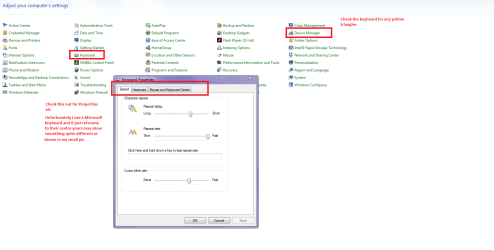
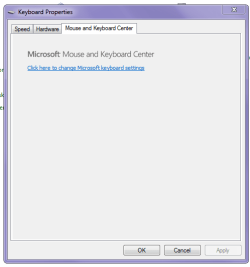
Now can you check in the Control Panel on the offending machine > Device Management and Keyboard see pics
 

Attachments

  • KEYBOARD.PNG
    KEYBOARD.PNG
    38 KB · Views: 0
  • KEYBOARD 2.PNG
    KEYBOARD 2.PNG
    9.1 KB · Views: 5

My Computer My Computer

Computer type
PC/Desktop
Computer Manufacturer/Model Number
Own build (new) Desk1 / Asus ROG Win 7 / Desk2 1st build
OS
Desk1 7 Home Prem / Desk2 10 Pro / Main lap Asus ROG 10 Pro 2 laptop Toshiba 7 Pro Asus P2520 7 & 10
CPU
Desk1 i5 3750K / Laptop i7 GTX 860M / Desk2 i5 2500
Motherboard
Desk1 Asus P877-V / Desk2 Gigabyte H67 UD3H / Laptop ?
Memory
Desk1 8GB (1866) / Desk2 16GB (1333) / Laptop 8Gb DDR3
Graphics Card(s)
Desk 1& 2NVidia GTX 650 & Laptops on board Intel
Sound Card
Desk 1 & 2 -XONAR DG Realtek High Def audio Laptop
Monitor(s) Displays
Desk 1 Benq HD 2450 / Desk2 Philips 24" / Laptop 17.5"
Screen Resolution
1920x1080 D1 & D2 & Laptop 1
Hard Drives
Desk1 Samsung 120GB 830 SSD
Asus ROG 256GB 850 Pro SSD
Desk2 Samsung 840 256 SSD
Toshiba 120GB EVO
PSU
Desk 1 Corsair HX 1050/ Laptop ? / Desk 2 Corsair HX 650
Case
Desk 1 Cooler HAF XM ? Toshiba laptop / Desk2 Coolermaster
Cooling
Fans on all Desk1 -2 Desk2 - all Coolermasters 5 Laptop ?
Keyboard
Desk 1 MS Sidewinder X6 Desk 2 MS Sidewinder X 4
Mouse
Desk 1&2 - Gigabyte MS 900 gamer - laptop - Logitec wireless
Internet Speed
ADSL2+
Other Info
One other Desktop (tester) and spare Toshba laptop both with SSD's
Running Kaspersky 2016 ISS on all machines config'd identically
Logitec audio stereo systems on each machine (x3)
Canon MG5250MFC
Router/modem TP-Link running WPA2SK
Back
Top