Keyboard Error 38

Big Tourist

New member
Local time
7:50 PM
Messages
5
I've searched every thread on the internet about this and none have helped, so I'm posting here to see if anybody can advise.

Seemingly at random my keyboard stops working. About 30 seconds later it starts up again, on its own. This happens between once a day and once a week. The power light goes out and the audio sounds like I've unplugged the USB.

When this happens, in Device Manager it says "Windows cannot load the device driver for this hardware because a previous instance of the device driver is still in memory. (Code 38)"

And in Event Viewer it gives a Warning (Error would be more suited but still): "The driver \Driver\kbdhid failed to load for the device HID\VID_045E&PID_0752\7&2598f110&0&0000." These errors always come in pairs with exactly the same timestamp.

According to Device Manager my keyboard uses drivers kbdclass.sys, kbdhid.sys and klkbdflt.sys. No idea if this is correct or not.

I've tried the keyboard in different USBs (2 and 3) and updated and uninstalled / reinstalled the driver. My machine has no viruses, malware or spyware. It's only a couple of months old and has been happening all this time (edited).

Does anybody know what causes this and how to fix it? Thanks.

Windows 7 Home Premium 64, 8Gb, SSD
 
Last edited:

My Computer

OS
Win 7 Home Premium 64
Hello and welcome BT now just what is the make of the keyboard as for susytem specs all we have is the OS mate it makes it difficult not knowing a bit about the machine.

ie did you build it is it a laptop witha plug in KB etc

Now in the Device Manager when you open the keyboard is there a yellow triangle there?
 

My Computer

Computer type
PC/Desktop
Computer Manufacturer/Model Number
Own build (new) Desk1 / Asus ROG Win 7 / Desk2 1st build
OS
Desk1 7 Home Prem / Desk2 10 Pro / Main lap Asus ROG 10 Pro 2 laptop Toshiba 7 Pro Asus P2520 7 & 10
CPU
Desk1 i5 3750K / Laptop i7 GTX 860M / Desk2 i5 2500
Motherboard
Desk1 Asus P877-V / Desk2 Gigabyte H67 UD3H / Laptop ?
Memory
Desk1 8GB (1866) / Desk2 16GB (1333) / Laptop 8Gb DDR3
Graphics Card(s)
Desk 1& 2NVidia GTX 650 & Laptops on board Intel
Sound Card
Desk 1 & 2 -XONAR DG Realtek High Def audio Laptop
Monitor(s) Displays
Desk 1 Benq HD 2450 / Desk2 Philips 24" / Laptop 17.5"
Screen Resolution
1920x1080 D1 & D2 & Laptop 1
Hard Drives
Desk1 Samsung 120GB 830 SSD
Asus ROG 256GB 850 Pro SSD
Desk2 Samsung 840 256 SSD
Toshiba 120GB EVO
PSU
Desk 1 Corsair HX 1050/ Laptop ? / Desk 2 Corsair HX 650
Case
Desk 1 Cooler HAF XM ? Toshiba laptop / Desk2 Coolermaster
Cooling
Fans on all Desk1 -2 Desk2 - all Coolermasters 5 Laptop ?
Keyboard
Desk 1 MS Sidewinder X6 Desk 2 MS Sidewinder X 4
Mouse
Desk 1&2 - Gigabyte MS 900 gamer - laptop - Logitec wireless
Internet Speed
ADSL2+
Other Info
One other Desktop (tester) and spare Toshba laptop both with SSD's
Running Kaspersky 2016 ISS on all machines config'd identically
Logitec audio stereo systems on each machine (x3)
Canon MG5250MFC
Router/modem TP-Link running WPA2SK
It's a Microsoft Wired Keyboard 400. My machine is a PC and is fully patched up-to-date. It was custom built by a company in the UK.

Version 6.1.7601 Service Pack 1 Build 7601
Processor Intel(R) Core(TM) i7-3770 CPU @ 3.40GHz, 3401 Mhz, 4 Core(s), 8 Logical Processor(s)

I've checked the disks (2 SSDs) using HD Sentinel and there are no errors or bad sectors. I've also checked the memory using Microsoft's tool and this seems fine too.

Most of the time the keyboard works fine and Device Manager shows no problems. When the problem occurs the first thing is the keyboard power light goes off (e.g. Numlock or whatever's on at the time) and the tone sounds like I've disconnected the USB.

The keyboard is then dead. Two events are logged to the Event Manager at this time (as above) and an exclamation mark is shown in Device Manager.

I wait about 30 seconds and the keyboard comes back on. The exclamation mark disappears from DM.

I thought it might be a bad cable but if I manually disconnect the USB I don't get the errors in Event Log, so I don't think it's that.

Edit: I don't know if it's relevant but I've also got a wired Wacom Intuous 5 A4 connected. I don't think it can interfere with the keyboard but it does some odd things so I wouldn't bet on it.

Thanks
 

My Computer

OS
Win 7 Home Premium 64
Ok BT try the thing without the touchpad installed if it continues then maybe you might have to not use that. Oh and disconnect all other USB devices and then slowly add them and see what happens.

Let us know if the problem persists.
 

My Computer

Computer type
PC/Desktop
Computer Manufacturer/Model Number
Own build (new) Desk1 / Asus ROG Win 7 / Desk2 1st build
OS
Desk1 7 Home Prem / Desk2 10 Pro / Main lap Asus ROG 10 Pro 2 laptop Toshiba 7 Pro Asus P2520 7 & 10
CPU
Desk1 i5 3750K / Laptop i7 GTX 860M / Desk2 i5 2500
Motherboard
Desk1 Asus P877-V / Desk2 Gigabyte H67 UD3H / Laptop ?
Memory
Desk1 8GB (1866) / Desk2 16GB (1333) / Laptop 8Gb DDR3
Graphics Card(s)
Desk 1& 2NVidia GTX 650 & Laptops on board Intel
Sound Card
Desk 1 & 2 -XONAR DG Realtek High Def audio Laptop
Monitor(s) Displays
Desk 1 Benq HD 2450 / Desk2 Philips 24" / Laptop 17.5"
Screen Resolution
1920x1080 D1 & D2 & Laptop 1
Hard Drives
Desk1 Samsung 120GB 830 SSD
Asus ROG 256GB 850 Pro SSD
Desk2 Samsung 840 256 SSD
Toshiba 120GB EVO
PSU
Desk 1 Corsair HX 1050/ Laptop ? / Desk 2 Corsair HX 650
Case
Desk 1 Cooler HAF XM ? Toshiba laptop / Desk2 Coolermaster
Cooling
Fans on all Desk1 -2 Desk2 - all Coolermasters 5 Laptop ?
Keyboard
Desk 1 MS Sidewinder X6 Desk 2 MS Sidewinder X 4
Mouse
Desk 1&2 - Gigabyte MS 900 gamer - laptop - Logitec wireless
Internet Speed
ADSL2+
Other Info
One other Desktop (tester) and spare Toshba laptop both with SSD's
Running Kaspersky 2016 ISS on all machines config'd identically
Logitec audio stereo systems on each machine (x3)
Canon MG5250MFC
Router/modem TP-Link running WPA2SK
Thanks for the reply. Trouble is I work from home so use the Wacom every day for about 12 hours, can't do without it. I can disconnect my external HD but apart from the Wacom and mouse that's the only other thing I have on USB. Also my keyboard's on a USB2 and the others on USB3 ones.

I updated my keyboard driver yesterday but this is another bizarre thing. It said it had found a new driver but loaded the exact same one it had already, the one from 11th Nov 2012. I'll see if this has made a difference but I doubt it.

I'm wondering what the error actually means - why would it be trying to load a driver into memory in the first place? Surely the driver is loaded on logon and just stays there. I guess more to the point, why is there no code that checks the presence of the driver first instead of returning an error, but I guess the answer to that is in some developer's head somewhere :)
 

My Computer

OS
Win 7 Home Premium 64
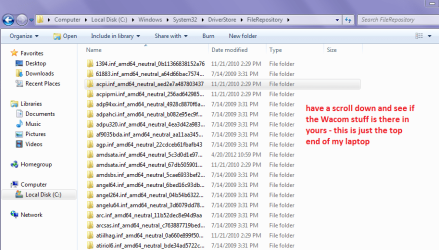
Yes BT I think you are on track there as drivers are loaded to the hard drive - actually in the System32 - have a look at my pic and then in yours to see what is there.

This is a Google for the KB mate as I don't know where you are you will have to find the right region. In any case I prefer to load from the manufacturers site the Windows search for feature I never have much luck with at all.

Google

Tip: next time you need to post make sure some of your specs are available it makes helping that much easier.

For a quick way to find them download and run this

Speccy - Download < from piriform:)
 

Attachments

  • FILE.PNG
    FILE.PNG
    32.9 KB · Views: 6

My Computer

Computer type
PC/Desktop
Computer Manufacturer/Model Number
Own build (new) Desk1 / Asus ROG Win 7 / Desk2 1st build
OS
Desk1 7 Home Prem / Desk2 10 Pro / Main lap Asus ROG 10 Pro 2 laptop Toshiba 7 Pro Asus P2520 7 & 10
CPU
Desk1 i5 3750K / Laptop i7 GTX 860M / Desk2 i5 2500
Motherboard
Desk1 Asus P877-V / Desk2 Gigabyte H67 UD3H / Laptop ?
Memory
Desk1 8GB (1866) / Desk2 16GB (1333) / Laptop 8Gb DDR3
Graphics Card(s)
Desk 1& 2NVidia GTX 650 & Laptops on board Intel
Sound Card
Desk 1 & 2 -XONAR DG Realtek High Def audio Laptop
Monitor(s) Displays
Desk 1 Benq HD 2450 / Desk2 Philips 24" / Laptop 17.5"
Screen Resolution
1920x1080 D1 & D2 & Laptop 1
Hard Drives
Desk1 Samsung 120GB 830 SSD
Asus ROG 256GB 850 Pro SSD
Desk2 Samsung 840 256 SSD
Toshiba 120GB EVO
PSU
Desk 1 Corsair HX 1050/ Laptop ? / Desk 2 Corsair HX 650
Case
Desk 1 Cooler HAF XM ? Toshiba laptop / Desk2 Coolermaster
Cooling
Fans on all Desk1 -2 Desk2 - all Coolermasters 5 Laptop ?
Keyboard
Desk 1 MS Sidewinder X6 Desk 2 MS Sidewinder X 4
Mouse
Desk 1&2 - Gigabyte MS 900 gamer - laptop - Logitec wireless
Internet Speed
ADSL2+
Other Info
One other Desktop (tester) and spare Toshba laptop both with SSD's
Running Kaspersky 2016 ISS on all machines config'd identically
Logitec audio stereo systems on each machine (x3)
Canon MG5250MFC
Router/modem TP-Link running WPA2SK
Well, all Wacom and keyboard drivers seem to be where they should be but beyond that I'm not sure what I'm looking for.
 

My Computer

OS
Win 7 Home Premium 64
I know we have been over this before but the driver where did you get it from because a Goolge throws this up.

Software Downloads: Wired Keyboard 400

Now I use Microsoft KB's as a matter of fact (Sidewinders x4 & x6) and I got actual Windows updates for them as well as the install software for them so do you remember getting udates for the keyboard you have there?
 

My Computer

Computer type
PC/Desktop
Computer Manufacturer/Model Number
Own build (new) Desk1 / Asus ROG Win 7 / Desk2 1st build
OS
Desk1 7 Home Prem / Desk2 10 Pro / Main lap Asus ROG 10 Pro 2 laptop Toshiba 7 Pro Asus P2520 7 & 10
CPU
Desk1 i5 3750K / Laptop i7 GTX 860M / Desk2 i5 2500
Motherboard
Desk1 Asus P877-V / Desk2 Gigabyte H67 UD3H / Laptop ?
Memory
Desk1 8GB (1866) / Desk2 16GB (1333) / Laptop 8Gb DDR3
Graphics Card(s)
Desk 1& 2NVidia GTX 650 & Laptops on board Intel
Sound Card
Desk 1 & 2 -XONAR DG Realtek High Def audio Laptop
Monitor(s) Displays
Desk 1 Benq HD 2450 / Desk2 Philips 24" / Laptop 17.5"
Screen Resolution
1920x1080 D1 & D2 & Laptop 1
Hard Drives
Desk1 Samsung 120GB 830 SSD
Asus ROG 256GB 850 Pro SSD
Desk2 Samsung 840 256 SSD
Toshiba 120GB EVO
PSU
Desk 1 Corsair HX 1050/ Laptop ? / Desk 2 Corsair HX 650
Case
Desk 1 Cooler HAF XM ? Toshiba laptop / Desk2 Coolermaster
Cooling
Fans on all Desk1 -2 Desk2 - all Coolermasters 5 Laptop ?
Keyboard
Desk 1 MS Sidewinder X6 Desk 2 MS Sidewinder X 4
Mouse
Desk 1&2 - Gigabyte MS 900 gamer - laptop - Logitec wireless
Internet Speed
ADSL2+
Other Info
One other Desktop (tester) and spare Toshba laptop both with SSD's
Running Kaspersky 2016 ISS on all machines config'd identically
Logitec audio stereo systems on each machine (x3)
Canon MG5250MFC
Router/modem TP-Link running WPA2SK
I updated the keyboard driver through Device Manager, so I assume it just went to the Microsoft site. But... hold this space for a while because I have an idea the problem might be with the Wacom tablet. I'm not definite but it seems that the keyboard has gone off at least a couple of times when I've picked up the tablet to use it, and also there are a few problems with the tablet too. I've just rung Amazon and they're sending me a new tablet so at least I'll be able to check this out. So I'll update this thread when I've tested it.
 

My Computer

OS
Win 7 Home Premium 64
I updated the keyboard driver through Device Manager, so I assume it just went to the Microsoft site. But... hold this space for a while because I have an idea the problem might be with the Wacom tablet. I'm not definite but it seems that the keyboard has gone off at least a couple of times when I've picked up the tablet to use it, and also there are a few problems with the tablet too. I've just rung Amazon and they're sending me a new tablet so at least I'll be able to check this out. So I'll update this thread when I've tested it.
Actually BT you are better off going to the Microsoft site for the drivers / software direct I ma not a great lover of the on board checker to be honest.
But it will be interesting to see what comes up with that tablet device set up.
 

My Computer

Computer type
PC/Desktop
Computer Manufacturer/Model Number
Own build (new) Desk1 / Asus ROG Win 7 / Desk2 1st build
OS
Desk1 7 Home Prem / Desk2 10 Pro / Main lap Asus ROG 10 Pro 2 laptop Toshiba 7 Pro Asus P2520 7 & 10
CPU
Desk1 i5 3750K / Laptop i7 GTX 860M / Desk2 i5 2500
Motherboard
Desk1 Asus P877-V / Desk2 Gigabyte H67 UD3H / Laptop ?
Memory
Desk1 8GB (1866) / Desk2 16GB (1333) / Laptop 8Gb DDR3
Graphics Card(s)
Desk 1& 2NVidia GTX 650 & Laptops on board Intel
Sound Card
Desk 1 & 2 -XONAR DG Realtek High Def audio Laptop
Monitor(s) Displays
Desk 1 Benq HD 2450 / Desk2 Philips 24" / Laptop 17.5"
Screen Resolution
1920x1080 D1 & D2 & Laptop 1
Hard Drives
Desk1 Samsung 120GB 830 SSD
Asus ROG 256GB 850 Pro SSD
Desk2 Samsung 840 256 SSD
Toshiba 120GB EVO
PSU
Desk 1 Corsair HX 1050/ Laptop ? / Desk 2 Corsair HX 650
Case
Desk 1 Cooler HAF XM ? Toshiba laptop / Desk2 Coolermaster
Cooling
Fans on all Desk1 -2 Desk2 - all Coolermasters 5 Laptop ?
Keyboard
Desk 1 MS Sidewinder X6 Desk 2 MS Sidewinder X 4
Mouse
Desk 1&2 - Gigabyte MS 900 gamer - laptop - Logitec wireless
Internet Speed
ADSL2+
Other Info
One other Desktop (tester) and spare Toshba laptop both with SSD's
Running Kaspersky 2016 ISS on all machines config'd identically
Logitec audio stereo systems on each machine (x3)
Canon MG5250MFC
Router/modem TP-Link running WPA2SK
Back
Top