Solved Keyboard Languages (Start bar search issue)

MichaelKus

New member
Local time
10:19 PM
Messages
4
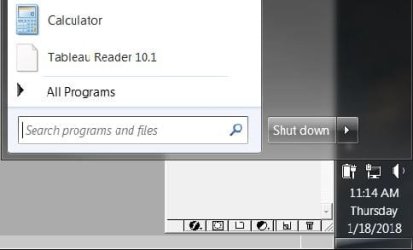
My issue is that my keyboard is set up for a different layout other than QWERTY, but only when I'm typing in the Start bar search box.

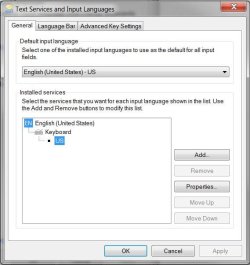
I know there are other posts about going into "Region & Language" -> "Keyboards and Languages" to change the keyboard layout, however I have done this and removed all other keyboard languages other than English -> US.

What other settings are there governing the keyboard layout when it's only effecting the Start bar search function?
 

My Computer

Computer type
PC/Desktop
Computer Manufacturer/Model Number
Samsung
OS
Microsoft Windows 7 Enterprise 64-bit 7601 Multiprocessor Free Service Pack 1
CPU
Intel(R) Core(TM) i7-5500U CPU @ 2.40GHz
Motherboard
SAMSUNG ELECTRONICS CO., LTD. NP940X3K-K02US
Memory
8.00 GB
Graphics Card(s)
(1) BmcMirror.4.0.beforeWin8 (2) Intel(R) HD Graphics 5500
Sound Card
(1) Realtek High Definition Audio (2) Targus Audio (3) U
Screen Resolution
(1) 1920 x 1080 x 32 bits (4294967296 colors) @ 60 Hz (2)
Hard Drives
SAMSUNG MZNLN256HCHP-000 SCSI Disk Device
Browser
Chrome
Welcome to the Forum.

Please edit your profile with ALL your hardware specs. It will help us to help you.
System Info - See Your System Specs - Windows 7 Help Forums

Open Control Panel\All Control Panel Items\Region and Language - Text services and input languages
With the snipping tool take a snapshot and post here as an attachment. Use the paper clip (top right menu) -browse to the image file - upload
 

My Computers

System One System Two

  • Computer type
    PC/Desktop
    Computer Manufacturer/Model Number
    custom build
    OS
    Windows 7 HP 64
    CPU
    i5 6600K - 800MHz to 4200MHz
    Motherboard
    GA-Z170-HD3P
    Memory
    4+4G GSkill DDR4 3000
    Graphics Card(s)
    IG - Intel 530
    Monitor(s) Displays
    Samsung 226BW
    Screen Resolution
    1680x1050
    Hard Drives
    (1) -1 SM951 – 128GB M.2 AHCI PCIe SSD drive for Windows 7 and Lubuntu
    (2) -1 WD SATA 3 - 1T for Data
    (3) -1 WD SATA 3 - 1T for backup
    PSU
    Thermaltake 450W TR2 gold
    Keyboard
    Old and good Chicony mechanical keyboard
    Mouse
    Logitech mX performance - 9 buttons (had to disable some)
    Internet Speed
    500Mb/s
    Browser
    Firefox 64
    Other Info
    TinyWall firewall
  • Computer type
    Laptop
    System Manufacturer/Model Number
    Asus Q550LF
    OS
    Windows 7 Pro
    CPU
    i7-4500U 800MHz to 3.0GHz
    Motherboard
    Asus Q550LF
    Memory
    (4+4)G DDR3 1600
    Graphics Card(s)
    IG intel 4400 + NVIDIA GeForce GT 745M
    Sound Card
    Realtek
    Monitor(s) Displays
    LG Display LP156WF4-SPH1
    Screen Resolution
    1920 x 1080
    Hard Drives
    BX500 120G SSD for Windows and programs +
    1T HDD for data
    Internet Speed
    500 Mb/s
    Browser
    Firefox
    Other Info
    TinyWall firewall
Thanks for that link, the auto upload system specs was great.

I've also attached the Text Services and Input Languages screen shot.

Thanks again for the welcome and info!
 

Attachments

  • Capture.JPG
    Capture.JPG
    62.2 KB · Views: 10

My Computer

Computer type
PC/Desktop
Computer Manufacturer/Model Number
Samsung
OS
Microsoft Windows 7 Enterprise 64-bit 7601 Multiprocessor Free Service Pack 1
CPU
Intel(R) Core(TM) i7-5500U CPU @ 2.40GHz
Motherboard
SAMSUNG ELECTRONICS CO., LTD. NP940X3K-K02US
Memory
8.00 GB
Graphics Card(s)
(1) BmcMirror.4.0.beforeWin8 (2) Intel(R) HD Graphics 5500
Sound Card
(1) Realtek High Definition Audio (2) Targus Audio (3) U
Screen Resolution
(1) 1920 x 1080 x 32 bits (4294967296 colors) @ 60 Hz (2)
Hard Drives
SAMSUNG MZNLN256HCHP-000 SCSI Disk Device
Browser
Chrome

My Computer

Computer type
PC/Desktop
Computer Manufacturer/Model Number
medionl/Aspire 6930G/acer x55a
OS
W7 home premium 32bit/W7HP 64bit/w10 tp insider ring
CPU
E5300 dual core
Motherboard
medion MS7366
Memory
3gb
Graphics Card(s)
Nvidia Geforce 7100 Nforce 630i
Monitor(s) Displays
avixc
Internet Speed
n (isp resticted to 72)
Antivirus
mse/pands
Browser
palemoon
Other Info
Belkin Fd7050 n USB using Railink RT2870 drivers, more upto date
Ah so you just helped me figure something out Roy, thank you!

My keyboard layout, for instance when typing in the sevenforums message box, is -QWERTY-
But when I open the Start bar and try to type in the search box it is indeed using the -DVORAK- layout. I need it to change back to -QWERTY-

How can it be different for just the Start bar search function?
 

Attachments

  • Capture.JPG
    Capture.JPG
    27.1 KB · Views: 9

My Computer

Computer type
PC/Desktop
Computer Manufacturer/Model Number
Samsung
OS
Microsoft Windows 7 Enterprise 64-bit 7601 Multiprocessor Free Service Pack 1
CPU
Intel(R) Core(TM) i7-5500U CPU @ 2.40GHz
Motherboard
SAMSUNG ELECTRONICS CO., LTD. NP940X3K-K02US
Memory
8.00 GB
Graphics Card(s)
(1) BmcMirror.4.0.beforeWin8 (2) Intel(R) HD Graphics 5500
Sound Card
(1) Realtek High Definition Audio (2) Targus Audio (3) U
Screen Resolution
(1) 1920 x 1080 x 32 bits (4294967296 colors) @ 60 Hz (2)
Hard Drives
SAMSUNG MZNLN256HCHP-000 SCSI Disk Device
Browser
Chrome
Hi Michael,

To be honest NO idea, possibly remnants from the uninstall IT must have been enabled at some point
(or data in the search box when you previously uninstalled and it kept the setting for that only)

But what might work - add the Dvorak keyboard
then try the search bar entry if it works fine - leave it, dont think so

if not move it up the order us-dvorak on top- (we know whats gonna happen all Dvorak)
test and then reset it bak down the order
test again
if that then works, bingo then either leave as is or remove.

Roy
 

My Computer

Computer type
PC/Desktop
Computer Manufacturer/Model Number
medionl/Aspire 6930G/acer x55a
OS
W7 home premium 32bit/W7HP 64bit/w10 tp insider ring
CPU
E5300 dual core
Motherboard
medion MS7366
Memory
3gb
Graphics Card(s)
Nvidia Geforce 7100 Nforce 630i
Monitor(s) Displays
avixc
Internet Speed
n (isp resticted to 72)
Antivirus
mse/pands
Browser
palemoon
Other Info
Belkin Fd7050 n USB using Railink RT2870 drivers, more upto date
Roy, believe it or not, I added the Dvorak keyboard at the bottom, under US...AND IT WORKED

So I'm leaving it there because everything types in US:QWERTY now.

Thank you!
 

My Computer

Computer type
PC/Desktop
Computer Manufacturer/Model Number
Samsung
OS
Microsoft Windows 7 Enterprise 64-bit 7601 Multiprocessor Free Service Pack 1
CPU
Intel(R) Core(TM) i7-5500U CPU @ 2.40GHz
Motherboard
SAMSUNG ELECTRONICS CO., LTD. NP940X3K-K02US
Memory
8.00 GB
Graphics Card(s)
(1) BmcMirror.4.0.beforeWin8 (2) Intel(R) HD Graphics 5500
Sound Card
(1) Realtek High Definition Audio (2) Targus Audio (3) U
Screen Resolution
(1) 1920 x 1080 x 32 bits (4294967296 colors) @ 60 Hz (2)
Hard Drives
SAMSUNG MZNLN256HCHP-000 SCSI Disk Device
Browser
Chrome
Back
Top