Solved Files appear in start bar search, but not anywhere else.

Belatryx

New member
Local time
7:50 AM
Messages
9
Location
Vaughan
Why do files that don't exist appear in start bar search, but not in My Computer or Libraries? How do I delete them?

I had videos and I'm not sure what I did but for some reason I deleted them and couldn't find them in my libraries or anywhere else on my computer. When I searched for the video file names in the start bar search, the files come up, but when I click them they don't exist. So I am wondering why can I still search for them in my start bar, even when they don't exist anymore, and how can I delete them?

When I right click on the file that comes up when I search it in my search bar, and try to delete, it won't because the file doesn't exist.
 

My Computer My Computer

At a glance

Windows 7 Home Premium 64-bit
OS
Windows 7 Home Premium 64-bit
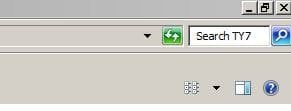
double click the 'computer' icon on your desktop--in the search field in the upper right corner--type the file name that you are searching for--that should bring up the actual file listing
 

Attachments

  • Capture.JPG
    Capture.JPG
    10.5 KB · Views: 106

My Computer My Computer

At a glance

win7 ultimate 32bitcore2 Extreme QX6850-OCd to 3.15 GHz4 GBNVidia 8600 GT
Computer Manufacturer/Model Number
SALEON model 2.2b
OS
win7 ultimate 32bit
CPU
core2 Extreme QX6850-OCd to 3.15 GHz
Motherboard
ASUS P5G41-M LE
Memory
4 GB
Graphics Card(s)
NVidia 8600 GT
Monitor(s) Displays
23" acer
Hard Drives
one SATA 250GB partitioned equally in half
one SATA 160GB-internal storage
PSU
500W Thermaltake
Case
mini tower
double click the 'computer' icon on your desktop--in the search field in the upper right corner--type the file name that you are searching for--that should bring up the actual file listing

Hey thanks for your reply, but I have done that already. I searched everywhere, the files don't exist. They are deleted. But the file names still come up in my start bar search, but I can't click them or delete them or anything because they 'do not exist'
 

My Computer My Computer

At a glance

Windows 7 Home Premium 64-bit
OS
Windows 7 Home Premium 64-bit

My Computer My Computer

At a glance

win7 ultimate 32bitcore2 Extreme QX6850-OCd to 3.15 GHz4 GBNVidia 8600 GT
Computer Manufacturer/Model Number
SALEON model 2.2b
OS
win7 ultimate 32bit
CPU
core2 Extreme QX6850-OCd to 3.15 GHz
Motherboard
ASUS P5G41-M LE
Memory
4 GB
Graphics Card(s)
NVidia 8600 GT
Monitor(s) Displays
23" acer
Hard Drives
one SATA 250GB partitioned equally in half
one SATA 160GB-internal storage
PSU
500W Thermaltake
Case
mini tower

My Computer My Computer

At a glance

Windows 7 Home Premium 64-bit
OS
Windows 7 Home Premium 64-bit
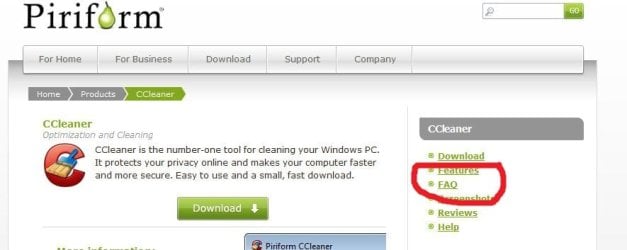
next thing to try--download and install CCleaner-read the info on piriforms website before using this tool--see 'features' and FAQ section

CCleaner - PC Optimization and Cleaning - Free Download

just be careful when installing as one of the installer windows wants to install extra 'toolbars' (Ask.com I think) make sure to uncheck these options
 

Attachments

  • Capture.JPG
    Capture.JPG
    36.7 KB · Views: 3

My Computer My Computer

At a glance

win7 ultimate 32bitcore2 Extreme QX6850-OCd to 3.15 GHz4 GBNVidia 8600 GT
Computer Manufacturer/Model Number
SALEON model 2.2b
OS
win7 ultimate 32bit
CPU
core2 Extreme QX6850-OCd to 3.15 GHz
Motherboard
ASUS P5G41-M LE
Memory
4 GB
Graphics Card(s)
NVidia 8600 GT
Monitor(s) Displays
23" acer
Hard Drives
one SATA 250GB partitioned equally in half
one SATA 160GB-internal storage
PSU
500W Thermaltake
Case
mini tower
The files are gone. Those are just leftover junctions.
 

My Computer My Computer

At a glance

Vista, Windows7, Mint Mate, Zorin, Windows 8from 1.6GHz Duo to i7
Computer Manufacturer/Model Number
HP, Dell, Gateway, Toshiba - 4 laptops and 2 desktops
OS
Vista, Windows7, Mint Mate, Zorin, Windows 8
CPU
from 1.6GHz Duo to i7
Monitor(s) Displays
2x HP w2207
Hard Drives
5x HDD, 7x SSD, 12x Externals
Keyboard
with trackball - no mices
Mouse
Trackball mice
Internet Speed
DSL 6000
next thing to try--download and install CCleaner-read the info on piriforms website before using this tool--see 'features' and FAQ section

CCleaner - PC Optimization and Cleaning - Free Download

just be careful when installing as one of the installer windows wants to install extra 'toolbars' (Ask.com I think) make sure to uncheck these options

Thanks for this download, I tried it, still no luck though.
 

My Computer My Computer

At a glance

Windows 7 Home Premium 64-bit
OS
Windows 7 Home Premium 64-bit
The files are gone. Those are just leftover junctions.

Yes, I know this.. but I am just wondering if there is a way to delete these leftover junctions. I guess I can't see them unless I physically search for them, but I just don't quite understand why they are still searchable in my start bar.
 

My Computer My Computer

At a glance

Windows 7 Home Premium 64-bit
OS
Windows 7 Home Premium 64-bit
did you try the 'registry cleaner' section of CCleaner?
 

Attachments

  • Capture.JPG
    Capture.JPG
    49.7 KB · Views: 3

My Computer My Computer

At a glance

win7 ultimate 32bitcore2 Extreme QX6850-OCd to 3.15 GHz4 GBNVidia 8600 GT
Computer Manufacturer/Model Number
SALEON model 2.2b
OS
win7 ultimate 32bit
CPU
core2 Extreme QX6850-OCd to 3.15 GHz
Motherboard
ASUS P5G41-M LE
Memory
4 GB
Graphics Card(s)
NVidia 8600 GT
Monitor(s) Displays
23" acer
Hard Drives
one SATA 250GB partitioned equally in half
one SATA 160GB-internal storage
PSU
500W Thermaltake
Case
mini tower
Yeah, they sit in some cache in Appdata > Local that you cannot get to.
 

My Computer My Computer

At a glance

Vista, Windows7, Mint Mate, Zorin, Windows 8from 1.6GHz Duo to i7
Computer Manufacturer/Model Number
HP, Dell, Gateway, Toshiba - 4 laptops and 2 desktops
OS
Vista, Windows7, Mint Mate, Zorin, Windows 8
CPU
from 1.6GHz Duo to i7
Monitor(s) Displays
2x HP w2207
Hard Drives
5x HDD, 7x SSD, 12x Externals
Keyboard
with trackball - no mices
Mouse
Trackball mice
Internet Speed
DSL 6000

My Computer My Computer

At a glance

Vista, Windows7, Mint Mate, Zorin, Windows 8from 1.6GHz Duo to i7
Computer Manufacturer/Model Number
HP, Dell, Gateway, Toshiba - 4 laptops and 2 desktops
OS
Vista, Windows7, Mint Mate, Zorin, Windows 8
CPU
from 1.6GHz Duo to i7
Monitor(s) Displays
2x HP w2207
Hard Drives
5x HDD, 7x SSD, 12x Externals
Keyboard
with trackball - no mices
Mouse
Trackball mice
Internet Speed
DSL 6000
Yeah, they sit in some cache in Appdata > Local that you cannot get to.

Aw lame. So a.k.a I cannot get rid of them?
 

My Computer My Computer

At a glance

Windows 7 Home Premium 64-bit
OS
Windows 7 Home Premium 64-bit
Those junctions do no harm. I would not worry about them.
 

My Computer My Computer

At a glance

Vista, Windows7, Mint Mate, Zorin, Windows 8from 1.6GHz Duo to i7
Computer Manufacturer/Model Number
HP, Dell, Gateway, Toshiba - 4 laptops and 2 desktops
OS
Vista, Windows7, Mint Mate, Zorin, Windows 8
CPU
from 1.6GHz Duo to i7
Monitor(s) Displays
2x HP w2207
Hard Drives
5x HDD, 7x SSD, 12x Externals
Keyboard
with trackball - no mices
Mouse
Trackball mice
Internet Speed
DSL 6000
The files are gone. Those are just leftover junctions.

Yes, I know this.. but I am just wondering if there is a way to delete these leftover junctions. I guess I can't see them unless I physically search for them, but I just don't quite understand why they are still searchable in my start bar.

You probably need to rebuild the Search Index.

Rebuilding the index can take a long time to complete, depending upon the number of files and available resources in the system. Follow these steps to rebuild the Search Index in Windows 7:
1. Click Start, type Indexing Options. Press ENTER
2. In the Indexing Options window, click Advanced
3. When the User Account Control prompt appears, click Continue
4. To rebuild the Search index, click the Rebuild button
indexing1.gif

5. Click OK when you see the following message:
This operation will completely re-build the indexed locations on your computer and might resolve problems if your search results often appear to be out of date. This operation might take a long time.
6. Click OK
indexing2.gif
 

My Computer My Computer

At a glance

Windows 7 Professional x64Intel i5 quad processor16 GBRadeon HD 5770
Computer type
PC/Desktop
Computer Manufacturer/Model Number
Custom Built
OS
Windows 7 Professional x64
CPU
Intel i5 quad processor
Motherboard
DP67BG
Memory
16 GB
Graphics Card(s)
Radeon HD 5770
Sound Card
Realtek High Definition Audio
Monitor(s) Displays
Samsung SyncMaster
Screen Resolution
1920X1080
Hard Drives
WD 2TB (SATA Internal)
WD 1TB (USB External)
PSU
Corsair GS800
Case
Tower (Generic)
Cooling
3 Internal Fans
Keyboard
MS Wireless
Mouse
MS Optical Wired
Internet Speed
54 mbps
Antivirus
Emsisoft
Browser
IE-Version 9, Palemoon-Version 24.2.0
did you try the 'registry cleaner' section of CCleaner?
I doubt that would help.

The files are gone. Those are just leftover junctions.

Yes, I know this.. but I am just wondering if there is a way to delete these leftover junctions. I guess I can't see them unless I physically search for them, but I just don't quite understand why they are still searchable in my start bar.

You probably need to rebuild the Search Index.

Rebuilding the index can take a long time to complete, depending upon the number of files and available resources in the system. Follow these steps to rebuild the Search Index in Windows 7:
1. Click Start, type Indexing Options. Press ENTER
2. In the Indexing Options window, click Advanced
3. When the User Account Control prompt appears, click Continue
4. To rebuild the Search index, click the Rebuild button
indexing1.gif

5. Click OK when you see the following message:
This operation will completely re-build the indexed locations on your computer and might resolve problems if your search results often appear to be out of date. This operation might take a long time.
6. Click OK
indexing2.gif

This worked!! Thank you very much, you are very smart :)

Thank you also to everyone else who helped..

Check out this thread as well, let me know if you know a solution.. thanks again!

http://www.sevenforums.com/general-discussion/228278-uninstalled-programs-still-have-notification-area-icons.html
 

My Computer My Computer

At a glance

Windows 7 Home Premium 64-bit
OS
Windows 7 Home Premium 64-bit
did you try the 'registry cleaner' section of CCleaner?
I doubt that would help.

Yes, I know this.. but I am just wondering if there is a way to delete these leftover junctions. I guess I can't see them unless I physically search for them, but I just don't quite understand why they are still searchable in my start bar.

You probably need to rebuild the Search Index.

Rebuilding the index can take a long time to complete, depending upon the number of files and available resources in the system. Follow these steps to rebuild the Search Index in Windows 7:
1. Click Start, type Indexing Options. Press ENTER
2. In the Indexing Options window, click Advanced
3. When the User Account Control prompt appears, click Continue
4. To rebuild the Search index, click the Rebuild button
indexing1.gif

5. Click OK when you see the following message:
This operation will completely re-build the indexed locations on your computer and might resolve problems if your search results often appear to be out of date. This operation might take a long time.
6. Click OK
indexing2.gif

This worked!! Thank you very much, you are very smart :)

Thank you also to everyone else who helped..

Check out this thread as well, let me know if you know a solution.. thanks again!

http://www.sevenforums.com/general-...grams-still-have-notification-area-icons.html

Thank you for the compliment. I am glad the suggestion worked for you.
 

My Computer My Computer

At a glance

Windows 7 Professional x64Intel i5 quad processor16 GBRadeon HD 5770
Computer type
PC/Desktop
Computer Manufacturer/Model Number
Custom Built
OS
Windows 7 Professional x64
CPU
Intel i5 quad processor
Motherboard
DP67BG
Memory
16 GB
Graphics Card(s)
Radeon HD 5770
Sound Card
Realtek High Definition Audio
Monitor(s) Displays
Samsung SyncMaster
Screen Resolution
1920X1080
Hard Drives
WD 2TB (SATA Internal)
WD 1TB (USB External)
PSU
Corsair GS800
Case
Tower (Generic)
Cooling
3 Internal Fans
Keyboard
MS Wireless
Mouse
MS Optical Wired
Internet Speed
54 mbps
Antivirus
Emsisoft
Browser
IE-Version 9, Palemoon-Version 24.2.0
  • Like
Reactions: whs
Back
Top