
Solved Keyboard Layouts...

omglolthxkpz

New member
Local time
4:21 PM
Messages
15
Hi,
I have a Asus G73JH-A1 laptop with Windows 7 Home 64 Bit.

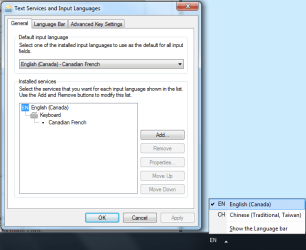
I use the English(Canada) keyboard layout and I don't need to have any other type of layouts but for some reason the Chinese (Traditional, Taiwan) keeps on appearing and this takes up my Ctrl+Space shortcut and is really annoying.

When I open the dialog to change my input languages the keyboard does not appear and I have to add it before removing it.

The same problem happens with English(US) keyboard but less often.

If there is no way to uninstall, disable or whatever these keyboard, is there any way to add/remove them with a batch file or something? thanks!
 

Attachments
  • Keyboards.png
    Keyboards.png
    18.5 KB · Views: 18

My Computer

OS
Windows 7 Home x64
Does that mean that my problem has no solution??
 

My Computer

OS
Windows 7 Home x64
Sounds like you just need to remove the Language bar from your task bar so it can no longer be accidentally set by whatever shortcuts or program is setting it. I had similar problems when the Language bar was on my taskbar.
 

My Computer

OS
Windows 7
Thanks! :D
It looks like it works, I also deleted the entries in "HKEY_LOCAL_MACHINE\SYSTEM\ControlSet002\Control\Keyboard Layouts\"
(Of course i exported and saved them first just in case it causes a problem)
Thank you very much, now I can use intellisense again.
 

My Computer

OS
Windows 7 Home x64
Can you not change the shortcut instead in that Advanced Key Settings tab? Modify what option your shortcut does.
 

My Computer

Computer Manufacturer/Model Number
Asus G73SW-XN2
OS
Windows 2000 5.0 Build 2195
CPU
Intel Core i7-2630QM@2GHz(2.9GHz Turbo Boost) [Sandy Bridge]
Motherboard
Asus G73SW (Intel HM65 Chipset)
Memory
Kingston DDR3 1333 16GB (4GBx4)
Graphics Card(s)
nVidia GTX 460m 1.5GB
Sound Card
EAX Advanced HD 5.0, THX TruStudio
Monitor(s) Displays
17.3 in. primary & 23 in. secondary
Screen Resolution
1920x1080
Hard Drives
Seagate Momentus XT (SATA II) 500 GB @ 7200 RPM
Hitachi (SATA II) 500GB @ 7200 RPM

Non Raid because ASUS was crappy to choose an HM65 Chipset
Keyboard
Built-in 102-Key Backlit Keyboard
Other Info
It's a Laptop.
No, I tried that, the shortcut doesn't appear in the list
 

My Computer

OS
Windows 7 Home x64
Open the start menu and search for "Lpksetup". Type the whole word. See if you can uninstall Chinese using that.
 

My Computer

Computer Manufacturer/Model Number
Asus G73SW-XN2
OS
Windows 2000 5.0 Build 2195
CPU
Intel Core i7-2630QM@2GHz(2.9GHz Turbo Boost) [Sandy Bridge]
Motherboard
Asus G73SW (Intel HM65 Chipset)
Memory
Kingston DDR3 1333 16GB (4GBx4)
Graphics Card(s)
nVidia GTX 460m 1.5GB
Sound Card
EAX Advanced HD 5.0, THX TruStudio
Monitor(s) Displays
17.3 in. primary & 23 in. secondary
Screen Resolution
1920x1080
Hard Drives
Seagate Momentus XT (SATA II) 500 GB @ 7200 RPM
Hitachi (SATA II) 500GB @ 7200 RPM

Non Raid because ASUS was crappy to choose an HM65 Chipset
Keyboard
Built-in 102-Key Backlit Keyboard
Other Info
It's a Laptop.
If that doesn't work, open the registry "HKCU\Keyboard Layout\Preload" and post what values you have there.

EDIT: Nvm, I found the value for English (Canada). On that key there should only be two values: One that has data 00001009 and the other 00000404. Delete the key with the 00000404 data and restart your PC.

Let me know the outcome.
 

My Computer

Computer Manufacturer/Model Number
Asus G73SW-XN2
OS
Windows 2000 5.0 Build 2195
CPU
Intel Core i7-2630QM@2GHz(2.9GHz Turbo Boost) [Sandy Bridge]
Motherboard
Asus G73SW (Intel HM65 Chipset)
Memory
Kingston DDR3 1333 16GB (4GBx4)
Graphics Card(s)
nVidia GTX 460m 1.5GB
Sound Card
EAX Advanced HD 5.0, THX TruStudio
Monitor(s) Displays
17.3 in. primary & 23 in. secondary
Screen Resolution
1920x1080
Hard Drives
Seagate Momentus XT (SATA II) 500 GB @ 7200 RPM
Hitachi (SATA II) 500GB @ 7200 RPM

Non Raid because ASUS was crappy to choose an HM65 Chipset
Keyboard
Built-in 102-Key Backlit Keyboard
Other Info
It's a Laptop.
There is only English.
I think I found some kind of solution but I don't know how it will affect the system...
I went in the registry and found everything referring to Chinese and deleted them, whey were in

[HKEY_LOCAL_MACHINE\SYSTEM\ControlSet001\Control\Keyboard Layout\DosKeybCodes]
[HKEY_LOCAL_MACHINE\SYSTEM\ControlSet001\Control\Keyboard Layouts]
[HKEY_LOCAL_MACHINE\SYSTEM\ControlSet002\Control\Keyboard Layout\DosKeybCodes]
[HKEY_LOCAL_MACHINE\SYSTEM\ControlSet002\Control\Keyboard Layouts]

and when I checked in
[HKEY_LOCAL_MACHINE\SYSTEM\CurrentControlSet] there was no Chinese.

After I deleted everything, the language bar disappeared (since I only had 1 left)
Is there another solution? Because I think that my solution is kinda harsh :)
 

My Computer

OS
Windows 7 Home x64
i edited my post. check the registry for the value i mentioned

EDIT: and yeah.. that solution is kinda harsh >_<
 

My Computer

Computer Manufacturer/Model Number
Asus G73SW-XN2
OS
Windows 2000 5.0 Build 2195
CPU
Intel Core i7-2630QM@2GHz(2.9GHz Turbo Boost) [Sandy Bridge]
Motherboard
Asus G73SW (Intel HM65 Chipset)
Memory
Kingston DDR3 1333 16GB (4GBx4)
Graphics Card(s)
nVidia GTX 460m 1.5GB
Sound Card
EAX Advanced HD 5.0, THX TruStudio
Monitor(s) Displays
17.3 in. primary & 23 in. secondary
Screen Resolution
1920x1080
Hard Drives
Seagate Momentus XT (SATA II) 500 GB @ 7200 RPM
Hitachi (SATA II) 500GB @ 7200 RPM

Non Raid because ASUS was crappy to choose an HM65 Chipset
Keyboard
Built-in 102-Key Backlit Keyboard
Other Info
It's a Laptop.
I only have: (Default) (value not set) and 1 (00001009) and that's what I had even before I deleted Chinese entries. (This is why they don't show up in the Text Services and Input Languages)
btw sorry i didn't see there was a second page xD
 

My Computer

OS
Windows 7 Home x64
How about HKCU\Keyboard Layout\Substitutes?

BTW this pertains to the list generated by the language bar. I'm trying to find the 00000404 value which points to the Chinese (Taiwan) language. Pinning that means the end of your problems... well the end if you haven't found it already, anyway XD
 

My Computer

Computer Manufacturer/Model Number
Asus G73SW-XN2
OS
Windows 2000 5.0 Build 2195
CPU
Intel Core i7-2630QM@2GHz(2.9GHz Turbo Boost) [Sandy Bridge]
Motherboard
Asus G73SW (Intel HM65 Chipset)
Memory
Kingston DDR3 1333 16GB (4GBx4)
Graphics Card(s)
nVidia GTX 460m 1.5GB
Sound Card
EAX Advanced HD 5.0, THX TruStudio
Monitor(s) Displays
17.3 in. primary & 23 in. secondary
Screen Resolution
1920x1080
Hard Drives
Seagate Momentus XT (SATA II) 500 GB @ 7200 RPM
Hitachi (SATA II) 500GB @ 7200 RPM

Non Raid because ASUS was crappy to choose an HM65 Chipset
Keyboard
Built-in 102-Key Backlit Keyboard
Other Info
It's a Laptop.
There is nothing in HKCU\Keyboard Layout\Substitutes, but I noticed something, when I deleted the Chinese entries and i went in "Text Services and Input Languages" I couldn't add Chinese, it didn't even appear in the list, so i think i really killed it lol :P
 

My Computer

OS
Windows 7 Home x64
Oh well, you fixed it so it's alright. And yeah, you actually did kill it. It's basically unregistering the .dll file that corresponds to the keyboard layout, instead you opted for the more "direct" approach.

There should be no consequences except that Windows does not know it exists anymore, and you can't select that keyboard layout.

I was trying the "user" approach that way only the user will be affected and not the whole system. Also the whole point I was looking at HKCU instead of HKLM.

Just FYI though, if I remember it right, the actual file that makes that keyboard layout (Chinese) exist is C:\Windows\System32\KBDUS.dll


:thumbsup:

EDIT: [editting spree LOL XD] You're welcome :)
 

My Computer

Computer Manufacturer/Model Number
Asus G73SW-XN2
OS
Windows 2000 5.0 Build 2195
CPU
Intel Core i7-2630QM@2GHz(2.9GHz Turbo Boost) [Sandy Bridge]
Motherboard
Asus G73SW (Intel HM65 Chipset)
Memory
Kingston DDR3 1333 16GB (4GBx4)
Graphics Card(s)
nVidia GTX 460m 1.5GB
Sound Card
EAX Advanced HD 5.0, THX TruStudio
Monitor(s) Displays
17.3 in. primary & 23 in. secondary
Screen Resolution
1920x1080
Hard Drives
Seagate Momentus XT (SATA II) 500 GB @ 7200 RPM
Hitachi (SATA II) 500GB @ 7200 RPM

Non Raid because ASUS was crappy to choose an HM65 Chipset
Keyboard
Built-in 102-Key Backlit Keyboard
Other Info
It's a Laptop.
[EDIT Yes it is the right file], but I didn't want to delete the file just in case it has other layouts in it
 

My Computer

OS
Windows 7 Home x64
Back
Top