Solved Keyboard not working, can't log in

386DX

New member
Member
Local time
1:26 AM
Messages
98
Seems to boot up ok, keyboard lights up. At the Cntl+Alt+Delete screen, keyboard inop. I tried two other keyboards and USB ports but nothing. HD light solid on, so something is working hard. Happened right after Bitdefender required a reboot. Booted to Win 7 repair CD , shows C drive is greyed out, only D, system. Continued but couldn't finish repair. DOA right now. Thanks for any ideas.

Edit: Only the sleep button works. Has anyone had a problem with today's Bitdefender update? Can't get in to roll it back.

Edit2: Keyboard works navigating BIOS before Windows starts.
 
Last edited:

My Computer My Computer

Computer type
PC/Desktop
Computer Manufacturer/Model Number
HP NP206AA-A2L-p6102f
OS
Win 7 Ultimate x64
CPU
2.8 GHz
Memory
8GB
Graphics Card(s)
ATI Radeon HD 4650
Sound Card
AMD High Definition Audio Device
Monitor(s) Displays
HP x20LED Series Wide LCD Monitor
Hard Drives
WDC WD20 SCSI
External Samsung Portable SSD T5 USB
Keyboard
HID Keyboard Device
Mouse
Gaming Optical Mouse16
Internet Speed
50Mbps
Browser
Firefox 71
No recent, current, restorable backup images on external media?
 

My Computer My Computer

Computer type
PC/Desktop
Computer Manufacturer/Model Number
Antec desktop; Acer Aspire laptops
OS
Windows 7 Professional 64-bit
CPU
Desktop i5; Acers i5 & i7
Memory
desktop 16GB; 1 Acer 8GB & 1 Acer 16GB
Hard Drives
1TB split into 2 equal partitions [OS and data] usable by RJS
Internet Speed
AT&T DSL
Browser
FF, GChrome, msIE
Other Info
Windows 7 Firewall, Emsisoft AM/AV, MSE [scan-only], SpywareBlaster, Ruiware/BillP combine
No, just a Win 7 Repair disk and Defender Bootable which isn't booting.
 

My Computer My Computer

Computer type
PC/Desktop
Computer Manufacturer/Model Number
HP NP206AA-A2L-p6102f
OS
Win 7 Ultimate x64
CPU
2.8 GHz
Memory
8GB
Graphics Card(s)
ATI Radeon HD 4650
Sound Card
AMD High Definition Audio Device
Monitor(s) Displays
HP x20LED Series Wide LCD Monitor
Hard Drives
WDC WD20 SCSI
External Samsung Portable SSD T5 USB
Keyboard
HID Keyboard Device
Mouse
Gaming Optical Mouse16
Internet Speed
50Mbps
Browser
Firefox 71
When I ran the Repair disc, System Recovery Options shows Win 7, 1.8GB, but now on D drive instead of C. The first option is Startup Repair. Says no problems. Second option is System Restore. It restored to yesterday's restore point. Still no keyboard. Skipped third option System Image Recovery because I don't have one. Ran fourth option Windows Memory Diagnostic, all ok. Fifth option was Command Prompt, shows x:\windows\system32 instead of c drive.
 

My Computer My Computer

Computer type
PC/Desktop
Computer Manufacturer/Model Number
HP NP206AA-A2L-p6102f
OS
Win 7 Ultimate x64
CPU
2.8 GHz
Memory
8GB
Graphics Card(s)
ATI Radeon HD 4650
Sound Card
AMD High Definition Audio Device
Monitor(s) Displays
HP x20LED Series Wide LCD Monitor
Hard Drives
WDC WD20 SCSI
External Samsung Portable SSD T5 USB
Keyboard
HID Keyboard Device
Mouse
Gaming Optical Mouse16
Internet Speed
50Mbps
Browser
Firefox 71
SOLVED: I forgot the most obvious step: F8 and Last Known Good. That lesson took 8 hours!
 

My Computer My Computer

Computer type
PC/Desktop
Computer Manufacturer/Model Number
HP NP206AA-A2L-p6102f
OS
Win 7 Ultimate x64
CPU
2.8 GHz
Memory
8GB
Graphics Card(s)
ATI Radeon HD 4650
Sound Card
AMD High Definition Audio Device
Monitor(s) Displays
HP x20LED Series Wide LCD Monitor
Hard Drives
WDC WD20 SCSI
External Samsung Portable SSD T5 USB
Keyboard
HID Keyboard Device
Mouse
Gaming Optical Mouse16
Internet Speed
50Mbps
Browser
Firefox 71
No recent, current, restorable backup images on external media?


Hi Roland. I'm creating a Win 7 system image. If I select my Samsung SSD, it says it's not formatted in NTFS. If I select DVD, it needs 426GB (system and C), so that's out. Do I need to buy another SSD and format NTFS?
 

My Computer My Computer

Computer type
PC/Desktop
Computer Manufacturer/Model Number
HP NP206AA-A2L-p6102f
OS
Win 7 Ultimate x64
CPU
2.8 GHz
Memory
8GB
Graphics Card(s)
ATI Radeon HD 4650
Sound Card
AMD High Definition Audio Device
Monitor(s) Displays
HP x20LED Series Wide LCD Monitor
Hard Drives
WDC WD20 SCSI
External Samsung Portable SSD T5 USB
Keyboard
HID Keyboard Device
Mouse
Gaming Optical Mouse16
Internet Speed
50Mbps
Browser
Firefox 71
Don't know, awaiting others to give us the answers.
 

My Computer My Computer

Computer type
PC/Desktop
Computer Manufacturer/Model Number
Antec desktop; Acer Aspire laptops
OS
Windows 7 Professional 64-bit
CPU
Desktop i5; Acers i5 & i7
Memory
desktop 16GB; 1 Acer 8GB & 1 Acer 16GB
Hard Drives
1TB split into 2 equal partitions [OS and data] usable by RJS
Internet Speed
AT&T DSL
Browser
FF, GChrome, msIE
Other Info
Windows 7 Firewall, Emsisoft AM/AV, MSE [scan-only], SpywareBlaster, Ruiware/BillP combine
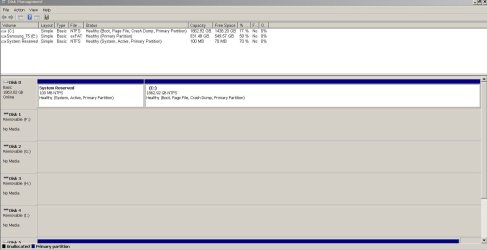
Open Disk Manager (C:\Windows\System32\diskmgmt.msc).
Expand the window and columns (so we can read them) and, with the snipping tool, take a snapshot of the whole window and post it here as an attachment
 

My Computers My Computers

System One System Two

  • Computer type
    PC/Desktop
    Computer Manufacturer/Model Number
    custom build
    OS
    Windows 7 HP 64
    CPU
    i5 6600K - 800MHz to 4200MHz
    Motherboard
    GA-Z170-HD3P
    Memory
    4+4G GSkill DDR4 3000
    Graphics Card(s)
    IG - Intel 530
    Monitor(s) Displays
    Samsung 226BW
    Screen Resolution
    1680x1050
    Hard Drives
    (1) -1 SM951 – 128GB M.2 AHCI PCIe SSD drive for Windows 7 and Lubuntu
    (2) -1 WD SATA 3 - 1T for Data
    (3) -1 WD SATA 3 - 1T for backup
    PSU
    Thermaltake 450W TR2 gold
    Keyboard
    Old and good Chicony mechanical keyboard
    Mouse
    Logitech mX performance - 9 buttons (had to disable some)
    Internet Speed
    500Mb/s
    Browser
    Firefox 64
    Other Info
    TinyWall firewall
  • Computer type
    Laptop
    System Manufacturer/Model Number
    Asus Q550LF
    OS
    Windows 7 Pro
    CPU
    i7-4500U 800MHz to 3.0GHz
    Motherboard
    Asus Q550LF
    Memory
    (4+4)G DDR3 1600
    Graphics Card(s)
    IG intel 4400 + NVIDIA GeForce GT 745M
    Sound Card
    Realtek
    Monitor(s) Displays
    LG Display LP156WF4-SPH1
    Screen Resolution
    1920 x 1080
    Hard Drives
    BX500 120G SSD for Windows and programs +
    1T HDD for data
    Internet Speed
    500 Mb/s
    Browser
    Firefox
    Other Info
    TinyWall firewall
Hi Megahertz07:


The keyboard and "Windows on D drive" issues are resolved.


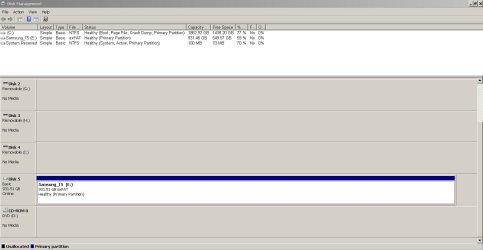
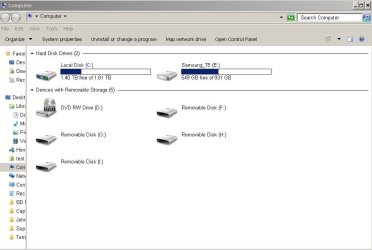
Many drives are showing, but G, H and I are not being used. I hit delete, but they are still there, so I needed to take two snips to show them all, with the SSD on the bottom. How do I remove these unused drives?


Now the question is do I need to buy another SSD to save a 426GB image. I have the 1.8TB SSD, but it contains data and is formatted ex-FAT.


Thanks
 

Attachments

  • diskmgmt_top.JPG
    diskmgmt_top.JPG
    86.2 KB · Views: 2
  • diskmgmt_bottom.JPG
    diskmgmt_bottom.JPG
    75.5 KB · Views: 1
  • Drive_Listing.JPG
    Drive_Listing.JPG
    49.9 KB · Views: 0

My Computer My Computer

Computer type
PC/Desktop
Computer Manufacturer/Model Number
HP NP206AA-A2L-p6102f
OS
Win 7 Ultimate x64
CPU
2.8 GHz
Memory
8GB
Graphics Card(s)
ATI Radeon HD 4650
Sound Card
AMD High Definition Audio Device
Monitor(s) Displays
HP x20LED Series Wide LCD Monitor
Hard Drives
WDC WD20 SCSI
External Samsung Portable SSD T5 USB
Keyboard
HID Keyboard Device
Mouse
Gaming Optical Mouse16
Internet Speed
50Mbps
Browser
Firefox 71
The Samsung T5 is an external drive and it's formatted as exFat.
exFAT is a type of drive format that is quite universal. You can use it on Windows, Linux and Mac.
You have 400G of data on it. What program are you using to make a disk image?
If NTFS is needed (to use Windows image creator), you have two options:
- Copy all data on the Samsung T5 to a folder on C: partition and then format the Samsung T5 as NTFS. Then copy the data back to the Samsung T5
- With Disk Manager, shrink the F partition making a unallocated space of 500G. Then, on the unallocated space, create a new volume, formatting it as NTFS.

The F, G, H and I are storage devices like SD memory card devices. You probably have one or two on the computer and one or two on your printer. You can't remove them as they are physically conected. They show no media as they are empty (No SD memory card on them)
 

My Computers My Computers

System One System Two

  • Computer type
    PC/Desktop
    Computer Manufacturer/Model Number
    custom build
    OS
    Windows 7 HP 64
    CPU
    i5 6600K - 800MHz to 4200MHz
    Motherboard
    GA-Z170-HD3P
    Memory
    4+4G GSkill DDR4 3000
    Graphics Card(s)
    IG - Intel 530
    Monitor(s) Displays
    Samsung 226BW
    Screen Resolution
    1680x1050
    Hard Drives
    (1) -1 SM951 – 128GB M.2 AHCI PCIe SSD drive for Windows 7 and Lubuntu
    (2) -1 WD SATA 3 - 1T for Data
    (3) -1 WD SATA 3 - 1T for backup
    PSU
    Thermaltake 450W TR2 gold
    Keyboard
    Old and good Chicony mechanical keyboard
    Mouse
    Logitech mX performance - 9 buttons (had to disable some)
    Internet Speed
    500Mb/s
    Browser
    Firefox 64
    Other Info
    TinyWall firewall
  • Computer type
    Laptop
    System Manufacturer/Model Number
    Asus Q550LF
    OS
    Windows 7 Pro
    CPU
    i7-4500U 800MHz to 3.0GHz
    Motherboard
    Asus Q550LF
    Memory
    (4+4)G DDR3 1600
    Graphics Card(s)
    IG intel 4400 + NVIDIA GeForce GT 745M
    Sound Card
    Realtek
    Monitor(s) Displays
    LG Display LP156WF4-SPH1
    Screen Resolution
    1920 x 1080
    Hard Drives
    BX500 120G SSD for Windows and programs +
    1T HDD for data
    Internet Speed
    500 Mb/s
    Browser
    Firefox
    Other Info
    TinyWall firewall
Thanks. I got some of what you suggested, but this is new territory for me right now. I tried answering your questions, but not confident in the answers and don't want to assume I do know.

>What program are you using to make a disk image?
It was suggested I use the built-in imaging program in Windows, but have no preference.

I don't think NTFS is needed for the SSD image, although I'd like to keep my options open for using Linux in the future. That's why I'm thinking ex-FAT.
 

My Computer My Computer

Computer type
PC/Desktop
Computer Manufacturer/Model Number
HP NP206AA-A2L-p6102f
OS
Win 7 Ultimate x64
CPU
2.8 GHz
Memory
8GB
Graphics Card(s)
ATI Radeon HD 4650
Sound Card
AMD High Definition Audio Device
Monitor(s) Displays
HP x20LED Series Wide LCD Monitor
Hard Drives
WDC WD20 SCSI
External Samsung Portable SSD T5 USB
Keyboard
HID Keyboard Device
Mouse
Gaming Optical Mouse16
Internet Speed
50Mbps
Browser
Firefox 71
Don't worry. Linux can read and write to NTFS.

Do you want to create a disk image of your Win 7 drive and store to the Samsung T5 or you want to create a Samsung T5 disk image and store on the C: partition?

One of the best disk image creator is Macrium Reflect 7
 

My Computers My Computers

System One System Two

  • Computer type
    PC/Desktop
    Computer Manufacturer/Model Number
    custom build
    OS
    Windows 7 HP 64
    CPU
    i5 6600K - 800MHz to 4200MHz
    Motherboard
    GA-Z170-HD3P
    Memory
    4+4G GSkill DDR4 3000
    Graphics Card(s)
    IG - Intel 530
    Monitor(s) Displays
    Samsung 226BW
    Screen Resolution
    1680x1050
    Hard Drives
    (1) -1 SM951 – 128GB M.2 AHCI PCIe SSD drive for Windows 7 and Lubuntu
    (2) -1 WD SATA 3 - 1T for Data
    (3) -1 WD SATA 3 - 1T for backup
    PSU
    Thermaltake 450W TR2 gold
    Keyboard
    Old and good Chicony mechanical keyboard
    Mouse
    Logitech mX performance - 9 buttons (had to disable some)
    Internet Speed
    500Mb/s
    Browser
    Firefox 64
    Other Info
    TinyWall firewall
  • Computer type
    Laptop
    System Manufacturer/Model Number
    Asus Q550LF
    OS
    Windows 7 Pro
    CPU
    i7-4500U 800MHz to 3.0GHz
    Motherboard
    Asus Q550LF
    Memory
    (4+4)G DDR3 1600
    Graphics Card(s)
    IG intel 4400 + NVIDIA GeForce GT 745M
    Sound Card
    Realtek
    Monitor(s) Displays
    LG Display LP156WF4-SPH1
    Screen Resolution
    1920 x 1080
    Hard Drives
    BX500 120G SSD for Windows and programs +
    1T HDD for data
    Internet Speed
    500 Mb/s
    Browser
    Firefox
    Other Info
    TinyWall firewall
Thanks. I want to store an image on the external SSD in case the Win10 upgrade fails.
 

My Computer My Computer

Computer type
PC/Desktop
Computer Manufacturer/Model Number
HP NP206AA-A2L-p6102f
OS
Win 7 Ultimate x64
CPU
2.8 GHz
Memory
8GB
Graphics Card(s)
ATI Radeon HD 4650
Sound Card
AMD High Definition Audio Device
Monitor(s) Displays
HP x20LED Series Wide LCD Monitor
Hard Drives
WDC WD20 SCSI
External Samsung Portable SSD T5 USB
Keyboard
HID Keyboard Device
Mouse
Gaming Optical Mouse16
Internet Speed
50Mbps
Browser
Firefox 71
I suggest you try the Macrium Reflect 7
I never saved a Macrium Reflect 7 image on a exFAT, but I don't see any reason it wont work.
 

My Computers My Computers

System One System Two

  • Computer type
    PC/Desktop
    Computer Manufacturer/Model Number
    custom build
    OS
    Windows 7 HP 64
    CPU
    i5 6600K - 800MHz to 4200MHz
    Motherboard
    GA-Z170-HD3P
    Memory
    4+4G GSkill DDR4 3000
    Graphics Card(s)
    IG - Intel 530
    Monitor(s) Displays
    Samsung 226BW
    Screen Resolution
    1680x1050
    Hard Drives
    (1) -1 SM951 – 128GB M.2 AHCI PCIe SSD drive for Windows 7 and Lubuntu
    (2) -1 WD SATA 3 - 1T for Data
    (3) -1 WD SATA 3 - 1T for backup
    PSU
    Thermaltake 450W TR2 gold
    Keyboard
    Old and good Chicony mechanical keyboard
    Mouse
    Logitech mX performance - 9 buttons (had to disable some)
    Internet Speed
    500Mb/s
    Browser
    Firefox 64
    Other Info
    TinyWall firewall
  • Computer type
    Laptop
    System Manufacturer/Model Number
    Asus Q550LF
    OS
    Windows 7 Pro
    CPU
    i7-4500U 800MHz to 3.0GHz
    Motherboard
    Asus Q550LF
    Memory
    (4+4)G DDR3 1600
    Graphics Card(s)
    IG intel 4400 + NVIDIA GeForce GT 745M
    Sound Card
    Realtek
    Monitor(s) Displays
    LG Display LP156WF4-SPH1
    Screen Resolution
    1920 x 1080
    Hard Drives
    BX500 120G SSD for Windows and programs +
    1T HDD for data
    Internet Speed
    500 Mb/s
    Browser
    Firefox
    Other Info
    TinyWall firewall
Back
Top