Keyboard not working

joshuaconroy

New member
Member
Local time
1:03 AM
Messages
38
Hi I have windows 7 home 64 bit

Computer started up yesterday fine got to login screen mouse working keyboard not

The keyboard keeps num lock on. Works on bios and windows recovery not in safe mode

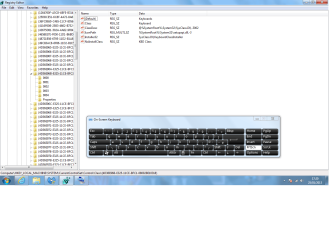
So I have gone into regedit located the keyboard. And no upper or lower limits only 3 others

Do I need the upper and lower limit and if so how do I make them and if not what's wrong

Thanks
 

My Computer

Computer Manufacturer/Model Number
Compaq cq5306uk
OS
windows 7 64 bit home premium
CPU
Intel(R) Core(TM)2 Quad CPU Q8300 @ 2.50GHz
Memory
4gb
Hard Drives
1 tb
Cooling
fan
What type of keyboard are you using wired or usb
Do you have another one you can try ?
 

My Computer

Computer type
PC/Desktop
Computer Manufacturer/Model Number
Pauly Special
OS
Win7 Ultimate X64
CPU
Intel i5 3570K
Motherboard
Gigabyte Z77X-DS3H
Memory
8GB DDR3 1600
Graphics Card(s)
Onboard
Sound Card
Onboard
Screen Resolution
1280x1024
Hard Drives
Samsung 840 Evo SSD (OS)
1TB Spinner (Data)
PSU
800W Arctic
Case
Cooler Master
Cooling
3x120mm Fans
Keyboard
MS Wireless
Mouse
MS Wireless
Internet Speed
20M
I have a USB the PC doesn't have ps/2 and the keyboard it's self if fine tryed on next doors pc and my laptop. I kind of need the pc for week end for tax returns

Thanks
 

My Computer

Computer Manufacturer/Model Number
Compaq cq5306uk
OS
windows 7 64 bit home premium
CPU
Intel(R) Core(TM)2 Quad CPU Q8300 @ 2.50GHz
Memory
4gb
Hard Drives
1 tb
Cooling
fan
Make sure the usb receiver is plugged into main usb port straight into mobo, if it is already try plugging it into different port in another pair on back of machine and reboot hopefully windows will reinstall the usb and may kick back into life

If not try booting up in safe mode as it may be conflicting with another usb driver, have you plugging anything new in lately
 

My Computer

Computer type
PC/Desktop
Computer Manufacturer/Model Number
Pauly Special
OS
Win7 Ultimate X64
CPU
Intel i5 3570K
Motherboard
Gigabyte Z77X-DS3H
Memory
8GB DDR3 1600
Graphics Card(s)
Onboard
Sound Card
Onboard
Screen Resolution
1280x1024
Hard Drives
Samsung 840 Evo SSD (OS)
1TB Spinner (Data)
PSU
800W Arctic
Case
Cooler Master
Cooling
3x120mm Fans
Keyboard
MS Wireless
Mouse
MS Wireless
Internet Speed
20M
Hi yeah I've tryed all that unplugged all USB devises plugging it in to other ports all other USB devises are fine. Rebooted about ten times just does the same thing ;(
 

My Computer

Computer Manufacturer/Model Number
Compaq cq5306uk
OS
windows 7 64 bit home premium
CPU
Intel(R) Core(TM)2 Quad CPU Q8300 @ 2.50GHz
Memory
4gb
Hard Drives
1 tb
Cooling
fan
Any more info needed or ideas please
 

My Computer

Computer Manufacturer/Model Number
Compaq cq5306uk
OS
windows 7 64 bit home premium
CPU
Intel(R) Core(TM)2 Quad CPU Q8300 @ 2.50GHz
Memory
4gb
Hard Drives
1 tb
Cooling
fan
How about entering device manager and removing keyboard under HID devices so no keyboard then reboot and plug back in ??? Don't know just trying to chuck some ideas out
 

My Computer

Computer type
PC/Desktop
Computer Manufacturer/Model Number
Pauly Special
OS
Win7 Ultimate X64
CPU
Intel i5 3570K
Motherboard
Gigabyte Z77X-DS3H
Memory
8GB DDR3 1600
Graphics Card(s)
Onboard
Sound Card
Onboard
Screen Resolution
1280x1024
Hard Drives
Samsung 840 Evo SSD (OS)
1TB Spinner (Data)
PSU
800W Arctic
Case
Cooler Master
Cooling
3x120mm Fans
Keyboard
MS Wireless
Mouse
MS Wireless
Internet Speed
20M
I have a USB the PC doesn't have ps/2 and the keyboard it's self if fine tryed on next doors pc and my laptop. I kind of need the pc for week end for tax returns

Thanks

Just because it works fine on others doesn`t mean it works fine on your pc. Get another, they are cheap and you can always take it back.

Pauly`s suggestion is a good 1.
 

My Computer

Computer type
PC/Desktop
Computer Manufacturer/Model Number
Skylake Special #666
OS
Windows 10 Pro x64
CPU
Intel Core i7 6700K
Motherboard
Asus Sabertooth Z170 Mark 1
Memory
GSkill TridentZ RGB 16GB 3600 16-16-16-36
Graphics Card(s)
EVGA GTX 980 Ti SC x2
Sound Card
Realtek High Definition
Monitor(s) Displays
AOC G2460PG
Screen Resolution
1920 x 1080 144Hz
Hard Drives
Samsung 860 Pro 256GB, Seagate Barracuda 4TB x2
PSU
EVGA 1000 P2, EVGA White Custom Braided Cables
Case
Corsair Vengeance C70 Gunmetal Black
Cooling
Corsair H100i v2, Corsair ML120 x2, Thermal Grizzly Kryonaut
Keyboard
Logitech G910 Orion Spectrum
Mouse
Logitech G700s
Internet Speed
Verizon Fios Quantum Gateway 75/75
Antivirus
Windows Defender, Malwarebytes Free 3.8.3
Browser
Chrome
Other Info
Corsair SP120 x4, LG Blu-ray Drive, Durabrand HT-395 100 Watt Dolby Digital Amp, Corsair H2100 Wireless 7.1 Headset
Okay device manger first it says device is working propley. I un install and remove reboot and I don't even get a light on keyboard. Found new boxed keyboard in loft same old routine. Nout. I'm still cautious of the reg. all other devices have upper and lower limits but not the keyboard.

Thanks guys
 

My Computer

Computer Manufacturer/Model Number
Compaq cq5306uk
OS
windows 7 64 bit home premium
CPU
Intel(R) Core(TM)2 Quad CPU Q8300 @ 2.50GHz
Memory
4gb
Hard Drives
1 tb
Cooling
fan
Helppppppppppppp !!!!!!!!!!!!!!
 

My Computer

Computer Manufacturer/Model Number
Compaq cq5306uk
OS
windows 7 64 bit home premium
CPU
Intel(R) Core(TM)2 Quad CPU Q8300 @ 2.50GHz
Memory
4gb
Hard Drives
1 tb
Cooling
fan
Hi joshuaconroy,

You may also attempt the following steps and see if they work:

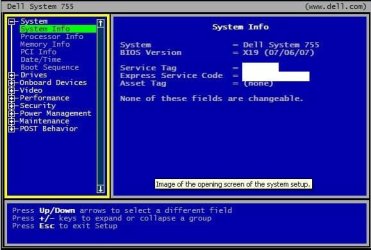
1. 'Restore BIOS defaults': Power off the system > Unplug all 'USB external peripherals' except 'Keyboard & Mouse' > Power it back on and at 'Dell splash screen, repeatedly tap 'F2 key' > BIOS Screen appears > Reset BIOS defaults with key combination <Alt><F> or 'Load Defaults' menu option. (Mouse is inoperable in this environment). Refer to the image below:

1.JPG

2. If the issue persists, you may also try 're-installing' 'USB Root Hubs' in 'Device Manager': Open 'Device Manager', locate 'Universal Serial Bus Controllers' category and expand it > Right click and uninstall all 'USB Root Hubs' listed underneath this category > Restart your computer and Windows will re-install all 'USB controllers' automatically > Check if the 'keyboard' works.

Hope this helps.
 

My Computer

OS
Windows 7 64bit
okay so i uninstalled the keyboard from devises and printers and unplugged every thing except mouse restarted it logged in opened devises and printers. plugged keyboard in it popped straight up not wanting to install drivers as if i was plugging in a new devise it says its working properly and nothing still just num lock on not responding


what do i try next thanks guys
 

My Computer

Computer Manufacturer/Model Number
Compaq cq5306uk
OS
windows 7 64 bit home premium
CPU
Intel(R) Core(TM)2 Quad CPU Q8300 @ 2.50GHz
Memory
4gb
Hard Drives
1 tb
Cooling
fan
i have have a Compaq cq5306uk

Intel(R) Core(TM)2 Quad CPU Q8300 @ 2.50GHz, 2499 Mhz, 4 Core(s), 4 Logical Processor(s)

it is on windows 7 home basic 64-bit 4gb of ram

that is my pc if it helps
 

My Computer

Computer Manufacturer/Model Number
Compaq cq5306uk
OS
windows 7 64 bit home premium
CPU
Intel(R) Core(TM)2 Quad CPU Q8300 @ 2.50GHz
Memory
4gb
Hard Drives
1 tb
Cooling
fan
okay so i uninstalled the keyboard from devises and printers and unplugged every thing except mouse restarted it logged in opened devises and printers. plugged keyboard in it popped straight up not wanting to install drivers as if i was plugging in a new devise it says its working properly and nothing still just num lock on not responding


what do i try next thanks guys

Hi joshuaconroy,

Please share if you've tried re-installing the 'USB Root Hubs'; also ensure that you restore 'BIOS settings' to 'factory defaults'. To re-install 'USB Root Hubs', you may also refer to the following 'Microsoft article': USB devices may stop functioning correctly when multiple devices connected to the same USB hub go into selective suspend

Do reply with the findings; would be glad to assist.
 

My Computer

OS
Windows 7 64bit
okay i tryed bios reset but not root hub will try when i get home thanks

will this disable my mouse if so how am i ment to login to multi users with no mouse and no keyboard
 

My Computer

Computer Manufacturer/Model Number
Compaq cq5306uk
OS
windows 7 64 bit home premium
CPU
Intel(R) Core(TM)2 Quad CPU Q8300 @ 2.50GHz
Memory
4gb
Hard Drives
1 tb
Cooling
fan
this is a screenshots of the keyboard registry

how can i fix it
 

Attachments

  • Untitled.png
    Untitled.png
    62.8 KB · Views: 2

My Computer

Computer Manufacturer/Model Number
Compaq cq5306uk
OS
windows 7 64 bit home premium
CPU
Intel(R) Core(TM)2 Quad CPU Q8300 @ 2.50GHz
Memory
4gb
Hard Drives
1 tb
Cooling
fan
okay i tryed bios reset but not root hub will try when i get home thanks

will this disable my mouse if so how am i ment to login to multi users with no mouse and no keyboard

Hi joshuaconroy,

Thank you for the reply.

'Re-installation of USB Root Hubs' leads to the 'rebuilding' of 'USB drivers' in the system. Its removal leaves all 'USB devices' connected to the system, as unusable until the driver re-builds itself. You may 'rebuild' the 'USB driver' manually by using the following steps (Without System Restart): On 'Device Manager' page, click 'Action tab' in the 'File Menu' > Click 'Scan for hardware changes' (Functionality of USB Root Hubs will be immediately restored).

Do reply with the findings; would be glad to assist.


My Computer

OS
Windows 7 64bit
Okay so I have given up trying to fix it so I made a 200gb partition from my 1tb hdd did a easy transfer

Clean install of windows 7 ultimate 64 bit did easy transfer on new one set a back up weekly on to the partition and so far so good

Thanks for all your help
 

My Computer

Computer Manufacturer/Model Number
Compaq cq5306uk
OS
windows 7 64 bit home premium
CPU
Intel(R) Core(TM)2 Quad CPU Q8300 @ 2.50GHz
Memory
4gb
Hard Drives
1 tb
Cooling
fan
Back
Top